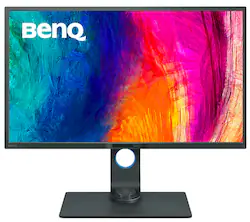
BenQ - PD3200U DesignVue 32" IPS LED 4K UHD 60Hz Monitor 100% sRGB AQCOLOR Technology (HMI/DP/mDP/USB Hub) - Gray
- Key Specs
- Refresh Rate: 60Hz (The number of frames per second the device can produce natively without enhancement. Higher rates help produce smooth, seamless pictures.)
- Maximum Resolution: 3840 x 2160 (Maximum resolution refers to the highest number of pixels that a screen can process and display. Higher resolution signals produce more detailed images.)
- Response Time: 4 milliseconds (The speed at which pixels can change colors is called response time. It is measured in milliseconds (ms).)
- Panel Type: IPS (Technology that affects response time and image quality.)
- Synchronization Technology: Not Applicable (Generally, these technologies allow syncing between a computer/console game's frame rate and the device's refresh rate for a smoother display without tearing.)
- Screen Size: 32 inches (Size of the screen, measured diagonally from corner to corner.)
- Display Connector(s): 1 x DisplayPort 1.2 (The number and type of connectors used to connect to an external display.)
- General
- Product Name: PD3200U DesignVue 32" IPS LED 4K UHD 60Hz Monitor 100% sRGB AQCOLOR Technology (HMI/DP/mDP/USB Hub)
- Brand: BenQ
- Operating System Compatibility: Mac, Windows
- Model Number: PD3200U
- Color: Gray
- Display
- Refresh Rate: 60Hz (The number of frames per second the device can produce natively without enhancement. Higher rates help produce smooth, seamless pictures.)
- Maximum Resolution: 3840 x 2160 (Maximum resolution refers to the highest number of pixels that a screen can process and display. Higher resolution signals produce more detailed images.)
- Native Resolution: 3840 x 2160 (Native resolution of a screen refers to its single, fixed resolution. Sometimes screens must scale an image up or down in order to fit the native resolution. This can cause a loss of resolution or detail.)
- Contrast Ratio: 20,000,000:1 (Measured difference between a displayed image's brightest whites and darkest blacks. The larger the first number, the more detail and color that can be displayed.)
- Response Time: 4 milliseconds (The speed at which pixels can change colors is called response time. It is measured in milliseconds (ms).)
- Display Type: LED
- Panel Type: IPS (Technology that affects response time and image quality.)
- Synchronization Technology: Not Applicable (Generally, these technologies allow syncing between a computer/console game's frame rate and the device's refresh rate for a smoother display without tearing.)
- Aspect Ratio: 16:9 (The measurement of the width of a screen compared to the height of a screen, expressed as a ratio.)
- Curved Screen: false
- Brightness: 350 candela per square meter (A measure of the total light output.)
- Screen Size: 32 inches (Size of the screen, measured diagonally from corner to corner.)
- High Dynamic Range (HDR): false (An HDR-compatible 4K TV or other HDR-compatible product displays HDR video content when it's available from sources like 4K Ultra HD Blu-ray Discs and 4K streaming services.)
- Horizontal Viewing Angle: 178 degrees (The maximum angle at which the display can be viewed with acceptable visual performance from either side.)
- Vertical Viewing Angle: 178 degrees (The maximum angle at which the display can be viewed with acceptable visual performance from above or below.)
- Connectivity
- Number of DisplayPort Inputs (Total): 1
- Number of HDMI Inputs (Total): 1
- Display Connector(s): 1 x DisplayPort 1.2 (The number and type of connectors used to connect to an external display.)
- Compatibility
- Wall Mountable: true (The product is able to be secured to a wall. Some products are designed ready to mount, while others may require additional hardware/accessories for installation.)
- VESA Wall Mount Standard: 100mm x 100mm (VESA wall mount standards refer to the spacing of screw holes built into a TV in order to fit with standard TV wall mounts. These standards are implemented into most TVs and monitors.)
- Features
- Tiltable: true
- Adjustable Stand Height: true
- Eye Relief Features: Low blue light, Flicker free, Periodic break reminders
- Anti-Glare: true (Product has features, such as a matte finish, that reduce the likelihood for screen glare.)
- Built-In Webcam: false
- Integrated Speaker(s): true
- Dimensions
- Product Height With Stand: 19.3 inches
- Product Height Without Stand: 17.2 inches
- Product Width: 29.1 inches (The out of box width of the item. Width is measured as the horizontal distance from one side of the item to the other as it would be primarily used or placed.)
- Product Depth (With Stand): 8.8 inches
- Product Weight: 18.7 pounds (The out of box weight of the item.)
- Stand Included: true
- Power
- Power Consumption: 110 watts
- Power Saving/Off Mode: 0.5 watts (This mode will turn the display and/or the device off, or into a standby mode, after a preset length of time with no activity to conserve power.)
- Certifications Listings & Approvals
- ENERGY STAR Certified: false (Devices carrying the ENERGY STAR service mark, such as computer products and peripherals, kitchen appliances, and other products, generally use 20% to 30% less energy than required by federal standards.)
- EPEAT Qualified: true (The Electronic Product Environmental Assessment Tool (EPEAT) was designed to provide an environmental assessment tool for purchasers. In order to qualify for EPEAT, a product must meet all 23 required criteria.)
- EPEAT Level: Silver (The Electronic Product Environmental Assessment Tool (EPEAT) was designed to provide an environmental assessment tool for purchasers. In order to qualify for EPEAT, a product must meet all 23 required criteria. Products are rated Bronze, Silver or Gold based on how many of 28 optional criteria they meet (below 50%, 50%, 75%).)
- Warranty
- Warranty - Parts: 3 years
- Warranty - Labor: 3 years
- Other
- UPC: 840046035471
Upgrade your workstation with this 32-inch BenQ monitor. It has 4K resolution and 100 percent Rec.709 and sRGB color space for high-definition images with precise color reproduction, and its DualView function lets you display two modes on the same screen. This BenQ monitor has technology that protects your eye health during long work sessions.

- Ultra HD display: 3840 x 2160 resolution and 16:9 aspect ratio offer extraordinary clarity of fine details and textures for an optimal viewing and visual-intensive work experience.
- 4 ms response time: Helps prevent blurring, ghosting and streaking during intense action sequences in video games and movies.
- Watch crisp images: The 60Hz refresh rate is a good choice for gaming and other fast-moving media.
- 32" widescreen flat-panel IPS LED monitor: Work confidently in the sRGB and Rec.709 color space from a wide viewing angle.
- HDMI, DisplayPort and Mini DisplayPort inputs: Allow you to set up DVD players and other AV sources for a clear, high-quality audio and video signal.
- 178° horizontal and vertical viewing angles: Ensure a clear view of the monitor from multiple vantage points.
- 20,000,000:1 dynamic contrast ratio (1000:1 typical): Provides a high number of shades between black and white for accurate color reproduction when displaying images with extreme differences between light and dark.
- 350 cd/m² brightness: For a highly visible display and crisp on-screen images.
- Low Blue Light technology: Designed to filter out harmful blue light, effectively diminishing eye fatigue and irritation.
- DualView function: To showcase designs in two modes (e.g. sRGB and CAD/CAM) side-by-side without the need for two screens.
- Energy Star certified: Designed to use less energy and meets strict energy efficiency guidelines set by the Environmental Protection Agency and U.S. Department of Energy.
Whats Included
- BenQ 32" IPS LED 4K UHD Monitor
- DP to mDP cable
- HDMI cable
- Hotkey Puck
- Owner's manual
- USB 3.0 cable
Q: One of the images looks to show 2 HDMI inputs, but the specs list only 1. Which is correct?
A: There are 2 HDMI 2.0 inputs on my BENQ PD3200U monitor.
A: I bought my PD3200U three months ago, have used it very heavily, and have experienced absolutely none of the problems described by earlier purchasers. In fact, I've experienced no problems whatsoever, and the image quality is superb for the price (yeah, a $6,000 Eizo ColorEdge would no doubt be better). If you're in this price range, and want this size screen, this is the one to get. I looked at similarly priced Asus, LG, Dell, etc., and the BenQ is simply superior. I suspect the same would be true of the flagship models; Asus in particular is notorious for horrendously bad quality control even for $1,500+ models, whereas this whole issue with the flickering appears to be one isolated incident at BenQ, and if my own experience is any indication, they are telling the truth about having resolved it. My PD3200U has not one single dead pixel, and there is little to none of the dreaded backlight bleed when watching 2.35:1 theatrical films with letterboxing at top and bottom in a darkened room. The top right corner has a bit of glow, which I never notice when watching even dark Sci-Fi films. Again, at this price you can't expect it to be as close to perfect as an Eizo (or BenQ's own flagship models, which cost two to three times as much as the PD3200U), but it's vastly better than what I've seen from the other major brands at this tier. Text is smooth and crisp as long as you run the PD3200U at its native 3840x2160 resolution. Overall build quality is excellent. Speaking of the native resolution, make sure your video card is up to the challenge of 3840x2160 @ 60 Hz and True Color (32 bit), and your CPU as well. These monitors require real processing power, and my review is based on running the BenQ on a system that can do it justice. I'm quite picky about image quality, particularly color accuracy and uniformity across the screen, so what I'm saying here about how the BenQ stacks up against other brands actually means something. This BenQ was purchased to replace a Sony GDM-F520 FD Trinitron that finally died on me. If you're familiar with the Sony's reputation for stunning color and deep blacks, then you will know it's high praise for me to honestly say I would rather have the BenQ PD3200U, at this point. I never thought I'd be saying that about any LCD monitor costing less than maybe $3,000.
A: Yes, thunderbolt to HDMI .... do a profile on the monitor using apple DISPLAY function ... save, then select it.
Q: Does this monitor have HDR? If so, what type? Thanks.
A: That's a great question, although this monitor does not have HDR, it does have some other very impressive specs. 32 in Display Static Contrast: 1000:1 Dynamic Contrast 20000000:1 Refresh Rate: 60Hz sRGB 100%, Adobe RGB 73%
Q: Are the included HDMI cables version 2.0?
A: yes, I use the smaller HDMI plug for connecting to a MSI Trident in 4k native and the large plug HDMI for playing 4k and HDR content from streaming/media player . Great Monitor for photo editing and multimedia player.
A: Yes; a Thunderbolt to DisplayPort cable is actually the best way to run this monitor. This is the setup I use and it works flawlessly.
Q: Does this Monitor support Nvidia's G-Sync?
A: No, the refresh rate is only 60Hz.














