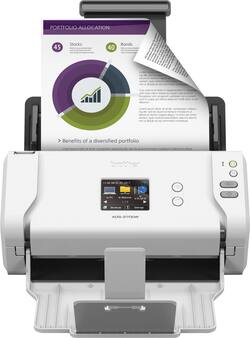
Brother - ADS-2700W Wireless High-Speed Duplex Desktop Color Document Scanner with Touchscreen LCD - White
- Key Specs
- Networking: Wireless
- Scan (Color) Speed: 35 copies per minute (The number of color pages able to be scanned per minute.)
- Scan Method: Single pass
- Duplex Scan Function: true
- General
- Brand: Brother
- Model Number: ADS-2700W
- Product Name: ADS-2700W Wireless High-Speed Duplex Desktop Color Document Scanner with Touchscreen LCD
- Color: White
- Connectivity
- Scanner Connectivity: Ethernet, USB 2.0, Wi-Fi
- Minimum System Requirements: Windows 10, Windows 8/8.1, Windows 7 (SP1), Windows XP (SP3), Mac OSX v10.10.x, 10.11x, 10.12.x; Linux
- Dimensions
- Product Height: 7 inches (The out of box height of the item. Height is measured as the vertical distance from the bottom of the item to the top as it would be primarily used or placed.)
- Product Width: 11.8 inches (The out of box width of the item. Width is measured as the horizontal distance from one side of the item to the other as it would be primarily used or placed.)
- Maximum Document Length: 196 inches
- Maximum Document Width: 8.5 inches
- Product Weight: 5.8 pounds (The out of box weight of the item.)
- Features
- Automatic Document Feeder Capacity: 50 sheets
- Automatic Document Feeder Included: true
- Scanner Type: Sheetfed, Business Card, Document, Receipt Scanners
- Transparency Scanning: false (This function supports scanning of transparent media, such as film slides or negatives.)
- Scanner Resolution: Up to 600 x 600 (Refers to the number of pixels/dots, both horizontally and vertically, of the image produced by the scanner. Generally, the higher the resolution, the sharper and cleaner the produced image.)
- Memory Card Slot: false
- Document Size: Letter, Legal, Executive, Memo
- File Format(s): TIFF, BMP, JPEG, PNG
- Image Scanner Type: Dual CIS
- Grayscale Depth: 256 levels (Refers to the number of bits used to define each pixel in the captured image, which determines the number of tones, or levels, that can be represented. Generally, the greater the bit depth, the better the image quality.)
- Scanner Info
- Scan (Monochromatic) Speed: 35 copies per minute (The number of monochromatic grayscale pages able to be scanned per minute.)
- Scanner Bit Depth: 48 (Refers to the number of bits used to define each pixel in the captured image and determines the number of colors or tones that can be represented. Generally, the greater the bit depth, the better the image quality.)
- Included
- Included Software: Kofax PaperPort™ SE with OCR for Windows, Presto!® PageManager® with OCR for Mac®
- Certifications Listings & Approvals
- ENERGY STAR Certified: true (Devices carrying the ENERGY STAR service mark, such as computer products and peripherals, kitchen appliances, and other products, generally use 20% to 30% less energy than required by federal standards.)
- TWAIN Compliant: true (Products with this label are compliant with standards set by the TWAIN Working Group for regulating communication between software and digital imaging devices. Devices that are TWAIN compliant are compatible for use with each other without requiring additional software, even if they have different capabilities.)
- Warranty
- Warranty - Parts: 1 year
- Warranty - Labor: 1 year
- Other
- UPC: 012502648758
Store documents and photos digitally with this Brother wireless scanner. Its duplex setting copies both sides of the page in a single pass to save time, and its image optimizing feature improves the quality of the scan. The 2.8-inch touch screen on this Brother wireless scanner lets you configure its settings to your preferences.
- Fast scan speeds in a space-saving design: High-speed, single-pass duplex color and black/white document scanning at speeds up to 35 ppm(1) in a space saving, lightweight design.
- Connect your way: Versatile connection options with built-in wireless, Fast Ethernet or connect locally to a single computer via high-speed USB 2.0.
- Protection for your most secure information: Secure scanner access by individual and specific scanning functions; Settings Lock; secure network protocols including SSL/TLS, SFTP.
- Up to 35ppm scan speeds(1): Rapidly preserves a variety of files. Duplex scanning helps you get the job done quickly.
- 2.8" color touchscreen display: Offers one-touch scanning to preset destinations and device settings management.
- Auto Start Scan: Allows you to simply drop paper into the feeder to automatically initiate scanning to a predefined profile.
- Scan to a variety of destinations: Including File(2), Image(2), OCR(2), Email, Network, FTP, Mobile Devices and USB flash memory drive(3) to help optimize your business processes.
- 50-sheet ADF (Automatic Document Feeder): Handles multiple media types and paper sizes including legal, ledger size(4) and long paper, plus business and plastic ID cards, receipts and photos.
- Image optimizing features: Enhance scans(6) with automatic color detection/adjustment, image rotation (PC only), bleed through/background removal, text enhancement, color drop out features and more.
- Supports your business processes: Supports Windows®, Mac® and Linux® environments and TWAIN/SANE/WIA for PC/ICA for Mac drivers(5).
- Do more with bundled software: Includes document management, OCR, and business card management software(5).
- ENERGY STAR certified: Designed to use less energy and meets strict energy efficiency guidelines set by the Environmental Protection Agency and U.S. Department of Energy.
- Fast scan speeds in a space-saving design: High-speed, single-pass duplex color and black/white document scanning at speeds up to 35 ppm(1) in a space saving, lightweight design.
- Connect your way: Versatile connection options with built-in wireless, Fast Ethernet or connect locally to a single computer via high-speed USB 2.0.
- Protection for your most secure information: Secure scanner access by individual and specific scanning functions; Settings Lock; secure network protocols including SSL/TLS, SFTP.
- Up to 35ppm scan speeds(1): Rapidly preserves a variety of files. Duplex scanning helps you get the job done quickly.
- 2.8" color touchscreen display: Offers one-touch scanning to preset destinations and device settings management.
- Auto Start Scan: Allows you to simply drop paper into the feeder to automatically initiate scanning to a predefined profile.
- Scan to a variety of destinations: Including File(2), Image(2), OCR(2), Email, Network, FTP, Mobile Devices and USB flash memory drive(3) to help optimize your business processes.
- 50-sheet ADF (Automatic Document Feeder): Handles multiple media types and paper sizes including legal, ledger size(4) and long paper, plus business and plastic ID cards, receipts and photos.
- Image optimizing features: Enhance scans(6) with automatic color detection/adjustment, image rotation (PC only), bleed through/background removal, text enhancement, color drop out features and more.
- Supports your business processes: Supports Windows®, Mac® and Linux® environments and TWAIN/SANE/WIA for PC/ICA for Mac drivers(5).
- Do more with bundled software: Includes document management, OCR, and business card management software(5).
- ENERGY STAR certified: Designed to use less energy and meets strict energy efficiency guidelines set by the Environmental Protection Agency and U.S. Department of Energy.
Whats Included
- Brother ADS-2700W Wireless Desktop Scanner
- Power adapter
- Quick setup guide
- Warranty sheet
- Product registration sheet
- Brother ADS-2700W Wireless Desktop Scanner
- Power adapter
- Quick setup guide
- Warranty sheet
- Product registration sheet
Q: How does it handle documents that might have folds or creases?
A: Documents can not be used in the ADS-2700W that's curled, wrinkled, folded, ripped, stapled, paper-clipped, pasted, or taped.
Q: Can I duplex into SLMPDF and omit blank pages through the settings menu? How fast is it?
A: I am not familiar with SLMPDF, but here is my experience. I scanned a 3 page document with blank backs in 2 sided mode. The scanner scanned them and the PDF document appeared on my Mac in 6 seconds with the blank pages removed. That six seconds included the scanning of each page, transmission of the pages to my Mac via WiFi, the removal of the blank pages and the saving of the file to the Mac file system on the SSD. I would not call this a "production scanner" for an office full of people, but for home use it is pretty nice so far.
A: Your question made me curious so I gave it a try. First I scanned one color photo set to 600 dpi. The scan added a slightly reddish cast to the picture and there is no way to adjust for it in the driver software. I thought it still quite acceptable and otherwise quite accurate. Then I tried a stack of ten 2 1/2" X 3 1/2" black and white photos from the late 50"s with the scanner set to 600 dpi and gray-scale scanning and default settings otherwise. It scanned all ten perfectly, without any skewing or other issues. I found the quality to be quite acceptable. A dedicated flatbed might do a slightly better job when both scans are compared head to head but also with a lot more time and trouble.
Q: does it scan to pdf and jpeg
A: Yes, the Brother ADS-2700W can scan to PDF and JPEG.
Q: Does this scanner copy both sides of a page at once?
A: Yes, the ADS-2700W copies both sides of a page at once and beautifully so!
Q: Can receipts be scanned through this product or does anyone know of a receipt scanning product?
A: Receipts scan through this machine rapidly and efficiently.
A: The Brother ADS-2700W machine scans to multiple destinations including File; Image, OCR; Email, Network, USB flash drive; and mobile devices, is compatible with Windows, Mac®; and Linux®; and TWAIN/SANE/WIA for PC drivers.
Q: If I scan 50 pages, can I separate and stack before saving as separate files?
A: Yes, the Brother ADS-2700W scanner allows you to separate and stack scanned documents before saving them as separate files. For more information, feel free to contact Brother Customer Service directly.