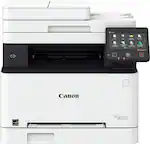
Brother - MFC-L3780CDW Wireless Digital Color All-in-One Printer with Laser Quality Output, Great for Business - White
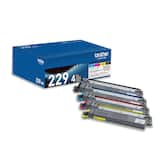 Brother - TN229 4-Pack Standard-Yield Toner Cartridges - Black/Cyan/Magenta/Yellow$286.98
More Buying Options
Related Item

Specifications
- NetworkingWired, WirelessENERGY STAR CertifiedYesPrinter TypeAll In One, Copier, Fax, ScannerDuty CycleUp to 4,000ISO Color Print Speed31 pages per minuteISO Mono Print Speed31 pages per minute
- Key Specs
- Networking: Wired, Wireless
- ENERGY STAR Certified: true (Devices carrying the ENERGY STAR service mark, such as computer products and peripherals, kitchen appliances, and other products, generally use 20% to 30% less energy than required by federal standards.)
- Printer Type: All In One, Copier, Fax, Scanner
- Duty Cycle: Up to 4,000 (The maximum number of pages per month that the device can produce without failing, as specified by the manufacturer.)
- ISO Color Print Speed: 31 pages per minute (The number of color pages able to be printed per minute in the device's default single-side mode, as tested by the International Standards Organization (ISO).)
- ISO Mono Print Speed: 31 pages per minute (The number of black ink (grayscale) pages able to be printed per minute in the device's default single-side mode, as tested by the International Standards Organization (ISO).)
- Monochromatic/Color: Color
- General
- Brand: Brother
- Model Number: MFC-L3780CDW
- Product Name: MFC-L3780CDW Wireless Digital Color All-in-One Printer with Laser Quality Output, Great for Business
- Color: White
- Display Screen: true
- Display Screen Size: 3.5 inches
- Dimensions
- Product Height: 15.8 inches (The out of box height of the item. Height is measured as the vertical distance from the bottom of the item to the top as it would be primarily used or placed.)
- Product Width: 18.2 inches (The out of box width of the item. Width is measured as the horizontal distance from one side of the item to the other as it would be primarily used or placed.)
- Product Depth: 18.2 inches (The out of box depth of the item. Depth is measured as the distance from the front of the item to the back as it would be primarily used or placed.)
- Product Weight: 47.8 pounds (The out of box weight of the item.)
- Features
- Automatic Document Feeder: true
- Photo Printing: false
- Automatic Reduction/Enlargement: false
- Touch Screen: true (Touch-screen devices make navigating more intuitive. Using a touch-screen display, you can do things such as tap to select, hold and drag to move items, swipe to scroll, and pinch to zoom.)
- Automatic Two-Sided Printing: true
- Wide Format Printing: false (Machines with this function support printing on media with widths between 18 and 100 inches, such as posters, banners, canvases, and more.)
- Wide Format Scanning: false
- Connectivity
- Wired Connectivity: USB-A
- Wireless Connectivity: Wi-Fi (The manner in which a device sends data to another device over a short distance without the use of wires or cables.)
- Minimum System Requirements: Windows 10, 11; Windows Server (2012, 2012 R2, 2016, 2019, 2022); macOS* v11, v12, v13; Chrome OS. *Printing or scanning via macOS requires the use of AirPrint. Mac drivers are not provided for this machine.
- Certifications Listings & Approvals
- EPEAT Qualified: true (The Electronic Product Environmental Assessment Tool (EPEAT) was designed to provide an environmental assessment tool for purchasers. In order to qualify for EPEAT, a product must meet all 23 required criteria.)
- EPEAT Level: Silver (The Electronic Product Environmental Assessment Tool (EPEAT) was designed to provide an environmental assessment tool for purchasers. In order to qualify for EPEAT, a product must meet all 23 required criteria. Products are rated Bronze, Silver or Gold based on how many of 28 optional criteria they meet (below 50%, 50%, 75%).)
- TWAIN Compliant: true (Products with this label are compliant with standards set by the TWAIN Working Group for regulating communication between software and digital imaging devices. Devices that are TWAIN compliant are compatible for use with each other without requiring additional software, even if they have different capabilities.)
- Paper Info
- Automatic Document Feeder Capacity: 50 sheets
- Maximum Document Length: 14 inches
- Maximum Document Width: 8.5 inches
- Paper Feeder: Tray loader
- Paper Handling: 250-sheet capacity paper tray, 30-sheet capacity multi-purpose tray
- Supported Paper Sizes: Standard Tray: Letter, Legal, Mexican Legal, India Legal, Executive, A5, A5 Long Edge, A6, B5, B6, A4 Short, Folio; Multi-Purpose Tray: Width 3.0" to 8.5", Length 4.57" to 14"
- Tray Capacity: 250
- Ink
- Compatible Cartridges: Brother TN229
- Ink Subscription Service Available: true (The printer monitors ink usage and alerts the subscription provider when levels are low. A purchased subscription provides refills of ink based on usage.)
- Ink Cartridges Required: 1 x Black, 1 x Cyan, 1 x Magenta, 1 x Yellow (The quantity and color of ink cartridges required for the printer to operate.)
- Ink Cartridges Included: 1 x Black, 1 x Cyan, 1 x Magenta, 1 x Yellow (The quantity and color of ink cartridges included.)
- Copier Info
- Copier Resolution (Black): Up to 600 x 600 (Refers to the number of pixels/dots, both horizontally and vertically, of the image produced by the copier in black ink. Generally, the higher the resolution, the sharper and cleaner the produced image.)
- Copier Resolution (Color): Up to 600 x 600 (Refers to the number of pixels/dots, both horizontally and vertically, of the image produced by the copier in colored ink. Generally, the higher the resolution, the sharper and cleaner the produced image.)
- Maximum Number Of Copies: 99
- Scanner Info
- Duplex Scan Function: false
- Scanner Resolution: Up to 19200 x 19200 (Refers to the number of pixels/dots, both horizontally and vertically, of the image produced by the scanner. Generally, the higher the resolution, the sharper and cleaner the produced image.)
- Scanner Type: Flatbed
- Fax Info
- Integrated Fax: true
- Performance
- Approximate Page Yield (Black): 1500
- Approximate Page Yield (Color): 1200
- Printer Resolution (Black): Up to 600 x 2400 (Refers to the number of pixels/dots, both horizontally and vertically, of the image produced by the printer in black ink. Generally, the higher the resolution, the sharper and cleaner the produced image.)
- Printer Resolution (Color): Up to 600 x 2400 (Refers to the number of pixels/dots, both horizontally and vertically, of the image produced by the printer in colored ink. Generally, the higher the resolution, the sharper and cleaner the produced image.)
- Output Tray Capacity: 150 sheets
- Recommended Monthly Volume: Up to 4,000 pages (The maximum number of pages that can be printed per month, as recommended by the manufacturer. Printing in excess of this number may reduce the machine's overall lifespan or print quality over time.)
- Warranty
- Warranty - Parts: 1 year
- Warranty - Labor: Not applicable
- Compatibility
- Works With: Amazon Alexa (Compatible with or able to be connected to other smart devices or applications.)
- Other
- UPC: 012502666486
Great for small businesses, the Brother MFC-3780CDW wireless digital color all-in-one printer with copy, scan, and fax functionalities offers remarkable efficiency with impressive print speeds and productivity-centric features. Consistently produces smudge-free, laser-quality prints for documents that garner the attention of colleagues, clients, and customers. Achieves print speeds up to 31 ISO pages per minute (ppm)(1) and scan speeds up to 29/22 ISO images per minute (ipm)(2) (black/color). With its versatile paper handling and an intuitive 3.5” touchscreen, it is engineered to help boost productivity, simplify tasks, and keep your business thriving. Advanced security features help safeguard sensitive information while printing and include the added protection of an NFC card reader for badge authentication. Engineered and supported by Brother, the MFC-L3780CDW is an industrious addition to any small workspace.
- Brother Genuine Toner: Choose TN229 Standard or TN229XL High Yield replacement cartridges. And with Refresh Subscription Service, you’ll never worry about running out and you’ll enjoy savings up to 50%(3). Get started with a Free Trial(4).
- Amplify your professional documents: With the consistent performance of laser-quality digital color printing.
- Maximize productivity with all-in-one functionality: Single pass duplex copy and scan for efficient completion of double-sided documents. Impressive print speeds up to 31 ISO ppm(1) and scan speeds up to 29/22 ISO ipm(2) (black/color).
- Flexible connection options: Built-in dual band wireless (2.4GHz / 5GHz)(5), Gigabit Ethernet, Wi-Fi Direct, or USB interface for local connection to a single computer.
- Cloud connectivity: Print-from/scan-to popular Cloud apps such as Google Drive, Dropbox, Evernote, OneNote and others(6) with the 3.5” color touchscreen, plus use it to create up to 48 time-saving shortcuts.
- Walk-up print and scan with USB host: The built-in front USB host enables direct printing from and scanning to USB flash drive(7).
- Versatile paper handling: Save time on multi-page jobs with a 50-sheet Auto Document Feeder. Quickly feed uniquely-sized media through the 30-page multipurpose tray(8).
- Expandable capacity: The 250-sheet paper tray reduces frequency of paper refills, and an optional lower paper tray doubles total capacity to 500-sheets(9) – ideal for high volume printing.
- Advanced security features: Safeguard data and keep connections secure while printing. Includes the elevated protection of an NFC card reader that protects the integrity of sensitive business information.
- Print from virtually anywhere: Brother Mobile Connect app puts the power of printer management in your hands. Print remotely, scan to mobile app, monitor toner levels, and re-order Brother Genuine supplies(10).
- Print with purpose: Engineered to be environmentally friendly, MFC-L3780CDW is ENERGY STAR compliant and EPEAT Silver rated. Eco-friendly printer features include Eco Mode, Toner Save Mode, and automatic duplex printing.
- Trust Brother Genuine: Formulated specifically for use with Brother printers, Brother Genuine Toner offers the reassurance of reliable compatibility and consistent performance. Look for multipack options that can help optimize your budget.
- Brother at your side support: Backed by Brother with a 1-year limited warranty and free online, call, or live chat support for the life of your printer.
- Brother Genuine Toner: Choose TN229 Standard or TN229XL High Yield replacement cartridges. And with Refresh Subscription Service, you’ll never worry about running out and you’ll enjoy savings up to 50%(3). Get started with a Free Trial(4).
- Amplify your professional documents: With the consistent performance of laser-quality digital color printing.
- Maximize productivity with all-in-one functionality: Single pass duplex copy and scan for efficient completion of double-sided documents. Impressive print speeds up to 31 ISO ppm(1) and scan speeds up to 29/22 ISO ipm(2) (black/color).
- Flexible connection options: Built-in dual band wireless (2.4GHz / 5GHz)(5), Gigabit Ethernet, Wi-Fi Direct, or USB interface for local connection to a single computer.
- Cloud connectivity: Print-from/scan-to popular Cloud apps such as Google Drive, Dropbox, Evernote, OneNote and others(6) with the 3.5” color touchscreen, plus use it to create up to 48 time-saving shortcuts.
- Walk-up print and scan with USB host: The built-in front USB host enables direct printing from and scanning to USB flash drive(7).
- Versatile paper handling: Save time on multi-page jobs with a 50-sheet Auto Document Feeder. Quickly feed uniquely-sized media through the 30-page multipurpose tray(8).
- Expandable capacity: The 250-sheet paper tray reduces frequency of paper refills, and an optional lower paper tray doubles total capacity to 500-sheets(9) – ideal for high volume printing.
- Advanced security features: Safeguard data and keep connections secure while printing. Includes the elevated protection of an NFC card reader that protects the integrity of sensitive business information.
- Print from virtually anywhere: Brother Mobile Connect app puts the power of printer management in your hands. Print remotely, scan to mobile app, monitor toner levels, and re-order Brother Genuine supplies(10).
- Print with purpose: Engineered to be environmentally friendly, MFC-L3780CDW is ENERGY STAR compliant and EPEAT Silver rated. Eco-friendly printer features include Eco Mode, Toner Save Mode, and automatic duplex printing.
- Trust Brother Genuine: Formulated specifically for use with Brother printers, Brother Genuine Toner offers the reassurance of reliable compatibility and consistent performance. Look for multipack options that can help optimize your budget.
- Brother at your side support: Backed by Brother with a 1-year limited warranty and free online, call, or live chat support for the life of your printer.
Whats Included
- Brother MFC-L3780CDW Printer
- Starter Black/Cyan/Yellow/Magenta toner cartridges (approx.1,000 pages each, ISO/IEC 19798 (Letter/A4))
- DR229CL drum unit set
- Product Safety Guide
- Reference Guide
- Warranty Card
- Quick Setup Guide
- Wi-Fi 5GHz Channel Sheet
- Brother MFC-L3780CDW Printer
- Starter Black/Cyan/Yellow/Magenta toner cartridges (approx.1,000 pages each, ISO/IEC 19798 (Letter/A4))
- DR229CL drum unit set
- Product Safety Guide
- Reference Guide
- Warranty Card
- Quick Setup Guide
- Wi-Fi 5GHz Channel Sheet
Product Manuals
Disclaimers
- Requires a high-speed Internet connection.
- Print speeds vary with use. See manufacturer for info on print speeds.
- Requires a high-speed Internet connection.
- Print speeds vary with use. See manufacturer for info on print speeds.
Q: How many sheets of paper does the printer tray hold?
A: The standard paper tray holds 250 sheets.
Q: How is this printer connected to a computer?
A: This printer can connect wirelessly or via a USB cable.
Q: What is the maximum print speed of this printer?
A: This printer can print up to 31 ISO pages per minute.
Q: Does this printer offer duplex printing?
A: Yes, this model offers automatic two-sided printing.
Q: Can this printer scan documents?
A: Yes, this is an all-in-one printer that can also scan, copy, and fax.
Q: Is this a Laser Printer? The description says “Laser Quality”.
A: The Brother MFCL3780CDW is a Color Laser LED printer which is a type of computer printer similar to a laser printer. The difference between the two print technologies lies in how the drum is illuminated in order to create the text and images on the paper. Laser printers use a complex system of lenses and mirrors to print. All these moving parts must maintain very precise timing and alignment to create a single dot at a time across the imaging drum. LED printers use a stationary array of LEDs to create an entire line of dots across the drum at the same time.
A: The Brother MFCL3780CDW comes with, Starter Black Toner Cartridge (2,300 pages‡), Starter Cyan, Magenta, Yellow Toner Cartridges (1,200 pages‡), DR229CL Drum Unit (20,000 pages‡), WT229CL Waste Toner Box (50,000 pages‡), BU229CL Belt Unit (50,000 pages‡), AC Power Cord, Telephone Line Cord, Product Safety Guide, Reference Guide, Warranty Card, Quick Setup Guide. Thank you for being a Brother customer.
Q: Can this printer print on photo paper?
A: Yes, the Brother MFCL3780CDW is able to print photo paper from the Multi-Purpose Tray (MP tray) only.
Compare similar products

Great for small businesses, the Brother MFC-3780CDW wireless digital color all-in-one printer with copy, scan, and fax functionalities offers remarkable efficiency with impressive print speeds and productivity-centric features. Consistently produces smudge-free, laser-quality prints for documents that garner the attention of colleagues, clients, and customers. Achieves print speeds up to 31 ISO pages per minute (ppm)(1) and scan speeds up to 29/22 ISO images per minute (ipm)(2) (black/color). With its versatile paper handling and an intuitive 3.5” touchscreen, it is engineered to help boost productivity, simplify tasks, and keep your business thriving. Advanced security features help safeguard sensitive information while printing and include the added protection of an NFC card reader for badge authentication. Engineered and supported by Brother, the MFC-L3780CDW is an industrious addition to any small workspace.
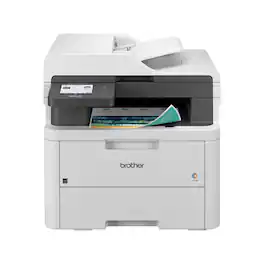
Great for small offices, the Brother MFC-L3720CDW wireless digital color all-in-one printer with copy, scan, and fax functionalities is set to meet the challenges of any small business with fast, reliable performance. Offering a host of practical features and functions, it consistently creates clear, smudge-free documents with steadfast efficiency. Achieves print speeds of up to 19 ISO pages per minute (ppm)(1) and scan speeds up to 29/22 ISO images per minute (ipm)(2) (black/color). Versatile paper handling and connectivity options help you work smarter and save time. Intuitive and customizable, the 3.5” touchscreen connects directly to a wide variety of Cloud-based apps(3), and simplifies tasks with the ability to create up to 48 timesaving custom shortcuts. Advanced security features safeguard sensitive information and create secure connections to devices and networks. Engineered and supported by Brother, the MFC-L3720CDW is a trustworthy, industrious addition to any small office or business.
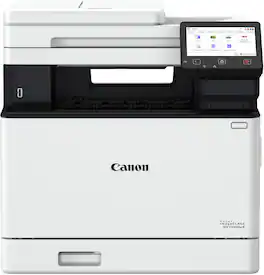
Designed for small / home offices and hybrid work environments, the imageCLASS MF753Cdw II model balances speedy performance and minimal maintenance. The MF753Cdw II is easy to set up and has a customizable, 5" color touchscreen that delivers an intuitive user experience. Produce crisp, colorful documents with fast print speeds of up to 35 pages per minute ¹ using high quality Canon Genuine Toner 069 / 069 H. Use Poster Artist Online to create professional-posters, banners and signage. The MF753Cdw II offers a plain paper capacity of up to 250 sheets in the standard cassette, 50 sheets in the multipurpose tray and an expandable paper capacity of up to 850 sheets using optional cassette PF-K1 which holds up to 550 sheets. The MF753Cdw has a 50-sheet duplex (one pass, 2-sided) automatic document feeder, which helps save time and keeps your documents in order. Easily connect wirelessly ² from computers or mobile devices. Print using a variety of mobile apps, including the Canon PRINT app ³ using your compatible mobile device. The MF753Cdw II comes with a 3-year limited warranty ⁴ and is backed by Canon's Service and Support network.

The Brother MFC-L8930CDW Business Color Laser All-in-One Printer is ideal for business work teams, supporting maximum productivity in high-demand environments with reliable performance. It features fast printing and copying with lifelike color and sharp black output for professional documents, presentations, and marketing collateral, plus advanced scanning capabilities. Maximize printing budgets with included Brother Genuine standard yield toner cartridges and achieve low-cost printing using the TN635XXL super high yield replacement toner cartridges. Triple Layer Security features help to keep the device secure, protect documents in transit, and safeguard against network intrusions. The printer includes dual-band (2.4GHz/5GHz) wireless and Gigabit Ethernet for wireless or wired networks, as well as convenient mobile device printing and scanning(1).
| Pros for Brother - MFC-L3780CDW Wireless Digital Color All-in-One Printer with Laser Quality Output, Great for Business - White | |||
|---|---|---|---|
| Print Quality, Overall Performance, Setup, Ease of use, Connectivity | There were no pros for this product— | There were no pros for this product— | There were no pros for this product— |
| Cons for Brother - MFC-L3780CDW Wireless Digital Color All-in-One Printer with Laser Quality Output, Great for Business - White | |||
| Weight | There were no cons for this product— | There were no cons for this product— | There were no cons for this product— |
Specs

Reviews
Customers are saying
Customers are delighted by the MFC-L3780CDW printer's excellent print quality, reliable performance, and straightforward setup. Users appreciate its ease of use, flawless wireless connectivity, and impressive speed, while also noting its relatively quiet operation and user-friendly touchscreen display. The printer's weight and the absence of specific scanning software were minor concerns for some users.
Customer Images
The vast majority of our reviews come from verified purchases. Reviews from customers may include My Best Buy members, employees, and Tech Insider Network members (as tagged). Select reviewers may receive discounted products, promotional considerations or entries into drawings for honest, helpful reviews.
- Rated 5 out of 5 stars
My new Brother MFC-L3780CDW
I recently purchased the Brother MFC-L3780CDW, and overall, it’s been an impressive addition to my workspace. Here’s a breakdown of my experience with it so far: Setup and Connectivity Setting up the printer was straightforward. Connecting it to my Wi-Fi network was smooth, and the printer was easily detected by multiple devices, including my laptop, smartphone, and tablet. The wireless functionality means I can print from anywhere, which adds a lot of convenience. Print Quality The print quality is excellent. Text documents come out crisp and clear, and the colors in graphics and images are vibrant. The laser-quality output makes a noticeable difference, especially for professional-looking documents. For an all-in-one, the quality of color prints exceeded my expectations. Speed and Efficiency This printer is fast, especially for larger print jobs. It handles both single-sided and duplex printing efficiently, and I haven’t noticed any jams or slowdowns. The all-in-one functions—copying, scanning, and faxing—are also quick and efficient, with the scanner producing sharp digital images. User Interface and Touchscreen The touchscreen is responsive and intuitive to use. Navigating through the menus to access different functions is simple, which makes it user-friendly. Even without the manual, most functions are straightforward to figure out. Cost and Maintenance While toner cartridges are a bit pricey, they last a long time and deliver consistent quality. Considering the overall performance, I think the maintenance costs are fair. The fact that it’s a laser printer also means fewer issues with clogging compared to inkjets, which is a big plus. Noise Level One pleasant surprise is that it’s relatively quiet. There’s a hum while it prints, but it’s minimal—perfect for a shared workspace where noise can be distracting. Pros and Cons Pros: High-quality, laser-like print output Fast printing and reliable wireless connectivity Responsive and easy-to-use touchscreen interface Quiet operation Cons: Replacement toner can be costly Slightly bulkier than some other all-in-ones Conclusion The Brother MFC-L3780CDW is a great choice for anyone needing a high-quality, efficient, and reliable all-in-one printer. It handles everything from basic document printing to scanning and copying with ease, making it ideal for a home office or small business. I’d highly recommend it to anyone looking for professional-quality printing and convenience.
Posted by ErwinM
- Rated 5 out of 5 stars
Excellent All-in-One Printer for Business Use
This Brother MFC-L3780CDW has been an outstanding addition to my home office setup. The wireless connectivity works flawlessly, and the laser quality output is exactly what I needed for professional documents. Pros: -Crystal clear color printing for business materials -Easy wireless setup - connected to my network in minutes -Fast printing speeds keep my workflow moving -Scanner function works perfectly for document management -Compact design fits well in my office space -Reliable performance since day one The all-in-one functionality saves space and handles everything I need - printing, scanning, copying, and faxing. Perfect for a small business operation where quality and reliability matter. Highly recommend this printer for anyone needing professional-quality output with the convenience of wireless connectivity. Worth every penny! Would I buy again? Absolutely.
Posted by Sarge
- Rated 5 out of 5 stars
Best Brother MFC-L3780CDW Digital Laser Color
I had previously inkjet from Brothers & HP. I must say I prefer the Brother - MFC-L3780CDW Wireless Digital Laser Color All-in-One Printer the best. It is so quiet. The geek squad brought it inside and set it up for me. I am so glad I joined Best Buy plan for the year. The two guys work well together in putting the writing table together for the printer to sit on. They made sure the printer was working via wifi before leaving. There was no way I could have lifted that printer. I like not having to constantly buy ink cartridges. I need to print many documents so the laser printer is more effective with its high speed printing. For my needs to print regular documents, this printer suits me well. I liked the option to scan, fax and print my documents. It was a nuisance before I got my Brothers printer, running out to pay to fax documents. It is easy for me to use.
Posted by XenaW