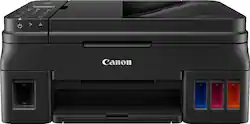
Canon - PIXMA G4210 Wireless MegaTank All-In-One Inkjet Printer - Black
- Key Specs
- Networking: Wireless
- ENERGY STAR Certified: true (Devices carrying the ENERGY STAR service mark, such as computer products and peripherals, kitchen appliances, and other products, generally use 20% to 30% less energy than required by federal standards.)
- Printer Type: Copier, Fax, Printer, Scanner
- ISO Color Print Speed: 10 pages per minute (The number of color pages able to be printed per minute in the device's default single-side mode, as tested by the International Standards Organization (ISO).)
- ISO Mono Print Speed: 15 pages per minute (The number of black ink (grayscale) pages able to be printed per minute in the device's default single-side mode, as tested by the International Standards Organization (ISO).)
- Output Tray Capacity: 100
- Touch Screen: true (Touch-screen devices make navigating more intuitive. Using a touch-screen display, you can do things such as tap to select, hold and drag to move items, swipe to scroll, and pinch to zoom.)
- General
- Product Name: PIXMA G4210 Wireless MegaTank All-In-One Inkjet Printer
- Brand: Canon
- Display Screen: true
- Display Screen Size: 3 inches
- Model Number: 2316C002
- Color: Black
- Dimensions
- Product Height: 7.8 inches (The out of box height of the item. Height is measured as the vertical distance from the bottom of the item to the top as it would be primarily used or placed.)
- Product Width: 17.6 inches (The out of box width of the item. Width is measured as the horizontal distance from one side of the item to the other as it would be primarily used or placed.)
- Product Depth: 17.6 inches (The out of box depth of the item. Depth is measured as the distance from the front of the item to the back as it would be primarily used or placed.)
- Product Weight: 16 pounds (The out of box weight of the item.)
- Features
- Automatic Document Feeder: true
- Photo Printing: true
- Monochromatic/Color: Color
- Automatic Two-Sided Printing: false
- Tray Capacity: 100
- Certifications Listings & Approvals
- EPEAT Qualified: false (The Electronic Product Environmental Assessment Tool (EPEAT) was designed to provide an environmental assessment tool for purchasers. In order to qualify for EPEAT, a product must meet all 23 required criteria.)
- TWAIN Compliant: true (Products with this label are compliant with standards set by the TWAIN Working Group for regulating communication between software and digital imaging devices. Devices that are TWAIN compliant are compatible for use with each other without requiring additional software, even if they have different capabilities.)
- Scanner Info
- Scanner Type: Flatbed
- Duplex Scan Function: true
- Scanner Resolution: Up to 19200 x 19200 (Refers to the number of pixels/dots, both horizontally and vertically, of the image produced by the scanner. Generally, the higher the resolution, the sharper and cleaner the produced image.)
- Fax Info
- Integrated Fax: true
- Ink
- Compatible Cartridges: GI-290 Black, GI-290 Cyan, GI-290 Magenta, GI-290 Yellow
- Memory
- Memory Card Slot: false
- Paper Info
- Automatic Document Feeder Capacity: 100 sheets
- Maximum Document Length: 14 inches
- Maximum Document Width: 8.5 inches
- Supported Paper Sizes: 4" x 6", 5" x 5" Square, 5" x 7", 8" x 10", Letter, Legal, U.S. No 10 Envelopes
- Paper Feeder: Cassette
- Paper Handling: 100-sheets rear paper tray
- Compatible Media Types: Plain Paper, Canon High Resolution Paper, Photo Paper Glossy, Photo Paper Plus Semi-Gloss, Matte Photo Paper, Other
- Performance
- Printer Resolution (Black): Up to 4800 x 1200 (Refers to the number of pixels/dots, both horizontally and vertically, of the image produced by the printer in black ink. Generally, the higher the resolution, the sharper and cleaner the produced image.)
- Printer Resolution (Color): Up to 4800 x 1200 (Refers to the number of pixels/dots, both horizontally and vertically, of the image produced by the printer in colored ink. Generally, the higher the resolution, the sharper and cleaner the produced image.)
- Connectivity
- Minimum System Requirements: Windows 10/8/8.1/7 SP1, Mac OS X v10.10.5 - macOS v10.12 (Sierra)
- Other
- UPC: 013803292527
Print documents and photos with this Canon PIXMA printer. The integrated tanks provide a clear view of ink levels for hassle-free monitoring, and the capacity is 30 times standard cartridges, so you can go longer between refills. This Canon PIXMA printer lets you print from your smartphone or tablet via the Canon PRINT app.
Fast print speeds up to 8.8 ISO ppm* in black, up to 5 ISO ppm* in color; creates a 4" x 6" photo-quality print in as little as 60 seconds*
- Prints up to 8.8 ISO ppm* in black and up to 5 ISO ppm* in color: Produces a 4" x 6" photo-quality print in as little as 60 seconds.
- Inkjet multifunction printer: Ideal for home or small business use. Offers excellent print quality for photos and documents and accepts a variety of paper types and sizes.
- Apple® AirPrint enabled: Allows Apple iPad® and iPhone® printing.
- Wireless and mobile printing capability**: Connect computers or devices easily with built-in Wi-Fi. Plus, print from your mobile device and from select online cloud services with Canon free mobile printing app or Google Cloud Print.
- Edit and organize your photos: The My Image Garden software provides filter effects and automatic layout suggestions for customizing your prints, calendar view for easy organizing, and more.
- Up to 4800 x 1200 dpi (dots per inch) color resolution: The high resolution offers incredible quality and detail in documents and photos.
- Four individual ink tanks: Replace the ink tank you need when its color runs out. Such design provides up to 30 times the amount of ink compared to conventional ink cartridge sets.
- Standard paper handling: Up to 100-sheet plain paper or 20-sheet photo paper capacity.
- One high-speed USB port for simple connectivity: Offers a standard connection to your PC.
- Scanner with color CIS (Contact Image Sensor): Allows you to scan documents in up to 600 x 1200 dpi optical resolution and in up to 19,200 x 19,200 dpi interpolated resolution so you can enjoy faithful document reproduction.
- High-speed fax: Features 33.6 Kbps modem to meet your office needs.
- Prints up to 8.8 ISO ppm* in black and up to 5 ISO ppm* in color: Produces a 4" x 6" photo-quality print in as little as 60 seconds.
- Inkjet multifunction printer: Ideal for home or small business use. Offers excellent print quality for photos and documents and accepts a variety of paper types and sizes.
- Apple® AirPrint enabled: Allows Apple iPad® and iPhone® printing.
- Wireless and mobile printing capability**: Connect computers or devices easily with built-in Wi-Fi. Plus, print from your mobile device and from select online cloud services with Canon free mobile printing app or Google Cloud Print.
- Edit and organize your photos: The My Image Garden software provides filter effects and automatic layout suggestions for customizing your prints, calendar view for easy organizing, and more.
- Up to 4800 x 1200 dpi (dots per inch) color resolution: The high resolution offers incredible quality and detail in documents and photos.
- Four individual ink tanks: Replace the ink tank you need when its color runs out. Such design provides up to 30 times the amount of ink compared to conventional ink cartridge sets.
- Standard paper handling: Up to 100-sheet plain paper or 20-sheet photo paper capacity.
- One high-speed USB port for simple connectivity: Offers a standard connection to your PC.
- Scanner with color CIS (Contact Image Sensor): Allows you to scan documents in up to 600 x 1200 dpi optical resolution and in up to 19,200 x 19,200 dpi interpolated resolution so you can enjoy faithful document reproduction.
- High-speed fax: Features 33.6 Kbps modem to meet your office needs.
Whats Included
- 4" x 6" photo paper sample pack (3 sheets GP-701)
- Black print head
- Color print head
- Full set of ink bottles (One bottle of each; BK,C,M,Y)
- PIXMA G4210 Wireless All-In-One Inkjet Printer
- Power cord
- Setup CD-ROM
- Telephone cord
- Two full size black (BK) ink bottles
- 4" x 6" photo paper sample pack (3 sheets GP-701)
- Black print head
- Color print head
- Full set of ink bottles (One bottle of each; BK,C,M,Y)
- PIXMA G4210 Wireless All-In-One Inkjet Printer
- Power cord
- Setup CD-ROM
- Telephone cord
- Two full size black (BK) ink bottles
A: Yes, this printer can be used with a USB connection and is the way I am using it. Two cautions if you have not bought this yet. The specifications on Best Buy say it has a touch screen. It does not and the screen is not backlit making it hard to read in low light. The specs also say it is auto duplexing. It is not. Duplexing is manual. I have only had this for about 3 weeks and the printing is fine but color is slow.
A: Call 1-800-OK-Canon
A: Is not a duplex printer. Have to flip it to print two-sided.
A: Yes, compatible with MaC OS, IPhone, Ipad, and Android with App.
A: Yes and yes. I use the various digital options usually to send straight to email or text instead of fax though. The scanner is incredible and refilling the ink was so easy! I love this machine so far...
A: There isn’t a backlight on the Canon 4210. For me, all the other perks outweighed the backlight and the ADF.
A: There is no flash receptacle on the printer. I recommend installing an app from the Windows 10 app store named "Windows Scan." It will do OCR, as well as giving you full 'save as' and 'save to' options.
Q: Does canon have any MegaTank printer with dual side scanning?
A: Not at this time.