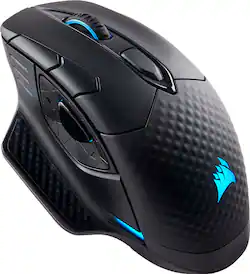
CORSAIR - DARK CORE SE Wireless Gaming 9 Button Optical Mouse with RGB Lighting and Qi Wireless Charging
- Key Specs
- Lighting Type: RGB
- Maximum Sensitivity: 16000 dots per inch (Mouse sensitivity is measured in dots per inch (DPI). The higher the DPI, the more sensitive the mouse is and may be more useful for high-density pixel screens. Lower DPI typically means more precision and accuracy in mouse movement.)
- Number of Buttons (Total): 9
- General
- Product Name: DARK CORE SE Wireless Gaming 9 Button Optical Mouse with RGB Lighting and Qi Wireless Charging
- Brand: CORSAIR
- System Requirements: Microsoft Windows (The software that a product must have for it to be able to integrate with another product.)
- Model Number: CH-9315311-NA
- Features
- Mouse Type: Gaming
- Lighting Type: RGB
- Customizable Lighting: true
- Performance
- Mouse Operation: Button(s)
- Mouse Grip Style: Palm grip (In comparison to many palm and claw grips, ergonomic grip mice are designed for a specific handedness and put the hand and wrist in a position to promote comfort. Customizable grips feature buttons/keys that can be configured to perform specific actions and may also have customizable calibration and sensitivity settings.)
- Handedness: Right-handed
- Tracking Method: Optical (There are several types of computer mice, optical and laser being among the most common. Optical mice detect less detail and provide more precise and accurate movement. Laser mice detect more detail and can be used on a wider variety of surfaces, but are more sensitive to small movements.)
- Maximum Sensitivity: 16000 dots per inch (Mouse sensitivity is measured in dots per inch (DPI). The higher the DPI, the more sensitive the mouse is and may be more useful for high-density pixel screens. Lower DPI typically means more precision and accuracy in mouse movement.)
- Minimum Sensitivity: 100 dots per inch (Mouse sensitivity is measured in dots per inch (DPI). The higher the DPI, the more sensitive the mouse is. Lower DPI typically means more precision and accuracy in mouse movement, but higher DPI may be useful for high-density pixel screens.)
- Number of Buttons (Total): 9
- Number of Thumb Buttons: 3
- Number of Programmable Buttons: 9
- Designed for Game Genre: FPS, MOBA
- Connectivity
- Operating System Compatibility: Windows
- Plug and Play Operation: true
- Power
- Mouse Power Source: Battery-powered
- On/Off Switch: false
- Rechargeable Battery (Mouse): true
- Wireless Charging: true
- Wireless Charging Standard: Qi
- Included
- Mouse Pad Included: false
- Dimensions
- Product Height: 1.7 inches (The out of box height of the item. Height is measured as the vertical distance from the bottom of the item to the top as it would be primarily used or placed.)
- Product Length: 5 inches (The out of box length of the item. Length is measured as the longest dimension of the item.)
- Product Width: 3.51 inches (The out of box width of the item. Width is measured as the horizontal distance from one side of the item to the other as it would be primarily used or placed.)
- Warranty
- Manufacturer's Warranty - Parts: 2 years
- Manufacturer's Warranty - Labor: 2 years
- Other
- UPC: 843591077545
Upgrade PC game performance with this Corsair gaming mouse. Its 1 ms 2.4GHz wireless technology is low latency to provide the edge in eSports competitions, and the nine programmable buttons enable custom configurations. This Corsair gaming mouse has a contoured shape and interchangeable side grips to provide the user with a tailored fit.
- Optical technology: LED lights scan the surface beneath the mouse to detect movement with a fair amount of accuracy, suitable for everyday computing and browsing.
- Ultra-fast 1ms Wireless or Bluetooth®: Choose between Ultra-fast 1ms 2.4GHz wireless, low-latency Bluetooth® or wired connection.
- 9 programmable buttons with optimized sniper button positioning: Take control with extensive customization, anything from simple remaps to complex macros.
- Qi® wireless charging: Charge wirelessly with CORSAIR MM1000 or any compatible Qi®wireless charging pad.
- Compatible with most versions of Windows: Works with most PCs.
Whats Included
- Corsair DARK CORE RGB SE Wireless Gaming Optical Mouse
- USB charging and data cable
- USB wireless transceiver
- USB cable adapter
- One Additional Side Grip
- Quick Start Guide
- Warranty Card
Product Manuals
Q: Is there another way to charge besides the Qi Mouse pad?
A: I charge mine by plugging in the USB cable that comes with it.
Q: Are these on display in their stores?
A: Hi, It'd be indeed, in the computers section. If you have anything else we can help with, please reach out: support.corsair.com -Art
Q: Is the USB plug in USB-C? What about the wireless dongle?
A: USB is not type C, wireless dongle can go directly in any USB Type A slot.
Q: Does it come with the wireless charging mousepad?
A: no and don't buy this for gaming
Q: Are the buttons quiet to click? playing mouse button heavy games can be annoying
A: Its a bit on the louder side there is a decent audible sound to the right and left click, the other buttons are very quite in comparison.
Q: Does this have rubber on it?
A: Yes the controller features rubber along the top for comfort
Q: Does a wireless usb come with the mouse to plug in to the pc?
A: Yes, it will also charge the mouse as well.
Q: Can I hook up this mouse to a acer gaming laptop
A: You have 3 ways to do. Bluetooth, wireless via a dongle if you don't have/want bluetooth, and by a direct wired connec to a USB jack.

















