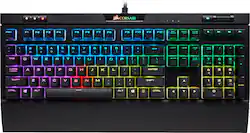
CORSAIR - Gaming STRAFE RGB MK.2 MX Silent Mechanical Wired CHERRY MX Silent RGB Switch Keyboard with RGB Back Lighting
- Key Specs
- Lighting Type: RGB
- Form Factor: Full-size (The size, arrangement, and physical configuration of the product.)
- Keyboard Technology: Mechanical (Type of technology that detects a key press.)
- Key Switch Behavior: Linear (Refers to the mechanisms under the keycaps on a keyboard that enable you to type faster and more precisely. Linear switches move straight up and down without any sound or bump. Tactile switches provide a noticeable bump in the key press, and no sound. Clicky switches provide a bump in the key press and "clicky" sound.)
- General
- Product Name: Gaming STRAFE RGB MK.2 MX Silent Mechanical Wired CHERRY MX Silent RGB Switch Keyboard with RGB Back Lighting
- Brand: CORSAIR
- Model Number: CH-9104113-NA
- Features
- Lighting Type: RGB
- Customizable Lighting: true
- Numeric Keypad: true
- Touchpad: false
- Keyboard Type: Gaming
- Palm Rest: true
- Spill Resistant: false (Designed to resist some degree of accidental liquid spill. The level of spill-resistance is indicated by the product manufacturer, but the degree of protection may not be guaranteed after normal wear of the product.)
- Foldable: false
- Functions
- Form Factor: Full-size (The size, arrangement, and physical configuration of the product.)
- Number Of Keys: 104
- Keyboard Technology: Mechanical (Type of technology that detects a key press.)
- Dedicated Macro Keys: true (Perform shortcuts of key sequences to carry out commands with a single key. Key sequences may include key strokes, mouse actions, and/or menu actions.)
- Adjustable Tilt Function: true
- Key Switch Type: Cherry MX Silent Red
- Key Switch Behavior: Linear (Refers to the mechanisms under the keycaps on a keyboard that enable you to type faster and more precisely. Linear switches move straight up and down without any sound or bump. Tactile switches provide a noticeable bump in the key press, and no sound. Clicky switches provide a bump in the key press and "clicky" sound.)
- Rollover: Full-key (Refers to the number of keys that can be correctly registered when pressed simultaneously. Rollover may be referred to as n-key rollover (KRO) or anti-ghosting.)
- Multimedia Keys: false
- Internet Keys: false
- Number Of Programmable Keys: 104
- Connectivity
- Number Of USB Port(s): 1 (The total number of USB ports including all generations and versions.)
- Compatibility
- Operating System Compatibility: Windows
- Plug and Play Operation: true
- Dimensions
- Product Height: 1.6 inches (The out of box height of the item. Height is measured as the vertical distance from the bottom of the item to the top as it would be primarily used or placed.)
- Product Width: 17.6 inches (The out of box width of the item. Width is measured as the horizontal distance from one side of the item to the other as it would be primarily used or placed.)
- Product Weight: 51.5 ounces (The out of box weight of the item.)
- Mouse
- Mouse Included: false
- Other
- UPC: 843591060776
Add color to your gaming rig with this Corsair Strafe mechanical gaming keyboard. It has 100 percent cherry MX RGB key-switches for up to 30 percent less noise during key presses and dedicated volume and multimedia controls, so you can quickly make adjustments. This Corsair Strafe mechanical gaming keyboard has a USB port for use with peripherals.
- USB pass-through port: Compatible with most mice, wireless headset adapters and cell phones.
- Cherry MX Silent RGB switches: Respond with minimal noise.
- Keyboard controls: Include volume, mute, brightness, play/pause, stop, previous track, next track, and more.
- Adjustable keyboard height and palm rest: For added comfort and support.
- Integrated numeric keypad: Allows simple data entry when you're not gaming for multifunction use.
- USB interface: Enables a simple wired connection to your computer.
Whats Included
- CORSAIR Gaming STRAFE RGB MK.2 MX Silent Mechanical Wired CHERRY MX Silent RGB Switch Keyboard with RGB Back Lighting
Q: Do the colors of the lights move around or do the colors stay still?
A: you need to download the corsair iCUE software to control the RGB lighting. Using the iCUE, you can set multiple profiles that can make the keyboard lights do many things from patterns to static lighting. If you youtube this keyboard you can find a lot of videos.
Q: Will it work good with an HP computer
A: It will not work with a toaster unless it has a usb
Q: Does it have CHERRY MX red or brown switches?
A: Cherry MX Silent, neither Brown or Red. They are Linear like the Brown and Red, but they are muffled at the bottom of the keystroke, and they are considerably more quiet than my keyboard with Cherry Brown keys. Hope this helps
Q: Will it work on my ps4 slim
A: Hi Tristan, I'm afraid none of our keyboards are guaranteed to work with PS4. If you have any other questions please reach out: support.corsair.com
A: Hi, Not through BB US, you'd have to purchase from a retailer in that region. If you have anything else we can help with, please reach out: support.corsair.com -Art
Q: Does this come with the FPS and MOBA keycaps as it does on the Corsair website?
A: Yes, they come in a separate vacuum sealed container along with the keycap remover.
A: I can but in Icue software when connected to PC, but I have not found a way to have keys lit in different colors constantly.

















