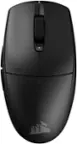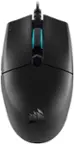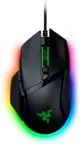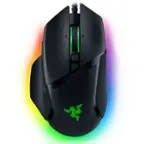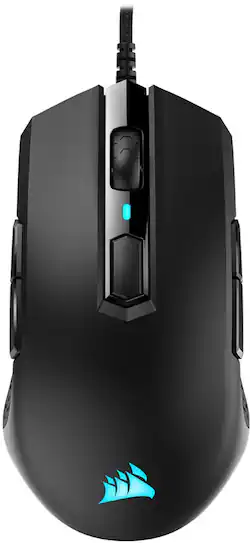
CORSAIR - M55 RGB PRO Wired Optical Gaming Mouse - Black
- Key Specs
- Lighting Type: None
- Maximum Sensitivity: 12400 dots per inch (Mouse sensitivity is measured in dots per inch (DPI). The higher the DPI, the more sensitive the mouse is and may be more useful for high-density pixel screens. Lower DPI typically means more precision and accuracy in mouse movement.)
- Number of Buttons (Total): 8
- General
- Brand: CORSAIR
- Model Number: CH-9308011-NA
- Product Name: M55 RGB PRO Wired Optical Gaming Mouse
- Color: Black
- System Requirements: Microsoft Windows 7 / 8 / 10 (The software that a product must have for it to be able to integrate with another product.)
- Features
- Mouse Type: Gaming
- Lighting Type: None
- Performance
- Mouse Operation: Button(s)
- Mouse Grip Style: Claw grip, Palm grip (In comparison to many palm and claw grips, ergonomic grip mice are designed for a specific handedness and put the hand and wrist in a position to promote comfort. Customizable grips feature buttons/keys that can be configured to perform specific actions and may also have customizable calibration and sensitivity settings.)
- Handedness: Ambidextrous
- Tracking Method: Optical (There are several types of computer mice, optical and laser being among the most common. Optical mice detect less detail and provide more precise and accurate movement. Laser mice detect more detail and can be used on a wider variety of surfaces, but are more sensitive to small movements.)
- Maximum Sensitivity: 12400 dots per inch (Mouse sensitivity is measured in dots per inch (DPI). The higher the DPI, the more sensitive the mouse is and may be more useful for high-density pixel screens. Lower DPI typically means more precision and accuracy in mouse movement.)
- Minimum Sensitivity: 200 dots per inch (Mouse sensitivity is measured in dots per inch (DPI). The higher the DPI, the more sensitive the mouse is. Lower DPI typically means more precision and accuracy in mouse movement, but higher DPI may be useful for high-density pixel screens.)
- Number of Buttons (Total): 8
- Number of Programmable Buttons: 8
- Connectivity
- Wired Connectivity: USB Type A
- Operating System Compatibility: Windows
- Power
- Mouse Power Source: Wired
- Dimensions
- Product Height: 1.6 inches (The out of box height of the item. Height is measured as the vertical distance from the bottom of the item to the top as it would be primarily used or placed.)
- Product Width: 2.3 inches (The out of box width of the item. Width is measured as the horizontal distance from one side of the item to the other as it would be primarily used or placed.)
- Product Weight: 85.9 grams (The out of box weight of the item.)
- Other
- UPC: 840006607779
Enjoy versatile use with this Corsair Pro ambidextrous multi-grip gaming mouse. The 12,400 dpi optical sensor offers accurate movement, while the lightweight design provides comfort during long sessions. Plug-and-play functionality supports a quick setup via the rugged braided USB cable. This Corsair Pro ambidextrous multi-grip gaming mouse features eight programmable buttons for customization, and the 50-million-click-rated switches deliver longevity.
- Precision to win: Take control over your gaming thanks to a 12,400 DPI optical sensor for high-accuracy tracking.
- Dynamic RGB backlighting: Illuminated by dynamic, customizable RGB LED backlighting with dozens of customizable presets and effects.
- Built to last: Durable construction featuring 50 million click-rated Omron switches and a premium braided cable gives the M55 RGB PRO the strength to withstand years of intense gaming sessions.
- CORSAIR iCUE software: Lets you switch from left to righthanded mode, customize macros and button remaps, control and synchronize RGB lighting across all compatible CORSAIR devices, adjust DPI settings, and more.
- Wired connection: This mouse connects to your computer using an USB port.
- Optical technology: LED lights scan the surface beneath the mouse to detect movement with a fair amount of accuracy, suitable for everyday computing and browsing.
- 8 fully programmable buttons: Create an in-game advantage with powerful macros and button remaps.
- Versatile ambidextrous design: Play at your highest level with either hand using your most comfortable grip, be it palm, claw, or fingertip.
- Weighs just 0.19 lbs: Incredibly lightweight construction lets you play effortlessly at your top form for hours.
- Compatible with most versions of Windows: Works with most PCs.
- Precision to win: Take control over your gaming thanks to a 12,400 DPI optical sensor for high-accuracy tracking.
- Dynamic RGB backlighting: Illuminated by dynamic, customizable RGB LED backlighting with dozens of customizable presets and effects.
- Built to last: Durable construction featuring 50 million click-rated Omron switches and a premium braided cable gives the M55 RGB PRO the strength to withstand years of intense gaming sessions.
- CORSAIR iCUE software: Lets you switch from left to righthanded mode, customize macros and button remaps, control and synchronize RGB lighting across all compatible CORSAIR devices, adjust DPI settings, and more.
- Wired connection: This mouse connects to your computer using an USB port.
- Optical technology: LED lights scan the surface beneath the mouse to detect movement with a fair amount of accuracy, suitable for everyday computing and browsing.
- 8 fully programmable buttons: Create an in-game advantage with powerful macros and button remaps.
- Versatile ambidextrous design: Play at your highest level with either hand using your most comfortable grip, be it palm, claw, or fingertip.
- Weighs just 0.19 lbs: Incredibly lightweight construction lets you play effortlessly at your top form for hours.
- Compatible with most versions of Windows: Works with most PCs.
Whats Included
- CORSAIR M55 RGB PRO Wired Optical Gaming Mouse
- CORSAIR M55 RGB PRO Wired Optical Gaming Mouse
Product Manuals
Q: How long is the cord on this mouse?
A: 1.8m Braided Fiber
Q: How heavy is the mouse I am playing Fortnite and I need a light mouse when I am just starting on pc?
A: Hello, It'd be 86g. If you have anything else we can help with, please reach out: support.corsair.com -Art
Q: Can I hook it up to my x box?
A: Yes, this can be hooked up to the Xbox.
Q: Can I adjust the DPI on this mouse? What is the DPI range?
A: Hi Zebra, You sure can with our iCue software. The DPI range is 200-12,400. If you have anything else we can help with, please reach out: support.corsair.com -Art
A: Hi Ace, Xbox is not officially supported with our mice. If you have any additional questions, feel free to let us know: support.corsair.com -Albert
Q: What are the DPI modes, what color is what DPI?
A: Hi NOTDEVELOP, Reach to our support team, we'd be happy to help you with your questions in regards to the DPI settings. support.corsair.com -Brian
Q: Does the mouse have silent click?
A: Hello, It is not "silent" per se, you can hear a quiet audible click. If you have anything else we can help with, please reach out: support.corsair.com -Art
Q: Can the scroll wheel freely spin?
A: The scroll wheel has light track feeling when turned by finger. But the scroll wheel starting making squeaking sound after using the mouse for 2 months.