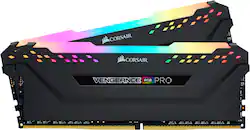
CORSAIR - Vengeance RGB PRO 16GB (2PK x 8GB) 3000MHz DDR4 C15 DIMM Desktop Memory
- Key Specs
- Type of Memory (RAM): DDR4
- Form Factor: Desktop (The type of computer the memory is configured to fit in.)
- Speed: 3000 megahertz
- Latency: 15-17-17-35 (Refers to the amount of time between the moment a memory request is initiated and the moment the request is retrieved by a processor, commonly written as a series of 4 numbers, or timings. Each timing measures the performance of the module according to a specific parameter. Generally, the lower the numbers, the faster the RAM can respond to requests.)
- CAS Latency: 15 (Column Address Strobe (CAS) Latency refers to the number of clock cycles (for synchronous DRAM) or nanoseconds (for asynchronous DRAM) between the moment an instruction or command is initiated and the moment the data result is available. Generally, the lower the numbers, the better.)
- Lighting Type: RGB
- Memory Capacity (per Module): 8 gigabytes (Refers to the maximum amount of data that can be stored on the memory module.)
- Memory Capacity (Total): 16 gigabytes (Refers to the maximum total amount of data that can be stored on all included memory modules.)
- General
- Product Name: Vengeance RGB PRO 16GB (2PK x 8GB) 3000MHz DDR4 C15 DIMM Desktop Memory
- Brand: CORSAIR
- Memory Capacity (per Module): 8 gigabytes (Refers to the maximum amount of data that can be stored on the memory module.)
- Number Of Modules: 2
- Memory Capacity (Total): 16 gigabytes (Refers to the maximum total amount of data that can be stored on all included memory modules.)
- Model Number: CMW16GX4M2C3000C15
- Compatibility
- Type of Memory (RAM): DDR4
- Pin Configuration: 288
- Form Factor: Desktop (The type of computer the memory is configured to fit in.)
- Operating System Compatibility: Windows
- Speed
- Memory Speed Rating: PC4-24000 (The RAM's bandwidth rating. The numbers refer to generation and transfer speed and are typically separated with a hyphen. For example, PC3-12800 would indicate that the module is 3rd generation and has a theoretical bandwidth of 12,800 megabytes per second (MBs). The higher the second number, the faster the speed.)
- Speed: 3000 megahertz
- Latency: 15-17-17-35 (Refers to the amount of time between the moment a memory request is initiated and the moment the request is retrieved by a processor, commonly written as a series of 4 numbers, or timings. Each timing measures the performance of the module according to a specific parameter. Generally, the lower the numbers, the faster the RAM can respond to requests.)
- CAS Latency: 15 (Column Address Strobe (CAS) Latency refers to the number of clock cycles (for synchronous DRAM) or nanoseconds (for asynchronous DRAM) between the moment an instruction or command is initiated and the moment the data result is available. Generally, the lower the numbers, the better.)
- Features
- Buffered or Registered: Unbuffered (Registered (buffered) memory modules are classified by the addition of a register between the memory controller and DRAM modules. When compared to conventional unbuffered (unregistered) memory, this type provides more stability with less electrical load on the controller, making it a common choice for use in robust applications, such as servers.)
- Data Integrity Check: Non-ECC (Error-correcting code (ECC) memory helps to maintain data integrity within a computer system, protecting it from potential crashes as well as losses or changes to data due to undetected errors. Systems that use ECC have an additional chip on the RAM that acts as the error check.)
- Memory Channels: Dual (Multi-channel memory increases the rate of data transfer between the DRAM memory and memory controller by adding more channels of communication. The more channels, the more memory bandwidth.)
- Lighting Type: RGB
- Power
- Voltage: 1.35 volts (Amount of power needed to support an electrical current.)
- Other
- UPC: 843591076944
Get the most out of your gaming PC with this 16GB CORSAIR Vengeance RGB DDR4 RAM. Each of the 8GB sticks snaps into your compatible motherboard, providing a total of 16GB, and extreme performance is assured thanks to the 3000 MHz frequency. Installation is simple thanks to the plug-and-play nature of this CORSAIR Vengeance RGB DDR4 RAM.
- Kit of two 8GB DDR4 SDRAM memory modules: For 16GB total memory.
- 288-pin DIMM: For capable system operation. DIMM is dual in-line memory module.
- Up to 3000MHz operating speed: For excellent multitasking capability.
- Anodized aluminum heatspreader: Keeps memory cool for efficient operation.
Whats Included
- CORSAIR Vengeance RGB PRO 16GB (2PK 8GB) 3GHz PC4-24000 DDR4 DIMM Unbuffered Non-ECC Desktop Memory Kit with RGB Lighting
Q: Will these work in the z390’s?
A: This will connect to a z390 motherboard.
Q: would this work on a omen pc with a HP 87C3 motherboard
A: Hi Adrian, Yes, this memory kit is compatible with that PC/motherboard. However, I suggest the 3200 MHz kit to match the default memory modules' speed: https://www.bestbuy.com/site/corsair-vengeance-rgb-pro-16gb-2pk-8gb-3-2ghz-pc4-25600-ddr4-dimm-unbuffered-non-ecc-desktop-memory-kit-with-rgb-lighting-black/6256216.p?skuId=6256216. If you have any additional questions, we'd be happy to help: support.corsair.com -Albert
A: XMP: cl 15-17-17-35 Hynix CFR (C-die) IC
Q: Will this RAM be compatible with an IBUYPOWER - BB981?
A: Hi, Yes, this memory kit is compatible with that PC. You'll replace the existing memory module with the two memory modules in this kit. After installation, please enable XMP in BIOS to utilize the rated 3000 MHz speed. If you have any additional questions, we'd be happy to help: support.corsair.com -Albert
Q: Will this memory works with the msi B450 tomahawk max motherboard?
A: Hi Atlas, You'll want to get either of these 2 kits instead for that setup: CMW16GX4M2Z2933C16 CMW16GX4M2C3200C16 If you have any other questions, please reach out: support.corsair.com
Q: Will this work on a msi bazooka b450m motherboard?
A: If you take a look at the MSI support page below, some variations of this ram, like the quad channel kits are compatible. Since this kit is dual channel, essentially half a kit, it *should work just fine with great performance. https://www.msi.com/Motherboard/support/B450M-BAZOOKA#support-mem-12
A: Hi crxzio, We recommend that you contact iBUYPOWER to ensure that your system supports the speed and capacity of this memory kit prior to purchasing: support.corsair.com -Brian
Q: Which software can you use to control the RGB on the stick?
A: Download Corsairs iCUE software. It's 1st party and allows you to control RGB for anything Corsair branded.




















