




Dell - XPS 2-in-1 12.5" Touch-Screen Laptop - Intel Core i5 - 4GB Memory - 128GB Solid State Drive - Carbon Fiber
This item is no longer available in new condition.
See similar items below.
Description
Features
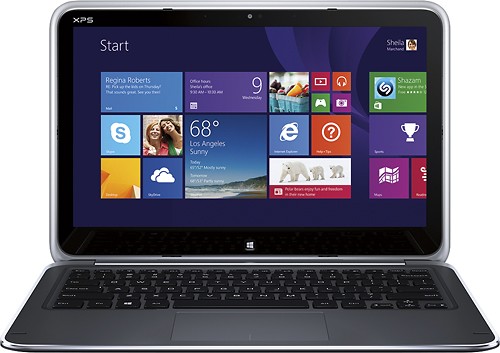
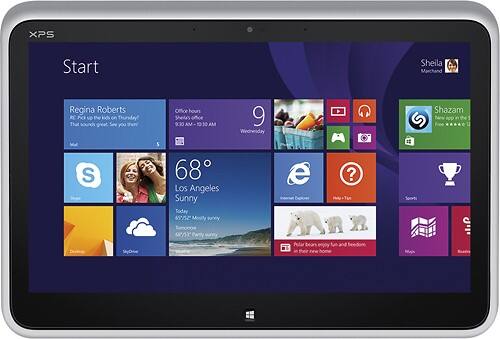
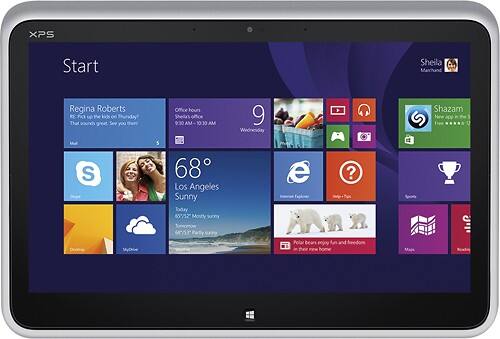
12.5" Full HD touch screen for hands-on control
Natural finger-touch navigation makes the most of Windows 8. The 1920 x 1080 resolution boasts impressive color and clarity. Durable Corning Gorilla glass. Energy-efficient LED backlight.
3rd Gen Intel® Core™ i5-3317U mobile processor
Ultra-low-voltage platform. Dual-core, four-way processing provides maximum high-efficiency power to go. Intel Turbo Boost Technology delivers dynamic extra power when you need it.
4GB system memory for basic multitasking
Adequate high-bandwidth RAM to smoothly run multiple applications and browser tabs all at once.
128GB solid state drive (SSD)
While offering less storage space than a hard drive, a flash-based SSD has no moving parts, resulting in faster start-up times and data access, no noise, and reduced heat production and power draw on the battery.
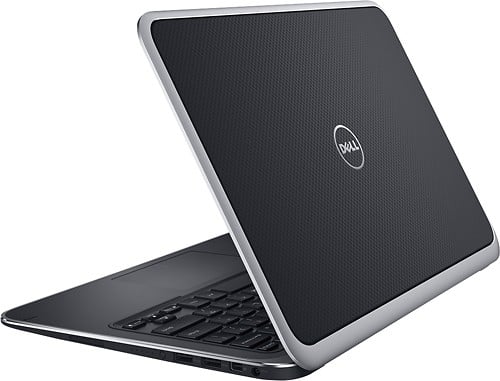
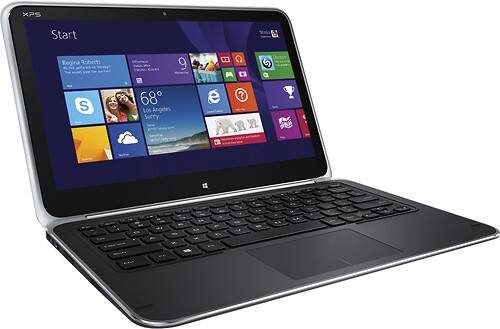
Innovate flip-hinge design
Works as a laptop and as a tablet. The screen rotates within its frame, transforming from laptop to tablet with one fluid motion.
Intel® Smart Connect technology for connectivity that's always up to date
No waiting required — your e-mail, contacts, social networks and apps automatically update, even in sleep mode.
Intel® HD Graphics 4000
Third-generation on-processor graphics provide proficient image quality for Internet use, photo editing, video streaming and casual games.
Weighs 3.4 lbs. and measures 0.8" thin
Ultrathin and ultralight for maximum portability, featuring a smaller screen size and omitting the DVD/CD drive to achieve the compact form factor. 4-cell lithium-ion battery.
Machined aluminum and carbon fiber casing
Durable, precision-cut materials create a sophisticated look and provide a rigid but lightweight frame.
Bluetooth interface syncs with compatible devices
Wirelessly transfer photos, music and other media between the laptop and your Bluetooth-enabled cell phone or MP3 player, or connect Bluetooth wireless accessories.
2 USB 3.0 ports maximize the latest high-speed devices
USB 3.0 ports are backward-compatible with USB 2.0 devices (at 2.0 speeds).
Wireless network connectivity
Built-in high-speed wireless LAN connects to your network or hotspots on the most common Wi-Fi standards.
Microsoft Windows 8 operating system
Designed for touch, mouse and keyboard, so you can choose how you get around. Use the touch screen to easily zoom and customize your new Start screen, or restore the familiar Windows desktop experience.
Built-in 1.3MP webcam
Makes it easy to video chat with family and friends or teleconference with colleagues over Skype or other popular applications.
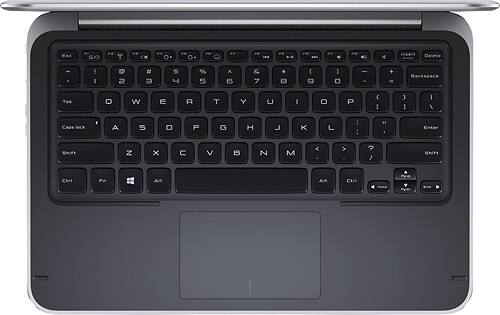
Island-style keyboard with chiclet keys
Buttonless touchpad.
Basic software package included
McAfee Quiet Build (12-month subscription). Microsoft Office 365 trial.
Note:
This laptop does not include a built-in DVD/CD drive.
Intel, Pentium, Celeron, Core, Atom, Ultrabook, Intel Inside and the Intel Inside logo are trademarks or registered trademarks of Intel Corporation or its subsidiaries in the United States and other countries.
Included Free
2 Items (Total Value: $30) Webroot - Internet Security with Antivirus Protection (3 Devices) (6-Month Subscription) - Android, Apple iOS, Chrome, Mac OS, Windows [Digital]A $29.99 value!Real-time protection for PC, Mac, Chromebook Android and IOS devices.Cloud based Webroot Internet Security Plus with Antivirus proactively shields households from the latest malware, phishing scams and other cyberattacks—all without slowing down your computer.We continuously analyze and classify billions of apps, files, websites and more so you bank, shop and browse online worry-free. Our leading rollback technology automatically returns infected devices to their original state.Installing in seconds and designed to work with any software, the full package features Chromebook security and system optimizer. Webroot empowers you with peace of mind without slowing you down.
 Microsoft - Xbox Game Pass Ultimate 1 Month Membership - Activation Required [Digital]Play Call of Duty: Black Ops 7, Fortnite, Forza Horizon 5, Madden NFL and hundreds of other games with Xbox Game Pass Ultimate, no console required. Get new games the day they release, play some of the biggest games of the year or try out franchises you’ve always been curious about. Enjoy 1-month of Xbox Game Pass Ultimate with your Best Buy purchase and play today. Eligible for new subscribers only. Plan auto-renews until cancelled.
What's Included
Dell XPS 2-in-1 12.5" Touch-Screen Laptop - Intel Core i5 - 4GB Memory - 128GB Solid State Drive
6-cell lithium-ion battery
AC power cord
Owner's manual
Other
- Energy Star CompatibleNo
- Processor BrandIntel®
- <a href="javascript:winopengld('1083716230738','pcmcat38200050027','cat12080')">Processor</a>Intel® 3rd Generation Core™ i5
- <a href="javascript:winopengld('1083716230979','pcmcat38200050027','cat12080')">Processor Speed</a>1.7GHz (with Turbo Boost up to 2.6GHz)
- Battery Type6-cell Lithium Ion (Li-Ion)
- <a href="javascript:winopengld('1087340511518','pcmcat38200050027','cat12080')">Display Type</a>High-definition
- <a href="javascript:winopengld('1087340566303','pcmcat38200050027','cat12080')">Screen Size (Measured Diagonally)</a>12.5"
- <a href="javascript:winopengld('1083716231665','pcmcat38200050027','cat12080')">Cache Memory</a>3MB
- <a href="javascript:winopengld('1083716231937','pcmcat38200050027','cat12080')">System Memory (RAM)</a>4GB
- Type of Memory (RAM)DDR3L
- <a href="javascript:winopengld('1083716232062','pcmcat38200050027','cat12080')">Hard Drive Type</a>SSD (Solid State Drive)
- <a href="javascript:winopengld('1083716235838','pcmcat38200050027','cat12080')">Computer Hard Drive Size</a>128GB
- Optical DriveNot included
- Direct-Disc LabelingNo
- Digital Media Reader or SlotsNo
- <a href="javascript:winopengld('1083716236524','pcmcat38200050027','cat12080')">Graphics</a>Intel® HD Graphics 4000
- <a href="javascript:winopengld('1083716238297','pcmcat38200050027','cat12080')">TV Tuner</a>No
- <a href="javascript:winopengld('1083716236935','pcmcat38200050027','cat12080')">MPEG</a>No
- Built-in WebcamYes
- <a href="javascript:winopengld('1083716237122','pcmcat38200050027','cat12080')">Modem</a>None
- <a href="javascript:winopengld('1087340512096','pcmcat38200050027','cat12080')">Networking</a>None
- Wireless NetworkingWireless-B+G+N
- Bluetooth-EnabledYes
- <a href="javascript:winopengld('1087340818871','pcmcat38200050027','cat12080')">S-Video Outputs</a>None
- <a href="javascript:winopengld('1087340512157','pcmcat38200050027','cat12080')">PCMCIA Slots</a>None
- <a href="javascript:winopengld('1083716239272','pcmcat38200050027','cat12080')">USB 2.0 Ports</a>1 USB 3.0
- <a href="javascript:winopengld('1083716239354','pcmcat38200050027','cat12080')">IEEE 1394 FireWire Ports</a>None
- <a href="javascript:winopengld('1083716239311','pcmcat38200050027','cat12080')">Parallel Ports</a>None
- <a href="javascript:winopengld('1083716239499','pcmcat38200050027','cat12080')">Game Ports</a>None
- Laptop WeightUltraportable (5.5 lbs. or less)
- Battery Life<a href="javascript:openOfferDetails('1218066009426','cat12178');">Not available</a>
- HDMI OutputNo
- Blu-ray PlayerNo
- TouchscreenYes
- Operating System PlatformWindows
- <a href="javascript:winopengld('1083716241291','pcmcat38200050027','cat12080')">Operating System</a>Windows 8
- <a href="javascript:winopengld('1218331155414','pcmcat38200050027','cat12080')">Operating System Bit Version</a>64-bit
- <a href="javascript:winopengld('1218870374819','pcmcat38200050027','cat12080')">ENERGY STAR Certified</a>No
- Best Buy PC AppNo
- Graphics ChipIntel
- Drive Capacity128GB
- Graphics CardIntel® HD Graphics 4000
- ConvertibleYes
- 2-in-1Yes
- UPC884116105718
Customer reviews
Rating 4.2 out of 5 stars with 165 reviews
(165 customer reviews)to a friend
Customers are saying
Customers frequently mention the responsive touchscreen, long battery life, and lightweight design as positive aspects of the product. The ease of use and fast SSD are also appreciated. Some customers have expressed concerns about the display quality, memory capacity, and the Windows 8 operating system. A few customers feel the price is a bit high.
This summary was generated by AI based on customer reviews.
- Pros mentioned:Touchscreen
Rated 4 out of 5 stars
Features are great...
||Posted .This reviewer received promo considerations or sweepstakes entry for writing a review.Overall great product we bought so that we could do demos at trade-shows and now I liked it so much that I use it for my own biz laptop. One issue is the wear of the left panel from palm which is odd as my Samsung took a year and this took 2 weeks to wear. Screen is great too yet if you do graphic software videos at all get the 8MB memory XPS. ~Clint @cazoomi
I would recommend this to a friend - Pros mentioned:Ease of useCons mentioned:Display quality, Price
Rated 1 out of 5 stars
Excellent device ruined by display flaw
Posted .This reviewer received promo considerations or sweepstakes entry for writing a review.This could have been a glowing review for a truly innovative convertible since the XPS 12 is second only to the Surface Pro for performance, flexibility, and portability, but the device has a fatal flaw that I have since learned is quite common. The high resolution display is extremely susceptible to image ghosting. By that I mean, the displays in many units retain the outlines of bright images if they remain on the screen for more than a minute or two. If you own one, you can easily test whether yours has the problem by doing the following: 1) Set the Windows 8 start screen background to blue (pretty much the default). 2) Go to the Windows desktop, and set the color to something akin to the old XP blue or any comparable color. This is not necessary but does make the resulting issue easier to see in less time. 3) Pin a few items to the task bar, and add a couple icons to the upper left portion of the desktop. 4) Work on the desktop for few minutes with the task bar and upper left corner visible (five to ten minutes is enough). You can even just leave the desktop open and on the screen - no need to run anything as long as the desktop and task bar stay visible. 5) After five minutes (mine was no more than a minute after a few days), hit the Windows button to jump back to the start screen. 6) Observe the bottom of the screen that corresponds to where the task bar is on the desktop, and the upper left where you placed the icons. 7) If you have the display issue, you will see the faint to vivid outlines of the taskbar and pinned items, and the same of the upper left icons showing through as ghosts. An example is attached to this review. These will fade in anywhere from a minute to up to ten minutes. 8) You can achieve the same result by opening a bright web page in a windows and then after a few minutes switching to a darker screen. While some may think this is trivial, the above is just a test to demonstrate. It does have a real world impact in functionality. For instance, if you are working on a bright object in something such as Photoshop, you can be stuck with the ghosting when you switch to editing a darker image. On that subject, no one should have to wait for the display on a $1000 laptop to fix itself so that you can complete a task. Even more importantly, I confirmed with mine over the course of a week that the effect takes less time to be triggered the longer it is used and takes more time to dissipate. That suggests at some point there is a potential for a memory effect and permanently marred display. I would write this off as just a single defective display except if you do a search you will find numerous complaints, with Dell's solution being to replace the laptops, sometimes with ones with the same problem. I also stopped by two Phoenix area Best Buys and checked their multiple demo displays and all had the same issue. I showed this to the staff in one store who were shocked by it and acknowledged it was pretty obvious if you were looking for it. This would be unacceptable for a low end bargain machine but the XPS 12 is definitely a lot more than that. It is a performance laptop with a $1000 price tag. Under the circumstances, I cannot recommend it. If you buy one (or already own one) I would further recommend checking for the problem. It will not go away, will worsen with time, and is not limited to early production units. You should not have to live with the problem, or suddenly realize it is there after your warranty expires. As I said, it is also not just some trivial little test such as looking for a bit of backlight bleed that has no effect on actual use. This can impact actual use in very inconvenient ways. BTW, do not let anyone convince you it is common to all 1080P displays. While early MacBook Pros with Retina displays had a version of the same problem they have fixed it. The equally high resolution Surface Pro which I also own is not susceptible to the problem at all. This is a Dell XPS 12 problem, not a universal high resolution display issue.
No, I would not recommend this to a friend - Pros mentioned:Battery life, Processor speed, Touchscreen
Rated 4 out of 5 stars
Excellent Value
||Posted .This reviewer received promo considerations or sweepstakes entry for writing a review.I purchased this ultrabook convertible to replace a very good Windows 8 tablet, so I was a tad hesitant to spend the extra money. Now I am glad I did. The XPS 12 has a fast processor and plenty of RAM, so I'm running all my apps quite comfortably. It also features Intel WiDi capability, so I am streaming HD from the XPS 12 to my living room TV (using a Netgear WiDi adapter). Of course its greatest strength is the flip/swivel screen, which is a marvel of design engineering. I can convert from tablet to laptop in less than 5 seconds without skipping a beat, and then back again when I am ready. The mechanics of the screen are solid and clearly built to last, and provide a great sense of security that I am not going to break it accidentally. I was very careful about the flip conversion at first, but I now I do it almost without thinking about it. Another big plus: the screen itself. Beautiful, vibrant, crystal-clear 1080p HD. Unmatched in this price range, I am willing to bet. So what are the cons? Well, I have noticed that the system runs kinda hot under heavy app use, especially when I am watching video, and of course the fan kicks on - but it's not really loud at all. It just contributes to the battery drain. I am more worried about keeping the exhaust vents on the back/bottom clear. But in spite of this, and under some heavy usage, I am enjoying a solid 6+ continuous hours of battery life on average. But I keep my screen brightness down pretty far, too. (Tip: disable the automatic screen brightness function and set the screen to pretty low brightness. It's fine for most usage, and you can manually adjust when you need to.) OVERALL: this has proven to be an exceptional value for the price tag, and is a solid, well-built machine.
I would recommend this to a friend - Pros mentioned:Battery life, Touchscreen
Rated 4 out of 5 stars
Goodbye Lion: Back to Windows
||Posted .This reviewer received promo considerations or sweepstakes entry for writing a review.For the past 2 years I've been using the first two generations of MacBook Airs as my portable device for work and personal use. The design, form factor, build, finish, reliability and portability are top notch. That ended one month ago when I spotted the XPS. You just don't realize how convenient a touch screen is until you start using one. In the case of the XPS, the ability to convert it into a tablet is cool, especially with its large, excellent screen. I was split between this and Lenovo's Yoga. While the Yoga offers a memory slot to complement the SSD, the backlit keyboard was essential for me to work on planes and other low light conditions. I also prefer the Dell's design. The metal frame and carbon fiber finish are nice. Build quality is excellent. In terms of performance, it runs cool, batteries last 4 to 5 hours with constant use, the i5 and 4GB are fast enough for my MS Office apps and for having multiple apps open. I no longer need to travel with my MacBook Air and Ipad...this takes up less space than those two combined. This a great machine but not perfect. It is heavy compared to the MacBook Air. There are few dedicated accessories compared to the Air. Case selections are limited (I bought the Dell leather portfolio). The charger is compact but not as nice as the Mac's. The keyboard is good but the Mac's works better (the XPS's is too recessed, occasionally causing me to swipe the touchpad, in turn causing the cursor to move unexpectedly). The Mac's touchpad is also smoother both literally and in terms of scrolling or moving the cursor. And the Win8 software is less stable than the Mac's...I use my machine constantly and find I need to re-start it every day or two because it stops responding as it should (i.e. the touchscreen feature stops working or I get stuck on a page). Despite these minor shortcomings, overall I am very happy with the XPS.
I would recommend this to a friend - Pros mentioned:Battery life, Processor speed, Touchscreen
Rated 5 out of 5 stars
Nice Combo Laptop/Tablet
||Posted .This reviewer received promo considerations or sweepstakes entry for writing a review.I purchased the Dell XPS 12 for my daughter primarily for doing school work. She absolutely loves the convertible touchscreen. Size and weight are excellent for her. Build quality is very good and it is fun to able to say that it is made out of carbon fiber... Overall the i5 processor is pretty good and 4 GB ram are fine for our needs. I am not that thrilled with the touch pad but the touchscreen is very responsive. A larger SSD would be a plus but with all of the cheap cloud storage this is not a big deal. Battery life seems pretty good so far. I purchased this as an open box for about $750 and at that price I think it is fairly good value for the money. You pay a premium for the flippy screen... Overall nice machine.
I would recommend this to a friend - Cons mentioned:Display quality
Rated 4 out of 5 stars
Great combination of laptop and tablet
||Posted .This reviewer received promo considerations or sweepstakes entry for writing a review.Best designed convertible laptop / tablet I could find. Future generations might come up with a better design, but the flip screen of this model seems to be the easiest and most secure of any design presently available. Easy to switch back and forth. In laptop mode you can still use the touchscreen, and in tablet mode and you are able to call up an onscreen keyboard. Have had an occasional freeze up in tablet mode, but not yet often enough to become annoying. Does seem to have adequate internal memory and hard drive for present needs, but if you want to build a music or video library on disk, you will have to buy an external disk drive. I would prefer if they included an internal disk drive. I am use to working on a desktop computer, and originally I was wishing this laptop came with a larger screen. However, I am finding that I use it in tablet mode more often than laptop mode, and must admit that if it were much larger or heavier, it probably wouldn't be nearly as handy. In hindsight, I think they probably came up with the right compromise. I guess for longer sessions where I really miss having a larger screen, I could sit at my desk and hook it up to an external monitor of whatever size I wanted. I have had this model for about a month, and so far I am more than pleased.
I would recommend this to a friend - Pros mentioned:Battery life, Touchscreen
Rated 4 out of 5 stars
Overall Good Design
||Posted .This reviewer received promo considerations or sweepstakes entry for writing a review.Pros:The XPS 12 is a very well built laptop with nice design and can convert into a usable tablet. It works well and seems very intuitive. The battery life is decent at around 3 hours in power saving mode and 2 hours on normal battery mode. Cons: The XPS 12 is a a bit pricey for the actual components youre getting within the laptop. If you have the extra cash go for the haswell version of the XPS since it will probably boost your battery life significantly. The touchpad can also be a bit tricky to start off with but it is highly configurable. That said, it'll probably take some time to get used to but the windows 8 interface really helps alleviate some of the irks of using a touchpad when you can be using the touchscreen instead. All in all I recommend the XPS 12 if you have the extra funds laying around and want a well built if not slightly under powered laptop/tablet hybrid.
I would recommend this to a friend - Pros mentioned:Battery life
Rated 5 out of 5 stars
A great PC with a super display
||Posted .This reviewer received promo considerations or sweepstakes entry for writing a review.I have owned numerous Dell laptops over the last 15 years and this one is tops. Some reviews criticized the touchpad but I have had no trouble. However, when you first use the PC, be sure to run the Dell utility that updates all of the firmware. While this is somewhat time-consuming, it ensures that all of your drivers, etc are up-to-date. The performance of the SSD combined with the Core I5 CPU is quite good. While Dell offers a Core I7 for this PC, I think the Core I5 is sufficient while saving battery. Also, the Core I5 will ‘burst’ to 2.4GHz when necessary so the performance is excellent. The unit boots from a cold start in 5 seconds; faster if coming off of sleep or hibernate. The display quality is outstanding and the ‘flip’ feature works easily and the construction is quite solid. If you are primarily looking for a Tablet, look elsewhere because this unit will be larger and heavier than a dedicated Tablet. It is really a Laptop that can also perform admirably as a Tablet at a flip of the screen which is just what I needed. Sound through the speakers is marginal and no SD card slot is unfortunate. Overall, however, it is a great product.
I would recommend this to a friend
Q: QuestionCan the laptop play CDs?
Asked by Anonymous.
- A:Answer Im sorry, no, it does not have an internal drive. You can, however, use an external drive on it. Best Buy Mobile and Connectivity Specialist, Kraig
Answered by spex
Q: QuestionWill this laptop support Java and Adobe Flash ?will this laptop support Java 1.6.0xx or higher and Adobe Flash Player 10.x or higher ?
Asked by mchillin.
- A:Answer Yes, it will. Best Buy Mobile and Connectivity Specialist, Kraig
Answered by spex
Q: QuestionWhat is the maximum ram i can upgrade this model to?
Asked by bud3945.
- A:Answer The RAM for this computer would not be able to be upgraded beyond the standard 4GB.
Answered by MatthewSBBY
Q: QuestionCan you write on the btablet PC with a dedicated "pen" device?
Asked by Anonymous.
- A:Answer I use a captive stylus to take notes. Like the ones they sell for ipads.
I would recommend:
Answered by ajm79
Q: Questionbacklit keys, do they drain battery?can you turn off the backlighting on the keys and does it save on battery life?
Asked by sdan.
- A:Answer not sure if it drains the battery but there is a function on the keyboard to turn of the back light keys
Answered by hbomb23431
Q: Questionis there a screen lock button?if i'm listening to music, and want to turn screen black while i listen? like on a tablet or phone, you can turn off the screen and let the music still play.
Asked by question maker.
- A:Answer Hello, Thank you for your interest in the XPS 12 Ultrabook. As it turns out, there is not a stand-by like button that instantly turns off the screen while keeping the programs running (music playback for example). In tablet mode, pressing the power button puts the XPS 12 is standby mode, so you can’t really wake it up instantaneously. Hope this helps! JonathanNforDell
Answered by YourDellTeam

Q: Question4th gen?the dell website is showing this with a 4th gen intel, can I not get one here?
Asked by steve.
- A:Answer Hello, Thank you for your interest in the XPS 12 convertible ultrabook! It is true that the XPS 12 was recently updated with Intel 4th Gen processor options on Dell's website. It takes a small bit of time for sites like Best Buy to acquire the latest laptops from us, so I would expect you to see 4th Gen versions here soon! Hope this helps! JonathanNforDell
Answered by YourDellTeam
Q: Question3G / 4GDoes this device work with a sim card?
Asked by jt.
- A:Answer No. It is WiFi only.
Answered by StephenAZ

Most viewed
- $999.99Your price for this item is $999.99
- $499.99Your price for this item is $499.99
- $249.99Your price for this item is $249.99
- $899.00Your price for this item is $899.00$999.00The comparable value for this item is $999.00
- $529.99Your price for this item is $529.99$629.99The comparable value for this item is $629.99
- $239.99Your price for this item is $239.99$499.99The comparable value for this item is $499.99
- $1,099.99Your price for this item is $1,099.99$1,499.99The comparable value for this item is $1,499.99
- $299.00Your price for this item is $299.00$349.00The comparable value for this item is $349.00
- $279.99Your price for this item is $279.99$379.99The comparable value for this item is $379.99
- $69.99Your price for this item is $69.99
- $1,249.99Your price for this item is $1,249.99
- $499.99Your price for this item is $499.99
- $779.99Your price for this item is $779.99
- $169.00Your price for this item is $169.00$399.00The comparable value for this item is $399.00
- $115.99Your price for this item is $115.99$139.99The comparable value for this item is $139.99
- $499.00Your price for this item is $499.00$599.00The comparable value for this item is $599.00
- $1,567.89Your price for this item is $1,567.89
- $649.99Your price for this item is $649.99
- $299.99Your price for this item is $299.99$499.99The comparable value for this item is $499.99
- $79.99Your price for this item is $79.99$499.99The comparable value for this item is $499.99