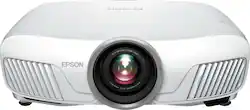
Epson - Home Cinema 5040UB 3LCD Projector with 4K Enhancement and HDR - White
- Key Specs
- Product Weight: 31.51 pounds (The out of box weight of the item.)
- Contrast Ratio: 1,000,000:1 (Measured difference between a displayed image's brightest whites and darkest blacks. The larger the first number, the more detail and color that can be displayed.)
- Projector Use: Home Theater
- General
- Brand: Epson
- Model Number: 5040UB
- Product Name: Home Cinema 5040UB 3LCD Projector with 4K Enhancement and HDR
- Color: White
- Series: Home Cinema (Part of a group of the same product type with similar features.)
- Dimensions
- Product Height: 10 inches (The out of box height of the item. Height is measured as the vertical distance from the bottom of the item to the top as it would be primarily used or placed.)
- Product Width: 25.7 inches (The out of box width of the item. Width is measured as the horizontal distance from one side of the item to the other as it would be primarily used or placed.)
- Product Depth: 19.7 inches (The out of box depth of the item. Depth is measured as the distance from the front of the item to the back as it would be primarily used or placed.)
- Product Weight: 31.51 pounds (The out of box weight of the item.)
- Display
- Resolution (Native): 1920 x 1080 (Native resolution of a screen refers to its single, fixed resolution. Sometimes screens must scale an image up or down in order to fit the native resolution. This can cause a loss of resolution or detail.)
- 3-Chip Technology: true (Projectors with this technology are able to display images with optimal brightness, color, and detail. Because of their high-performance design, these projectors are primarily used in large venues and digital cinemas.)
- High Dynamic Range (HDR): true (An HDR-compatible 4K TV or other HDR-compatible product displays HDR video content when it's available from sources like 4K Ultra HD Blu-ray Discs and 4K streaming services.)
- High Dynamic Range Format: HDR 10 (There are a few HDR formats that tell the TV or other HDR-compatible product how to best utilize its capabilities to display HDR content. HDR technology can support one or multiple formats, each with various benefits to picture quality.)
- Contrast Ratio: 1,000,000:1 (Measured difference between a displayed image's brightest whites and darkest blacks. The larger the first number, the more detail and color that can be displayed.)
- Aspect Ratio: 16:9 (The measurement of the width of a screen compared to the height of a screen, expressed as a ratio.)
- Digital Keystone Correction: true ("Keystone effect" refers to the distortion of an image when it is projected on an angled surface or when the projector is positioned too high or too low from the center of the display. Projectors with a digital keystone correction feature are able to scale the image as needed before it is projected, resulting in the correct image orientation no matter where it is displayed.)
- 3D Technology: true
- Viewing
- Minimum Projector Distance: 3 feet (Minimum distance that the projector can be placed from the screen to produce a display with acceptable visual performance.)
- Maximum Projector Distance: 26.6 feet (Maximum distance that the projector can be placed from the screen to produce a display with acceptable visual performance.)
- Minimum Viewable Screen Size: 30 inches
- Maximum Viewable Screen Size: 300 inches
- Features
- Projector Use: Home Theater
- Remote Control Included: true
- Exposure Control
- Focus Adjustment: Powered (The method used to focus the device in order to view or display a sharper image.)
- Minimum Aperture: 1.51 (The smallest opening of a lens, typically expressed in f-numbers. The larger the number, the smaller the aperture and the less light that can enter the lens. A smaller aperture creates a larger depth of field, which keeps both foreground and background in focus.)
- Maximum Aperture: 1.7 (The limit to how wide a lens can be open, typically expressed in f-numbers. The smaller the number, the larger the aperture and the more light that can enter the lens. A larger aperture creates a shallower depth of field, helpful for keeping subjects in focus and blurring background details.)
- Audio
- Integrated Speaker(s): false
- Speaker(s) Included: false
- Other
- UPC: 010343921856
Enjoy movies on the big screen in the comfort of your home with this Epson PowerLite projector. It comes with an HDMI interface and lens shift, making setup fast and easy, and the 4K enhancement technology displays brighter pictures with exceptional color. This Epson PowerLite projector supports multiple formats, including HDR, streaming and Blu-ray.
- 3D technology: Delivers an immersive viewing experience (3D glasses required). The 2D-to-3D conversion allows you to easily transform 2D images into stunning 3D content.
- 2500 lumens of color brightness and 2500 lumens of white brightness: Boost display visibility and produce clear, vibrant on-screen images.
- High dynamic range (HDR) creates a more realistic picture: HDR technology expands the contrast and color range of the pixels on your projector to reveal a better, brighter, more colorful image. The picture quality is noticeably more natural.
- 3LCD 3-chip technology: Delivers best-in-class Color Brightness* and reliable performance with no rainbow effect.
- Expansive color gamut: Get brilliant, color-rich performance that displays the entire sRGB color space, plus DCI in Digital Cinema Mode.
- Epson® Image Enhancement Technology: Features Super-resolution and improved Detail Enhancement to sharpen and refine images for lifelike smoothness and clarity.
- 4K Enhancement Technology: Accepts 4K input and supports HDCP 2.2 for scenes with 4K content. Shifts each pixel diagonally by 0.5 pixels to double the resolution and surpass Full HD image quality.
Whats Included
- CD-ROM with user guide link
- Home Cinema 5040UB 3LCD Projector with 4K Enhancement and HDR
- Owner's manual
- Power cord
- Remote control with AA batteries
- Two HDMI cable clamps
Q: Has the power supply issue with this 5040UB model been corrected?
A: I purchased this unit from Best Buy, replaced after 2 months. 6 months later same problem. Wouldn't power up
Q: If my projector is 16 feet away from the screen will it work on a 90 inch screen?
A: http://www.projectorcentral.com/Epson-Home_Cinema_5040UB-projection-calculator-pro.htm
Q: can you buy this projector in black ?
A: The black version of this projector is the Pro Cinema 6040 UB. It is the same projector but is black and comes with another year of warranty, a mount, an extra bulb and $1000 higher price tag.
Q: is that 5040 ub play ratio 2:35
A: Yes. And it also has an programmable zoom lens in case you have a 2.35 screen to accommodate 16:9 as well.
Q: Will this projector display 4K content from a Roku Premier +???
A: The projector will scale it and use its 4k-like technology to make it look as 4k as possible. Epson calls this 4K Enhancement. Projector central says: The key to understanding why the 4K Enhancement looks so impressive is realizing that there's only so much detail the human eye can actually resolve. The 5040UB's pixel-shifting technology increases the apparent resolution of the picture by enough to come close to that limit. Of course it depends on how close you like to sit to the screen. And it also depends on the type of subject matter -- it is easier to see resolution differences between the 5040UB and native 4K projectors when viewing high resolution graphics and text documents than it is with video.
A: Hey Scooter, Wish I could give you some expert answers here, but a few things I would check, aside from starting with the manual, and then calling Epson) - I would check to ensure fans are working and/or ventilation is working as expected on projector to ensure that Over-Heating isn't the cause of the bulbs failing. - I'd also check the Serial Number of the bulbs and see if they are close, in case it is a bad batch. This is not an exact science, as most mfg have a specific way of decoding Serial Number to mfg date, so may not be apparent to the avg user as to what SNs are actually "close". - Any discoloration or burn marks on the bulbs? Either way, I'd be surprised/disappointed if Epson wouldn't replace the bulbs for free given the situation. May be a matter of just keeping on them, or a matter of just who you get on the other line that is willing to help (luck of the draw kind of thing). I would however escalate it to Epson if the initial customer service rep gave the 'ol "Sorry, nothing i can do". Anyway, just a few thoughts. Hope you get some resolution (if so, curious what resolution you end up with).
Q: Will this projector work 15 feet away from the screen hanging from ceiling with a 140" screen?
A: Yes, it works fine at that distance with that screen for a 2:35 screen, and should work fine for 16:9 as well - the remote controlled zoom will let you go from significantly smaller to significantly larger at that distance with no apparent difference in picture quality. It has an excellent set of lenses, but you're going to want bluray quality or better for that size screen, because dvd quality is just not going to look good.
Q: What is the maximum recommended screen size?
A: The projector will project and image from 50 inches to 250 inches depending on the distance from the screen.