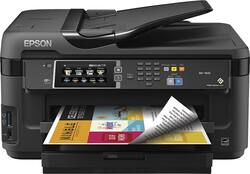
Epson - WorkForce WF-7610 Network-Ready Wide-Format Wireless All-In-One Printer - Black
- Key Specs
- Networking: Wireless
- ENERGY STAR Certified: true (Devices carrying the ENERGY STAR service mark, such as computer products and peripherals, kitchen appliances, and other products, generally use 20% to 30% less energy than required by federal standards.)
- Printer Type: All In One
- ISO Color Print Speed: 10 pages per minute (The number of color pages able to be printed per minute in the device's default single-side mode, as tested by the International Standards Organization (ISO).)
- ISO Mono Print Speed: 18 pages per minute (The number of black ink (grayscale) pages able to be printed per minute in the device's default single-side mode, as tested by the International Standards Organization (ISO).)
- Output Tray Capacity: 125
- Touch Screen: true (Touch-screen devices make navigating more intuitive. Using a touch-screen display, you can do things such as tap to select, hold and drag to move items, swipe to scroll, and pinch to zoom.)
- General
- Brand: Epson
- Model Number: C11CC98201
- Product Name: WorkForce WF-7610 Network-Ready Wide-Format Wireless All-In-One Printer
- Color: Black
- Display Screen: true
- Display Screen Size: 4.3 inches
- Dimensions
- Product Height: 13.4 inches (The out of box height of the item. Height is measured as the vertical distance from the bottom of the item to the top as it would be primarily used or placed.)
- Product Width: 22.3 inches (The out of box width of the item. Width is measured as the horizontal distance from one side of the item to the other as it would be primarily used or placed.)
- Product Depth: 22.3 inches (The out of box depth of the item. Depth is measured as the distance from the front of the item to the back as it would be primarily used or placed.)
- Product Weight: 40.8 pounds (The out of box weight of the item.)
- Features
- Automatic Document Feeder: true
- Photo Printing: false
- Automatic Two-Sided Printing: true
- Tray Capacity: 250
- Duty Cycle: Up to 20,000 (The maximum number of pages per month that the device can produce without failing, as specified by the manufacturer.)
- Certifications Listings & Approvals
- EPEAT Qualified: false (The Electronic Product Environmental Assessment Tool (EPEAT) was designed to provide an environmental assessment tool for purchasers. In order to qualify for EPEAT, a product must meet all 23 required criteria.)
- Scanner Info
- Scanner Type: Flatbed
- Duplex Scan Function: true
- Scanner Resolution: Up to 2400 x 1200 (Refers to the number of pixels/dots, both horizontally and vertically, of the image produced by the scanner. Generally, the higher the resolution, the sharper and cleaner the produced image.)
- Fax Info
- Integrated Fax: true
- Ink
- Compatible Cartridges: 252, 252XL
- Ink Subscription Service Available: false (The printer monitors ink usage and alerts the subscription provider when levels are low. A purchased subscription provides refills of ink based on usage.)
- Memory
- Memory Card Type: Memory Stick Duo, Secure Digital
- Memory Card Slot: true
- Paper Info
- Automatic Document Feeder Capacity: 35 sheets
- Maximum Document Length: 47.2 inches
- Maximum Document Width: 13 inches
- Supported Paper Sizes: 3.5" x 5", 4" x 6", 5" x 7", 8" x 10", 8.5" x 11", 11" x 17", 13" x 19", A4, A6, half letter, executive, user-definable (3.5" x 47.2" in length)
- Paper Feeder: Cassette tray
- Paper Handling: Up to 250 sheets
- Compatible Media Types: Plain Paper, Epson Bright White Paper, Epson Presentation Paper Matte, Epson Premium Presentation Paper Matte
- Copier Info
- Maximum Number Of Copies: 999
- Copier Resolution (Black): Up to 600 x 600 (Refers to the number of pixels/dots, both horizontally and vertically, of the image produced by the copier in black ink. Generally, the higher the resolution, the sharper and cleaner the produced image.)
- Copier Resolution (Color): Up to 600 x 600 (Refers to the number of pixels/dots, both horizontally and vertically, of the image produced by the copier in colored ink. Generally, the higher the resolution, the sharper and cleaner the produced image.)
- Performance
- Printer Resolution (Black): Up to 4800 x 2400 (Refers to the number of pixels/dots, both horizontally and vertically, of the image produced by the printer in black ink. Generally, the higher the resolution, the sharper and cleaner the produced image.)
- Printer Resolution (Color): Up to 4800 x 1200 (Refers to the number of pixels/dots, both horizontally and vertically, of the image produced by the printer in colored ink. Generally, the higher the resolution, the sharper and cleaner the produced image.)
- Connectivity
- Minimum System Requirements: PC: Windows Server 2003, Server 2003 R2, Server 2008, Server 2008 R2, Server 2012, Server 2012 R2, XP SP3 (32-bit), XP Professional x64 Edition, Vista (32- or 64-bit), 7 (32- or 64-bit) or 8.x (32- or 64-bit); Mac: OS X 10.5.8 - 10.9.x
- Other
- UPC: 010343908215
With Epson Connect and built-in Wi-Fi with Wi-Fi Direct, this Epson WorkForce WF-7610 wide format all-in-one printer allows easy wireless printing from select smartphones and tablets. The 4-in-1 functionality lets you print, copy, scan and fax for versatile use.
- Easy Replenish: With a printer set up for Easy Replenish, you'll automatically receive shipments of the ink you need. The printer monitors its own ink levels, so you'll only receive ink when you need it.
- Prints up to 18 ISO ppm* in black, up to 10 ISO ppm* in color: To generate documents quickly.
- 4-in-1 functionality: Prints, copies, scans and faxes for multipurpose use.
- PrecisionCore 2S PrintHead 4-color ink jet technology: Promotes optimal performance.
- Built-in wireless LAN (802.11b/g/n): With Wi-Fi Direct allows rapid wireless connectivity.
- Network-ready with built-in 10/100 Mbps Ethernet interface: For simple connection to your home or office network.
- Tablet and smartphone printing: Epson Connect enables simple wireless printing from most smartphones, tablets and more.
- Apple® AirPrint enabled: For Apple iPad® and iPhone® printing.
- Up to 4800 x 1200 optimized dpi resolution: Helps ensure sharp text and images.
- Supports multiple paper sizes: Including 3.5" x 5", 4" x 6", 5" x 7", 8" x 10", 8.5" x 11", 8.5" x 14", 11" x 17", 13" x 19", A4, A6, half letter, executive and user-definable from 3.5" - 47.2" in length for versatility.
- Copies up to 16 ISO cpm* in black, up to 8.8 ISO cpm* in color: So you can quickly produce copies.
- Automatic 2-sided ADF color flatbed scanner: With 24-bit color output and 48-bit color input, up to 2400 dpi optical resolution, up to 1200 x 2400 dpi hardware resolution and up to 9600 dpi interpolated resolution offers faithful reproduction.
- High-speed fax: With 33.6 Kbps modem, 200 speed dials and up to 550-page fax memory to meet your office needs. Color faxing to and from color fax machines.
- 250-sheet input paper capacity: Along with a 35-sheet automatic document feeder lets you quickly complete large tasks.
- 4.3" color touch screen: Helps simplify navigation.
- High-speed USB interface: Makes it easy to connect your compatible PC or Mac.
- Easy Replenish: With a printer set up for Easy Replenish, you'll automatically receive shipments of the ink you need. The printer monitors its own ink levels, so you'll only receive ink when you need it.
- Prints up to 18 ISO ppm* in black, up to 10 ISO ppm* in color: To generate documents quickly.
- 4-in-1 functionality: Prints, copies, scans and faxes for multipurpose use.
- PrecisionCore 2S PrintHead 4-color ink jet technology: Promotes optimal performance.
- Built-in wireless LAN (802.11b/g/n): With Wi-Fi Direct allows rapid wireless connectivity.
- Network-ready with built-in 10/100 Mbps Ethernet interface: For simple connection to your home or office network.
- Tablet and smartphone printing: Epson Connect enables simple wireless printing from most smartphones, tablets and more.
- Apple® AirPrint enabled: For Apple iPad® and iPhone® printing.
- Up to 4800 x 1200 optimized dpi resolution: Helps ensure sharp text and images.
- Supports multiple paper sizes: Including 3.5" x 5", 4" x 6", 5" x 7", 8" x 10", 8.5" x 11", 8.5" x 14", 11" x 17", 13" x 19", A4, A6, half letter, executive and user-definable from 3.5" - 47.2" in length for versatility.
- Copies up to 16 ISO cpm* in black, up to 8.8 ISO cpm* in color: So you can quickly produce copies.
- Automatic 2-sided ADF color flatbed scanner: With 24-bit color output and 48-bit color input, up to 2400 dpi optical resolution, up to 1200 x 2400 dpi hardware resolution and up to 9600 dpi interpolated resolution offers faithful reproduction.
- High-speed fax: With 33.6 Kbps modem, 200 speed dials and up to 550-page fax memory to meet your office needs. Color faxing to and from color fax machines.
- 250-sheet input paper capacity: Along with a 35-sheet automatic document feeder lets you quickly complete large tasks.
- 4.3" color touch screen: Helps simplify navigation.
- High-speed USB interface: Makes it easy to connect your compatible PC or Mac.
Whats Included
- WorkForce WF-7610 Wireless All-In-One Printer
- 4 ink cartridges (black, cyan, magenta, yellow)
- Epson Scan software, PC-Fax software
- Power cord
- Setup CD-ROM, Epson printer driver
- Owner's manual
- WorkForce WF-7610 Wireless All-In-One Printer
- 4 ink cartridges (black, cyan, magenta, yellow)
- Epson Scan software, PC-Fax software
- Power cord
- Setup CD-ROM, Epson printer driver
- Owner's manual
Q: Can you scan document size 11 x 17 inches?
A: Yes you can. My husband is an engineer and that's why he bought this particular printer. He says you can even scan a 12x18.
A: Yes, in this instance, he was correct. The printers have very little ink with them and we've always had to immediately purchase new ink. We have a business, so we couldn't afford to just print a few pages here and there. Try Epson; their ink is more affordable than HP and we've switched over to Epson. HP can sometimes have a real cheap printer purchase price but you'll pay for it in the end with expensive ink.
Q: Is this printer Windows 10 Compatible? And does it support AirPrint?
A: This printer works with AirPrint and is Window 10 compatible.
Q: Under specifications is said this was not a photo printer
A: The 7610, which I owned briefly, is NOT a photo printer, but it is an excellent printer otherwise. It does fall short on photos, though. It will print photos, but not exceptionally good photos. For a printer that does everything well, I suggest the Canon Pixma MX922, which I've owner for over a year and am highly satisfied with. From 4 x 6 to 8.5 X 11 photos I've never been disappointed. It prints well on matte to glossy papers, and the colors are outstanding. It's not the fastest printer, possibly a bit slower than most businesses need, but It's been fine for me.
Q: COMPARE A EPSON WF-7610 TO A WF-7620
A: The 7610 has one paper tray and the 7620 has two trays. Otherwise they are the same.
Q: What is the max size of paper that can be scan on the flatbed scanner? Thank you
A: 11x17 max size on flatbed
Q: will this printer use 12 x 12 cardstock
A: I do not specifically know about 12x12 card stock as I have not tried that size. I have printed cardstock using the back feeder (best results) just fine. I have also printed 13x19 61 lb. photo paper just fine (rear feeder as well). Best of luck.
Q: Where can I find how to rid an error code Ox69
A: Found out after sending the question how to get rid of error Ox69 that it was the ink cartridges casing was not closed tightly. Thanks














