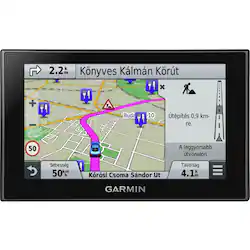
Garmin - nüvi 2689LMT 6" GPS with Built-In Bluetooth, Lifetime Map Updates and Lifetime Traffic Updates - Black
- Key Specs
- Screen Size: 6 inches (Size of the screen, measured diagonally from corner to corner.)
- Touch Screen: true (Touch-screen devices make navigating more intuitive. Using a touch-screen display, you can do things such as tap to select, hold and drag to move items, swipe to scroll, and pinch to zoom.)
- 3D-Map View: false
- Lifetime Map Updates: true
- Lifetime Traffic Updates: true
- Points Of Interest: 10000000
- Programmable Routes: true
- General
- Product Name: nüvi 2689LMT 6" GPS with Built-In Bluetooth, Lifetime Map Updates and Lifetime Traffic Updates
- Brand: Garmin
- Designed Usage: Car
- Model Number: 010-01188-02
- Display
- Screen Size: 6 inches (Size of the screen, measured diagonally from corner to corner.)
- Touch Screen: true (Touch-screen devices make navigating more intuitive. Using a touch-screen display, you can do things such as tap to select, hold and drag to move items, swipe to scroll, and pinch to zoom.)
- Color Display: true
- 3D-Map View: false
- Resolution: 800 x 480 (Refers to the number of pixels, both horizontally and vertically, used to capture video/images. The higher the resolution the finer the detail that can be seen.)
- Backlit Display: true (Integrated lights allow for visibility of the display in low-light conditions.)
- Map
- Lifetime Map Updates: true
- Integrated Base Maps: true
- Map Coverage Area: Canada
- Map Provider: Navteq
- Number Of Waypoints: 1000
- Navigation
- Lifetime Traffic Updates: true
- Points Of Interest: 10000000
- Programmable Routes: true
- Voice Prompts: true
- Environmental
- Water Resistant: false (Resists some degree of water penetration.)
- Features
- Pedestrian Mode: false
- Text-To-Speech: true (A system that converts language text into speech.)
- Storage
- Expandable Storage: true
- Memory Card Slot: true
- Memory Card Included: false (Indicates whether a memory card is included.)
- Connectivity
- Bluetooth Enabled: true (The device is capable of communicating with another device via Bluetooth, provided they are within the required range of each other. A Bluetooth-enabled device must also be the same Bluetooth version or higher than the accessory it is intended to pair with.)
- Power
- Rechargeable Battery: true
- Battery Life: 1 hours (Battery life will vary depending on the product configuration, product model, applications loaded on the product, power management setting of the product and the product features used by the customer. As with all batteries, the maximum capacity of this battery will decrease with time and usage.)
- Other
- UPC: 753759115364
Easily view routes on the 6" color display of this Garmin nüvi 2689LMT 010-01188-02 GPS that features pinch-to-zoom functionality and dual orientation for simple use. Active-lane guidance shows you the lane to be in for your next turn or exit.
- Preloaded map coverage of the U.S.: As well as Canada, Mexico and Puerto Rico, with more than 10 million points of interest, to help you find your way.
- Backlit 6" color touch display: Lets you easily navigate settings and functions via pinch-to-zoom capability and dual orientation.
- Text-to-speech and turn-by-turn voice prompts: Allow you to keep your eyes on the road while navigating with convenient voice guidance. Voice-activated interaction ensures the GPS responds to verbal commands.
- Real-time traffic and weather updates: Avoid possible traffic jams and weather delays with optional traffic and weather receivers (weather receiver not included).
- Bluetooth technology: Lets you make hands-free calls (cell phone with Bluetooth capability required, not included).
- Direct access technology: Delivers more specific location information for select retail stores, such as indicating a store's location is at a lower level.
- Foursquare: Helps you find new and popular restaurants, shops and more.
- Garmin Real Directions: Uses landmarks and traffic lights to guide you.
- Active-lane guidance: Generates a live-action model that shows you the lane you need be in for your next turn or exit.
- Smartphone Link app (download required): Enables you to send locations and addresses from your smartphone to your GPS.
- Built-in rechargeable lithium-ion battery: Promotes extended use.
- Automatic rerouting: Provides alternate travel directions in the event of a deviation from the directions given.
- Compact design: For go-anywhere portability.
- microSD card slot: Insert a removable memory card (not included) containing additional map data or regional maps to expand your navigational ability.
Whats Included
- Garmin nüvi 2689LMT 6" GPS with Built-In Bluetooth, Lifetime Map Updates and Lifetime Traffic Updates
- Automotive suction-cup mount
- Lifetime traffic antenna, vehicle power cable, USB cable
- Internal lithium-ion battery
- Owner's manual
Q: does it show every upcoming street name on top?
A: Yes, when using the nüvi 2689LMT it will display both the street you are on and the upcoming intersection. It will do this when you are navigating to a destination or when you are just driving around viewing the map. ~JH
Q: Does this GPS rely on cellular or satellite signals at all time for it to function?
A: All of the Garmin nüvi GPS device require satellite signal. This includes the nüvi 66LMT and the nüvi 2689LMT. {CW}
Q: can this GPS show the miles to destination instead of arrival time
A: Yes you can. To do this, touch the "Arrival Time" data field while a route is in progress and select "Destination Distance" instead. The data field will now be changed for this route and future routes. -NM
Q: Is there enough storage to hold entire US / Canada map?
A: Yes just took trip from VA to Newfoundland Canada and the entire area was covered ..Even roads in far out places were there. Pleasantly surprised at how well it worked in Newfoundland.
Q: What's the lowest time difference between traffic updates received by this ?
A: Traffic data refreshes every 5 minutes with a standard traffic subscription, which is included in the nuvi 2689LMT. Devices packaged with an HD traffic receiver (labeled as LMTHD) can refresh as often as every 30 seconds within designated coverage areas. If you have any further questions, feel free to contact Garmin Product Support directly by visiting http://j.mp/GRMNSupport. You'll find contact numbers, or email options on the lower right of the Support page under 'Contact Us'. Thank you. *CG
A: After entering a destination, you can select the "Routes" option on the nüvi 2689LMT to choose your route based on fastest time, shortest distance, or less fuel. -LB
A: In the display section- scroll down to related items: Language & keyboard, select Voice: American-English Samantha. She is the only option set up with "Garmin Real Direction " feature. She is saying the street name , left or right turn and how many mile ahead. I only use this setting, since figured out.
Q: Does Garmin still make the vivid color GPS with latest improvements?
A: My planned route is hot pink. Major crossroads are gold in color. Water is blue, parks are green. But the basic background is a tan color.






















