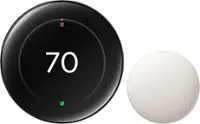
Google - Nest Smart Programmable Wifi Thermostat - Charcoal
Color
Charcoal Google - Nest Thermostat Trim Kit - Charcoal$14.99

More Buying Options
Related Item

Specifications
- App CompatibleYesCompatible with 24V CoolingYesCompatible with 24V HeatingYesWorks WithNest, Google Home, Amazon AlexaVoice Assistant Built-inNoTouch ScreenNo
- Key Specs
- App Compatible: true (The product can be connected to a program or software application on a mobile device, which then receives collected data from the product.)
- Compatible with 24V Cooling: true (Works with low-voltage (24 volts AC) cooling equipment.)
- Compatible with 24V Heating: true (Works with low-voltage (24 volts AC) heating equipment.)
- Works With: Nest, Google Home, Amazon Alexa (Compatible with or able to be connected to other smart devices or applications.)
- Voice Assistant Built-in: No (A digital assistant built into the device that uses voice commands to answer questions and control smart devices.)
- Touch Screen: false (Touch-screen devices make navigating more intuitive. Using a touch-screen display, you can do things such as tap to select, hold and drag to move items, swipe to scroll, and pinch to zoom.)
- Multi-Zone Control: true (Thermostats with this feature are able to control temperatures of multiple sections of a home.)
- Auto-Away Mode: true (Thermostats with this feature can automatically adjust heating or cooling to predetermined settings when the area is empty in order to conserve energy.)
- Motion Sensing: true
- ENERGY STAR Certified: true (Devices carrying the ENERGY STAR service mark, such as computer products and peripherals, kitchen appliances, and other products, generally use 20% to 30% less energy than required by federal standards.)
- General
- Brand: Google
- Model Number: GA02081-US
- Product Name: Nest Smart Programmable Wifi Thermostat
- Color: Charcoal
- Dimensions
- Product Height: 1.073 inches (The out of box height of the item. Height is measured as the vertical distance from the bottom of the item to the top as it would be primarily used or placed.)
- Product Width: 3.307 inches (The out of box width of the item. Width is measured as the horizontal distance from one side of the item to the other as it would be primarily used or placed.)
- Product Depth: 3.307 inches (The out of box depth of the item. Depth is measured as the distance from the front of the item to the back as it would be primarily used or placed.)
- Product Weight: 0.284 pounds (The out of box weight of the item.)
- Power
- Wire Configuration: C-wire, 4-Wire
- Power Source: Hard wired, Battery-powered
- Wire Terminals: C (common 24v power), Y (cooling), W (heating), R (power), G (fan operation), O (heat pump reversing valve), B (heat pump reversing valve) (The available connections on the device for wiring other devices to it. These are often abbreviated or coded due to the space available on the device.)
- Rechargeable Battery: false
- Battery Size: AAA (The battery size required for operation.)
- Number of Batteries Required: 2
- Number Of Batteries Included: 2
- Voltage Type: Low voltage (The kind of voltage used by the device.)
- Compatibility
- App Compatible: true (The product can be connected to a program or software application on a mobile device, which then receives collected data from the product.)
- Compatible Product(s): Heat pumps, Hot water systems
- Compatible with 24V Cooling: true (Works with low-voltage (24 volts AC) cooling equipment.)
- Compatible with 24V Heating: true (Works with low-voltage (24 volts AC) heating equipment.)
- Wireless Connectivity: Wi-Fi, Bluetooth (The manner in which a device sends data to another device over a short distance without the use of wires or cables.)
- Operating System Compatibility: Android, Apple iOS
- Works With: Nest, Google Home, Amazon Alexa (Compatible with or able to be connected to other smart devices or applications.)
- Voice Assistant Built-in: No (A digital assistant built into the device that uses voice commands to answer questions and control smart devices.)
- Features
- Programmable Period: 7 day
- 24-Hour Programming: true (Users can configure various temperature settings for different times of the day over a 24-hour period.)
- Touch Screen: false (Touch-screen devices make navigating more intuitive. Using a touch-screen display, you can do things such as tap to select, hold and drag to move items, swipe to scroll, and pinch to zoom.)
- Multi-Zone Control: true (Thermostats with this feature are able to control temperatures of multiple sections of a home.)
- Auto-Away Mode: true (Thermostats with this feature can automatically adjust heating or cooling to predetermined settings when the area is empty in order to conserve energy.)
- Backlit: true
- Date/Time Display: true
- Remote Sensor Capable: false (Indicates whether the thermostat is compatible with remote sensors. This capability allows for the connection of multiple sensors in order to collect temperature data from several locations in a zone for an overall assessment of the temperature needs.)
- Motion Sensing: true
- Periods Per Programmable Day: 96 (Thermostats with programmable days allow users to set desired temperatures for different days of the week. With multiple programmable periods per day, users can further customize the device to schedule temperatures for different times of day based on occupancy, schedule, etc.)
- Detector Type: Temperature, Humidity, Motion
- Energy Usage and History: true
- Furnace Filter Change Indicator: true
- Keypad Lock: true
- Certifications Listings & Approvals
- ENERGY STAR Certified: true (Devices carrying the ENERGY STAR service mark, such as computer products and peripherals, kitchen appliances, and other products, generally use 20% to 30% less energy than required by federal standards.)
- Warranty
- Warranty - Parts: 1 year
- Warranty - Labor: 1 year
- Other
- UPC: 193575007670
Meet the Nest Thermostat, the helpful thermostat with a cozy price. It can turn itself down to save energy when you leave the house. You can control it from anywhere with the Google Home app - whether you're on an errand or in bed. And it's easy to install yourself.
- Easy to install and use.: Designed so you can install yourself. Installation usually takes 30 minutes or less. You can quickly create a schedule that’s right for you. To change the temperature, swipe the touch bar on the side or use the Google Home app from anywhere.
- Control from anywhere.: You can change the temperature, adjust your schedule, and more from the free Google home app.₁ Or ask Google to change the temperature - just say, "Hey Google, turn up the heat."₂
- Compatible with the Google Home app.: Easily adjust temperature and comfort settings from anywhere using your Google Home app.₁
- Heating and cooling system care.: Your thermostat can monitor your heating and cooling system and alert you if something doesn't seem right.₃ It can also send helpful reminders like when it's time to replace your filter.
- ENERGY STAR certified thermostat.: The Nest Thermostat energy-saving features earned an ENERGY STAR from the EPA.₄ Also, the Nest Thermostat can use a built-in sensor and your phone's location to check if you've left the house. Then it can set itself to an Eco temperature to save energy.
- Designed with the environment in mind.: The Nest Thermostat is designed with recycled materials to reduce waste. Its plastic parts contain 49% recycled post-consumer plastic.
- Finds ways to help you save.: Savings finder looks for more ways to save, and suggests tweaks to your schedule.
- Monitors your systems.₅: Help catch many heating and cooling system issues early with peace of mind reminders and helpful alerts sent straight to your smartphone.
- Support a clean energy future, right from home.: Nest Renew from Google works with your compatible Nest thermostat to help you automatically prioritize usage to when energy is cleaner or less expensive.₆ ₇
Whats Included
- Nest Thermostat
- Documentation bundle
- Mounting screws
- 2 AA batteries
Product Manuals
Q: Do you need wifi to use the thermostat? Or can you use it no matter what
A: You can still use the Nest Thermostat to control your system even without Wi-Fi. However, you won't be able to utilize its other features such as remotely controlling the thermostat using the Home app. You can check this link to learn more about Nest Thermostat: https://support.google.com/googlenest/answer/10125150
Q: Is it compatible with the nest temperature sensors?
A: No, it is not remote sensor compatible. For that you need the Nest 3rd gen (standard $249 Nest) or Nest E.
Q: Does this thermostat support Matter for smart homes
A: Hey Patrick, that's a great question! Yes, both the Nest Thermostat and Nest Learning Thermostat (4th gen) are compatible with Matter. To learn how to set them up, please visit this link: https://support.google.com/googlenest/answer/12391458 If you have any further questions, please don't hesitate to contact us: https://support.google.com/googlenest/gethelp
Q: Can I use one app to run three different thermostats in three different locations.
A: Hi there. Yes, you can easily control your three Nest Thermostats from different locations using the Google Home app. This allows you to adjust temperatures, set schedules, and even monitor energy usage for each thermostat.
Q: Is there a way to use Siri to control this thermostat
A: No. Siri doesn't have support for the new Nest Thermostat.
Q: What generation is this one and is it a learning thermostat?
A: Hi there, Phil. This Nest Thermostat is the 1st generation of this iteration and is not one of our learning thermostats. For more insight on each device, here’s a link: https://support.google.com/googlenest/answer/9246551?hl=en
Q: does this thermostat tell you the outside temp?
A: Hi, Rick. Great question. No, the Nest Programmable Thermostat doesn't display the outside temperature. The farsight feature is indeed exclusive to the 3rd generation Google Nest Learning Thermostat.
Q: Does this thermostat control the fan speed of my a/c ? Like the minisplits do?
A: Don’t know what time 444 days the thermostat died couldn’t take it back to get money back or exchange it so I can’t answer your question.
Compare similar products

Meet the Nest Thermostat, the helpful thermostat with a cozy price. It can turn itself down to save energy when you leave the house. You can control it from anywhere with the Google Home app - whether you're on an errand or in bed. And it's easy to install yourself.

The Nest Learning Thermostat (4th gen) is Google’s smartest, most advanced thermostat yet. It’s a brilliant way to save energy and keep your home comfortable. It learns the temperatures you like, when you like them, even as your routine changes.¹ It gets to know how outdoor temps naturally heat and cool your home to save energy.¹ And it helps make sure your heating and cooling systems run smoothly.²

Nest 3rd Generation Smart Learning Thermostat: Take control of your home's heating and cooling without lifting a finger with this thermostat, which learns your habits and adjusts to automatically regulate your home's temperature based on your schedule. The Nest Leaf feature alerts you when you choose a temperature that's energy efficient.
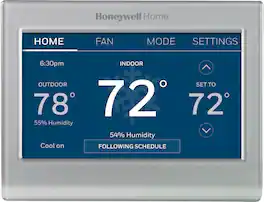
Completely customize your Wi-Fi Smart Color Thermostat to match your lifestyle and decor. The ENERGY STAR® certified smart thermostat lets you choose the temperature, schedule, display color and the devices you use to control it all.
| Pros for Google - Nest Smart Programmable Wifi Thermostat - Charcoal | |||
|---|---|---|---|
| Ease of Use, Overall Performance, Installation, Remote Control, Design | Ease of Use, Overall Performance, Design, Installation, Temperature Sensor | There were no pros for this product— | Ease of Use, Overall Performance, Installation, Remote Control, Connectivity |
| Cons for Google - Nest Smart Programmable Wifi Thermostat - Charcoal | |||
| Connectivity, Compatibility, Battery Life, User Interface | Connectivity, Compatibility | There were no cons for this product— | Compatibility, Size, Temperature Accuracy, App Functionality |
Specs
Reviews
Customers are saying
Customers frequently mention the Nest Smart Programmable Wifi Thermostat is easy to use and performs well overall. Installation is straightforward, and the remote control and scheduling features are appreciated, as is the sleek design. However, some customers have experienced connectivity and compatibility issues.
Customer Images
The vast majority of our reviews come from verified purchases. Reviews from customers may include My Best Buy members, employees, and Tech Insider Network members (as tagged). Select reviewers may receive discounted products, promotional considerations or entries into drawings for honest, helpful reviews.
- Rated 5 out of 5 stars
Great product!! Not so great app.
Great product!! I purchased 3 of these to replace the older thermostats that came with my house. They are intuitive. Once you learn how to operate them you can see the current temperature, change settings, and even setup routines on the Google Home app. The mirrored finish looks very nice. The display is bright and easily readable as well. The price point is not bad either. I have a Google Nest learning thermostat as well. This one is less complicated, but doesn’t have as many features. Honestly, the features it does have are perfect considering the lower cost. My biggest complaint isn’t with the product, but the app. Google has 2 apps, the Nest app and the Home app. I prefer the Nest app, but these do not work with that one. Oh well. It doesn’t detract from the device itself. Even with that, I give it 5 stars. I will also say, if your HVAC system doesn’t have a dedicated “C” wire, you’ll need to install a transformer to feed the 24 bolts required to charge the batteries. It was super simple for me, but you may need a professional to install this if you are not a fortunate as I was.
Posted by Neal
- Rated 3 out of 5 stars
Nest Smart Programmable Wifi Thermostat
I assumed that this thermostat would work with any type of heat system, found out I was wrong. I have a wall mount heater in my four season room that Nest is not compatible. I have on in the main part of my house and I love it!
Posted by SueS
- Rated 5 out of 5 stars
Great energy saver!
Replaced our old Thermostat for the Nest. It works great and its the first Smart decice for our house. Love how it can be controlled from my phone. It also helps save energy with the app. I will say dont use the Geek Squad as they did not do a good job installing. They blew a fuse in the furnace and said to call a pro as the nest didnt work. I They touched a wire together. The electrician told me they should have not only turned off the ac on the panel but also unplug the furnace when installing. I need to paint the wall where the old one was as it was bigger.
Posted by LeeH