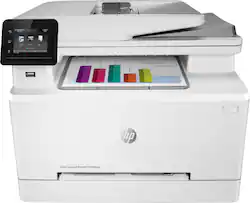
HP - M283FDW Color LaserJet Printer - White
- Key Specs
- Networking: Wired, Wireless
- ENERGY STAR Certified: true (Devices carrying the ENERGY STAR service mark, such as computer products and peripherals, kitchen appliances, and other products, generally use 20% to 30% less energy than required by federal standards.)
- Printer Type: Printer
- Duty Cycle: Up to 40,000 (The maximum number of pages per month that the device can produce without failing, as specified by the manufacturer.)
- ISO Color Print Speed: 22 pages per minute (The number of color pages able to be printed per minute in the device's default single-side mode, as tested by the International Standards Organization (ISO).)
- ISO Mono Print Speed: 22 pages per minute (The number of black ink (grayscale) pages able to be printed per minute in the device's default single-side mode, as tested by the International Standards Organization (ISO).)
- Monochromatic/Color: Color
- General
- Product Name: M283FDW Color LaserJet Printer
- Brand: HP
- Display Screen: true
- Display Screen Size: 2.7 inches
- Model Number: M283FDW
- Color: White
- Dimensions
- Product Height: 13.2 inches (The out of box height of the item. Height is measured as the vertical distance from the bottom of the item to the top as it would be primarily used or placed.)
- Product Width: 16.5 inches (The out of box width of the item. Width is measured as the horizontal distance from one side of the item to the other as it would be primarily used or placed.)
- Product Depth: 1 inches (The out of box depth of the item. Depth is measured as the distance from the front of the item to the back as it would be primarily used or placed.)
- Product Weight: 41.2 pounds (The out of box weight of the item.)
- Features
- Automatic Document Feeder: true
- Photo Printing: true
- Automatic Reduction/Enlargement: false
- Touch Screen: true (Touch-screen devices make navigating more intuitive. Using a touch-screen display, you can do things such as tap to select, hold and drag to move items, swipe to scroll, and pinch to zoom.)
- Automatic Two-Sided Printing: true
- Connectivity
- Wired Connectivity: Ethernet
- Wireless Connectivity: Wi-Fi (The manner in which a device sends data to another device over a short distance without the use of wires or cables.)
- Minimum System Requirements: Windows 10, 8.1, 8, 7 (32-bit/64-bit), Vista (32-bit), XP SP3 (32-bit), 2GB HDD (850GB for XP), Internet connection, USB; macOS Sierra (v10.12), High Sierra (v10.13), Mojave (v10.14), Catalina(v10.15); 200MB HDD; Internet connection, USB
- Certifications Listings & Approvals
- EPEAT Qualified: true (The Electronic Product Environmental Assessment Tool (EPEAT) was designed to provide an environmental assessment tool for purchasers. In order to qualify for EPEAT, a product must meet all 23 required criteria.)
- EPEAT Level: Silver (The Electronic Product Environmental Assessment Tool (EPEAT) was designed to provide an environmental assessment tool for purchasers. In order to qualify for EPEAT, a product must meet all 23 required criteria. Products are rated Bronze, Silver or Gold based on how many of 28 optional criteria they meet (below 50%, 50%, 75%).)
- Paper Info
- Automatic Document Feeder Capacity: 50 sheets
- Maximum Document Length: 14 inches
- Maximum Document Width: 8.5 inches
- Paper Feeder: Tray loader
- Paper Handling: Tray 1: 1-sheet input; Tray 2: 250-sheet input; 100-sheet output bin
- Supported Paper Sizes: up to 216 x 356 mm
- Tray Capacity: 2
- Ink
- Compatible Cartridges: HP 206
- Ink Subscription Service Available: false (The printer monitors ink usage and alerts the subscription provider when levels are low. A purchased subscription provides refills of ink based on usage.)
- Ink Cartridges Required: 1 x Black, 1 x Cyan, 1 x Magenta, 1 x Yellow (The quantity and color of ink cartridges required for the printer to operate.)
- Ink Cartridges Included: 1 x Black, 1 x Cyan, 1 x Magenta, 1 x Yellow (The quantity and color of ink cartridges included.)
- Performance
- Approximate Page Yield (Black): 1
- Approximate Page Yield (Color): 700
- Printer Resolution (Black): Up to 600 x 600 (Refers to the number of pixels/dots, both horizontally and vertically, of the image produced by the printer in black ink. Generally, the higher the resolution, the sharper and cleaner the produced image.)
- Printer Resolution (Color): Up to 600 x 600 (Refers to the number of pixels/dots, both horizontally and vertically, of the image produced by the printer in colored ink. Generally, the higher the resolution, the sharper and cleaner the produced image.)
- Output Tray Capacity: 100
- Recommended Monthly Volume: 150 - 2500 (The maximum number of pages that can be printed per month, as recommended by the manufacturer. Printing in excess of this number may reduce the machine's overall lifespan or print quality over time.)
- First Page Out Time: 10 seconds (The time it takes the printer to print and deliver the first page in the output tray. May depend on the complexity of the copy being printed.)
- Warranty
- Warranty - Parts: 1 Year
- Warranty - Labor: 1 Year
- Other
- UPC: 193905486694
An efficient, wireless MFP with fax for high-quality color and productivity. Save time with Smart Tasks in HP Smart app, and print and scan from your phone. Get seamless connections and strong security designed to help detect and stop attacks.
- Printer Resolution: Black (best): Up to 600 x 600 dpi; Color (best): Up to 600 x 600 dpi
- Connectivity: Standard Connectivity: Hi-Speed USB 2.0 port; built-in Fast Ethernet 10/100/1000 Base-TX network port, 802.11n 2.4/5GHz wireless, Fax port, Front Host USB
- Print Speed: Print speed black( Letter: Up to 22 ppm; First page out: As fast as 10.3 sec; Print speed Duplex: Up to 13 ppm); Print speed color( Letter: Up to 22 ppm; First Page Out: As fast as 11.7 sec; Print speed Duplex: Up to 13 ppm)
- Page Yield: Monthly, letter: Up to 40,000 pages
- Handling: Input Capacities: 1-sheet in Tray 1; Up to 250 sheets (25 mm stack height) in Tray 2 Standard; Up to 15 mm (Recommended only 5 envelopes or less at atime)
- Control or Display Panel: 2.7'' color graphic touch screen with 3 button at left side (Home, Help, Back)
- Printer Type: Laser Printer
- Duplex printing: Automatic (standard)
Whats Included
- M283FDW Color LaserJet Printer
Product Manuals
A: According to the HP spec sheet, the cartridges are introductory ones. The black is rated at 800 pages, while the colors are rated at 700 pages each.
A: Yes you can. Here's how it works. First you need to install the Full featured HP software. You will launch HP scan. In this example let's scan a 5 page double-sided document (10 sides) . You load them in the document feeder and note in the software that you are copying 2 sided manual to a PDF. You can the 5 pages. You take the output pages and rotate them so that the side facing in to the printer is now facing out. Load them in the document feeder and continue. The software automatically reorders the pages to 1-2-3-4-5-6-7-8-9-10. You can then save the PDF and compress it if you wish to make it smaller.
Q: What is the cost of toner cartridges etc.?
A: The high yield black is about $95 and the high yield color is about $100. Based on the page ratings, it's about 3 cents per page black and 4 cents per page for each color. I guess that means that a full color page runs about 15 cents.
A: There is a manual feed tray. The front of the printer with the HP logo comes forward and is a convenient way to feed speciality stock or envelopes.
A: Mine came with starter cartridges, not full ones. You can use either HP 206A or 206X. For the money, I'm likely to stay with the X's just so I'm not annoyed by having to purchase them so often. The price per page difference isn't significant to me since I don't print very much. I don't know how much you print, but since I print things very infrequently the LaserJet instead of the OfficeJet was the way to go. It has no print heads to dry out or other wastes of ink/toner that cost extra money to replace them before they're used up. My print quality has been great thus far.
Q: Height is 13.2, width is 16.5. What is the depth? In other words, how much desk space do it sit on?
A: the printer is just over 18 inches deep.
A: You should not have an issue as we currently have 5 computers connected to ours. However I'm not certain if there is an actual limit.