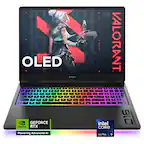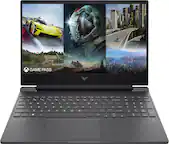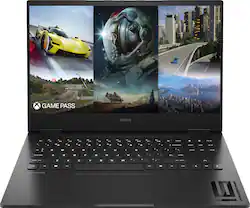
HP OMEN - 16.1" 144Hz Full HD Gaming Laptop - Intel Core i5 - 16GB Memory - NVIDIA GeForce RTX 4050 - 512GB SSD - Shadow Black
- Key Specs
- Screen Type: IPS
- Screen Size: 16.1 inches (Size of the screen, measured diagonally from corner to corner.)
- Screen Resolution: 1920 x 1080 (Full HD) (Screens come in a range of resolutions (measured in pixels, horizontal x vertical). The higher the resolution, the greater the picture quality.)
- Touch Screen: false (Touch-screen devices make navigating more intuitive. Using a touch-screen display, you can do things such as tap to select, hold and drag to move items, swipe to scroll, and pinch to zoom.)
- Refresh Rate: 144Hz (The number of frames per second the device can produce natively without enhancement. Higher rates help produce smooth, seamless pictures.)
- Processor Model: Intel 13th Generation Core i5 (Your computer's processor is like its brain. Working in combination with system memory, the power of the processor determines the complexity of software you can run, how many programs you can have open at the same time, and how fast those programs will run. Most computers feature an AMD, Intel or Snapdragon processor.)
- CPU Base Clock Frequency: 3.4 gigahertz (Actual central processing unit (CPU) speed may vary by device configuration and design. The average rate at which the processor is able to execute tasks under normal operating conditions as asserted by the manufacturer.)
- Storage Type: SSD
- Total Storage Capacity: 512 gigabytes
- System Memory (RAM): 16 gigabytes (Random-access memory (RAM) is a computing device's short-term data storage, which allows active information to be accessed quickly. The size and type of RAM determines how efficiently the device can handle large amounts of information at one time. For example, gaming or video editing requires more RAM for optimal performance.)
- Graphics: NVIDIA GeForce RTX 4050 (Often referred to as a "graphics processing unit" (GPU), this device is responsible for displaying image content and decoding/encoding video content in programs and games.)
- Display Connector(s): 1 x HDMI 2.1 (The number and type of connectors used to connect to an external display.)
- 2-in-1 Design: false (A laptop and a tablet combined in one lightweight, portable device. Sometimes referred to as "convertible" or "hybrid" laptops, these devices deliver the processing power and keyboard of a laptop. When you're ready to play, either detach the screen or fold your 2-in-1 into tablet mode to comfortably watch movies, play games, read an e-book and more.)
- Backlit Keyboard: true (Integrated lights allow for visibility of the keys in low-light conditions.)
- General
- Brand: HP OMEN
- Model Number: 16-wd0013dx
- Product Name: 16.1" 144Hz Full HD Gaming Laptop - Intel Core i5 - 16GB Memory - NVIDIA GeForce RTX 4050 - 512GB SSD
- Color: Shadow Black
- Year of Release: 2023
- Display
- Screen Type: IPS
- Screen Size: 16.1 inches (Size of the screen, measured diagonally from corner to corner.)
- Screen Resolution: 1920 x 1080 (Full HD) (Screens come in a range of resolutions (measured in pixels, horizontal x vertical). The higher the resolution, the greater the picture quality.)
- Touch Screen: false (Touch-screen devices make navigating more intuitive. Using a touch-screen display, you can do things such as tap to select, hold and drag to move items, swipe to scroll, and pinch to zoom.)
- Refresh Rate: 144Hz (The number of frames per second the device can produce natively without enhancement. Higher rates help produce smooth, seamless pictures.)
- Processor
- Processor Brand: Intel
- Processor Model: Intel 13th Generation Core i5 (Your computer's processor is like its brain. Working in combination with system memory, the power of the processor determines the complexity of software you can run, how many programs you can have open at the same time, and how fast those programs will run. Most computers feature an AMD, Intel or Snapdragon processor.)
- Processor Model Number: 13420H
- CPU Base Clock Frequency: 3.4 gigahertz (Actual central processing unit (CPU) speed may vary by device configuration and design. The average rate at which the processor is able to execute tasks under normal operating conditions as asserted by the manufacturer.)
- CPU Boost Clock Frequency: 4.6 gigahertz (Actual central processing unit (CPU) speed may vary by device configuration and design. The maximum rate at which the processor is able to execute tasks, typically only used for a short period of time as needed. This rate may temporarily boost the processor's performance, but may result in overheating, shutdown, or damage to equipment if sustained.)
- Number of CPU Cores: 8-core (A core, or "brain" of a CPU, allows it to receive and execute instructions. Each core can work independently or together to perform parallel operations.)
- CPU Cache Memory Level: L3
- L3 Cache: 12 megabytes (Cache memory, also called CPU memory, is random-access memory (RAM) that a computer microprocessor can access more quickly than it can access regular RAM. This memory is typically integrated directly with the CPU chip or placed on a separate chip that has a separate bus interconnect with the CPU.)
- Storage
- Storage Type: SSD
- Total Storage Capacity: 512 gigabytes
- Solid State Drive Capacity: 512 gigabytes (The amount of data that can be stored on the device's solid state drive (SSD). SSD is a flash-based storage with faster speeds than a hard disk drive (HDD).)
- Solid State Drive Interface: PCIe (Connects the solid state drive to the host system. PCI and SATA interfaces are the most common; PCI interfaces are typically faster, but SATA interfaces are compatible with a wider range of systems.)
- Memory
- System Memory (RAM): 16 gigabytes (Random-access memory (RAM) is a computing device's short-term data storage, which allows active information to be accessed quickly. The size and type of RAM determines how efficiently the device can handle large amounts of information at one time. For example, gaming or video editing requires more RAM for optimal performance.)
- Type of Memory (RAM): DDR5 (Each type of RAM delivers a different level of speed, bandwidth, energy efficiency and performance.)
- System Memory RAM Speed: 5200 megahertz (How fast the information-storing hardware operates. The faster the RAM, the faster memory can be transferred to other system components. Ultimately, faster RAM improves operational efficiency.)
- Number Of Memory Slots: 2
- Number of Memory Sticks Included: 2
- Graphics
- Graphics Type: Dedicated (Dedicated graphics uses a separate graphics card for processing video images. Because it does not use memory from the system's RAM, there is no extra burden on the CPU and graphics are processed more efficiently. Integrated graphics shares system RAM to process video images.)
- GPU Brand: NVIDIA
- Graphics: NVIDIA GeForce RTX 4050 (Often referred to as a "graphics processing unit" (GPU), this device is responsible for displaying image content and decoding/encoding video content in programs and games.)
- GPU Video Memory (RAM): 6 gigabytes (Random-access memory (RAM) is a GPU’s, or graphics cards, short-term data storage, which allows active information to be accessed quickly. The size and type of RAM determines how efficiently the GPU can handle large amounts of information at one time. For example, larger amounts of RAM for gaming or video editing increases performance.)
- Compatibility
- Operating System: Windows 11 Home (The operating system manages all software and hardware, including files, memory and connected devices. Most importantly, it lets you interact with your device and your programs in a visual way; otherwise, you'd be typing computer code to get anything done.)
- Voice Assistant Built-in: No (A digital assistant built into the device that uses voice commands to answer questions and control smart devices.)
- Connectivity
- Display Connector(s): 1 x HDMI 2.1 (The number and type of connectors used to connect to an external display.)
- Number of HDMI Outputs (Total): 1
- USB Ports: 3 x USB-A 3.2, 1 x USB-C 3.2 (The number and type of USB ports the product has.)
- Number of USB Ports (Total): 4
- Headphone Jack: true (The device features an interface that allows for the connection of headphones.)
- Wireless Connectivity: Bluetooth, Wi-Fi (The manner in which a device sends data to another device over a short distance without the use of wires or cables.)
- Power
- Power Supply Maximum Wattage: 230 watts
- Battery Cells: 4-cell
- Camera
- Front-Facing Camera: true
- Built-In Microphone: true
- Features
- 2-in-1 Design: false (A laptop and a tablet combined in one lightweight, portable device. Sometimes referred to as "convertible" or "hybrid" laptops, these devices deliver the processing power and keyboard of a laptop. When you're ready to play, either detach the screen or fold your 2-in-1 into tablet mode to comfortably watch movies, play games, read an e-book and more.)
- Backlit Keyboard: true (Integrated lights allow for visibility of the keys in low-light conditions.)
- Speaker Type: Dual speakers by Bang & Olufsen
- Security Features: Privacy camera
- Dimensions
- Product Height: 0.93 inches (The out of box height of the item. Height is measured as the vertical distance from the bottom of the item to the top as it would be primarily used or placed.)
- Product Width: 14.53 inches (The out of box width of the item. Width is measured as the horizontal distance from one side of the item to the other as it would be primarily used or placed.)
- Product Depth: 10.21 inches (The out of box depth of the item. Depth is measured as the distance from the front of the item to the back as it would be primarily used or placed.)
- Product Weight: 5.4 pounds (The out of box weight of the item.)
- Certifications Listings & Approvals
- ENERGY STAR Certified: true (Devices carrying the ENERGY STAR service mark, such as computer products and peripherals, kitchen appliances, and other products, generally use 20% to 30% less energy than required by federal standards.)
- EPEAT Qualified: true (The Electronic Product Environmental Assessment Tool (EPEAT) was designed to provide an environmental assessment tool for purchasers. In order to qualify for EPEAT, a product must meet all 23 required criteria.)
- EPEAT Level: Silver (The Electronic Product Environmental Assessment Tool (EPEAT) was designed to provide an environmental assessment tool for purchasers. In order to qualify for EPEAT, a product must meet all 23 required criteria. Products are rated Bronze, Silver or Gold based on how many of 28 optional criteria they meet (below 50%, 50%, 75%).)
- Included
- Optical Drive Type: None (An optical disk drive (ODD) uses a laser light to read data from or write data to an optical disc. These discs include CDs, DVDs, and Blu-ray Discs. This allows you to play music or watch movies using prerecorded discs.)
- Other
- UPC: 197192371169
While it's surely nice and cozy wherever your PC is setup in your home, with the new OMEN 16, desktop-level gaming is no longer tethered to your desk and pajamas. With a next gen Intel processor and graphics card, a buttery smooth, high refresh rate display, and enhanced thermal design, you can max out your relaxation and comfort wherever you go. Power your games, power your life, and bring powerful fun anywhere with the new OMEN 16. Portable desktop power is powerful fun anywhere.
- Get a fresh perspective with Windows 11: From a rejuvenated Start menu, to new ways to connect to your favorite people, news, games, and content—Windows 11 is the place to think, express, and create in a natural way.
- 144Hz FHD anti-glare display: Reduce frustrating lag and image ghosting with a display that combines a 144Hz refresh rate and 1080p Full High Definition resolution for smooth, crisp gameplay.
- Extend beyond performance to let your PC do even more at once: Offering more than just a performance score. This 13th Gen Intel Core processor advances real-world computing and delivers more ultra-efficient multi-tasking.
- NVIDIA GeForce RTX 4050: The NVIDIA GeForce RTX 4050 graphics are beyond fast for gamers and creators. Experience lifelike virtual worlds, ultra-high FPS gaming, revolutionary new ways to create, and unprecedented workflow acceleration.
- Memory: 16GB DDR5-5200 MHz RAM (2 x 8GB)
- DDR5 RAM: Designed to run efficiently and reliably at faster speeds, DDR5 is the latest RAM standard. With higher bandwidth, you get more of a boost in performance.
- PCIe NVMe SSD storage: Get up to 12.8x faster performance than a SATA SSD.¹
- OMEN Tempest Cooling Technology: Stay cool under pressure with the advanced laptop thermal solution. 3-sided venting and 5-way airflow ensure optimal system stability and performance when gameplay heats up.
- An exceptionally rich audio experience: HP Dual Speakers, HP Audio Boost, and expert tuning by Bang & Olufsen bring audio perfection to your PC.
- HP Fast Charge: Go from 0 to 50% charge in approximately 30 minutes.²
- HP True Vision FHD camera: Video chat in vibrant clarity with Full HD resolution, even in low light, and make every conversation a face-to-face experience for a better way to stay in touch.
- One Zone White Backlit Keyboard: Allows you to backlight 1 zone with white keyboard lighting.
- Effortlessly connected: Enjoy faster speeds, improved performance, greater capacity and lower latencies than earlier iterations with Wi-Fi 6E and Bluetooth 5.3 wireless card.
- Flicker-free: Using DC Dimming technology that controls brightness by adjusting direct current rather than cycling the backlight, we can eliminate screen flickering for more comfortable viewing.
- HP Imagepad with multi-touch gesture: This true multi-touch touchpad supports four finger gestures and lets you scroll, zoom, and navigate with a simple touch.
- Micro-edge display: See more of your screen with a micro-edge display that maximizes your viewing area.
- Try PC Game Pass for free: Play hundreds of high-quality PC games on your new HP device with 3 free months of PC Game Pass.
- Get a fresh perspective with Windows 11: From a rejuvenated Start menu, to new ways to connect to your favorite people, news, games, and content—Windows 11 is the place to think, express, and create in a natural way.
- 144Hz FHD anti-glare display: Reduce frustrating lag and image ghosting with a display that combines a 144Hz refresh rate and 1080p Full High Definition resolution for smooth, crisp gameplay.
- Extend beyond performance to let your PC do even more at once: Offering more than just a performance score. This 13th Gen Intel Core processor advances real-world computing and delivers more ultra-efficient multi-tasking.
- NVIDIA GeForce RTX 4050: The NVIDIA GeForce RTX 4050 graphics are beyond fast for gamers and creators. Experience lifelike virtual worlds, ultra-high FPS gaming, revolutionary new ways to create, and unprecedented workflow acceleration.
- Memory: 16GB DDR5-5200 MHz RAM (2 x 8GB)
- DDR5 RAM: Designed to run efficiently and reliably at faster speeds, DDR5 is the latest RAM standard. With higher bandwidth, you get more of a boost in performance.
- PCIe NVMe SSD storage: Get up to 12.8x faster performance than a SATA SSD.¹
- OMEN Tempest Cooling Technology: Stay cool under pressure with the advanced laptop thermal solution. 3-sided venting and 5-way airflow ensure optimal system stability and performance when gameplay heats up.
- An exceptionally rich audio experience: HP Dual Speakers, HP Audio Boost, and expert tuning by Bang & Olufsen bring audio perfection to your PC.
- HP Fast Charge: Go from 0 to 50% charge in approximately 30 minutes.²
- HP True Vision FHD camera: Video chat in vibrant clarity with Full HD resolution, even in low light, and make every conversation a face-to-face experience for a better way to stay in touch.
- One Zone White Backlit Keyboard: Allows you to backlight 1 zone with white keyboard lighting.
- Effortlessly connected: Enjoy faster speeds, improved performance, greater capacity and lower latencies than earlier iterations with Wi-Fi 6E and Bluetooth 5.3 wireless card.
- Flicker-free: Using DC Dimming technology that controls brightness by adjusting direct current rather than cycling the backlight, we can eliminate screen flickering for more comfortable viewing.
- HP Imagepad with multi-touch gesture: This true multi-touch touchpad supports four finger gestures and lets you scroll, zoom, and navigate with a simple touch.
- Micro-edge display: See more of your screen with a micro-edge display that maximizes your viewing area.
- Try PC Game Pass for free: Play hundreds of high-quality PC games on your new HP device with 3 free months of PC Game Pass.
Product Manuals
Disclaimers
- ¹Based on HP internal testing using CrystalDiskMark benchmarking software. Performance is sequentially read compared to SATA SSD.
- ²Recharges your battery up to 50% within 30 minutes when the system is off (using “shut down” command). After charging has reached 50% capacity, charging speed will return to normal speed. Charging time may vary +/-10% due to System tolerance.
- ¹Based on HP internal testing using CrystalDiskMark benchmarking software. Performance is sequentially read compared to SATA SSD.
- ²Recharges your battery up to 50% within 30 minutes when the system is off (using “shut down” command). After charging has reached 50% capacity, charging speed will return to normal speed. Charging time may vary +/-10% due to System tolerance.
A: The computer has 1 m.2 slot for storage and two RAM slots. They're both currently filled, but the computer can be upgraded up to 64 gigabytes by replacing the RAM modules with ones with a higher capacity.
Q: Why doesn't the image show the four zone rgb keyboard lighting?
A: Because this laptop doesn’t have it!! It has one color… white. The Best Buy specs say it has quad zone… HP rep says it has quad zone. Both wrong and false advertising.
A: Thank you for the question. Yes, you will need to reinstall Windows. You can use a flash drive to create bootable media. There is also third-party disk cloning software available. See instructions at Microsoft.com.
Q: Can this laptop charge via USB-C?
A: Mine will not charge via USB C port. Only with the supplied power adapter.
Q: If this laptop has 4 sRGB keyboard lighting why isn't it in the picture shown?
A: Apologies. HP does not mandate which images a retailer uses to illustrate product features. Please reach out to Best Buy if you require more information about their marketing strategy. You can see the 4-zone lighting in this image: https://ssl-product-images.www8-hp.com/digmedialib/prodimg/lowres/c08509929.png
Q: What is the sRGB percentage for the 1080p screen?
A: Hello, Alex. Thanks for your question. The color gamut is 45% NTSC.
A: Thank you for the question. This gaming laptop does not have a second SSD slot. If you want to increase storage, you can switch the existing drive to one with more capacity. That entails opening the case, removing adjacent components, and replacing them after installing the new SSD. We recommend that upgrades be done by a professional technician to preserve the warranty and avoid errors/damage to the internal components. You can also connect an external SSD via USB - a simpler and more cost-effective option.
Q: Will this laptop run the virtual game Second Life?
A: More than capable!