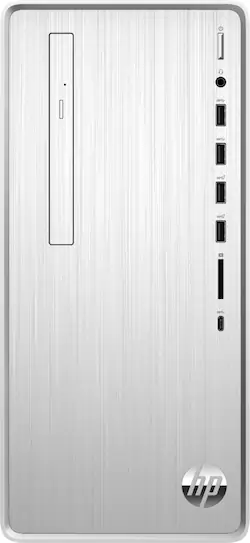
HP - Pavilion Desktop - Intel Core i3 - 8GB Memory - 256GB Solid State Drive
- Key Specs
- Processor Model: Intel 8th Generation Core i3 (Your computer's processor is like its brain. Working in combination with system memory, the power of the processor determines the complexity of software you can run, how many programs you can have open at the same time, and how fast those programs will run. Most computers feature an AMD, Intel or Snapdragon processor.)
- Storage Type: SSD
- Total Storage Capacity: 256 gigabytes
- System Memory (RAM): 8 gigabytes (Random-access memory (RAM) is a computing device's short-term data storage, which allows active information to be accessed quickly. The size and type of RAM determines how efficiently the device can handle large amounts of information at one time. For example, gaming or video editing requires more RAM for optimal performance.)
- Graphics Type: Integrated (Dedicated graphics uses a separate graphics card for processing video images. Because it does not use memory from the system's RAM, there is no extra burden on the CPU and graphics are processed more efficiently. Integrated graphics shares system RAM to process video images.)
- Graphics: Intel UHD Graphics 630 (Often referred to as a "graphics processing unit" (GPU), this device is responsible for displaying image content and decoding/encoding video content in programs and games.)
- General
- Product Name: Pavilion Desktop - Intel Core i3 - 8GB Memory - 256GB Solid State Drive
- Brand: HP
- Model Number: TP01-0014
- Processor
- Processor Brand: Intel
- Processor Model: Intel 8th Generation Core i3 (Your computer's processor is like its brain. Working in combination with system memory, the power of the processor determines the complexity of software you can run, how many programs you can have open at the same time, and how fast those programs will run. Most computers feature an AMD, Intel or Snapdragon processor.)
- Processor Model Number: i3-8100
- Storage
- Storage Type: SSD
- Total Storage Capacity: 256 gigabytes
- Solid State Drive Capacity: 256 gigabytes (The amount of data that can be stored on the device's solid state drive (SSD). SSD is a flash-based storage with faster speeds than a hard disk drive (HDD).)
- Solid State Drive Interface: PCIe (Connects the solid state drive to the host system. PCI and SATA interfaces are the most common; PCI interfaces are typically faster, but SATA interfaces are compatible with a wider range of systems.)
- Memory
- System Memory (RAM): 8 gigabytes (Random-access memory (RAM) is a computing device's short-term data storage, which allows active information to be accessed quickly. The size and type of RAM determines how efficiently the device can handle large amounts of information at one time. For example, gaming or video editing requires more RAM for optimal performance.)
- Type of Memory (RAM): DDR4 SDRAM (Each type of RAM delivers a different level of speed, bandwidth, energy efficiency and performance.)
- System Memory RAM Speed: 2400 megahertz (How fast the information-storing hardware operates. The faster the RAM, the faster memory can be transferred to other system components. Ultimately, faster RAM improves operational efficiency.)
- Number Of Memory Slots: 2
- Number of Memory Sticks Included: 1
- System Memory RAM Expandable To: 32 gigabytes (Adding more random-access memory (RAM) to a computer speeds up performance and improves efficiency. Upgrades to memory are limited by the number of expansion slots for additional RAM and existing RAM installed on the device.)
- Graphics
- Graphics Type: Integrated (Dedicated graphics uses a separate graphics card for processing video images. Because it does not use memory from the system's RAM, there is no extra burden on the CPU and graphics are processed more efficiently. Integrated graphics shares system RAM to process video images.)
- GPU Brand: Intel
- Graphics: Intel UHD Graphics 630 (Often referred to as a "graphics processing unit" (GPU), this device is responsible for displaying image content and decoding/encoding video content in programs and games.)
- Compatibility
- Operating System: Windows 10 Home (The operating system manages all software and hardware, including files, memory and connected devices. Most importantly, it lets you interact with your device and your programs in a visual way; otherwise, you'd be typing computer code to get anything done.)
- Operating System Architecture: 64-bit (An operating system (OS) manages computer hardware, software resources, and programs in conjunction with the system's processor. 64-bit operating systems can handle more data at once than 32-bit systems, resulting in faster speeds, more effiency, and overall improved performance.)
- Connectivity
- Number of HDMI Outputs (Total): 0
- Number of DisplayPort Outputs (Total): 0
- Number of VGA Ports: 1 (VGA (Video Graphics Adapter or Video Graphics Array) is a display standard that transmits via analog signals. This type of interface is typically used to connect a computer to a display device such as a monitor, projector, or TV.)
- Number of USB Ports (Total): 9
- Ethernet Card: 10/100/1000 (Also known as an Ethernet adapter, this card plugs into a computer's motherboard and enables it to access an Ethernet network. Ethernet data transmission speeds are measured in Mbps (megabits per second) and Gbps (gigabits per second). For example, a 10/100 Ethernet port transmits 10 and 100 Mbps, while a 10/100/1000 Ethernet port transmits 10 and 100 Mbps and has a maximum speed of 1000 Mbps (1 Gbps).)
- Number Of Ethernet Ports: 1
- Expansion
- Number of M.2 Slots: 2 (This interface is most commonly used for high-speed solid state drives (SSDs), and is often used in laptops due to its small size.)
- Number Of Internal 2.5" Bays: 1
- Number Of Internal 3.5" Bays: 2
- Features
- Media Card Reader: true (A hardware device that allows for access to data on a memory card and enables the transfer of its files to a computer. These devices may have one or multiple slots for various types of memory cards, and may be integrated into the computer or available as an external device.)
- Audio Technology: 5.1 channel surround
- Size: Mini
- Dimensions
- Product Height: 13.3 inches (The out of box height of the item. Height is measured as the vertical distance from the bottom of the item to the top as it would be primarily used or placed.)
- Product Width: 6.1 inches (The out of box width of the item. Width is measured as the horizontal distance from one side of the item to the other as it would be primarily used or placed.)
- Product Depth: 11.9 inches (The out of box depth of the item. Depth is measured as the distance from the front of the item to the back as it would be primarily used or placed.)
- Product Weight: 13.1 pounds (The out of box weight of the item.)
- Certifications Listings & Approvals
- ENERGY STAR Certified: true (Devices carrying the ENERGY STAR service mark, such as computer products and peripherals, kitchen appliances, and other products, generally use 20% to 30% less energy than required by federal standards.)
- EPEAT Qualified: true (The Electronic Product Environmental Assessment Tool (EPEAT) was designed to provide an environmental assessment tool for purchasers. In order to qualify for EPEAT, a product must meet all 23 required criteria.)
- EPEAT Level: Bronze (The Electronic Product Environmental Assessment Tool (EPEAT) was designed to provide an environmental assessment tool for purchasers. In order to qualify for EPEAT, a product must meet all 23 required criteria. Products are rated Bronze, Silver or Gold based on how many of 28 optional criteria they meet (below 50%, 50%, 75%).)
- Included
- Included Software: HP Support Assistant, Netflix, McAfee LiveSafe, HP JumpStart and HP Connection Optimizer
- Optical Drive Type: DVD-RW (An optical disk drive (ODD) uses a laser light to read data from or write data to an optical disc. These discs include CDs, DVDs, and Blu-ray Discs. This allows you to play music or watch movies using prerecorded discs.)
- Keyboard Included: true
- Mouse Included: true
- Wireless Keyboard: false
- Wireless Mouse: false
- Other
- UPC: 193905236312
HP Pavilion Desktop: Increase productivity with this HP Pavilion desktop computer. The 8th Gen Intel Core i3-8100 processor and 8GB of RAM allow for smooth and fast load times, while the 256GB SSD provides enough storage space for media files and documents. This HP Pavilion desktop computer has a Type C USB port, letting you connect to a variety of devices.
- Windows 10 operating system: Windows 10 brings back the Start Menu from Windows 7 and introduces new features, like the Edge Web browser that lets you markup Web pages on your screen. Learn more ›
- 8th Gen Intel Core i3-8100 processor: Smart quad-core, four-way processing performance.
- 8GB system memory for advanced multitasking: Substantial high-bandwidth RAM to smoothly run your games and photo- and video-editing applications, as well as multiple programs and browser tabs all at once.
- DVD/CD burner: Reads and writes to a variety of media formats, including DVD+R/RW, DVD-R/RW and CD-R/RW.
- 256GB solid state drive (SSD): While offering less storage space than a hard drive, a flash-based SSD has no moving parts, resulting in faster start-up times and data access, no noise, and reduced heat production and power draw on the battery.
- Built-in media reader for simple photo transfer: Supports select memory card formats.
- 4 SuperSpeed 5Gbs USB 3.1 ports: Ultra-fast data connections to transfer large files rapidly.
- 4 USB 2.0 ports: Quick plug-and-play connectivity for your devices and accessories.
- Type USB-C port: Charge or connect a display from one reversible port with 5Gb/s signaling rate.
- Next-generation wireless connectivity: Connects to your network or hotspots on all current Wi-Fi standards. Connect to a Wireless-AC router for speed nearly 3x faster than Wireless-N. Gigabit LAN port also plugs into wired networks.
- Bluetooth 4.2 interface syncs with compatible devices: Wirelessly transfer photos, music and other media between the desktop and your Bluetooth-enabled cell phone or MP3 player, or connect Bluetooth wireless accessories.
- Multimedia software package included: HP Support Assistant, Netflix, McAfee LiveSafe, HP JumpStart and HP Connection Optimizer.
- Additional ports: Microphone and headphone jacks.
Whats Included
- HP Pavilion TP01-0014
- Mouse, keyboard
Product Manuals
Q: Does this computer support dual monitors?
A: Yes the product has both VGA and HDMI video connectors. For the best quality output, you could add a graphics card too.
A: There is a WiFi card on this desktop so you can connect wirelessly to your wireless router for internet.
Q: Can I hard wire this computer to the internet?
A: You can use an ethernet cable to your modem (if that's what you mean by "hard wire"). You can also use Wi-fi, much like a laptop does.
Q: Does this computer have ports for speakers? If it does, how many? Not including usb ports. Thankyou.
A: Yes it does.On the front it has 1 Microphone/Headphone combo jack and the rear it has 3 audio jacks .
A: No harder than with any other Windows 10 computer. The big difference is in the software not the hardware - Windows 10 is "kind of like" previous versions, but will take some getting used to. You have a few choices: - copy what you want to transfer to portable media (memory stick, etc.) - network the two computers together (although I don't know how to do that) - hire someone to do it for you. Since this is a common thing to do, there may be more automated ways to do it. Try searching "transfer files to new computer".
A: The HP Pavilion Desktop TP01-1114 does not have a CD/DVD drive. You can use an external USB CD/DVD drive.
A: You can get a USB transfer cable and do it. However, the far easier way to do it would be to have the Geek Squad perform the work for you. That way, you'll know that you got everything transferred over.
Q: Does this computer have a DVD Drive?
A: Hi Donald this desktop computer comes with dvd/cd combo reader and writer. Thank you for choosing Intel.