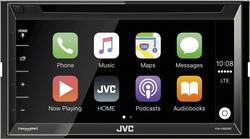
JVC - 6.8" - CD/DVD - Built-In Bluetooth - Apple® CarPlay - In-Dash Receiver - Black
- Key Specs
- Mobile Device Syncing: Apple CarPlay
- Bluetooth Enabled: true (The device is capable of communicating with another device via Bluetooth, provided they are within the required range of each other. A Bluetooth-enabled device must also be the same Bluetooth version or higher than the accessory it is intended to pair with.)
- Steering Wheel Control Compatible: false
- Tuner Type(s): AM/FM
- CD Player: true
- Screen Size: 6.8 inches (Size of the screen, measured diagonally from corner to corner.)
- Integrated GPS: false
- General
- Product Name: 6.8" - CD/DVD - Built-In Bluetooth - Apple® CarPlay - In-Dash Receiver
- Brand: JVC
- Model Number: KW-V820BT
- Audio
- Watts Per Channel: 50 watts
- Number Of Channels: 5
- Compatibility
- Mount Style: Double DIN
- Mobile Device Syncing: Apple CarPlay
- Mobile Operating System Compatibility: Apple iOS
- Bluetooth Enabled: true (The device is capable of communicating with another device via Bluetooth, provided they are within the required range of each other. A Bluetooth-enabled device must also be the same Bluetooth version or higher than the accessory it is intended to pair with.)
- Steering Wheel Control Compatible: false
- Tuner
- Tuner Type(s): AM/FM
- Receivers With HD Radio: true
- Players
- CD Player: true
- DVD Player: true
- Features
- Remote Control Included: true
- Marine: false
- EQ Presets: true
- Display
- Screen Size: 6.8 inches (Size of the screen, measured diagonally from corner to corner.)
- Screen Type: Touchscreen
- Faceplate Style: Fixed
- GPS
- Integrated GPS: false
- Dimensions
- Product Height: 3.9375 inches (The out of box height of the item. Height is measured as the vertical distance from the bottom of the item to the top as it would be primarily used or placed.)
- Product Width: 7.0625 inches (The out of box width of the item. Width is measured as the horizontal distance from one side of the item to the other as it would be primarily used or placed.)
- Product Depth: 6.125 inches (The out of box depth of the item. Depth is measured as the distance from the front of the item to the back as it would be primarily used or placed.)
- Product Weight: 4.43 pounds (The out of box weight of the item.)
- Other
- UPC: 046838073069
Use this JVC El Kameleon multimedia receiver in your car to enjoy enhanced audio. It uses Apple CarPlay and voice commands to get directions, make phone calls or play your favorite music, and it can connect up to two Bluetooth-enabled smartphones. This JVC El Kameleon multimedia receiver lets you easily stream content from apps such as Pandora and Sirius XM.
- 50W power x 4 channels: For robust sonic performance.
- Bluetooth technology: Allows simple pairing with compatible devices for wireless music streaming and hands-free calling.
- Built-in HD Radio: Delivers FM radio with CD quality and AM radio with FM radio quality.
- SiriusXM Satellite Radio-ready: Tuner, antenna and subscription are required (not included).
- CD, DVD, FLAC, AAC, and MP3 playback formats: Support your media collection.
- Rear auxiliary and USB ports: Simplify connection of compatible devices. Rear camera connectivity Lets you easily connect a back-up camera to aid in parking.
- Preamp outputs: Equipped with 3 pairs of RCA outputs; 4V front, rear and subwoofer outputs for flexible connectivity options.
- 6.8" color touch screen: Displays images in crisp detail and facilitates operation.
- Tuner with 20 presets: Lets you enjoy your favorite stations.
- 8-Preset EQ: Allows audio customization.
- Double DIN mounting style: For easy installation.
Whats Included
- JVC 6.8" - CD/DVD - Built-In Bluetooth -Apple® CarPlay - In-Dash Receiver
- Owner's Manual
A: Make sure that "carplay" is turned on in your iPhone settings. Also make sure you have the latest firmware for the JVC head unit. Updated firmware can be found here.... http://www.jvc.net/cs/car/firmware/2016/kwv820bt/
Q: Does this have a bass jack on the back & dose it come with a remote?
A: comes with remote and it has a p;ug in for sub woofer
A: Yes it will!
Q: Will this allow play back of dvd movies along with mp3//flac dvd data discs?
A: Yes, this receiver will play these discs.
A: The CarPlay system connects to your Apple device and gives you complete control over the apple map App through the view screen. It works very well… The only problem I have with the unit is this: I prefer Google maps (not Apple Maps) and no google apps are supported. There are no other GPS services that are supported through the system.
Q: Do the Best Buy have installation service for this one?
A: Yes, Depending on the vehicle, Best Buy can easily install this model and have it sounding great in no time. Check with Best Buy store for details



















