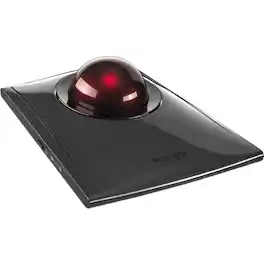
Kensington - SlimBlade Wired Trackball Ambidextrous Mouse with 4-button design - Graphite/Ruby Red
FREE shipping to

Specifications
- Number of Buttons (Total)4
- Key Specs
- Number of Buttons (Total): 4
- General
- Brand: Kensington
- Model Number: K72327US
- Product Name: SlimBlade Wired Trackball Ambidextrous Mouse with 4-button design
- Color: Graphite/Ruby Red
- System Requirements: Windows XP, Vista or 7; Mac OS X (The software that a product must have for it to be able to integrate with another product.)
- Features
- Mouse Type: Standard
- Performance
- Mouse Operation: Button(s)
- Handedness: Ambidextrous
- Tracking Method: Trackball (There are several types of computer mice, optical and laser being among the most common. Optical mice detect less detail and provide more precise and accurate movement. Laser mice detect more detail and can be used on a wider variety of surfaces, but are more sensitive to small movements.)
- Number of Buttons (Total): 4
- Connectivity
- Wired Connectivity: USB Type A
- Operating System Compatibility: Mac, Universal, Windows
- Power
- Mouse Power Source: Wired
- Dimensions
- Product Height: 6 inches (The out of box height of the item. Height is measured as the vertical distance from the bottom of the item to the top as it would be primarily used or placed.)
- Product Width: 5.25 inches (The out of box width of the item. Width is measured as the horizontal distance from one side of the item to the other as it would be primarily used or placed.)
- Product Weight: 544.31 grams (The out of box weight of the item.)
- Other
- UPC: 085896723271
Kensington SlimBlade Trackball Mouse: Comfortably navigate features on your PC or Mac with this ambidextrous trackball mouse, which keeps wrist movement to a minimum to reduce stress. Navigation, media and view modes allow flexible use.
- Trackball mouse with reliable optical tracking: Trackball mice require less wrist movement than traditional mice, since they track the motion of the built-in ball instead of the movement of the entire mouse.
- 4-button mouse design: Makes it easy to navigate features. Choose navigation mode to control cursor and scrolling. Media mode controls volume, play/pause, stop and track forward/backward, while view mode zooms in/out and pans.
- Ambidextrous design: Can be used comfortably whether you're right- or left-handed.
- Compatible with most Windows and Mac computers: Works across a wide array of computers.
- Trackball mouse with reliable optical tracking: Trackball mice require less wrist movement than traditional mice, since they track the motion of the built-in ball instead of the movement of the entire mouse.
- 4-button mouse design: Makes it easy to navigate features. Choose navigation mode to control cursor and scrolling. Media mode controls volume, play/pause, stop and track forward/backward, while view mode zooms in/out and pans.
- Ambidextrous design: Can be used comfortably whether you're right- or left-handed.
- Compatible with most Windows and Mac computers: Works across a wide array of computers.
Whats Included
- Kensington SlimBlade Trackball
- Owner's manual
- Kensington SlimBlade Trackball
- Owner's manual
Q: Can the ball be removed for cleaning
A: You can, the ball just lays in place
A: You can scroll by twisting the trackball, but I've found it cumbersome and never use the feature.
Compare similar products
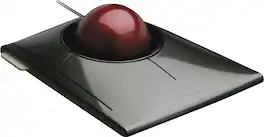
Kensington SlimBlade Trackball Mouse: Comfortably navigate features on your PC or Mac with this ambidextrous trackball mouse, which keeps wrist movement to a minimum to reduce stress. Navigation, media and view modes allow flexible use.
Kensington SlimBlade Pro Trackball - Optical - Cable/Wireless - Bluetooth/Radio Frequency - 2.40 GHz - Rechargeable - USB Type C, USB Type A - Trackball - 8 Programmable Button(s) - Symmetrical

Kensington Expert Mouse Wired Trackball - Optical USB

Tackle complex tasks or browse documents effortlessly with this Orbit wireless mobile trackball. An ergonomic setup and ambidextrous design allow for comfortable use, while the touch operation provides accurate, efficient scrolling. Customize the two buttons using free downloadable software for even greater ease of operation. A wireless USB nano receiver makes it easy to connect this Orbit wireless mobile trackball to a PC or Mac device.
Specs
Reviews
The vast majority of our reviews come from verified purchases. Reviews from customers may include My Best Buy members, employees, and Tech Insider Network members (as tagged). Select reviewers may receive discounted products, promotional considerations or entries into drawings for honest, helpful reviews.
- Rated 5 out of 5 stars
Great trackball that is easy on the wrist.
Initially the buttons were a little rough and sounded like flexing an empty aluminum can and feeling like a double click. But, after using is a few weeks and breaking it in, all is well. I here and feel a single click as expected. This is the third copy of the SlimBlade I've had over quite a few years and I really like the smooth action of the large ball and the lower profile which helps me keep my wrist straight and reduces wrist and arm strain. Although I am very satisfied with he SlimBlade, the software conflicted with my Mac mini M1 with Big Sur. Fortunately, the SlimBlade can be adjusted with the Mouse setting for pointer speed and acceleration, just not assigning buttons, etc.
This review is from Kensington - SlimBlade Wired Trackball Ambidextrous Mouse with 4-button design - Graphite/Ruby Red
Posted by dont88
- Rated 3 out of 5 stars
Its ok
It works for what is intended but does not feel to sturdy. Almost to lightweight for my need it feels cheap for the price.
This review is from Kensington - SlimBlade Wired Trackball Ambidextrous Mouse with 4-button design - Graphite/Ruby Red
Posted by Markz
- Rated 5 out of 5 stars
Worthy successor
I'm a lifelong trackball user, and have spent the last 10 years or so using the Kensington Trackball Pro and was a big fan of the large ball, rollers and the many configurable buttons. The software was the downfall, as it was outdated and had compatibility with my work machine. The new slimblade trackball is a fantastic replacement. I was worried that it wouldn't be smooth based on some reviews. I don't find that to to be the case even if it isn't on rollers. The ball is silky smooth, buttons are responsive, and the scrolling feature of the ball is very intuitive and works well. I have hesitated to download and install the software to get more out of the top two buttons... The previous experience with the Kensington software has me gun shy and honestly, I don't need them nearly as much. My top two buttons were configured for scrolling previously and it's been replaced. Highly recommended, though a little pricey for a 'pointing device'.
This review is from Kensington - SlimBlade Wired Trackball Ambidextrous Mouse with 4-button design - Graphite/Ruby Red
Posted by AZHBent