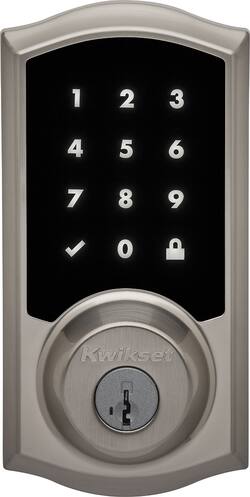
Kwikset - 919 Premis Bluetooth Touchscreen Smart Lock
- Key Specs
- Lock Type: Deadbolt
- Lock/Unlock Mechanism: Key, Keypad (There are several technologies used by smart locks to manage access, such as biometrics, Bluetooth, or NFC. Some locks allow codes to be entered via a keypad or touchscreen; digital keys can often be sent to multiple authorized devices or temporarily shared with guests.)
- Power Source: Battery-powered
- Installation Type: Replacement
- Wireless Connectivity: Bluetooth (The manner in which a device sends data to another device over a short distance without the use of wires or cables.)
- Color Finish: Satin nickel
- General
- Product Name: 919 Premis Bluetooth Touchscreen Smart Lock
- Brand: Kwikset
- Model Number: 99190-001
- Color Finish: Satin nickel
- Features
- Lock Type: Deadbolt
- Lock/Unlock Mechanism: Key, Keypad (There are several technologies used by smart locks to manage access, such as biometrics, Bluetooth, or NFC. Some locks allow codes to be entered via a keypad or touchscreen; digital keys can often be sent to multiple authorized devices or temporarily shared with guests.)
- Auto Unlock: true (Locks with this feature automatically unlock when certain conditions are met, such as coming within range of a home wireless network or when activated via a mobile app.)
- Unlock Notifications: true
- Shareable Keys: true (This feature allows a single key to be shared with multiple users or authorized devices.)
- Number of Key Fobs Included: 0
- Number of Keypad Codes Supported: 30 (Multiple keypad codes can be programmed to allow temporary access for guests, deliveries, and more while keeping primary codes secure.)
- Remote Monitoring Capabilities: true (Monitor)
- Power
- Power Source: Battery-powered
- Rechargeable Battery: false
- Battery Size: AA (The battery size required for operation.)
- Number of Batteries Required: 4
- Batteries Included: true (Indicates whether the product comes with the required batteries for its operation.)
- Low-Battery Indicator: true
- Compatibility
- Installation Type: Replacement
- App Compatible: true (The product can be connected to a program or software application on a mobile device, which then receives collected data from the product.)
- Wireless Connectivity: Bluetooth (The manner in which a device sends data to another device over a short distance without the use of wires or cables.)
- Operating System Compatibility: Apple iOS
- Works With: Amazon Alexa, Apple HomeKit, Arlo, Google Assistant, Hue, Ring (Compatible with or able to be connected to other smart devices or applications.)
- Other
- UPC: 883351595445
Secure your home and add convenient automation with this Kwikset 919 Premis touchscreen smart lock. Premis provides homeowners an easy, secure way to control their home security from an iPhone®, iPad® or iPod Touch®. Unlock or Lock the door using Siri® while also taking advantage of Kwikset patented security features, including SecureScreen™ and SmartKey®.
- Versatile compatibility: Works with most Bluetooth-enabled Apple® iOS devices.
- Hands-free Bluetooth connectivity: Easily and automatically sync your lock to your smartphone or tablet, so you don't have to worry about fumbling for your keys while your hands are full on the way in or out the door.
- Manage your lock with the Kwikset Premis app: Receive notifications and manage eKeys on-the-go with the user-friendly app. Data connection required for download.
- Schedule access for certain times: Offers convenient usage.
- Apple approved end-to-end encryption: To ensure your security.
- Receive confirmation on your smartphone: View lock activity, history and status notifications when lock is use via a downloadable app.
- Voice control: Lock and unlock your door using Siri® voice commands.
- Works with Apple HomeKit™: For smarter home management. Uses Apple approved end-to-end encryption to ensure your security.
- SmartKey® re-key technology: Re-key the lock yourself in seconds in 3 easy steps.
- Responsive touchscreen with SecureScreen™ technology: Helps prevent fingerprint and code detection.
- Alarm security: Alarm sounds after 3 consecutive incorrect codes are entered.
- Easy to manage: Easily send, add, delete or disable user codes. Schedule access for certain times/days.
Whats Included
- Kwikset 919 Premis Bluetooth Touchscreen Smart Lock
- Keys (2 pcs)
- AA battery (4 pcs)
- SmartKey tool
- Mounting hardware
Q: Does the screen support direct sun light without damaging the screen?
A: It’s a exterior deadbolt. Multiple of mine are cracking. After seeing kwiksets response that they shouldn’t be exposed to direct sunlight. I’m like……….what……..did they not realize that deadbolts go on the outside of a house. It’s pretty much ALL a deadbolt needs to be able to do is be in direct sunlight and lock.
A: Kwikset Model# 99190-001 919 Premis Bluetooth Touchscreen Smart Lock in Satin Nickel can be controlled remotely only if the user has the Apple TV generation 3 and iOS 9.2 or iPad with iOS 10.0 or higher under the same icloud account as the Premis.
Q: Is this easy to install from the directions if you have no experience installing locks?
A: I’ve changed a few in the past, and it’s a very straight forward process. I had more problems taking off my circa 1970’s door knobs to install the new ones to match, and with where my home hub was for apples HomeKit than anything else. So long as you use the long wood screws to go into the door frame, and the small door screws to go into the door, everything else was very easy. Watch a YouTube video while your waiting for your new locks to arrive and you will be good to go. Expect to spend about 30 minutes per lock.
Q: With the 919 Premis do I need to have an app on my phone to use the key pad to enter the home?
A: No, to use the keypad, you simply need to know one of the codes programmed by the owner. The owner can program up to 30 codes and provide timeframes as to when the code(s) will work.
Q: Can I program this to unlock in the morning and lock itself at night on a timer?
A: This is somewhat tricky to answer. This particular model is compatible with HomeKit. Within the Kwikset app, you are not able to do any extensive automation like this. However, in the Home app on your iPhone you can setup a lot of automation for the lock. This is where its tricky.... Apple, by design, setup a security measure to ALWAYS ask the iPhone user permission to run an automation that will provide access to the user's home. Meaning, any automation that results in a lock or garage (for example) opening, the Home app on your phone will ask you first "are you sure you want to run this" and if you select yes, then you will have to unlock your phone first before the automation will run. I get why they do this (makes sense)... however, it defeats the purpose of it being automated. I have setup a clever workaround thought. To do this you'll need to buy a cheap HomeKit compatible smart plug (i've seen them for $20). Once you get it, set it up in HomeKit and then setup the following automation rules: To unlock in the morning, setup these rules: 1. At 6am, turn on smart plug (choose whatever time you want). 2. If smart plug turns on, unlock lock/door. To lock at night, same thing: 1. At 6pm, turn off smart plug 2. if smart plug turns off, lock door. Note: to use this workaround, you cannot use the smart plug for any lamp, etc. It will be solely used as a trigger for the above automation.
A: 1- No 2-No, it must be connected to an Apple TV 4th gen or higher.
Q: Would you ship Kwikset 919 Premis to India?
A: stick with your current, lock, you will spend half of your time resetting this lock. Then, after your warranty ends it will eventually failed the electronic parts of it. It was made of cheap materials you can buy out of your local electronics store.






















