LG - 24" IPS FHD 120Hz Monitor with HDR10 (HDMI) - Black
Screen Size
23.8"More Buying Options
Related Item

Highlights
- Key Specs
- Refresh Rate: 120Hz (The number of frames per second the device can produce natively without enhancement. Higher rates help produce smooth, seamless pictures.)
- Maximum Resolution: 1920 x 1080 (Maximum resolution refers to the highest number of pixels that a screen can process and display. Higher resolution signals produce more detailed images.)
- Response Time: 5 milliseconds (The speed at which pixels can change colors is called response time. It is measured in milliseconds (ms).)
- Panel Type: IPS (Technology that affects response time and image quality.)
- Synchronization Technology: Not Applicable (Generally, these technologies allow syncing between a computer/console game's frame rate and the device's refresh rate for a smoother display without tearing.)
- Screen Size: 23.8 inches (Size of the screen, measured diagonally from corner to corner.)
- Display Connector(s): 1 x HDMI (The number and type of connectors used to connect to an external display.)
- General
- Brand: LG
- Model Number: 24U41YA-B
- Product Name: 24" IPS FHD 120Hz Monitor with HDR10 (HDMI)
- Color: Black
- Operating System Compatibility: Not Applicable
- Display
- Refresh Rate: 120Hz (The number of frames per second the device can produce natively without enhancement. Higher rates help produce smooth, seamless pictures.)
- Maximum Resolution: 1920 x 1080 (Maximum resolution refers to the highest number of pixels that a screen can process and display. Higher resolution signals produce more detailed images.)
- Native Resolution: 1920 x 1080 (Native resolution of a screen refers to its single, fixed resolution. Sometimes screens must scale an image up or down in order to fit the native resolution. This can cause a loss of resolution or detail.)
- Contrast Ratio: 1500:1 (Measured difference between a displayed image's brightest whites and darkest blacks. The larger the first number, the more detail and color that can be displayed.)
- Response Time: 5 milliseconds (The speed at which pixels can change colors is called response time. It is measured in milliseconds (ms).)
- Display Type: LED
- Panel Type: IPS (Technology that affects response time and image quality.)
- Synchronization Technology: Not Applicable (Generally, these technologies allow syncing between a computer/console game's frame rate and the device's refresh rate for a smoother display without tearing.)
- Aspect Ratio: 16:9 (The measurement of the width of a screen compared to the height of a screen, expressed as a ratio.)
- Curved Screen: false
- Brightness: 250 candela per square meter (A measure of the total light output.)
- Screen Size: 23.8 inches (Size of the screen, measured diagonally from corner to corner.)
- High Dynamic Range (HDR): true (An HDR-compatible 4K TV or other HDR-compatible product displays HDR video content when it's available from sources like 4K Ultra HD Blu-ray Discs and 4K streaming services.)
- High Dynamic Range Format: HDR 10 (There are a few HDR formats that tell the TV or other HDR-compatible product how to best utilize its capabilities to display HDR content. HDR technology can support one or multiple formats, each with various benefits to picture quality.)
- Horizontal Viewing Angle: 178 degrees (The maximum angle at which the display can be viewed with acceptable visual performance from either side.)
- Vertical Viewing Angle: 178 degrees (The maximum angle at which the display can be viewed with acceptable visual performance from above or below.)
- Color Gamut (Standard RGB): 99 percent
- Connectivity
- Number of HDMI Inputs (Total): 1
- Display Connector(s): 1 x HDMI (The number and type of connectors used to connect to an external display.)
- Headphone Jack: true (The device features an interface that allows for the connection of headphones.)
- Compatibility
- Wall Mountable: true (The product is able to be secured to a wall. Some products are designed ready to mount, while others may require additional hardware/accessories for installation.)
- VESA Wall Mount Standard: 100mm x 100mm (VESA wall mount standards refer to the spacing of screw holes built into a TV in order to fit with standard TV wall mounts. These standards are implemented into most TVs and monitors.)
- Features
- Tiltable: true
- Adjustable Stand Height: false
- Built-In Webcam: false
- Integrated Speaker(s): false
- Dimensions
- Product Height With Stand: 16.4 inches
- Product Height Without Stand: 12.5 inches
- Product Width: 21.2 inches (The out of box width of the item. Width is measured as the horizontal distance from one side of the item to the other as it would be primarily used or placed.)
- Product Depth (With Stand): 8.7 inches
- Product Depth Without Stand: 1.5 inches
- Product Weight: 7.1 pounds (The out of box weight of the item.)
- Stand Included: true
- Certifications Listings & Approvals
- ENERGY STAR Certified: false (Devices carrying the ENERGY STAR service mark, such as computer products and peripherals, kitchen appliances, and other products, generally use 20% to 30% less energy than required by federal standards.)
- EPEAT Qualified: false (The Electronic Product Environmental Assessment Tool (EPEAT) was designed to provide an environmental assessment tool for purchasers. In order to qualify for EPEAT, a product must meet all 23 required criteria.)
- Warranty
- Warranty - Parts: 1 Year Parts and Labor
- Warranty - Labor: 1 Year Parts and Labor
- Other
- UPC: 195174131770
The 24" class (23.8" screen) Full HD (1920 x 1080) IPS monitor delivers sharp, vibrant visuals from virtually any angle—ideal for working...and even playing from home. Whether you're tackling emails, browsing the web, or managing projects, this monitor helps you stay clear, focused, and productive. Its ultra-slim bezels and 3-side virtually borderless design bring a clean, modern look to any home office setup. The sleek stand adds a floating feel that’s perfect for dual monitor workstations or minimal desk spaces. A 120Hz refresh rate ensures smoother scrolling and frame transitions, while 1ms Motion Blur Reduction (MBR) keeps fast-moving visuals crisp—great for multitasking or after-hours gaming. With HDR10 and up to 99% sRGB color gamut coverage, this LG monitor delivers vivid, accurate color across everything from video calls to creative projects. Whether you're outfitting a new home office or upgrading your current work-from-home setup, the LG 24U41YA-B monitor offers the clarity, speed, and style you need to stay productive and inspired.
- Vivid Color with Full HD Resolution: The LG 24" IPS monitor with Full HD (1920 x 1080) resolution delivers sharp, vibrant visuals from virtually any angle. Whether you're tackling tasks, browsing the web, or managing your inbox, this monitor helps you stay clear, focused, and productive.
- Virtually Borderless. Visually Seamless.: The ultra-slim bezels and 3-side virtually borderless design creates a clean, modern look that keeps your focus where it belongs—on the screen. The sleek stand and base adds a floating feel, perfect for dual setups or a clutter-free workspace.
- Experience Smooth Motion with 120Hz: With a fast 120Hz refresh rate, you’ll experience smoother frame transitions. Whether you're working or gaming, enjoy more fluid visuals with less screen stutter and motion blur.
- 1ms Motion Blur Reduction for Crisp Gameplay: 1ms Motion Blur Reduction(MBR) keeps fast-paced gameplay sharp by minimizing blur and ghosting. Whether you're tracking enemies or racing to the finish, every frame stays crisp—giving you the edge when it matters most.
- Work, Create and Game in Bold Color: With HDR10 support and up to 99% sRGB color gamut coverage, this LG Monitor delivers rich, vivid color across a wide spectrum—ideal for immersive gaming, creative projects, and everyday productivity.
- Customize Your Screen View with the Switch App: The Switch app¹ transforms your screen into a multitasking hub for work, gaming, and streaming. Effortlessly split the screen into up to 6 sections, customize display layouts, or launch video calls with a single hotkey. Navigate smart features with ease and switch seamlessly between your PC and the built-in webOS streaming platform.
- Adjustable Tilt for Easy Viewing: From video calls to multitasking, the tilt-adjustable display helps you find your ideal viewing angle. With smooth adjustment from -5° to 20°, the LG Monitor provides a viewing position that feels just right—no matter what you're working on.
- Action As It Happens: Dynamic Action Sync minimizes input lag for faster reactions—so you can respond to every move, shot, or turn the instant it happens.
- Black Stabilizer: Black Stabilizer brightens dark scenes, helping gamers spot enemies hiding in the shadows and react quickly during sudden flashes—keeping you one step ahead in every battle.
- Easy Viewing, Comfortable Reading: Reader Mode lowers blue light levels, creating a more comfortable viewing experience—great for reading documents, browsing the web, or working for extended periods.
Whats Included
- Monitor
- Power Cable
- HDMI Cable
Product Manuals
Disclaimers
- ¹Software installation required. Visit Support on LG.com to download.
Q: Is this compatible with Bluetooth?
A: The LG 24" IPS FHD 120Hz Monitor with HDR10 (HDMI) - Black, Model # 24U41YA-B, does not support Bluetooth...^Ivan.
Q: Is this monitor compatible with a mac mini?
A: Yes. It is fully compatible with the Mac mini
Q: Can this monitor be used to view 6 Lorex 1080p 1TB Wired Analog Security Cameras?
A: Check the manual or the specifications for your 6 Lorex 1080p 1TB Wired Analog Security Camera to see how it connects to monitors. Connectivity for this LG 24" IPS FHD 120Hz Monitor with HDR10 (HDMI) - Black, Model # 24U41YA-B, includes an HDMI 2.0 input and a 15-Pin, D-Sub connector. If your security camera connects to monitors via HDMI or D-Sub, it will work with the monitor...^Ivan.
Q: How much does the package with the box weight?
A: I didn’t weigh it. Just brought it home and hooked it up.
Q: Can you use it in portrait mode with a display stand?
A: The LG 24" IPS FHD 120Hz Monitor with HDR10 (HDMI) - Black, Model # 24U41YA-B, does not support portrait mode, nor does it support auto rotation. With the right mount and if your operating system or graphics card supports screen orientation, you may be able to view the monitor, or any monitor for that matter, in portrait mode...^Ivan.
A: I'm in a chat now with LG tech and sent him photo of stand he thinks is faulty and won't tilt. He's preparing a replacement how. I'm aware of how to handle the screen from the manual to not cause damage. Nothing moves to tilt. Thanks for quick reply to my question.
A: As mentioned earlier, the instructions for tilting the LG 24" IPS FHD 120Hz Monitor with HDR10 (HDMI) - Black, Model # 24U41YA-B, and illustrated diagrams showing how to hold the monitor when tilting it can be found under 'Adjusting the Angle' in the manual that you downloaded...^Ivan.
Compare similar products
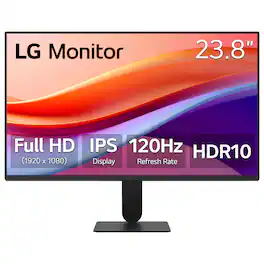
The 24" class (23.8" screen) Full HD (1920 x 1080) IPS monitor delivers sharp, vibrant visuals from virtually any angle—ideal for working...and even playing from home. Whether you're tackling emails, browsing the web, or managing projects, this monitor helps you stay clear, focused, and productive. Its ultra-slim bezels and 3-side virtually borderless design bring a clean, modern look to any home office setup. The sleek stand adds a floating feel that’s perfect for dual monitor workstations or minimal desk spaces. A 120Hz refresh rate ensures smoother scrolling and frame transitions, while 1ms Motion Blur Reduction (MBR) keeps fast-moving visuals crisp—great for multitasking or after-hours gaming. With HDR10 and up to 99% sRGB color gamut coverage, this LG monitor delivers vivid, accurate color across everything from video calls to creative projects. Whether you're outfitting a new home office or upgrading your current work-from-home setup, the LG 24U41YA-B monitor offers the clarity, speed, and style you need to stay productive and inspired.

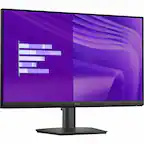
Acer KA242Y 23.8-inch monitor has an amazing thin enclosure with a frameless bezel. Get fast refresh rates thanks to the Adaptive-Sync Support product that matches the refresh rate of your monitor with your graphics card. The 1920 x 1080 Full HD resolution with an incredible 100,000,000:1 contrast ratio lets you enjoy High-Definition entertainment in the comfort of your home. Enjoy the accurate color performance presented by IPS technology, and vivid color in every viewing angle. The eye protect technology also gives you a comfortable viewing experience while Energy Star compliance helps you save money and energy

The 27" Full HD (1920 x 1080) IPS monitor delivers sharp, vibrant visuals from virtually any viewing angle—ideal for working ...and even playing from home. Whether you're tackling emails, browsing the web, or managing projects, this monitor helps you stay clear, focused, and productive. The display's ultra-slim bezels and 3-side virtually borderless design bring a clean, modern look to any home office setup. The sleek stand adds a floating feel that’s perfect for dual monitor workstations or minimal desk spaces. A 120Hz refresh rate ensures smoother scrolling and frame transitions, while 1ms Motion Blur Reduction (MBR) keeps fast-moving visuals crisp—great for multitasking or after-hours gaming. With HDR10 support and up to 99% sRGB color gamut coverage, this LG monitor delivers vivid, accurate color across everything from video calls to creative projects. Whether you're outfitting a new home office or upgrading your current work-from-home setup, the LG 27U41YA-B monitor offers the clarity, speed, and style you need to stay productive and inspired.
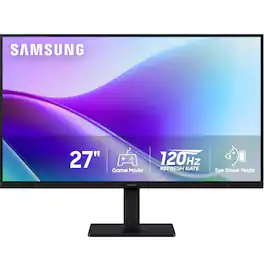
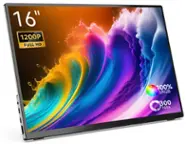
Samsung's 27" Monitor with FHD Resolution consistently delivers stunning colors across the entire display with the IPS panel. The 120Hz refresh rate reduces lag and motion blur when playing fast-paced games, watching videos, or working on creative projects. Game Picture Mode shifts any game to fill the screen with every detail in view and optimizable game settings enable color and image contrast to be instantly adjusted for more clarity. Eye Saver Mode protects vision by reducing irritating screen flicker and minimizing blue light. Features a super slim design with ultra-thin border bezels for a lightweight and stylish addition to any environment. Devices can be plugged directly into monitor for increased flexibility and convenience.
| Pros for LG - 24" IPS FHD 120Hz Monitor with HDR10 (HDMI) - Black | |||
|---|---|---|---|
| Overall Performance, Screen Size, Refresh Rate | Overall Performance, Screen Size, Refresh Rate, Resolution, Ease of Use | Refresh Rate, Image Quality, Size, Design | Picture Quality |
| Cons for LG - 24" IPS FHD 120Hz Monitor with HDR10 (HDMI) - Black | |||
| Mounting Ease | Adjustability | Adjustability | There were no cons for this product— |
Specs
Reviews
Customer Images
The vast majority of our reviews come from verified purchases. Reviews from customers may include My Best Buy members, employees, and Tech Insider Network members (as tagged). Select reviewers may receive discounted products, promotional considerations or entries into drawings for honest, helpful reviews.
- Rated 5 out of 5 stars
Amazing Monitor
I got this as a third monitor in my setup, and it works fantastically, being able to do 1080p 120Hz and using it for side tasks makes me working and gaming a lot easier, if you’re looking for a good 1080 120hz monitor for a good price for gaming or just to have on the side, then I do recommend this purchase.
Posted by lara
- Rated 5 out of 5 stars
Very good
Very good monitor almost as good as my tv runs games very good.
Posted by Gannon
- Rated 5 out of 5 stars
Crisp and affordable!!
EXACTLY what I needed and affordable. I stare at code all day and I returned two monitors before finding this one because the pixelated text was giving me headaches. This monitor is crisp you can’t see pixels and it’s helped a lot with my eye strain
Posted by Nikki