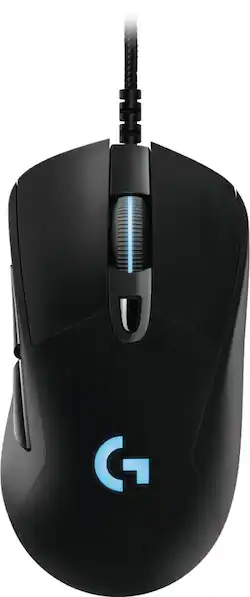
Logitech - G403 Wired Optical Gaming Mouse with RGB Lighting - Black
- Key Specs
- Lighting Type: RGB
- Maximum Sensitivity: 12000 dots per inch (Mouse sensitivity is measured in dots per inch (DPI). The higher the DPI, the more sensitive the mouse is and may be more useful for high-density pixel screens. Lower DPI typically means more precision and accuracy in mouse movement.)
- General
- Product Name: G403 Wired Optical Gaming Mouse with RGB Lighting
- Brand: Logitech
- Model Number: 910-004796
- Features
- Mouse Type: Gaming
- Lighting Type: RGB
- Customizable Lighting: true
- Performance
- Mouse Operation: Other
- Handedness: Ambidextrous
- Tracking Method: Optical (There are several types of computer mice, optical and laser being among the most common. Optical mice detect less detail and provide more precise and accurate movement. Laser mice detect more detail and can be used on a wider variety of surfaces, but are more sensitive to small movements.)
- Maximum Sensitivity: 12000 dots per inch (Mouse sensitivity is measured in dots per inch (DPI). The higher the DPI, the more sensitive the mouse is and may be more useful for high-density pixel screens. Lower DPI typically means more precision and accuracy in mouse movement.)
- Number of Programmable Buttons: 6
- Connectivity
- Wired Connectivity: USB
- Operating System Compatibility: Windows
- Power
- Mouse Power Source: Wired
- Dimensions
- Product Height: 1.69 inches (The out of box height of the item. Height is measured as the vertical distance from the bottom of the item to the top as it would be primarily used or placed.)
- Product Width: 2.68 inches (The out of box width of the item. Width is measured as the horizontal distance from one side of the item to the other as it would be primarily used or placed.)
- Product Weight: 5.67 grams (The out of box weight of the item.)
- Warranty
- Manufacturer's Warranty - Parts: 1 year
- Manufacturer's Warranty - Labor: 1 year
- Other
- UPC: 097855121851
Elevate your game play with this Logitech gaming mouse. Its 1 ms report rate provides a split-second response to each move and click, and its advanced sensor lets you respond with consistent accuracy. The rubber grips increase comfort and control, and the six programmable buttons let you customize this Logitech gaming mouse to suit your style.
- Programmable RGB lighting: Choose from a palette of colors and different brightness levels to match your style, system or environment. Download Logitech Gaming Software to get access to over 300 game profiles and intelligent illumination.
- Optical technology: LED lights scan the surface beneath the mouse to detect movement with a fair amount of accuracy, suitable for everyday computing and browsing.
- Maximum of 12000 dpi: Lets you find the perfect sensitivity.
- 1000Hz polling rate: Provides ultrafast responsiveness.
- Wired connection: This mouse connects to your computer using an USB port.
- Adjustable weight system: The included 10g removable weight module gives you options when it comes to tuning the mouse exactly to your preferences.
- Compatible with most versions of Windows: Works with most PCs.
Whats Included
- 10g optional weight
- Logitech G403 Wired Optical Gaming Mouse with RGB Lighting
- Owner's manual
A: My mouse had the same issue. Turns out that you need to fix the dpi. In my case, I had to press the button near the scroll wheel one time, and that resolved the issue.
Q: Is this the G403 Prodigy Mouse?
A: As far as I can tell, this is indeed the G403 Prodigy Mouse you asked about. I've been using it on my iMac for about one month now, and it makes that computer so much better to use. Obviously, the iMac is not a heavy gaming device, but the 5k screen needs a mouse with high DPI and good sensitivity. I have not been disappointed. I'm thinking about swapping this out with the ancient Logitech MX-518 attached to my Windows PC. This is - in my opinion - a fantastic mouse for the price.
Q: Are you going to sell the Logitech G403 WIRELESS gaming mouse?
A: More likely not.
Q: Will this work on my mac desktop?
A: Per the Logitech website: SYSTEM REQUIREMENTS Windows® 7 or later macOS® 10.11 or later Chrome OSTM USB port Internet access for Logitech G HUB (optional)
Q: How long is the wire on the mouse
A: It is 6 feet long.