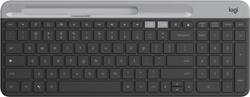
Logitech - K580 Multi-Device Chrome OS Edition Full-size Wireless Membrane Keyboard - Graphite
- Key Specs
- Lighting Type: None
- Form Factor: Full-size (The size, arrangement, and physical configuration of the product.)
- Keyboard Technology: Membrane (Type of technology that detects a key press.)
- Connection Type: Wireless
- General
- Product Name: K580 Multi-Device Chrome OS Edition Full-size Wireless Membrane Keyboard
- Brand: Logitech
- Model Number: 920-009270
- Color: Graphite
- Features
- Lighting Type: None
- Numeric Keypad: true
- Touchpad: false
- Keyboard Type: Handheld
- Palm Rest: false
- Spill Resistant: true (Designed to resist some degree of accidental liquid spill. The level of spill-resistance is indicated by the product manufacturer, but the degree of protection may not be guaranteed after normal wear of the product.)
- Keyboard Features: Low-profile keys, auto-sleep feature
- Foldable: false
- Keycap Material: ABS
- Functions
- Form Factor: Full-size (The size, arrangement, and physical configuration of the product.)
- Keyboard Technology: Membrane (Type of technology that detects a key press.)
- Dedicated Macro Keys: false (Perform shortcuts of key sequences to carry out commands with a single key. Key sequences may include key strokes, mouse actions, and/or menu actions.)
- Adjustable Tilt Function: false
- Multimedia Keys: true
- Internet Keys: false
- Number Of Programmable Keys: 0
- Connectivity
- Connection Type: Wireless
- Wireless Connectivity: Radio Frequency (RF) (The manner in which a device sends data to another device over a short distance without the use of wires or cables.)
- Maximum Wireless Range: 32.8 feet
- Compatibility
- Operating System Compatibility: Android, Chrome
- Plug and Play Operation: true
- System Requirements: USB Receiver: USB port; Bluetooth: Bluetooth Low Energy technology-enabled device; Chrome OS, Android 5.0 or later (The software that a product must have for it to be able to integrate with another product.)
- Power
- Battery Size: AAA (The battery size required for operation.)
- Number of Batteries Required: 2
- Batteries Included: true (Indicates whether the product comes with the required batteries for its operation.)
- On/Off Switch: true
- Dimensions
- Product Height: 0.83 inches (The out of box height of the item. Height is measured as the vertical distance from the bottom of the item to the top as it would be primarily used or placed.)
- Product Width: 14.7 inches (The out of box width of the item. Width is measured as the horizontal distance from one side of the item to the other as it would be primarily used or placed.)
- Product Weight: 19.7 ounces (The out of box weight of the item.)
- Mouse
- Mouse Included: false
- Other
- UPC: 097855153203
Type on your Chromebook or smartphone for effortless multitasking with this Logitech slim wireless keyboard. The built-in easy switch lets you pair and alternate multiple devices quickly, while the slim keys offer a comfortable, quiet typing experience. This Bluetooth-enabled Logitech slim wireless keyboard includes an auto-sleep feature that is activated when you're not typing to ensure long battery life.
- Google Assistant, Search, Launcher, and media keys: Ensure easy access and more efficient work.
- Easy Switch technology: Allows you to pair and quickly switch between multiple devices for easy typing on your computer, phone, or tablet seamlessly.
- Wireless technology: Enables reliable connection via the included USB wireless receiver or Bluetooth Low Energy technology.
- Numeric keypad and 15 FN keys: Provide simple data entry and multifunction use.
- Membrane keyboard with quiet, low-profile keys: Offers a fluid, laptop-like typing experience.
- Compact, battery-powered design: The built-in auto-sleep feature preserves battery life, so you can power through your work. In addition, this keyboard has a phone cradle for easier multitasking.
- Up to 32.8' wireless range: Lets you sit in any convenient place in the room.
- Chrome OS and Android compatible: You can use it with your existing device.
- More sustainable: Certified carbon neutral: the carbon impact of the product and packaging has been reduced to zero.
Whats Included
- Logitech K580 Multi-Device Chrome OS Edition Wireless Membrane Keyboard
- USB Unifying receiver
- Two AAA battery
- Owner's manual
Q: HOW DO YOU MAKE THE NUMBER PAD LOCK
A: Fn+del
A: The Google Assistant key does act as the Windows Start key, but unfortunately you will not get F1-F12 and Caps Lock functionality when connected to Windows devices.
A: Absolutely! The K580 will be able to connect to, and switch seamlessly between, up to 2 devices using Bluetooth connection or the included USB unifying receiver.
Q: Is it compatible with Windows? Any potential issues thereof?
A: Yes, it is compatible with Windows.
Q: how do i print the screen? I try fn+ INS and nothing , I tried fn+alt+ins and nothing...
A: i don't think it has print screen but search key (the one with the circle) + shift + s takes a screenshot.
Q: Is this keyboard backlit at all?
A: i just received mine 2 weeks ago and its NOT back lit. That would be a nice feature however I can only assume it would've overly drained the battery.
Q: Is this keyboard a standard length?
A: I would consider the length a standard keyboard. Purchased the keyboard a month ago and pleased with the purchase. I can connect and store up to 2 different laptops in the keyboard connection memory. So far I connected a PC windows 11 and a Mac and had no issues connecting to both using Bluetooth. Also has the USB adaptor stored in the keyboard if needed.























