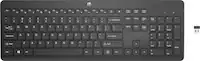
Logitech - MX Keys S for Mac Advanced Full-size Wireless Scissor Keyboard with Backlit keys for MacBook, iMac, iPad - Pale Gray
Color
Pale Gray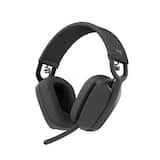 Logitech - Zone Vibe 100 Wireless Bluetooth Over-the-Ear Headphones with Noise-Cancelling Microphone - Graphite$99.99
More Buying Options
Related Item

Specifications
- Lighting TypeSingle colorForm FactorFull-sizeKeyboard TechnologyScissorConnection TypeWireless
- Key Specs
- Lighting Type: Single color
- Form Factor: Full-size (The size, arrangement, and physical configuration of the product.)
- Keyboard Technology: Scissor (Type of technology that detects a key press.)
- Connection Type: Wireless
- General
- Brand: Logitech
- Model Number: 920-011622
- Product Name: MX Keys S for Mac Advanced Full-size Wireless Scissor Keyboard with Backlit keys for MacBook, iMac, iPad
- Color: Pale Gray
- Features
- Lighting Type: Single color
- Customizable Lighting: false
- Numeric Keypad: true
- Touchpad: false
- Keyboard Type: Programmable
- Palm Rest: false
- Spill Resistant: false (Designed to resist some degree of accidental liquid spill. The level of spill-resistance is indicated by the product manufacturer, but the degree of protection may not be guaranteed after normal wear of the product.)
- Keyboard Features: Spherically dished keys, smart illumination, programmable keys, Smart Keys layout, Easy Switch to pair with up to 3 devices
- Functions
- Form Factor: Full-size (The size, arrangement, and physical configuration of the product.)
- Keyboard Technology: Scissor (Type of technology that detects a key press.)
- Adjustable Tilt Function: false
- Multimedia Keys: true
- Connectivity
- Connection Type: Wireless
- Wireless Connectivity: Bluetooth (The manner in which a device sends data to another device over a short distance without the use of wires or cables.)
- Maximum Wireless Range: 33 feet
- Number Of USB Port(s): 1 (The total number of USB ports including all generations and versions.)
- Number of Devices Connectable Simultaneously: 3
- Compatibility
- Operating System Compatibility: Mac, Apple iPadOS, Apple iOS
- System Requirements: Requires Bluetooth Low Energy technology, macOS 10.15 or later, iPadOS 14 or later (The software that a product must have for it to be able to integrate with another product.)
- Power
- Rechargeable Battery: true
- Battery Chemistry: Lithium
- On/Off Switch: true
- Dimensions
- Product Height: 0.81 inches (The out of box height of the item. Height is measured as the vertical distance from the bottom of the item to the top as it would be primarily used or placed.)
- Product Width: 16.94 inches (The out of box width of the item. Width is measured as the horizontal distance from one side of the item to the other as it would be primarily used or placed.)
- Product Depth: 5.18 inches (The out of box depth of the item. Depth is measured as the distance from the front of the item to the back as it would be primarily used or placed.)
- Product Weight: 28.57 ounces (The out of box weight of the item.)
- Mouse
- Mouse Included: false
- Warranty
- Warranty - Parts: 1 year
- Warranty - Labor: None
- Other
- UPC: 097855189530
Introducing MX Keys S for Mac — a low-profile wireless keyboard with Mac-specific keys that offers a fast fluid precise typing experience, smart illumination, and customizable, time-saving Smart Actions and matching Space gray and Pale gray finishes that blend perfectly into your Apple setup.
- Mastered for Mac: With a Mac key layout and matching Apple finishes, Logi Options+ functions for macOS, USB C charging, Logitech MX Keys S for Mac makes for a perfect fit with your Apple setup.¹
- Fluid typing experience: A laptop-like profile with spherically dished keys shaped for your fingertips; experience fast, fluid, and precise typing on this wireless bluetooth keyboard for Mac.
- Automate repetitive tasks with Logitech keyboard: Easily create and share time-saving Smart Actions shortcuts to perform multiple actions with a single keystroke with the Logi Options+ app. ¹
- Smarter illumination: Keys on this backlit keyboard light up as your hands approach and adapt to the environment; now with more lighting customizations on Logi Options+. ¹
- More comfort, deeper focus: Work comfortably for longer with a low-profile design and an optimum keyboard angle that is better for your wrist posture.
- Connect to multiple Apple devices: Work seamlessly on up to 3 devices on macOS, iPadOS, iOS via Bluetooth Low Energy. ²
- Team with MX Master 3S for Mac: Pair any MX for Mac wireless keyboard and mouse with Logi Options+ and seamlessly work, transfer text and files between 3 Apple computers.
- Made with recycled plastic: Plastic parts in Logitech MX Keys S for Mac include certified post-consumer recycled plastic 26% for Space Gray and 11% for Pale Grey. ῳ
- 1-month of Adobe Creative Cloud on us (a value of $59.99)*: Pair two of the world’s top creative tools. Buy one MX Keys S and claim your free 1-month Adobe Creative Cloud membership. *Value calculated based on Adobe Creative Cloud All Apps monthly value of $59.99 valid on Adobe.com on Sept 12, 2024. Terms & Conditions apply.¹ ² ³
- Mastered for Mac: With a Mac key layout and matching Apple finishes, Logi Options+ functions for macOS, USB C charging, Logitech MX Keys S for Mac makes for a perfect fit with your Apple setup.¹
- Fluid typing experience: A laptop-like profile with spherically dished keys shaped for your fingertips; experience fast, fluid, and precise typing on this wireless bluetooth keyboard for Mac.
- Automate repetitive tasks with Logitech keyboard: Easily create and share time-saving Smart Actions shortcuts to perform multiple actions with a single keystroke with the Logi Options+ app. ¹
- Smarter illumination: Keys on this backlit keyboard light up as your hands approach and adapt to the environment; now with more lighting customizations on Logi Options+. ¹
- More comfort, deeper focus: Work comfortably for longer with a low-profile design and an optimum keyboard angle that is better for your wrist posture.
- Connect to multiple Apple devices: Work seamlessly on up to 3 devices on macOS, iPadOS, iOS via Bluetooth Low Energy. ²
- Team with MX Master 3S for Mac: Pair any MX for Mac wireless keyboard and mouse with Logi Options+ and seamlessly work, transfer text and files between 3 Apple computers.
- Made with recycled plastic: Plastic parts in Logitech MX Keys S for Mac include certified post-consumer recycled plastic 26% for Space Gray and 11% for Pale Grey. ῳ
- 1-month of Adobe Creative Cloud on us (a value of $59.99)*: Pair two of the world’s top creative tools. Buy one MX Keys S and claim your free 1-month Adobe Creative Cloud membership. *Value calculated based on Adobe Creative Cloud All Apps monthly value of $59.99 valid on Adobe.com on Sept 12, 2024. Terms & Conditions apply.¹ ² ³
Whats Included
- Keyboard
- USB-C charging cable (USB-A to USB-C)
- User documentation
- Keyboard
- USB-C charging cable (USB-A to USB-C)
- User documentation
Disclaimers
- ¹ Requires Logi Options+ app, available for macOS
- ² Additional wireless compatibility of this device only with Logi Bolt receivers (not included)
- ³ Excludes plastic in printed wiring assembly (PWA), FFC cable, cables, and packaging.
- ¹ Requires Logi Options+ app, available for macOS
- ² Additional wireless compatibility of this device only with Logi Bolt receivers (not included)
- ³ Excludes plastic in printed wiring assembly (PWA), FFC cable, cables, and packaging.
Q: What type of battery does the keyboard use?
A: This keyboard has a rechargeable lithium battery.
Q: What is the maximum wireless range of the keyboard?
A: The maximum wireless range of the keyboard is 33 feet.
Q: What is the weight and dimensions of the keyboard?
A: The keyboard weighs 28.57 ounces and measures 16.94 inches wide, 5.18 inches deep, and 0.81 inches high.
Q: How many devices can the keyboard connect to simultaneously?
A: This keyboard allows you to easily switch between up to 3 devices.
Q: Will this keyboard also connect to a PC?
A: Yes, but you may need to use the dongle. I go between MacBook and a windows laptop (with dongle) all day long. GREAT device. Wish I’d bought it sooner!! Highly recommend it as money - and space/saving device..
A: Make sure the num lock key is on or the keypad won’t work.
Q: Backlit is not working. Is there a key I need to press
A: F3 and F4 keys are shortcuts for adjusting backlighting levels. The backlighting will not work in a bright environment - the keyboard can sense the lighting in the room that you are in. If you are in a dark room, and the backlighting is not working when you are pressing F4 to increase brightness, there may be an issue with the sensor that detects lighting levels.
A: Hey! I'd suggest you to get in touch with our Logitech support at https://support.logi.com/hc and the team will look into the issue.
Compare similar products
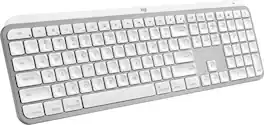
Introducing MX Keys S for Mac — a low-profile wireless keyboard with Mac-specific keys that offers a fast fluid precise typing experience, smart illumination, and customizable, time-saving Smart Actions and matching Space gray and Pale gray finishes that blend perfectly into your Apple setup.

MX Keys S Logitech Wireless Keyboard — a low-profile full-size keyboard that offers a fluid, precise typing experience and customizable, time-saving Smart Actions that automate your most repetitive tasks with a single keystroke. The backlit keyboard features smart backlighting that lights up when your hands approach it and automatically adjusts to suit the time of day.

Magic Keyboard is available with Touch ID, providing fast, easy, and secure authentication for logins and purchases. Magic Keyboard with Touch ID and Numeric Keypad delivers a remarkably comfortable and precise typing experience. It features an extended layout, with document navigation controls for quick scrolling and full-size arrow keys, which are great for gaming. The numeric keypad is also ideal for spreadsheets and finance applications. It’s wireless and features a rechargeable battery that will power your keyboard for about a month or more between charges. It pairs automatically with your Mac, so you can get to work right away. It features a USB-C port and includes a woven USB-C Charge Cable that lets you pair and charge by connecting to a USB-C port on your Mac.
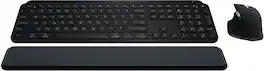
Master your flow with the MX Keys S Combo Wireless Mouse and Keyboard — the ultimate combo that combines the power of the fluid, fast precision typing of MX Keys S Wireless Keyboard with the precise, fast scrolling experience of MX Master 3S Wireless Mouse.
| Pros for Logitech - MX Keys S for Mac Advanced Full-size Wireless Scissor Keyboard with Backlit keys for MacBook, iMac, iPad - Pale Gray | |||
|---|---|---|---|
| Connectivity, Backlight, Build Quality | There were no pros for this product— | There were no pros for this product— | Connectivity, Keyboard Quality, Battery Life, Ease of use, Scroll Wheel |
| Cons for Logitech - MX Keys S for Mac Advanced Full-size Wireless Scissor Keyboard with Backlit keys for MacBook, iMac, iPad - Pale Gray | |||
| There were no cons for this product— | There were no cons for this product— | There were no cons for this product— | Palm Rest, Price |
Specs
Reviews
Customers are saying
Customers regard the MX Keys S for Mac keyboard highly, praising its excellent build quality, comfortable key feel, and long battery life. Many appreciate the seamless connectivity and ease of setup with Apple devices. While some users wished for Touch ID functionality, the overall experience is overwhelmingly positive. The keyboard's compatibility with various Apple products is also frequently highlighted.
Customer Images
The vast majority of our reviews come from verified purchases. Reviews from customers may include My Best Buy members, employees, and Tech Insider Network members (as tagged). Select reviewers may receive discounted products, promotional considerations or entries into drawings for honest, helpful reviews.
- Rated 5 out of 5 stars
Better than I expected
I've been shopping around for a new keyboard, one that doesn't feel cheap and comfortable to type with. This Logitech keyboard doesn't disappoint. The build quality is top notch and I get the same typing satisfaction as I do from my MacBook. Nice backlit keys and no connection issues. keyboard also has a proximity sensor that wakes it from sleep just before you start typing.
This review is from Logitech - MX Keys S for Mac Advanced Full-size Wireless Scissor Keyboard with Backlit keys for MacBook, iMac, iPad - Space Gray
Posted by XiomaraL
- Rated 5 out of 5 stars
S Tier keyboard
I really enjoyed the Logitech keyboard. I was coming from a magic mouse and magic keyboard set up for my MacBook Pro when utilizing a desktop. This set up with the MS3 is one of the best things that I’ve ever seen as a product sold. The only way that it could be improved is to use Apple proprietary systems to make touch ID compatible. But that is it. Everything else fish in wine. It feels functional quick to respond, and innovative, especially with the screenshot adaptation. This product is S Tier by far.
This review is from Logitech - MX Keys S for Mac Advanced Full-size Wireless Scissor Keyboard with Backlit keys for MacBook, iMac, iPad - Space Gray
Posted by Jordan
- Rated 5 out of 5 stars
Broke up a fight!
Loving it! I did drop it trying to break up a fight between two kittens. The keyboard played referee but wasnt badly damaged. Its been a great keyboard though very well made with lots of extra keys to use.
This review is from Logitech - MX Keys S for Mac Advanced Full-size Wireless Scissor Keyboard with Backlit keys for MacBook, iMac, iPad - Space Gray
Posted by Rhamzees