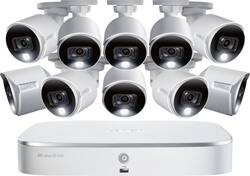
Lorex - 16-Channel, 10-Camera Indoor/Outdoor Wired 4K UHD 2TB DVR Surveillance System - White
- Key Specs
- Camera Resolution: 3840 x 2160 (Refers to the number of pixels, both horizontally and vertically, used to capture video/images. The higher the resolution the finer the detail that can be seen.)
- Field Of View: 111 degrees (The area of a target, measured as an angle from the location of viewing, that can be observed.)
- Night Vision: true
- Number Of Cameras Included: 10
- Camera Power Source: Plug-in
- Works With: Amazon Alexa, Apple HomeKit, Google Assistant (Compatible with or able to be connected to other smart devices or applications.)
- Number Of Channels: 16
- Recording Resolution: 1280 x 720, 1920 x 1080, 3840 x 2160 (Refers to the number of pixels, both horizontally and vertically, used to capture video. The higher the resolution the finer the video detail that can be seen.)
- Storage Type: DVR
- Indoor Or Outdoor Use: Indoor, Outdoor (Indicates the appropriate environment product was designed to be used in.)
- Minimum Operating Temperature: -40 degrees fahrenheit (The lowest recommended ambient (surrounding) temperature in which the product can ideally operate stated by the manufacturer. Generally long-term exposure of the product to temperatures less than the minimum can result in ineffective operation.)
- Maximum Operating Temperature: 131 degrees fahrenheit (The highest recommended ambient (surrounding) temperature in which the product can ideally operate stated by the manufacturer. Generally long-term exposure of the product to temperatures more than the maximum can result in ineffective operation.)
- General
- Product Name: 16-Channel, 10-Camera Indoor/Outdoor Wired 4K UHD 2TB DVR Surveillance System
- Brand: Lorex
- Model Number: D841A62-8DAA-E
- Camera
- Camera Resolution: 3840 x 2160 (Refers to the number of pixels, both horizontally and vertically, used to capture video/images. The higher the resolution the finer the detail that can be seen.)
- Field Of View: 111 degrees (The area of a target, measured as an angle from the location of viewing, that can be observed.)
- Night Vision: true
- Night Vision Distance: 151 feet
- Number Of Cameras Included: 10
- Frame Rate: 30 frames per second (The frequency at which consecutive images can be captured. The higher the frame rate, the more detail that can be captured.)
- Minimum Required Illumination: 0 lux (Refers to the minimum amount of light needed to view objects. Generally, the lower the number, the better the camera can detect objects in little to no light.)
- Camera Infrared Distance: 151 feet (The distance over which the camera's infrared, or night vision, capabilities can detect objects.)
- Image Sensor Type: CMOS (CCD and CMOS are the two main technologies used in image sensors. CCD, the older of the two types, turns analog light signals into digital pixels. This conversion happens without distortion, resulting in high-quality images. Newer CMOS sensors use transistors at each pixel to move electrical charges. CMOS sensors are typically less expensive, but also require more light to create distortion-free images.)
- Camera Mount Type: Other
- Power
- Camera Power Source: Plug-in
- Compatibility
- App Compatible: true (The product can be connected to a program or software application on a mobile device, which then receives collected data from the product.)
- Camera Compatibility: Lorex cameras
- Works With: Amazon Alexa, Apple HomeKit, Google Assistant (Compatible with or able to be connected to other smart devices or applications.)
- Connectivity
- Camera Connectivity: Wired (Security system cameras can be set up in several ways. Wired cameras require cables for power and footage transmission, while wire-free cameras don't need cables for either. Wireless cameras still require cables for receiving power but are able to transmit footage via a wireless network.)
- Recording & Playback
- Number Of Channels: 16
- Video Compression Type: MPEG-4; H.264; AVI
- Recording Resolution: 1280 x 720, 1920 x 1080, 3840 x 2160 (Refers to the number of pixels, both horizontally and vertically, used to capture video. The higher the resolution the finer the video detail that can be seen.)
- Storage
- Storage Type: DVR
- Internal Storage Capacity Upgradeable Upto: 10000 gigabytes
- Performance
- Indoor Or Outdoor Use: Indoor, Outdoor (Indicates the appropriate environment product was designed to be used in.)
- Minimum Operating Temperature: -40 degrees fahrenheit (The lowest recommended ambient (surrounding) temperature in which the product can ideally operate stated by the manufacturer. Generally long-term exposure of the product to temperatures less than the minimum can result in ineffective operation.)
- Maximum Operating Temperature: 131 degrees fahrenheit (The highest recommended ambient (surrounding) temperature in which the product can ideally operate stated by the manufacturer. Generally long-term exposure of the product to temperatures more than the maximum can result in ineffective operation.)
- Features
- Auto-On Detection: Motion
- Dimension
- Camera Height: 3.2 inches
- Camera Width: 2.8 inches
- Camera Depth: 5.9 inches
- Camera Weight: 0.66 pounds
- DVR Height: 1.8 inches
- DVR Width: 10.6 inches
- DVR Depth: 8 inches
- Sensor
- Sensors: Motion sensor (Detects stimuli such as heat, light, sound, motion, or pressure and responds accordingly by operating a control or initiating a function of the device.)
- Output
- DVR Output(s): HDMI, VGA, RCA audio, USB 2.0
- Included
- Camera(s) Included: true
- DVR Included: true
- Cable(s) Included: true
- Warranty
- Manufacturer's Warranty - Parts: 2 years
- Manufacturer's Warranty - Labor: 2 years
- Other
- UPC: 695529021300
Record and view impressive 4K video with this powerful 2TB recorder, providing Ultra HD resolution with superior detail and definition. This 2TB recorder also features advanced person/vehicle motion detection available on up to four channels, so you only receive alerts important to you. Smart Search allows you to filter motion events by area, time/date and person/vehicle, saving time when reviewing footage. With convenient voice control and smart home compatibility, 4K resolution, and advanced motion detection, this 2TB recorder covers all the bases.
- See more with Color Night Vision™: Make nighttime recognition of people and objects easier using clear color video in low light conditions such as porchlights and streetlights.
- Remote-triggered siren: This system sets off a loud intruder alert to deter crime. You can turn the camera siren on and off from the app providing real-time theft deterrence.
- Monitor your property with four cameras: These weatherproof Ultra HD 4K security cameras boast high-definition resolution.
- View and record from up to eight channels: Add more devices to ensure that your whole home is safe from intruders.
- Set and forget with hard drive storage: Comes with pre-installed security-grade duty-cycle 2TB hard drive.
- See more than ever before: Capture clear visual evidence with 4K Ultra HD and advanced 16x digital zoom.
- Infrared night vision lets you see in dark: Keep an eye on things with exceptionally long-range IR night vision up to 150' at night.
- Viewing angle up to 111°: Expertly captures a wide angle of your property for exceptional security at all times.
- Outdoor security cameras for all-weather coverage: The professional-grade cameras feature lightweight vandal-resistant polycarbonate protected housing, each camera is IP67-rated and can withstand temperatures from -22° to 140°F.
- Advanced Person/Vehicle motion detection: Allows you to only receive notifications on your mobile device when a person or vehicle is detected by the camera, reducing false alerts from other types of motion, such as animals or branches swaying in the wind.
- Works with Google Assistant and Amazon Alexa: For easy voice operations.
- Connected on the go: Get set up in an instant and stay connected with free Lorex Secure™ app. Get important motion alerts, enjoy remote live viewing in HD, and review recorded videos.
- HDMI and VGA outputs: Connect to a wide range of compatible displays for versatile viewing, including your HDTV, LCD or plasma TV. USB connectivity makes it easy to transfer stored footage.
- Check in anytime from anywhere: You can stream live video from your home to your mobile device.
- Motion-activated warning light: The bright customizable LED light warns off would-be intruders.
- All-in-one cabling: This system features premium 60' UL/CM rated in-wall fire-resistant cables.
- Reliable and secure local storage with no hidden fees: Store up to 35 days of motion recording with customizable recording resolution, frame rate, and quality settings.
Whats Included
- 10x UL/CM-rated 60ft in-wall fire resistant cables
- 4-in-1 camera power supply, DVR power adapter
- Lorex 16-Channel, 10-Camera Indoor/Outdoor Wired 4K 2TB DVR Surveillance System
- Mounting hardware
- Owner's manual
- Remote control, mouse, HDMI and Ethernet cables
Q: What is the FPS (frames per second) information for this system?
A: It SAYS 30, but 4K cameras right now use 7 frames per second. 7 is the most you can select in the recording menu, which coincidentally can only be accessed through an Internet Explorer 11 web browser, not the Lorex mobile app. In fact, everything related to camera settings, recording settings, hard drive, network, etc - can only be accessed through IE11 on a desktop Windows computer- and that's only after allowing some components to be installed (ActiveX) which are no longer supported by new browsers (like Edge, Chrome, etc). You basically have to figure out the DVR's address on your network, go there in IE11, and then you can see the menu. Unfortunately- turning down the camera recording setting to 5MP, 3MP, 1080P, 720P, etc DOES NOT change the frames per second choices. If you hook up an older 1080P camera to the system, it will allow up to 30 frames per second, but these 4K cameras do not. Even after selecting lower resolutions, confirming, and refreshing the menu - 7 is the max you can select. This means crystal clear 4K backgrounds, but blurry moving people and cars.
Q: Why do a battery symbol Be blinking off and on on one of my Lorex cameras
A: Low DC voltage will cause the battery icon to appear as well as cause poor performance at night when the IR leds are active for night vision. Check your Power connections for that camera and the power supply. You may need a higher current power adapter if the length is excessive.
A: I have the 8 camera 4K Lorex System. I have my system set up to send an email whenever motion is detected to my Samsung Galaxy S7 edge. This camera system will also send notifications through the Lorex App to your smartphone with a link to playback the review of what motion was detected. I turned it off because it got to be worrisome after a while. If you need to use this feature, I strongly suggest you enable motion detection with ONLY people and vehicle.
Q: we can see live video from any where in mobile or tablet ? and how
A: Yes you can, once you are connected to the internet you will have to download an app. Once you download the app you are able to see them live, or watch previously recorded videos on your phone or tablet.
A: I had this problem, turns out the monitor I was using was 720p. Once I hooked up a 1080p monitor a small blue arrow shows up in the bottom right corner. Problem is too low resolution on TV. Would be nice if LOREX would show this on their FAQ, almost returned the system!
Q: Do the cameras record audio?
A: No they do not
A: If by waterproof you mean can they be installed outside where they will get wet, then yes. I installed mine last week and since we’ve had a couple days of good downpours and there have been no issues with the cameras or wires at all.
A: You need a monitor connected to the DVR to setup the system. Once it's set up, you can use the monitor to view the cameras without internet service. But, if you wand to view the cameras on a cell phone, tablet or PC you need internet service.













