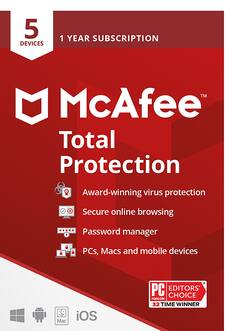
McAfee - Total Protection (5 Device) (1-Year Subscription) - Windows, Mac OS, Apple iOS, Android
- Key Specs
- Number of Devices: 5
- Number of Licenses: 1
- Operating System Compatibility: Windows, Mac OS, Apple iOS, Android
- Software Format: Physical (Physical software requires a disc, cartridge, etc. be inserted into the gaming console or computer to download and/or operate the software. Digital software allows for downloading and/or playing the software on the gaming console or computer without a physical disc, cartridge, etc. Physical (Download Code Only) software is purchased in physical form with a code that allows for downloading and/or playing the software on the gaming console or computer without a physical disc, cartridge, etc.)
- Subscription Period: 1 Year
- General
- Brand: McAfee
- Model Number: MCA950800F002
- Product Name: Total Protection (5 Device) (1-Year Subscription)
- Publisher: McAfee
- Features
- Protection Type(s): Malware, Phishing, Spam, Spyware/adware, Virus
- Real-Time Protection: true
- E-mail Security: true
- Parental Controls: false (Allows user to block unwanted content, signals, channels, networks, etc. from being received or accessed.)
- Firewall Type: Other (The method the firewall uses to filter and process data to increase network security, primarily by blocking malicious traffic requests while allowing legitimate traffic through.)
- In-Software Purchases: Subscription renewals
- Language(s): English
- Cloud Based Software: false
- Purchase Rights
- Number of Devices: 5
- Number of Licenses: 1
- Compatibility
- Operating System Compatibility: Windows, Mac OS, Apple iOS, Android
- Software Format: Physical (Physical software requires a disc, cartridge, etc. be inserted into the gaming console or computer to download and/or operate the software. Digital software allows for downloading and/or playing the software on the gaming console or computer without a physical disc, cartridge, etc. Physical (Download Code Only) software is purchased in physical form with a code that allows for downloading and/or playing the software on the gaming console or computer without a physical disc, cartridge, etc.)
- Requirements
- System Requirements: Windows 11, Windows 10, Windows 8.1 fully patched (32- and 64-bit); macOS 10.12 - 10.15; Android smartphones and tablets 7 or higher; Apple iOS 13 or later; 2 GB RAM; 1.3 GB free drive space; 1 GHz Processor (The software that a product must have for it to be able to integrate with another product.)
- Subscription: true
- Subscription Period: 1 Year
- Download Requirements: Internet connection, Firefox, Google Chrome, Safari (macOS and iOS only), Microsoft Edge (Chromium-based)
- Hard Drive Space Required: 1.3 gigabytes
- Other
- UPC: 731944710310
All-in-one online protection so you can enjoy life online. McAfee Total Protection delivers a single, simple solution to safeguard your privacy and identity, wherever and whenever.
- Award-winning antivirus: Rest easy knowing McAfee’s protecting you from the latest threats
- Browse confidently and privately: Keep your info safe from prying eyes with McAfee's Secure VPN
- See how safe you are being online: Get your personalized protection score, identify weaknesses and get help to fix them
- Bank, shop, and connect worry-free: Be warned about risky websites before you click
- Protect your identity: Your guided identity protection includes dark web monitoring for up to 10 emails
- Secure your accounts: Generate and store complex passwords with McAfee's password manager
- Award-winning antivirus: Rest easy knowing McAfee’s protecting you from the latest threats
- Browse confidently and privately: Keep your info safe from prying eyes with McAfee's Secure VPN
- See how safe you are being online: Get your personalized protection score, identify weaknesses and get help to fix them
- Bank, shop, and connect worry-free: Be warned about risky websites before you click
- Protect your identity: Your guided identity protection includes dark web monitoring for up to 10 emails
- Secure your accounts: Generate and store complex passwords with McAfee's password manager
Product Manuals
A: Yes! This can be used either as the first-time purchase and also as the renewal. When you buy this, take the code to https://www.mcafee.com/activate like you did before, but when you enter the code and log into your existing McAfee account, it will ask you if you want to extend your existing subscription. As long as you choose that option, your expiry date will be moved out by 1 year. You don't need to wait for the subscription to expire, nor do you need to reinstall. Your new expiry date will be 1 year from your current one - not 1 year from when you redeem the code so you don't lose any time. And since we constantly update our software, the latest has already been installed on your devices so no need to install anything further. Everything will continue to help you stay protected. Please let me know if you have any other questions.
A: This was a download. I would prefer a physical media copy. They are much simpler to use for installation and don't rely on an internet connection or speed. Also if you have to reinstall because of a system crash a physical copy is much easier.
A: I could be wrong but my experience is that the subscription is always fully up to date at the time of the download to your computer. I always try to buy mine within two months of when I need to renew my subscription, but the actual renewal is done online and will be the latest release at that time. Renewing an older subscription should work, but will probably require a longer time to download the updates you don't have. A first time user will be downloading the entire gamut of security which will take a longer time than a renewal. (I think?)
A: The subscription begins upon the first installation regardless of how many devices you install it on. Installing onto other devices doesn't change the expiration date. Make sure you go to https://www.mcafee.com/activate to redeem the code as there are many fraudulent sites out there claiming to be us and trying to charge you money. Please let me know if you have any other questions.
A: Yes! The codes don't expire. You can keep it until 2021 and it will still be valid. Just so you are aware, you won't lose any subscription time by applying the code now - it will add a year to whatever the current expiration is - in fact you can do that several times (with several codes) and create a multi-year subscription if you would like. But, if you want to hold onto it and not apply it until 2021, that is fine. Please let me know if you have any other questions.
A: You will have to uninstall it and install again with new activation code . It’s easy as the McAfee will guide you the process during new installation.
Q: What's the difference in the "Total Protection" and the "Antivirus" versions? thx
A: There are 2 versions of "antivirus" - McAfee AntiVirus and McAfee Antivirus Plus. Total Protection also has different features depending on the device count version you choose. Both antivirus versions, all Total Protection versions and all other consumer products we create have the same level of award-winning antivirus protection. The differences are in which features are included. McAfee Antivirus protects a single PC only. It includes a firewall and WebAdvisor, our tool that warns you about risky websites before you visit them. McAfee Antivirus Plus expands to be a cross-device platform protecting PC's, Macs, Smartphones and Tablets and it will protect up to 10 devices. The next step up is McAfee Internet Security, which includes things like an anti-spam filter and a password manager. McAfee Total Protection and LiveSafe are our top-end products and they introduce features like Safe Family, Identity Theft Protection, and File encryption. As you move up the stack, the step-up platform includes all the features the previous platform has, plus additional features. We try to give you options to fit your needs and protect what matters to you. Please let me know if I can help with anything further.
A: You can redeem it for your McAfee account and it will automatically start the subscription once your current one expires. It won't count the months with your current subscription. So basically the new subscription will expire 1 year after you current subscription expires.














