MSI - Prestige 16” Laptop – Intel Evo Edition - Intel Core Ultra 9 – NVIDIA GeForce RTX 4060 with 32GB Memory – 1TB SSD - Stellar Gray
Related Item

Highlights
- Key Specs
- Screen Type: IPS
- Screen Size: 16 inches (Size of the screen, measured diagonally from corner to corner.)
- Screen Resolution: 2560 x 1600 (Screens come in a range of resolutions (measured in pixels, horizontal x vertical). The higher the resolution, the greater the picture quality.)
- Touch Screen: false (Touch-screen devices make navigating more intuitive. Using a touch-screen display, you can do things such as tap to select, hold and drag to move items, swipe to scroll, and pinch to zoom.)
- Processor Model: Intel Core Ultra 9 Series 1 (Your computer's processor is like its brain. Working in combination with system memory, the power of the processor determines the complexity of software you can run, how many programs you can have open at the same time, and how fast those programs will run. Most computers feature an AMD, Intel or Snapdragon processor.)
- Storage Type: SSD
- Total Storage Capacity: 1000 gigabytes
- System Memory (RAM): 32 gigabytes (Random-access memory (RAM) is a computing device's short-term data storage, which allows active information to be accessed quickly. The size and type of RAM determines how efficiently the device can handle large amounts of information at one time. For example, gaming or video editing requires more RAM for optimal performance.)
- Graphics: NVIDIA GeForce RTX 4060 (Often referred to as a "graphics processing unit" (GPU), this device is responsible for displaying image content and decoding/encoding video content in programs and games.)
- Display Connector(s): 1 x Thunderbolt 4, 1 x HDMI 2.1 (The number and type of connectors used to connect to an external display.)
- Battery Chemistry: Lithium-polymer
- Backlit Keyboard: true (Integrated lights allow for visibility of the keys in low-light conditions.)
- General
- Brand: MSI
- Model Number: PRE16STU14020
- Product Name: Prestige 16” Laptop – Intel Evo Edition - Intel Core Ultra 9 – NVIDIA GeForce RTX 4060 with 32GB Memory – 1TB SSD
- Color: Stellar Gray
- Year of Release: 2023
- Display
- Display Type: LCD
- Screen Type: IPS
- Screen Size: 16 inches (Size of the screen, measured diagonally from corner to corner.)
- Screen Resolution: 2560 x 1600 (Screens come in a range of resolutions (measured in pixels, horizontal x vertical). The higher the resolution, the greater the picture quality.)
- Touch Screen: false (Touch-screen devices make navigating more intuitive. Using a touch-screen display, you can do things such as tap to select, hold and drag to move items, swipe to scroll, and pinch to zoom.)
- Processor
- Processor Brand: Intel
- Processor Model: Intel Core Ultra 9 Series 1 (Your computer's processor is like its brain. Working in combination with system memory, the power of the processor determines the complexity of software you can run, how many programs you can have open at the same time, and how fast those programs will run. Most computers feature an AMD, Intel or Snapdragon processor.)
- Processor Model Number: 185H
- Neural Processing Unit (NPU): true (Whether the product comes with an integrated neural processing unit (NPU) that performs computations for AI (artificial intelligence) functions to increase proficiency of the CPU and reduce power consumption.)
- Storage
- Storage Type: SSD
- Total Storage Capacity: 1000 gigabytes
- Solid State Drive Capacity: 1000 gigabytes (The amount of data that can be stored on the device's solid state drive (SSD). SSD is a flash-based storage with faster speeds than a hard disk drive (HDD).)
- Solid State Drive Interface: NVMe (Connects the solid state drive to the host system. PCI and SATA interfaces are the most common; PCI interfaces are typically faster, but SATA interfaces are compatible with a wider range of systems.)
- Memory
- System Memory (RAM): 32 gigabytes (Random-access memory (RAM) is a computing device's short-term data storage, which allows active information to be accessed quickly. The size and type of RAM determines how efficiently the device can handle large amounts of information at one time. For example, gaming or video editing requires more RAM for optimal performance.)
- Type of Memory (RAM): LPDDR5 (Each type of RAM delivers a different level of speed, bandwidth, energy efficiency and performance.)
- Graphics
- Graphics Type: Dedicated (Dedicated graphics uses a separate graphics card for processing video images. Because it does not use memory from the system's RAM, there is no extra burden on the CPU and graphics are processed more efficiently. Integrated graphics shares system RAM to process video images.)
- GPU Brand: NVIDIA
- Graphics: NVIDIA GeForce RTX 4060 (Often referred to as a "graphics processing unit" (GPU), this device is responsible for displaying image content and decoding/encoding video content in programs and games.)
- Compatibility
- Operating System: Windows 11 Home (The operating system manages all software and hardware, including files, memory and connected devices. Most importantly, it lets you interact with your device and your programs in a visual way; otherwise, you'd be typing computer code to get anything done.)
- Connectivity
- Display Connector(s): 1 x Thunderbolt 4, 1 x HDMI 2.1 (The number and type of connectors used to connect to an external display.)
- Number of HDMI Outputs (Total): 1
- Number of Thunderbolt Ports (Total): 1
- USB Ports: 1 x USB-A 3.2, 2 x USB-C 4 (The number and type of USB ports the product has.)
- Number of USB Ports (Total): 3
- Headphone Jack: true (The device features an interface that allows for the connection of headphones.)
- Microphone Input: true (The device features an input for connecting an external microphone.)
- Wireless Connectivity: Wi-Fi (The manner in which a device sends data to another device over a short distance without the use of wires or cables.)
- Wireless Standard: BE (The wireless networking protocol used by the device. Each iteration of the protocol is based on the 802.11 standard developed by the Institute of Electrical and Electronics Engineers (IEEE) Standards Association. Denoted by letters following 802.11 (802.11a, 802.11ac, etc.), each version, published in alphabetical order, encompasses all previous versions.)
- Wireless Networking Standard: Wi-Fi 7 (The wireless networking standard used by the device. Each iteration of the standard developed by the Wi-Fi Alliance corresponds to an existing IEEE 802.11 protocol; for example, standard 802.11ac (or AC) is termed Wi-Fi 5. Refers specifically to the standard the device is designed to use, but ultimately determines product interoperability and backward compatibility including previous versions.)
- Ethernet Card: 10/100/1000 (Also known as an Ethernet adapter, this card plugs into a computer's motherboard and enables it to access an Ethernet network. Ethernet data transmission speeds are measured in Mbps (megabits per second) and Gbps (gigabits per second). For example, a 10/100 Ethernet port transmits 10 and 100 Mbps, while a 10/100/1000 Ethernet port transmits 10 and 100 Mbps and has a maximum speed of 1000 Mbps (1 Gbps).)
- Power
- Battery Cells: 4-cell
- Battery Chemistry: Lithium-polymer
- Expansion
- Number of M.2 Slots: 1 (This interface is most commonly used for high-speed solid state drives (SSDs), and is often used in laptops due to its small size.)
- Camera
- Front-Facing Camera: true
- Front Facing Camera Video Resolution: 1080p (Refers to the number of pixels, both horizontally and vertically, used by the camera facing the user to capture video. The higher the resolution the finer the video detail that can be seen.)
- Built-In Microphone: true
- Features
- Backlit Keyboard: true (Integrated lights allow for visibility of the keys in low-light conditions.)
- Dimensions
- Product Height: 14.11 inches (The out of box height of the item. Height is measured as the vertical distance from the bottom of the item to the top as it would be primarily used or placed.)
- Product Width: 10.15 inches (The out of box width of the item. Width is measured as the horizontal distance from one side of the item to the other as it would be primarily used or placed.)
- Product Depth: 0.75 inches (The out of box depth of the item. Depth is measured as the distance from the front of the item to the back as it would be primarily used or placed.)
- Product Weight: 3.52 pounds (The out of box weight of the item.)
- Certifications Listings & Approvals
- ENERGY STAR Certified: true (Devices carrying the ENERGY STAR service mark, such as computer products and peripherals, kitchen appliances, and other products, generally use 20% to 30% less energy than required by federal standards.)
- EPEAT Qualified: false (The Electronic Product Environmental Assessment Tool (EPEAT) was designed to provide an environmental assessment tool for purchasers. In order to qualify for EPEAT, a product must meet all 23 required criteria.)
- Included
- Numeric Keypad: true
- Warranty
- Warranty - Parts: 1 year
- Warranty - Labor: 1 year
- Other
- UPC: 824142341476
Experience AI. Experience More. Reimagine Productivity with AI, the new Prestige 16 takes premium mobile performance, brilliant display, slim body, and high battery efficiency to the next stage. It delivers exceptional performance whether you are creating, planning or traveling — this is the best AI business laptop that allows you to work on the go.
- Windows 11 Operating System: Windows 11 has all the power and security of Windows 10 with a redesigned and refreshed look. It also comes with new tools, sounds, and apps. Every detail has been considered. All of it comes together to bring you a refreshing experience on your PC.
- 16" QHD+ display: The 2560 x 1600 resolution Energy-efficient LED backlight.
- Intel Evo Edition: Get the best of Intel Core Ultra processors in an Intel Evo Edition laptop that is sleek and light for a better on-the-go experience. Intel Evo Edition laptops have been rigorously tested to earn this 'seal of approval.’ These leading-edge designs have surpassed 75+ premium standards like high performance, fast charging, long lasting battery, instant wake, best-in-class connectivity, and ideal size & weight, giving you everything you need without compromise.
- Intel Core Ultra 9 -185H: Designers, streamers, and everyday users will be delighted by the exceptional performance of this Intel Core Ultra 9 processor. This newly released CPU boasts an impressive configuration with 16 Cores and 22 Threads. These processors feature a dedicated engine that helps unlock AI experiences on the PC and high-performance low power processing, so you can enjoy superior performance with less drain on battery.
- NVIDIA GeForce RTX 4060 graphics: Backed by 8GB GDDR6 dedicated video memory for an ultrafast, advanced GPU to fuel your games.
- 32GB system memory for intense multitasking and gaming: Reams of high-bandwidth LPDDR5 RAM to smoothly run your graphics-heavy PC games and video-editing applications, as well as numerous programs and browser tabs all at once.
- 1 TB solid-state drive (PCI-e): Save files fast and store more data. With massive amounts of storage and advanced communication power, PCI-e NVMe SSDs are great for major gaming applications, multiple servers, daily backups, and more.
- WI-FI 7 BE Extraordinary Wireless Experience: The latest Wi-Fi 7 delivers stunning speed while keeps the network smooth and stable even when sharing the network with numerous users. With its outstanding throughput and low latency, you just beat others to it.
- 140W PD 3.1Charging: 140W PD 3.1 fast charging, the maximum charging voltage is updated from 20V to 24V keeps your mobile devices productive and power even when you're busy at work and don’t have much time to charge, offers a highly portable and efficient fast charging solution than a normal daily laptop.
- Windows 11 Operating System: Windows 11 has all the power and security of Windows 10 with a redesigned and refreshed look. It also comes with new tools, sounds, and apps. Every detail has been considered. All of it comes together to bring you a refreshing experience on your PC.
- 16" QHD+ display: The 2560 x 1600 resolution Energy-efficient LED backlight.
- Intel Evo Edition: Get the best of Intel Core Ultra processors in an Intel Evo Edition laptop that is sleek and light for a better on-the-go experience. Intel Evo Edition laptops have been rigorously tested to earn this 'seal of approval.’ These leading-edge designs have surpassed 75+ premium standards like high performance, fast charging, long lasting battery, instant wake, best-in-class connectivity, and ideal size & weight, giving you everything you need without compromise.
- Intel Core Ultra 9 -185H: Designers, streamers, and everyday users will be delighted by the exceptional performance of this Intel Core Ultra 9 processor. This newly released CPU boasts an impressive configuration with 16 Cores and 22 Threads. These processors feature a dedicated engine that helps unlock AI experiences on the PC and high-performance low power processing, so you can enjoy superior performance with less drain on battery.
- NVIDIA GeForce RTX 4060 graphics: Backed by 8GB GDDR6 dedicated video memory for an ultrafast, advanced GPU to fuel your games.
- 32GB system memory for intense multitasking and gaming: Reams of high-bandwidth LPDDR5 RAM to smoothly run your graphics-heavy PC games and video-editing applications, as well as numerous programs and browser tabs all at once.
- 1 TB solid-state drive (PCI-e): Save files fast and store more data. With massive amounts of storage and advanced communication power, PCI-e NVMe SSDs are great for major gaming applications, multiple servers, daily backups, and more.
- WI-FI 7 BE Extraordinary Wireless Experience: The latest Wi-Fi 7 delivers stunning speed while keeps the network smooth and stable even when sharing the network with numerous users. With its outstanding throughput and low latency, you just beat others to it.
- 140W PD 3.1Charging: 140W PD 3.1 fast charging, the maximum charging voltage is updated from 20V to 24V keeps your mobile devices productive and power even when you're busy at work and don’t have much time to charge, offers a highly portable and efficient fast charging solution than a normal daily laptop.
Whats Included
- Prestige 16” Laptop – Intel Evo Edition - Intel Core Ultra 9 – NVIDIA GeForce RTX 4060 with 32GB Memory – 1TB SSD
- Prestige 16” Laptop – Intel Evo Edition - Intel Core Ultra 9 – NVIDIA GeForce RTX 4060 with 32GB Memory – 1TB SSD
Q: How much storage space does this MSI laptop have?
A: This MSI laptop comes equipped with a 1TB solid-state drive (PCI-e) for fast file saving and ample storage capacity.
Q: Which processor is used in the MSI Prestige 16” Laptop?
A: The MSI Prestige 16” Laptop is equipped with the Intel Core Ultra 9 -185H processor.
Q: Does this MSI laptop have a fast charging feature?
A: Yes, the MSI Prestige 16 supports 140W PD 3.1 fast charging, allowing you to quickly power up your device.
Q: What graphics card does this MSI laptop use?
A: This MSI laptop is powered by the NVIDIA GeForce RTX 4060 graphics card with 8GB GDDR6 dedicated video memory.
Q: What is the benefit of the Intel Evo Edition on this MSI laptop?
A: The Intel Evo Edition on this MSI laptop signifies that it has undergone rigorous testing and meets over 75 premium standards, including high performance, fast charging, long battery life, instant wake, best-in-class connectivity, and optimal size and weight.
Q: What version of Wi-Fi does this MSI laptop support?
A: This MSI laptop is equipped with the latest Wi-Fi 7 technology, providing exceptionally fast and stable wireless connectivity.
Q: What type of display does the MSI Prestige 16” Laptop have?
A: The MSI Prestige 16” Laptop features a 16-inch QHD+ display with a 2560 x 1600 resolution and an energy-efficient LED backlight.
Q: What is the battery life on this laptop?
A: Currently getting 8+ hrs per charge on a heavier data analysis / data science workload. Also have brightness turned down. I have heard on other dedicated graphics card laptops (like this model) you can turn off the GPU to save battery but I don't know how to do that yet on this model. I could see someone getting 10+ hrs easy on this model with light usage with brightness/power options optimized. I think the marketing material says 12+ hrs, I never believe the published battery life on any Windows laptop (by the manufacturer), but I am happy with the battery life so far. I could perhaps squeeze more out of the battery once I figure out how to shut off the dedicated GPU when I don't need it. I have used Thinkpads and Dell Precision for the same type of work in the past and the best I could get out of the same workload was 4 hrs on a charge brand new.
Compare similar products
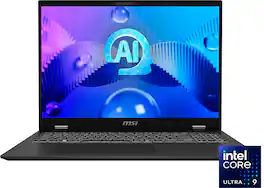
Experience AI. Experience More. Reimagine Productivity with AI, the new Prestige 16 takes premium mobile performance, brilliant display, slim body, and high battery efficiency to the next stage. It delivers exceptional performance whether you are creating, planning or traveling — this is the best AI business laptop that allows you to work on the go.

Step into the future with Predator Helios Neo 16S AI—a gaming powerhouse crafted for versatility on the move. Built around an Intel Core Ultra processor, NVIDIA GeForce RTX 5070 Ti GPU with 992 AI TOPS, and a vibrant 16-inch OLED WQXGA display offering 240Hz refresh and 100% DCI-P3 color accuracy. Designed for style-conscious gamers and professionals, this ultra-slim machine (19.9mm) with a sleek profile that meets the demands for performance on the go.
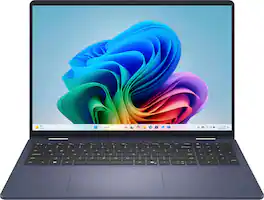
A versatile creative canvas. A stunning 16-inch screen built for versatile use with on-device Copilot+ featuring the latest Intel Core Ultra processors, designed to deliver the ultimate power efficiency and performance for the newest AI experiences in a sleek and stylish 2-in-1 laptop.

Prestige 16 AI EVO. Reimagine productivity with AI - the Prestige 16 AI Evo takes premium mobile performance, brilliant display, slim body and high battery efficiency to the next stage. It delivers exceptional performance whether you are creating, planning or traveling. This is the AI business laptop that allows you to work on the go. Slim and durable, the Prestige 16 AI Evo is crafted with a magnesium-aluminum chassis. Using Thixomolding with ATT (Advanced Thixomolding Technology), optimizes the mold injection process to achieve a seamless metal body: redefining strength, durability, and quality with the Prestige Series. The Prestige 16 AI Evo also has an Intel Evo Edition certification and comes powered by an Intel Core Ultra processor, making intensive computation seem easy and efficient. The integrated NPU also powers more workloads and is the choice to accelerate AI programs for long-sustained, power moderate, intensive applications. Extend your productivity with the powerful and reliable performance on the go.
| Pros for MSI - Prestige 16” Laptop – Intel Evo Edition - Intel Core Ultra 9 – NVIDIA GeForce RTX 4060 with 32GB Memory – 1TB SSD - Stellar Gray | |||
|---|---|---|---|
| Overall Performance, Portability, Battery Life | Overall Performance, Portability, Design, Screen Quality, Processor Speed | Overall Performance, Design, Portability, Speed, Storage Capacity | There were no pros for this product— |
| Cons for MSI - Prestige 16” Laptop – Intel Evo Edition - Intel Core Ultra 9 – NVIDIA GeForce RTX 4060 with 32GB Memory – 1TB SSD - Stellar Gray | |||
| There were no cons for this product— | Battery Life, Fan Noise, Heat Dissipation, Software | Battery Life, Camera Quality, Keyboard Feel | There were no cons for this product— |
Specs




Reviews
Customers are saying
Customers love the Prestige 16” Laptop for its long battery life. Many customers mentioned that the battery life is fantastic and they are very happy with it.
The vast majority of our reviews come from verified purchases. Reviews from customers may include My Best Buy members, employees, and Tech Insider Network members (as tagged). Select reviewers may receive discounted products, promotional considerations or entries into drawings for honest, helpful reviews.
- Rated 5 out of 5 stars
Battery life is killer. Long review.
I wanted a laptop with the maximum legal battery size TSA will let you fly with (100wh). I was tired of laptops that didn't prioritize someee battery life and was excited to learn more about the Ultra line of chips. Oh, before I begin, MSI's naming convention sucks. So let me disambiguate that so you don't waste time learning. The Prestige line is MSI's highest end of business laptops capable of Gaming. This is the first year that MSI went full metal on a laptop and decided to try it on their Prestige line which has always leaned toward clean, elegant, laptops - but now they can. The prestiges of 5 years ago had lousy batteries but no more. I don't know if this is the first year, but MSI stuck a 99.9 Wh battery in here. (If you are serious about battery life, why would a manufacturer put anything but 99 Wh? That's why I had to look away from lenovo.) But they didn't just slap a big battery in there, even software wise it seems to have the ability to focus on battery savings. Anyhow. Secondly, all of this year's MSI prestige's come in 2 types. The "Prestige Evo Edition" and the "Prestige Studio Evo Edition". The "Studio" moniker just means that this particular Prestige you are looking at has an nvidia chip. If it doesn't say studio, the laptop is either miss-labled or doesn't have a discrete GPU. And "Evo" just means it meets Intel's new certification that means a laptop has an "Ultra" chip and a large enough battery to earn the "Evo" badge (other brand's laptop's can also earn the badge). Alright, maybe that helped you. Maybe not. Alrighty, now on to the review again. Well, all that talk about battery life... well, it's not BS. I'm not sure if I should thank Windows, MSI, or Intel Ultra chips but the battery life is fantastic. Certainly the best windows laptop I've ever owned... But I love that I can connect the cable and dive into some gaming in the evenings. In fact, the battery is so long, its the first "gaming" laptop that I am comfortable using without a cord, even on something important, even just on a regular basis lol. You know those gaming bricks that last 60 minutes... yeah, this is not that. It is insanely responsive, the screen has good brightness, the screen is sadly not OLED, but for a work/school first, gaming second kind-of laptop, it is great. And then when you need to untether, it still delivers. I mean, under light use, it must have gotten between 6-8 hours of screen on time, but scattered throughout the entire day. It is light. I heard it would be, but it's pretty wild. I have regular work laptops that have no discrete graphics weighing more or having the same laptop thickness. Kinda wierd how much MSI could pack in here. And let's not forget it has a 100Wh battery in there somehow... It even has a numpad on the right! When it comes to gaming, I've been playing some Helldivers lately and loaded that up. It ran it as well as my 5 year old desktop, only the laptop was pushing 1600p monitor vs my 1080p desktop monitor.... For about 5 minutes. Then the laptop started skipping. Well after some tinkering around, I realized it was thermally throttling. So, I grabbed some desk items and propped it up and boom - it was running smooth again in less than 15 seconds. Now I have one of those metal ski laptop lifter things that fold away really small for travel, but break em out when I do feel like gaming. It can run games very well, just need to give the underside of the laptop some serious room to breathe. The holes for it to breath underneath are like literally the entire back half of the laptop lol, and they all need room if you're doing some intense gaming. I haven't tried even loading a game on battery. I guess I could for curiosity... but I would never really game on pure battery? so I haven't tried that. But speaking of cords, it can charge all the way down to a 30W USBC phone charger! Which is awesome cause on business trips I just need to bring my phone charger and can leave the brick behind (even if it's not that large, (if I know I won't have time to game it's nice to travel light)). It also has 2 USB-C ports to charge (I like having a backup incase cats/dogs/toddlers/spouses "somehow" damage a jack. You have backup)). If I had any gripes, it would be that the numpad is a weird config. Takes a bit of getting used to... but I much prefer having it than not, for those excel days or data entry days. Also, I couldn't believe how much updating it had to do. I mean it was bugging me to restart and do updates like every day or two for like 2 weeks. And actually it was kinda buggy every now and then too during those two weeks... but now it's butter, and it isn't hassling me for updates anymore. So I'd keep that in mind when you get setup. Also, I dislike that it only has a 16" screen. I really wanted like 18". But I didn't want that so bad I'm giving up a huge battery or real battery life. I considered Dell's XPS line that is also kinda business first/gaming second they were the only ones I found that also had a 99Wh battery. But spec for spec they were more than MSI all the way up their offerings.
Posted by FrankS
- Rated 5 out of 5 stars
Great laptop for data science
This MSI laptop is great. I purchased it because I needed something reliable with a fast processor and a good graphics card. I primarily use it for data science applications for my graduate studies. The full keyboard is a nice feature. This laptop is lightweight and well-built. The built-in Tobi-aware app is a great feature that I can turn on and off when necessary. I also like the physical shutter for the camera. The battery life has been good. The longest I have used it on battery power is 5-6 hours. The battery was about 35-40% after 5 hours and the performance never changed. I haven't tried running the laptop on battery for a full day.
Posted by MSIlaptop
- Rated 4 out of 5 stars
Solid Intel Core Ultra Laptop!
Solid laptop for the new Intel Meteor Lake Chips. Originally got the Intel Core Ultra 7 model and returned it because I wanted the slighlty higher clock speeds along with the dedicated Nvidia GPU. For those who don't want to shell out the extra $400 the Intel Arc GPU is a solid choice, I was able to test Minecraft and a few other Steam games on the ARC GPU and the ran great. As for this specific model, I have already used it for data analysis and data science tasks, it has performed great. I have yet to use the 4060 GPU for machine learning tasks, but should run well. Tried out a few games and performance was good (turned down settings from Ultra to ensure higher framerates). The first few battery cycles I have been able to get 8+ hours on a charge with a data analysis/data science workload. Under the right battery settings, switching to the Arc GPU (Nvidia Control Panel) and turning brightness down, I think you could get 10-12 hours easy with light web surfing/Youtube use. Only criticism would be the offset mousepad, as I am not used to that, it has been a slow transition. I did not neccessarily need a dedicated keypad, but it has come in handy a few times already when I have had to work in Excel/Google Sheets.
Posted by analytixguru




