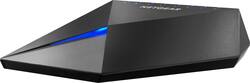
NETGEAR - Nighthawk S8000 10/100/1000 Mbps Gigabit Gaming & Streaming Switch
- Key Specs
- Number of PoE (Power over Ethernet) Ports: 8 (Allow connection of a single cable that provides both data connection and electrical power (Power over Ethernet).)
- Form Factor: Desktop
- Maximum Data Speed: 1000 megabits per second
- Switch Management Type: Web managed (Unmanaged switches don't require user configuration and are typically used for basic connectivity. Managed switches have more features and can be configured by the user for custom network use.)
- Number of LAN Ports: 8 (Number of devices able to be connected to the Local Area Network (LAN). LAN ports allow wired connections to other networking devices (wireless access points, range extenders, etc.) in order to share the internet connection received through a WAN port.)
- General
- Product Name: Nighthawk S8000 10/100/1000 Mbps Gigabit Gaming & Streaming Switch
- Brand: NETGEAR
- Model Number: GS808E-100NAS
- Network
- Quality Of Service (QoS) Traffic Prioritization: true (Allows a user to manage a device's network performance by configuring the types of traffic that receive top priority for transmission. High priority functions and applications receive maximum network performance, while low priority traffic receives minimum performance.)
- Speed
- Gigabit Ethernet Speed: true (Supports the gigabit Ethernet networking standard, which has a data rate of at least one gigabit per second, or 1,000 Mbps.)
- Dimensions
- Product Height: 1.6 inches (The out of box height of the item. Height is measured as the vertical distance from the bottom of the item to the top as it would be primarily used or placed.)
- Product Length: 5.2 inches (The out of box length of the item. Length is measured as the longest dimension of the item.)
- Product Width: 7.7 inches (The out of box width of the item. Width is measured as the horizontal distance from one side of the item to the other as it would be primarily used or placed.)
- Product Weight: 1.63 pounds (The out of box weight of the item.)
- Warranty
- Manufacturer's Warranty - Parts: 3 years
- Manufacturer's Warranty - Labor: 3 years
- Other
- UPC: 606449118728
NETGEAR Nighthawk S8000 8-port Gaming And Streaming switch is a versatile, ultra-performant, easily configurable, sleek designed switch for expert gaming and HD media streaming. It brings low latency and QoS management for ultra-high performance in high demanding gaming and media streaming. Its sleek and modern design makes it the perfect fit for any modern home or small office. The Nighthawk switch comes with an intuitive web application, "one click" comprehensive installation and one-click optimized settings for gaming, media streaming, standard networking, plus two user-defined configurations for total flexibility. The NETGEAR Nighthawk switch includes LIFETIME Hardware Warranty, LIFETIME Technical Chat online support, and 90 days free Technical Phone support.
- Gigabit Wired: 8-port Gigabit Ethernet LAN ports to connect your media, gaming, and other devices.
- Premium, sleek design for stable placement: Industry-first "cool-touch" premium zinc-alloy housing for durability and looks, with soft-touch no-slip base. Keep the switch on your desk or entertainment center for extra flair.
- Ideal to provide low latency gaming, gitch-free streaming, high data transfer: Ideal for multi-user online/VR gaming and 4K HD video/media streaming. Pre-optimized configurations that are accessible upon installation.
- Reduce the number of devices on WiFi: With the 8 Gigabit ports, directly wire your devices to offload high-bandwidth applications and network stress from your network ensuring best performance and experience for gaming, streaming, and more.
- Quality of Service (QoS) support: Three levels of network traffic prioritization and QoS management for ultra-high performance. GMP snooping support for multicast operation.
- Advanced switching features for optimal network configuration: The Nighthawk S8000 switch can go beyond plug-and-play connectivity with advanced L2 switch networking features.
Whats Included
- AC power adapter
- Nighthawk S8000 Gaming & Streaming Advanced 8-Port Gigabit Ethernet Switch (GS808E)
- Quick Installation Guide
Product Manuals
Q: Can this be used as an access point that is connected to the main modem?
A: I just purchased this switch and was posting my review and noticed your question. I know it has been over a month since you have asked, but I'll still answer if you need to know. When connecting the modem to port 8 (uplink port) on the switch, anything you hook up to ports 1-7 will also have a connection to that modem. I don't know if that's the answer you're looking for, but that is the basic purpose of a switch.
Q: Is this one good for PS4 gaming or is there one a little better
A: I am using mine for PS4, Xbox One X, Fire TV 4K with Ethernet adapter, and two computers. Works great... no issues so far.
A: Yes, it will work with a regular home internet setup for any device you wish to connect directly (hardwired). It will not boost your router speed and does not have wireless capability. It only allows wired connections between your devices and your home route. Think of it as a port expander for your router.
Q: Can you play fortnite on this does it work?
A: My son plays fortnight, and his Freinds at the same time when they are over and they have no issues.
Q: Is this thing a WiFi extender
A: Hello, This device is not a wifi extender. Its function is to add more network ports for additional network cables. Each port can control different devices. For example I have the following devices hardwired to the nighthawk, TV, Roku Xbox ect. You need cables run to each device , network cabling is best reliable connections. Good luck!
A: As long as the ps4 is hooked up wired instead of wireless his lag problem should be resolved . Wireless might be giving him the lag issue .
Q: Does this work with at&t wifi?
A: Alden this is a Hardware Ethernet Switch that connections between a home router and any device you want to connect inboxed a hardwired fashion with RJ45 Ethernet cabling. If the AT&T Wi-FI Router supplied has Ethernet ports on the back the S8000 can allow additional ports to be connected.
A: Jay you will need any length up to 100 meters of RJ45 Category 5e or 6 cabling. You can then directly connect the S8000 between your Router and Gaming Console. If you can directly connect your gaming console to the router with the RJ45 cabling the S8000 is not really needed.














