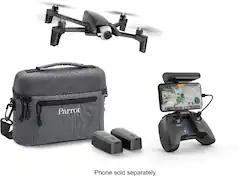
Parrot - ANAFI Extended Drone with Skycontroller - Dark Gray
- General
- Product Name: ANAFI Extended Drone with Skycontroller
- Brand: Parrot
- Recommended Minimum Age: 14 years
- Product Set: Extended Combo
- Model Number: 51595BBR
- Series: ANAFI (Part of a group of the same product type with similar features.)
- Color: Dark Gray
- Flight
- Maximum Altitude (Above Sea Level): 4500 feet
- Maximum Wind Speed Resistance: 31.1 miles per hour
- Number of Rotors: 4
- Camera
- Integrated Camera: true
- Digital Zoom: 3x (A digital zoom is accomplished electronically, with no adjustment of the camera's optics, and no optical resolution gained in the process. The existing data is not enhanced or added to, merely displayed at a lower resolution, thereby giving an illusion of an enlarged image.)
- Video Encoding Formats: MPEG-4 AVC, H.264 (The process of preparing the video for output, where the digital video is encoded to meet proper formats and specifications for recording and playback with the use of a compatible device.)
- Image File Format(s): DNG, JPEG (Standardized software format(s) of storing digital images. The type of format chosen for capturing and compressing the image can determine quality, level of detail, and storage space required.)
- Image Sensor Type: CMOS (CCD and CMOS are the two main technologies used in image sensors. CCD, the older of the two types, turns analog light signals into digital pixels. This conversion happens without distortion, resulting in high-quality images. Newer CMOS sensors use transistors at each pixel to move electrical charges. CMOS sensors are typically less expensive, but also require more light to create distortion-free images.)
- Environmental
- Indoor Or Outdoor Use: Outdoor (Indicates the appropriate environment product was designed to be used in.)
- Minimum Operating Temperature: 50 degrees fahrenheit (The lowest recommended ambient (surrounding) temperature in which the product can ideally operate stated by the manufacturer. Generally long-term exposure of the product to temperatures less than the minimum can result in ineffective operation.)
- Maximum Operating Temperature: 104 degrees fahrenheit (The highest recommended ambient (surrounding) temperature in which the product can ideally operate stated by the manufacturer. Generally long-term exposure of the product to temperatures more than the maximum can result in ineffective operation.)
- Compatibility
- Operating System Compatibility: Apple iOS, Android
- Features
- Integrated GPS: No
- Landing Gear/Legs Included: None
- Storage
- Memory Card Compatibility: microSD (The type of memory card(s) recommended for use with the product.)
- Memory Card Included: false (Indicates whether a memory card is included.)
- Power
- Battery Voltage: 7.6 volts
- Other
- UPC: 738516515953
Take to the skies with this Parrot Anafi Extended drone. Ideal for capturing footage off the beaten path, this ultra-compact drone offers easy portability and records breathtaking footage with a 4K camera. This Parrot Anafi Extended drone has a powerful battery that lets it explore the sky for up to 25 minutes at a time with a top speed of 33mph.
Fly Responsibly:
Before takeoff, update all software and firmware, and read the instructions thoroughly.
See the FAA website for registration requirements and information about flying a drone safely: https://www.faa.gov/uas/getting_started/. Additional state or local requirements may apply. Check your local jurisdiction. The following websites may help you make informed decisions about flying your drone: www.knowbeforeyoufly.org and www.modelaircraft.org.
- ANAFI Extended: The flying 4K HDR camera complete with accessories that you can take everywhere on the go.
- 180° tilt gimbal: ANAFI features a 180° tilt gimbal, capturing unprecedented shots from inimitable angles, up to 2.8X lossless zoom to visualize details clearly and 3-axis image stabilization to shoot ultra-stable videos and photos.
- 4K HDR: The flying 4K HDR camera boasts video and photo shooting capabilities. Show off your creative flair with a 21MP camera with Slow-Motion and Hyperlapse modes. Make your photos stand out with Adobe Creative Cloud (2-month membership included).
- FreeFlight 6 - intuitive piloting interface: Get ready to fly ANAFI using FreeFlight 6, the new intuitive piloting interface. With a tap of your finger, make automatic drone videos using state-of-the-art A.I. and Skycontroller 3. Film and photograph your most memorable moments.
- Automatic framing assistant: Cameraman is an automatic framing assistant for all your aerial videos. All you have to do is control the movement of your ANAFI drone whilst the subject is automatically framed.
- Slow-Motion mode: Records automatically, instantly adding a slow-motion result, ideal for all your sport or action based videos.
- Hyperlapse mode: Immediately accelerates your videos so you can capture a sunset, a sunrise or even passing clouds.
- Automatic aerial selfies: SmartDronies let you take automatic aerial selfies. Create fun moments with your friends and share them on your social media in a click.
- Robust carbon-reinforced design: ANAFI was made to resist difficult weather conditions thanks to its carbon reinforced frame and athermic camera that resists temperatures from -10° to +40°. The powerful motors can resist winds of up to 33mph.
- Fly Responsibly:: The following website may help you make informed decisions about flying your drone: KnowBeforeYouFly.org. Additional state or local requirements may apply. Check your local jurisdiction.
Whats Included
- 2-Month Adobe Creative Cloud membership
- Extra smart battery (2 pcs)
- Parrot ANAFI Drone
- Parrot Skycontroller 3
- Tailor-made travel bag
Q: Can you use an iPhone 6s with this controller?
A: I'm answering my own question. Yes, you can use an iPhone 6S with the Anafi controller.
A: Yes. It has a total of 3 batteries, 3 c cables, 16 gb sd and comes with 8 additional blades with tool. The set has everything you will need to get up in the air. You use your phone charging cable to connect the phone to the controller. I purchased an 8" phone charging cable which works great. I also purchased a 256 gb micro sd card.
A: Yes live view for up too 2.5 miles
A: Yes a Total of 3 Batteries in the "Fly more" Combo. You get about an hour and a half (Maybe a little less) in air time between the 3 batteries. Great purchase !
A: I'm not sure it's a sea level limitation. I've flown mine when I've been at over 10,000 (starting) feet in the rockies and it could have gone as high as I visually//safely would fly it. 4500 simply not accurate.
Q: Does this drone have Asbtacle Avoidance?
A: no it doesn't but it just means you need to be more careful no big deal you learn from your mistakes
A: If Parrot Anafi, you will need the phone or tablet attached to the controller and be running Freeflight 6. Expand the Telemetry window, the antenna on your controller will show a green field when pointed at the drone and a red field when pointed away from the drone. . It will show where the drone is on map. Just follow to that spot and push the alarm button at upper right of screen and the drone will start to beep. Go get it!!



















