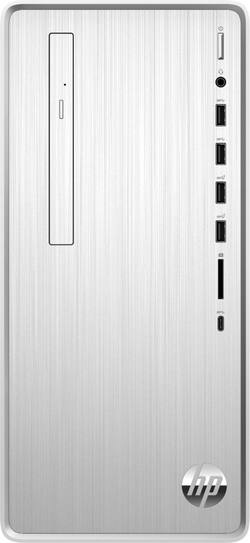
HP - Pavilion Desktop - Intel Core i7 - 8GB Memory - 256GB SSD
- Key Specs
- Processor Model: Intel 8th Generation Core i7 (Your computer's processor is like its brain. Working in combination with system memory, the power of the processor determines the complexity of software you can run, how many programs you can have open at the same time, and how fast those programs will run. Most computers feature an AMD, Intel or Snapdragon processor.)
- Storage Type: SSD
- Total Storage Capacity: 256 gigabytes
- System Memory (RAM): 8 gigabytes (Random-access memory (RAM) is a computing device's short-term data storage, which allows active information to be accessed quickly. The size and type of RAM determines how efficiently the device can handle large amounts of information at one time. For example, gaming or video editing requires more RAM for optimal performance.)
- Graphics Type: Integrated (Dedicated graphics uses a separate graphics card for processing video images. Because it does not use memory from the system's RAM, there is no extra burden on the CPU and graphics are processed more efficiently. Integrated graphics shares system RAM to process video images.)
- Graphics: Intel UHD Graphics 630 (Often referred to as a "graphics processing unit" (GPU), this device is responsible for displaying image content and decoding/encoding video content in programs and games.)
- General
- Product Name: Pavilion Desktop - Intel Core i7 - 8GB Memory - 256GB SSD
- Brand: HP
- Model Number: TP01-0034
- Processor
- Processor Brand: Intel
- Processor Model: Intel 8th Generation Core i7 (Your computer's processor is like its brain. Working in combination with system memory, the power of the processor determines the complexity of software you can run, how many programs you can have open at the same time, and how fast those programs will run. Most computers feature an AMD, Intel or Snapdragon processor.)
- Processor Model Number: i7-8700
- Storage
- Storage Type: SSD
- Total Storage Capacity: 256 gigabytes
- Solid State Drive Capacity: 256 gigabytes (The amount of data that can be stored on the device's solid state drive (SSD). SSD is a flash-based storage with faster speeds than a hard disk drive (HDD).)
- Solid State Drive Interface: PCIe (Connects the solid state drive to the host system. PCI and SATA interfaces are the most common; PCI interfaces are typically faster, but SATA interfaces are compatible with a wider range of systems.)
- Memory
- System Memory (RAM): 8 gigabytes (Random-access memory (RAM) is a computing device's short-term data storage, which allows active information to be accessed quickly. The size and type of RAM determines how efficiently the device can handle large amounts of information at one time. For example, gaming or video editing requires more RAM for optimal performance.)
- Type of Memory (RAM): DDR4 SDRAM (Each type of RAM delivers a different level of speed, bandwidth, energy efficiency and performance.)
- System Memory RAM Speed: 2666 megahertz (How fast the information-storing hardware operates. The faster the RAM, the faster memory can be transferred to other system components. Ultimately, faster RAM improves operational efficiency.)
- Number of Memory Sticks Included: 1
- System Memory RAM Expandable To: 32 gigabytes (Adding more random-access memory (RAM) to a computer speeds up performance and improves efficiency. Upgrades to memory are limited by the number of expansion slots for additional RAM and existing RAM installed on the device.)
- Graphics
- Graphics Type: Integrated (Dedicated graphics uses a separate graphics card for processing video images. Because it does not use memory from the system's RAM, there is no extra burden on the CPU and graphics are processed more efficiently. Integrated graphics shares system RAM to process video images.)
- GPU Brand: Intel
- Graphics: Intel UHD Graphics 630 (Often referred to as a "graphics processing unit" (GPU), this device is responsible for displaying image content and decoding/encoding video content in programs and games.)
- Compatibility
- Operating System: Windows 10 Home (The operating system manages all software and hardware, including files, memory and connected devices. Most importantly, it lets you interact with your device and your programs in a visual way; otherwise, you'd be typing computer code to get anything done.)
- Operating System Architecture: 64-bit (An operating system (OS) manages computer hardware, software resources, and programs in conjunction with the system's processor. 64-bit operating systems can handle more data at once than 32-bit systems, resulting in faster speeds, more effiency, and overall improved performance.)
- Connectivity
- Number of HDMI Outputs (Total): 1
- Ethernet Card: 10/100/1000 (Also known as an Ethernet adapter, this card plugs into a computer's motherboard and enables it to access an Ethernet network. Ethernet data transmission speeds are measured in Mbps (megabits per second) and Gbps (gigabits per second). For example, a 10/100 Ethernet port transmits 10 and 100 Mbps, while a 10/100/1000 Ethernet port transmits 10 and 100 Mbps and has a maximum speed of 1000 Mbps (1 Gbps).)
- Expansion
- Number of M.2 Slots: 2 (This interface is most commonly used for high-speed solid state drives (SSDs), and is often used in laptops due to its small size.)
- Number Of Internal 3.5" Bays: 2
- Number Of External 5.25" Expansion Bays: 1
- Features
- Keyboard Type: Mechanical
- Media Card Reader: true (A hardware device that allows for access to data on a memory card and enables the transfer of its files to a computer. These devices may have one or multiple slots for various types of memory cards, and may be integrated into the computer or available as an external device.)
- Audio Technology: 5.1 channel surround
- Size: Mini
- Dimensions
- Product Height: 13.3 inches (The out of box height of the item. Height is measured as the vertical distance from the bottom of the item to the top as it would be primarily used or placed.)
- Product Width: 6.1 inches (The out of box width of the item. Width is measured as the horizontal distance from one side of the item to the other as it would be primarily used or placed.)
- Product Depth: 11.9 inches (The out of box depth of the item. Depth is measured as the distance from the front of the item to the back as it would be primarily used or placed.)
- Certifications Listings & Approvals
- ENERGY STAR Certified: true (Devices carrying the ENERGY STAR service mark, such as computer products and peripherals, kitchen appliances, and other products, generally use 20% to 30% less energy than required by federal standards.)
- EPEAT Qualified: true (The Electronic Product Environmental Assessment Tool (EPEAT) was designed to provide an environmental assessment tool for purchasers. In order to qualify for EPEAT, a product must meet all 23 required criteria.)
- EPEAT Level: Bronze (The Electronic Product Environmental Assessment Tool (EPEAT) was designed to provide an environmental assessment tool for purchasers. In order to qualify for EPEAT, a product must meet all 23 required criteria. Products are rated Bronze, Silver or Gold based on how many of 28 optional criteria they meet (below 50%, 50%, 75%).)
- Included
- Included Software: HP Support Assistant, Netflix, Microsoft Office 365 (30 days trial), McAfee LiveSafe, Dropbox, HP JumpStart and HP Connection Optimizer
- Optical Drive Type: DVD-RW (An optical disk drive (ODD) uses a laser light to read data from or write data to an optical disc. These discs include CDs, DVDs, and Blu-ray Discs. This allows you to play music or watch movies using prerecorded discs.)
- Keyboard Included: true
- Mouse Included: true
- Wireless Keyboard: false
- Wireless Mouse: false
- Other
- UPC: 194441161229
HP Pavilion Desktop: Combine high performance and sleek styling with this HP Pavilion computer. An Intel Core i7 processor handles video editing and gaming, while the 8GB of RAM let you load multiple applications for better productivity. This HP Pavilion computer includes a 256GB M.2 SSD for a fast boot-up process and ample storage space, while the included mouse and keyboard enable quick setup.
- Windows 10 operating system: Windows 10 brings back the Start Menu from Windows 7 and introduces new features, like the Edge Web browser that lets you markup Web pages on your screen. Learn more ›
- 8th Gen Intel® Core™ i7-8700 processor: Powerful six-core, twelve-way processing performance. Intel Turbo Boost Technology delivers dynamic extra power when you need it, while increasing energy efficiency when you don't.
- 8GB system memory for advanced multitasking: Substantial high-bandwidth RAM to smoothly run your games and photo- and video-editing applications, as well as multiple programs and browser tabs all at once.
- DVD/CD burner: Reads and writes to a variety of media formats, including DVD+R/RW, DVD-R/RW and CD-R/RW.
- 256GB solid state drive (SSD): While offering less storage space than a hard drive, a flash-based SSD has no moving parts, resulting in faster start-up times and data access, no noise, and reduced heat production and power draw on the battery.
- Cloud support lets you access your files anywhere: Store your photos, videos, documents and other files on Dropbox for secure access across multiple devices. Fees may apply.
- Built-in media reader for simple photo transfer: Supports SD, SDHC and SDXC memory card formats.
- 4 SuperSpeed 5Gbs USB 3.1 ports: Ultra-fast data connections to transfer large files rapidly.
- 4 USB 2.0 ports: Quick plug-and-play connectivity for your devices and accessories.
- Next-generation wireless connectivity: Connects to your network or hotspots on all current Wi-Fi standards. Connect to a Wireless-AC router for speed nearly 3x faster than Wireless-N. Gigabit LAN port also plugs into wired networks.
- Bluetooth 4.2 interface syncs with compatible devices: Wirelessly transfer photos, music and other media between the desktop and your Bluetooth-enabled cell phone or MP3 player, or connect Bluetooth wireless accessories.
- Basic software package included: 30-days trial of Microsoft Office 365.
- Additional ports: Microphone and headphone jacks.
Whats Included
- HP Pavilion TP01-0034
- Mouse, keyboard
A: Yes, I say definitively, categorically, absolutely, without a doubt, the HP Pavilion TP01-0034 does NOT provide an ATX format power supply in the stock configuration. Nor will an ATX power supply readily fit into the chassis, mechanically or electrically, so the stock configuration cannot be readily upgraded to higher wattage. And by "ATX" I mean it will not fit ANY of the varieties of industry standard off-the-shelf PC power supply formats: ATX, SFX, Flex ATX, mini-ITX, TFX, etc. It is a physical format proprietary to HP that nobody else makes, is incompatible with everything prior, and which HP doesn't document, at least not yet. HP parts and documentation does not offer any power supply upgrades for their proprietary original part in this system, just an identical replacement part for failures. HP specs correctly state that the PCIe x16 socket will accept a "discrete graphic card". That compatibility is restricted to graphics cards that take power entirely from the PCIe connectors, even though HP doesn't explicitly state that restriction. HP should clearly disclose this restriction; they do not, but that doesn't mean that they're promising no restrictions. The stock system has no power supply unused capacity, and does not provide connectors, for the separate 12V power connections that most graphics cards require. A few lower-performance graphics cards like Radeon 550 types do not require separate 12V power connections, so these are eligible upgrade candidates for this system. The stock system provides a 180W power supply, which is already fully budgeted into running the CPU/motherboard, USB ports, upgrading PCIe cards, and upgrading M.2 or SATA drives. There is no spare capacity for any upgrade that demands additional power than these items. Of course if you're a tinkerer you could wrangle and splice-in any 12V power supply. You could fit it in the space available, or run power in from an external power supply outside the case. My point is that there is no *ready* way to upgrade this with an off-the-shelf power supply that just bolts on and plugs in. In that scenario you'd also be fussing with air circulation and adding fans. And worrying about whether your modifications are reversible or voiding the HP warranty. I'm not unhappy with the proprietary HP power supply. It is very efficient, compact, cooled, and quiet. The stock power supply runs the stock system fine, including my HDD drive upgrades. The case hardware is splendidly simple but effective. HP has well-done videos showing how to disassemble, repair, and install upgrades in the case. If HDD drives and PCIe cards are the only upgrades you'll need, this is an economical and high-quality design. I'm very happy with it because my application happens to fit those limitations, and it was a great bargain price of 500 bucks for Black Friday 2019. It makes a fine business or home computer with an i7 processor and built-in 4K UHD graphics. Just don't fool yourself that this is a mini-tower that you can plug in all sorts of power-demanding upgrades such as high-end gaming graphics cards, or that it is easy to work around this weakness of being non-standard in the power supply.
Q: Is there slot available to add an HDD to expand the hard drive?
A: Yes, you can add up to 2 additional hard drives or SSD drives.. There are 2 free SATA ports on the mother board (1 with SATA cable, 1 without SATA cable), and spots for both the 3.5" and 2.5" drives to be mounted internally. There are no external drive slots, only internal. Also didn't see another slot for M.2 drive either..
Q: Will this desktop support Dual Momotors?
A: Yes - I bought this computer today and am using dual monitors. One port is HDMI and the other is VGA so you'll need to make sure you have one of each cable.
Q: What brand and specs is the 8GB memory card? I want to buy one exactly like it to fill the 2nd slot.
A: The general answer for identifying compatible RAM is to go to Crucial’s website to enter your computer’s model number to see RAM options that are guaranteed to be compatible. I have done that successfully before, and that is what the Best Buy salesperson did when I tried to buy though them. (I understand Corsair is similar, but have never used them.) Unfortunately, salesperson said that Best Buy did not sell singles RAM cards, only pairs. So I ended up buying a single card through Amazon. Specifically, I bought the following for my HP PAVILION - TP01-0034 - i7: Crucial 8GB Single DDR4 2666 MT/s (PC4-21300) SR x8 DIMM 288-Pin
Q: Does it have any graphic s?
A: Yes. Has 1 PCI express slot for 6 inch length single fan GPU. Only 180W power supply though so you’ll need another PSU at 300W or more.
A: This system has an Intel i7 processor which should be able to do everything you asked above. The memory can be expanded if needed, there is an empty slot for additional RAM. The limitation would be more on the Hard Drive space, the drive that is included is small by today's standards. It is possible to have an additional hard drive added or you will have to rely heavily on the cloud storage if you are dealing with lots of files. Lastly this computer does not have a dedicated video card and due to the limited power supply I am not sure if I would recommend installing one. If you are planning on doing any type of video editing I would recommend purchasing a computer with a dedicated video card. If you are only working with Word and Xcel type files this computer will be fine.
Q: can i add a larger ssd drive and can i add a graphics card
A: You should be able to add both to this system. Note that this has M.2 slots as well so you may consider using an M.2 SSD vs the standard type. From the Spec Web page: Because its a smaller case you may want to check with the video card manufacture to make sure it would fit in the cabinet and also make sure that it is either a PCI-E x1 or x16 card. Number Of Internal 3.5" Bays 2 Number of M.2 Slots 2 Number Of External 5.25" Expansion Bays 1 Number Of PCI-E x1 Slots 1 Number Of PCI-E x16 Slots 1
A: I researched the power supply form factor for the HP Pavilion TP01-0034. It is definitely proprietary, undocumented HP design and physical form factor, and no generic ATX variety will directly fit the unmodified case. HP does not sell or even specify an upgraded wattage version that fits. The SATA power connectors are sourced from the motherboard, not the power supply. So typical graphics cards that require separate power cables are out, although you CAN use a lower-power graphics card that requires only PCIe power, such as the XFX Radeon RX 550 that Best Buy sells. Despite that stock limitation, custom modifications to upgrade the power supply are possible. On inspection I found that the only power supply connections to the motherboard are two cables with 12V 4-pin connectors that are always on and supply the motherboard. There is also a light-gauge third cable from the motherboard back to the power supply, which is simply the power returned by the motherboard to run the fan in the power supply at variable speeds. There are none of the conventional ATX connections for lower voltages or signals to switch the power supply on/off; all the various voltages needed by the motherboard are performed by DC-DC converters on the motherboard itself using the 12V supply. So it would be a simple modification to use any generic 12V DC power supply, if you can handle the wiring improvisations. This is interesting, in that you could hook up a 180W or larger 12V wall-wart, automotive 12V, SLA backup-batteries directly, or even 12V DC solar panels to run this computer.


















