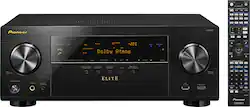
Pioneer - 1155W 7.2-Ch. 4K Ultra HD and 3D Pass-Through A/V Home Theater Receiver - Black
- Key Specs
- Number of Channels: 7.2 (The number of discrete channels of sound output. This can be a single number or multiple numbers separated by decimal(s). The first number is the primary, horizontally directed audio channels. The number after the first decimal, if applicable, is the number of subwoofer outputs or channels. The number after the second decimal, if applicable, is the number of height or atmospheric channels designed to immerse the listener by producing overhead sound effects.)
- General
- Product Name: 1155W 7.2-Ch. 4K Ultra HD and 3D Pass-Through A/V Home Theater Receiver
- Brand: Pioneer
- Model Number: VSX-90
- Audio
- Number of Channels: 7.2 (The number of discrete channels of sound output. This can be a single number or multiple numbers separated by decimal(s). The first number is the primary, horizontally directed audio channels. The number after the first decimal, if applicable, is the number of subwoofer outputs or channels. The number after the second decimal, if applicable, is the number of height or atmospheric channels designed to immerse the listener by producing overhead sound effects.)
- Surround Sound Supported: DTS TruSurround (Surround sound systems use multiple audio channels and speakers to create an immersive sound experience for the listener. There are also various proprietary technologies that imitate this kind of sound via a device's built-in speakers or soundbar.)
- Speaker A/B Switching: false (Allows a user to select between one of two sets of primary speakers.)
- Equalizer: true (Allows for the control of different frequencies within an audio signal, such as adjusting treble and bass levels.)
- Outputs
- Speaker Connection Type: Binding posts
- Headphone Jack: true (The device features an interface that allows for the connection of headphones.)
- Features
- Auto Calibration: true (Home theater systems and receivers with an autocalibration function can automatically determine basic settings like speaker volume, crossover point, equalization, and more.)
- Remote Control Included: true
- Dimensions
- Product Height: 17.1 inches (The out of box height of the item. Height is measured as the vertical distance from the bottom of the item to the top as it would be primarily used or placed.)
- Product Width: 17.125 inches (The out of box width of the item. Width is measured as the horizontal distance from one side of the item to the other as it would be primarily used or placed.)
- Product Depth: 14.25 inches (The out of box depth of the item. Depth is measured as the distance from the front of the item to the back as it would be primarily used or placed.)
- Product Weight: 21.5625 pounds (The out of box weight of the item.)
- Certifications Listings & Approvals
- ENERGY STAR Certified: false (Devices carrying the ENERGY STAR service mark, such as computer products and peripherals, kitchen appliances, and other products, generally use 20% to 30% less energy than required by federal standards.)
- Warranty
- Manufacturer's Warranty - Parts: 2 years
- Manufacturer's Warranty - Labor: 2 years
- Other
- UPC: 884938290883
Access Web content with this Pioneer Elite VSX-90 A/V home theater receiver's built-in Wi-Fi. Includes HDMI 4K Ultra HD and 3D pass-through technologies for compatibility with 3D TVs, Blu-ray players and gaming consoles and 4K Ultra HD TVs.
- Connect to the Internet: Via built-in Wi-Fi for access to Spotify Connect, Pandora, vTuner, HTC Connect, AirPlay, DLNA and more.
- 1155W total power (165W x 7 @ 6 ohms, 1kHz, 1% THD): Enables you to achieve robust audio output.
- Dolby Atmos 5.2.2 decoding: Delivers immersive surround sound.
- 4K 60p upscaling: Allows you to upconvert 1080p sources, so you can enjoy your favorite media in realistic detail.
- Advanced MCACC automatic room calibration: Automatically optimizes receiver output to optimum sound for the room acoustics.
- 2 auxiliary inputs: Make it easy to connect a variety of devices. The receiver supports FLAC, AIFF, WAV and DSD playback and more.
- AM/FM tuner: With 30 AM and 30 FM presets lets you enjoy your favorite stations.
Whats Included
- 1155W 7.2-Ch. 4K and 3D A/V Home Theater Receiver
- Remote, batteries
- AM/FM antenna
- Setup microphone
- Owner's manual
A: Kevin, The trick is that only certain inputs (HDMI 2,3) upscale. You are correct that this is shown in a bad place in the User Guide.
Q: Compatabilty
A: I'm running 6ohm on the VXS-90, have not tried 4 ohm but I have heard that the Pioneer Elite class D receivers handle 4 ohms better (SC-91 for instance). Might be worth the extra for reliable 4 ohm performance and I've seen it on sale from time to time.
A: Yes it has an AM/FM tuner with 30 station presets for AM and 30 for FM.
A: Yes, this is HDCP 2.2 compliant.
A: Yes. That is what a/b channels are for. Enjoy!
Q: connecting reviever to a/v system?
A: If you're referring to the VSX-90 receiver, then no. If you connect the receiver to an Ethernet cable that's connected to your home network router, then you can "log in" to the receiver using your PC. Really it's not "logging in" but rather typing in a web address (from memory it was http://192.168.8.29 or something like that) into a web browser, then it gave me icons to click/follow one at a time. I had the speakers and components already hooked up, so all I had to do on my PC was check the boxes for what components I had hooked up, type in names for each HDMI input (like PS3, Computer, etc), hook up the set-up mic when it prompted me to, then let it go through its set up. It was pretty slick and worked well for me.
Q: CONNECTING MY NEW PIONEER VSX-90 TO !) YEASR OLD PROJECTION TV
A: I have a Sony 60 projection that also works great. Bought it in 2003. If it is like mine, you only have component video connections to view HD (720 on mine). If that is the case, you do not have HDMI. Therefore, you will need a nice quality set of component video cables to connect your tv to your receiver.





















