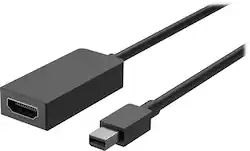
Microsoft - Surface Mini DisplayPort to HDMI 2.0 Adapter - Black
- Key Specs
- Connector Type (End 1): Mini DisplayPort
- Connector Type (End 2): HDMI Type A
- General
- Product Name: Surface Mini DisplayPort to HDMI 2.0 Adapter
- Brand: Microsoft
- Quantity: 1
- Compatibility: Microsoft Windows 10/8.1
- Model Number: EJT-00001
- Color: Black
- Connectivity
- Cable Type: HDMI
- Product Type: Adapter
- Connector Type (End 1): Mini DisplayPort
- Connector Type (End 2): HDMI Type A
- Environmental
- Indoor Or Outdoor Use: Indoor (Indicates the appropriate environment product was designed to be used in.)
- Other
- UPC: 889842178029
Show pictures or videos from your Surface tablet on a larger screen with this Microsoft Mini DisplayPort to HDMI 2.0 adapter. It supports 4K displays.
- Share everything on your Surface with the Mini DisplayPort to HDMI 2.0 adapter: It connects any Surface to any HDMI-compatible display.
- Active-format adapter: Supports AMD Eyefinity, NVIDIA, Surface Pro, Surface Book, and Surface Dock.
- Compatible with Thunderbolt: For use with Thunderbolt-compatible devices.
- HDMI 2.0 compatible: For use with your existing devices.
- 4K Ready: Supports 3840 x 2160p at 60Hz resolution and allows audio pass-thru for uncompressed digital 7.1, 5.1, or 2 channels.
Whats Included
- Microsoft Surface Mini DisplayPort to HDMI 2.0 Adapter
Q: How long is the cable? I don't see it listed anywhere.
A: It's about 9 inches (23 cm) total.
A: Touch screen monitors require a USB connection too. The touch feature doesn’t work via display cabling only.
Q: Does it work with the Surface Pro 3 docking station?
A: Yes, the Surface Pro 3 docking station has a Mini Display Port, and will be able to attach to the Surface Mini DisplayPort to HDMI 2.0 Adapter.
Q: Does this work for ps4 to tv output?
A: No, it does not work for ps4.
Q: Can I use this adapter to turn my Surface into a monitor for my Xbox 360?
A: No this doesn’t make the video an input. It’s only an output
Q: Does this adapter support ultra wide monitors? Resolutions of 2560 x 1080?
A: Yes, it will support it.
Q: compatible with Surface Laptop 2 & 4K @ 120Hz TV (HDMI connection)?
A: It works on Surface Pro 1 & 2, idk 3-6, not on 7:)
Q: Trying to connect through an HDMI monitor cable, will this work as an adapter for that?
A: Yes, used the "Mini Display Port to HDMI 2.0 adapter" to connect the monitor's HDMI cable to the Microsoft-Surface Dock's mini display port. Now able to use both monitors with the Surface Pro. Attached photo shows using two of the Mini Display Port to HDMI 2.0 adapters with the HDMI cables connected into the adapters, and connected to the Microsoft-Surface Dock's mini display ports.





















