Questions & Answers
- Model:
- INC004btSGY
- |
- SKU:
- 6452575
Highly rated by customers for: HDMI, Ease of use, Ports
$27.99Your price for this item is $27.99
Clearance
Comp. Value: $119.99
The comparable value price is $119.99
Page Showing 81-94 of 94 questions
Q: QuestionCan I use this for a dual screen option (2 monitors) if one of them connects with HDMI and the other VGA?
Asked by Tim.
- A:Answer Yes it do, if your computer can supporting it .
Answered by Tundra
Q: QuestionWhat are the dimensions (preferably in inches)
Asked by ROBB.
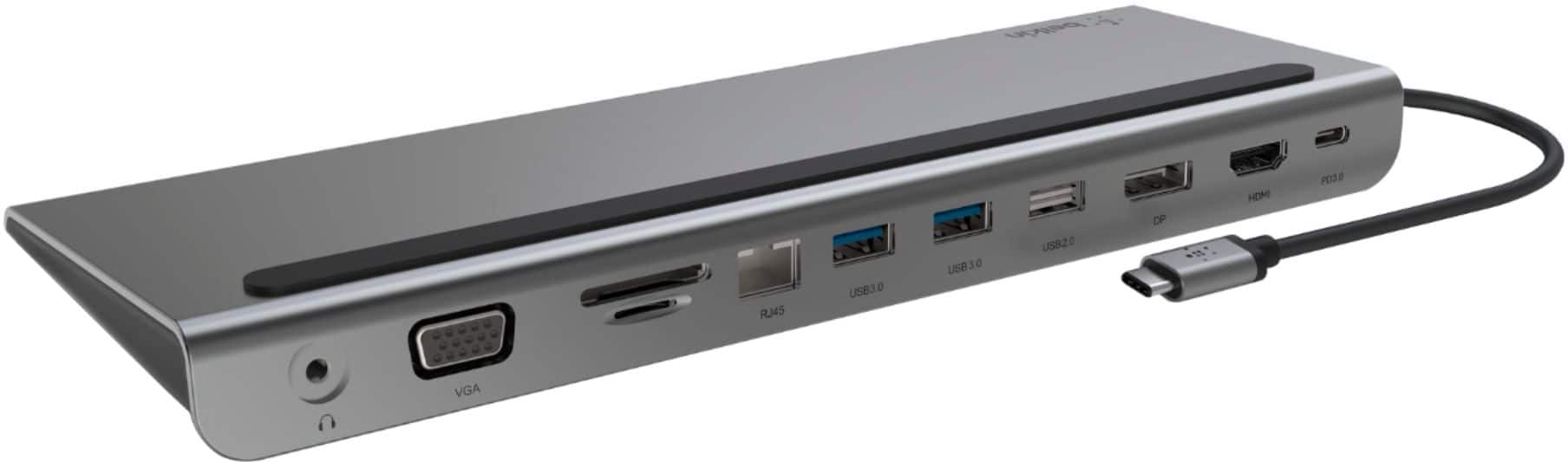
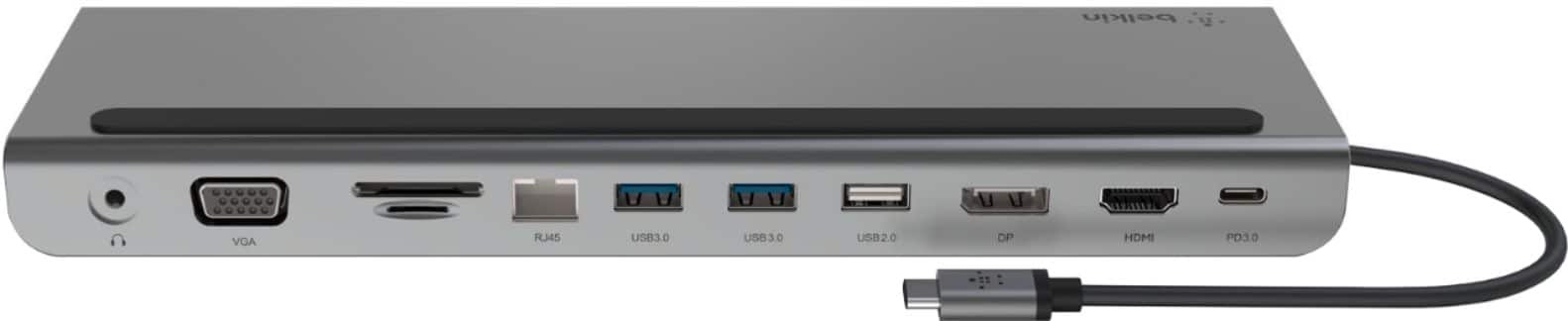
- A:Answer Hi, Rokky. The dock is 10.2”x3.5”x0.9” (LxWxH). Then, the cable is 6.4” long.
Answered by BelkinStaff

Q: QuestionWhat is the minimum power delivery to the unit for it to not be underpowered? Can this cause damage if exceeded?
Asked by Kris.
- A:Answer The HUB needs 5 Gbps USB-C or greater to work, but I recommend 10 Gbps for 4K output.
Answered by Br2000s
Q: QuestionI have a 2160p 165hz monitor (DP) and a 1080p 144hz monitor (HDMI). I want to see if this will work with full operational effeciency at its top refresh rate. Will this dock work at my monitors top performance?
Asked by Carson.
- A:Answer Hi, Carson. The Belkin INC022ttDG-RL only supports the following display resolutions. - Windows (USB-C DP Alt Mode Port 1) • Single-Monitor: 8K at 30 Hz / 4K at 120 Hz • Dual-Monitor: 4K at 60 Hz • Triple-Monitor: 4K at 60 Hz / 4K at 30 Hz / 4K at 30 Hz - Windows (HDMI 2) • Single-Monitor: 4K at 60 Hz • Dual-Monitor: 4K at 60 Hz • Triple-Monitor: 4K at 30 Hz / 4K at 60 Hz / 4K at 30 Hz - Windows (HDMI 3) • Single-Monitor: 4K at 60 Hz • Dual-Monitor: 4K at 60 Hz • Triple-Monitor: 4K at 30 Hz / 4K at 30 Hz / 4K at 60 Hz - macOS (USB-C DP Alt Mode Port 1) • Single-Monitor: 4K at 120 Hz • Dual-Monitor: 4K at 60 Hz (mirrored) • Triple-Monitor: 4K at 60 Hz (mirrored) - macOS (HDMI 2) • Single-Monitor: 4K at 60 Hz • Dual-Monitor: 4K at 60 Hz (mirrored) • Triple-Monitor: 4K at 60 Hz (mirrored) - macOS (HDMI 3) • Single-Monitor: 4K at 60 Hz • Dual-Monitor: 4K at 60 Hz (mirrored) • Triple-Monitor: 4K at 60 Hz (mirrored) - Chrome (USB-C DP Alt Mode Port 1) • Single-Monitor: 4K at 60 Hz • Dual-Monitor: 4K at 60 Hz • Triple-Monitor: Not applicable - Chrome (HDMI 2) • Single-Monitor: 4K at 60 Hz • Dual-Monitor: 4K at 60 Hz • Triple-Monitor: Not applicable - Chrome (HDMI 3) • Single-Monitor: 4K at 60 Hz • Dual-Monitor: 4K at 60 Hz • Triple-Monitor: Not applicable If there’s anything specific, you’d like to see more of or if you need help with any of your Belkin devices, just send us an email at [email protected] or call our support hotline which can be found here: https://www.belkin.com/support-article/?articleNum=55022.
Answered by BelkinStaff

Q: QuestionIs there a way to extend the USB-C connection that's supposedly to connect to your laptop, my USB c port is on the opposite side
Asked by Azul.
- A:Answer Hi, Azul. Using an adapter may work fine with your desired setup, but have not totally tested yet.
Answered by BelkinStaff

Q: QuestionWhat is the performance you can expect for this with a single, ultrawide 3440x1440p monitor? What refresh rate will it run at?
Asked by JD.
- A:Answer Hi, JD. Belkin INC004 can support up to three simultaneous monitor connections while using the dock. Take note that the maximum number of displays supported by the dock is different than that of maximum number of displays supported by your computer. While the dock can support up to the resolutions and refresh rates listed on the link below, your computer may not be able to support them. https://www.belkin.com/support-article/?articleNum=317818
Answered by BelkinStaff

Q: QuestionTwo monitors plugged into the dock (1 Display Port and 1 HDMI), the display port resolution is at 1920X1080, however hdmi monitor is capped at 1440X900. When this monitor is plugged directly into my laptop, i can get 1920X1080. Advice?
Asked by AW.
- A:Answer Hi, The maximum monitor resolutions supported by the dock is based on number of displays attached and used at the same time, as well as the computer's power. Here is the supported dual display resolution of the dock: • For Windows (Single and Dual Display Setup) > HDMI: 3840 x 2160 at 30 Hz > DisplayPort: 3840 x 2160 at 30 Hz • For Windows (Tri-Display Setup) > HDMI: 1280 x 720 at 60 Hz > DisplayPort: 1280 x 720 at 60 Hz • For MacOS (Single and Dual Display Setup) > HDMI: 3840 x 2160 at 30 Hz > DisplayPort: 3840 x 2160 at 30 Hz • For MacOS (Tri-Display Display Setup) > HDMI: 1920 x 1080 at 60 Hz > DisplayPort: 1920 x 1080 at 60 Hz You may also call our phone support team for advanced troubleshooting and hotlines are listed here: https://www.belkin.com/us/support-article?articleNum=55022.
Answered by BelkinStaff

Q: QuestionWill this allow my MacBook to "extend" not just "mirror" my display to a monitor via HDMI or DisplayPort?
Asked by Crudowns.
- A:Answer Mirroring or Extending is a function of your Mac. Unless it is a very old computer, you should be able to chose, on your Mac, if an external display extends or mirrors. This is true regardless of what kind of dock or HDMI adapter you use.
Answered by Anonymous
Q: QuestionWill this plug directly into a new 24" iMac that only has two Thunderbolt 4 ports?
Asked by Michael.
- A:Answer Hi Michael! This is not tested with the 24" iMac yet. However, it should work as the INC004 is designed to work with computers and devices that can connect over USB-C.
Answered by BelkinStaff

Q: QuestionIs this compatible with the iMac 24 inch?
Asked by MindsthatWant2Know.
- A:Answer Hi. The Belkin INC004 dock is designed to work with computers and devices that can connect over USB-C.
Answered by BelkinStaff

Q: QuestionAm i able to use this to display 2 monitors on my macbook air m1 chip while in clam shell mode?
Asked by Mendoza630.
- A:Answer Hi, Mendoza630. The Belkin CONNECT USB-C 11-in-1 Multiport Dock is not compatible with MacBooks M1 (2020).
Answered by BelkinStaff

Q: QuestionWill this docking station support a 13" MacBook Air?
Asked by Steveo.
- A:Answer Hi, Steveo. Yes, the Belkin INC004 will work a 13” MacBook Air (2018).
Answered by BelkinStaff

Q: QuestionWill this extend the Display port for all laptops or does the laptop need to have Thunderbolt capabilities? I have an older laptop with a USB-C Gen 1 slot.
Asked by QTASTIC.
- A:Answer Hi. The Belkin INC004 has been designed to work with computers and devices that can connect over USB-C.
Answered by BelkinStaff

Q: QuestionWill the USB - C plug that connects to your laptop also charge your laptop or do you have to have an external power cord attached?
Asked by QuickQuestion.
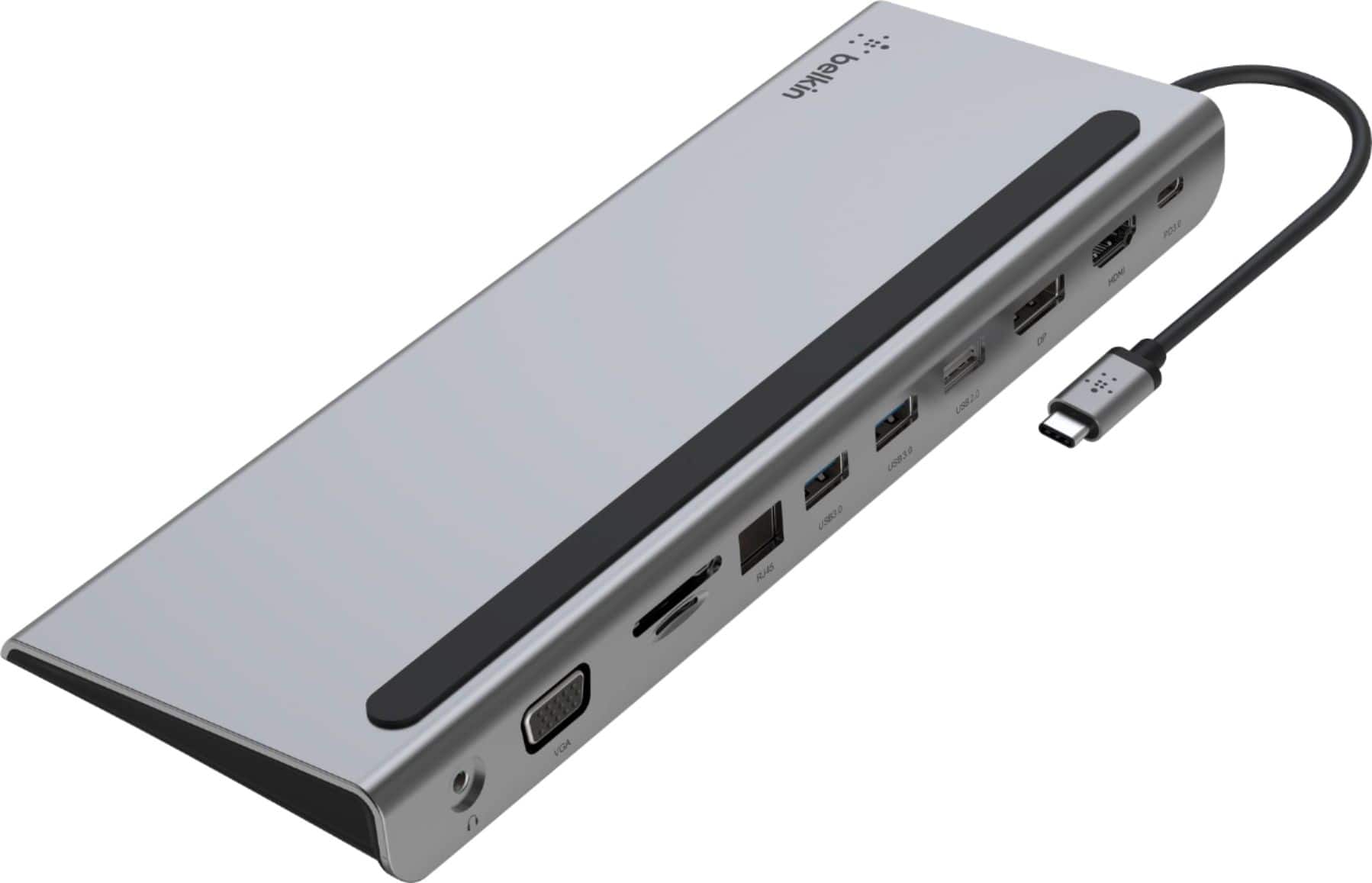
- A:Answer Hi. The Belkin CONNECT USB-C 11-in-1 Multiport Dock, INC004 is the perfect all-in-one solution to connect your USB-C laptop to multiple devices. Create your ultimate workstation or lead a seamless online presentation by conveniently connecting your laptop to monitors, projectors, SD cards, ethernet networking, and USB thumb drives. The Belkin INC004 also doubles as a laptop stand allowing you to neatly organize cables and connection ports in the back. Supporting USB-C PD pass-through charging of up to 100W, you no longer have to worry about choosing to have expansion ports or charge your laptop.
Answered by BelkinStaff

Most-viewed items
- Black Friday Deal$34.99Your price for this item is $34.99
- Black Friday Deal$87.99Your price for this item is $87.99
- Black Friday Deal$69.99Your price for this item is $69.99
- $139.99Your price for this item is $139.99
- Black Friday Deal$55.99Your price for this item is $55.99
- Black Friday Deal$99.99Your price for this item is $99.99
- Black Friday Deal$37.99Your price for this item is $37.99
- Black Friday Deal$55.99Your price for this item is $55.99
- $79.99Your price for this item is $79.99
- $49.99Your price for this item is $49.99$64.99The comparable value for this item is $64.99
- $149.99Your price for this item is $149.99
- $139.99Your price for this item is $139.99$199.99The comparable value for this item is $199.99
- $59.99Your price for this item is $59.99$99.99The comparable value for this item is $99.99
- $14.99Your price for this item is $14.99
- $69.99Your price for this item is $69.99$99.99The comparable value for this item is $99.99
- $39.99Your price for this item is $39.99$49.99The comparable value for this item is $49.99
- $61.99Your price for this item is $61.99$70.00The comparable value for this item is $70.00
- $25.49Your price for this item is $25.49$29.99The comparable value for this item is $29.99
- $189.99Your price for this item is $189.99$259.99The comparable value for this item is $259.99
- $84.99Your price for this item is $84.99$89.99The comparable value for this item is $89.99