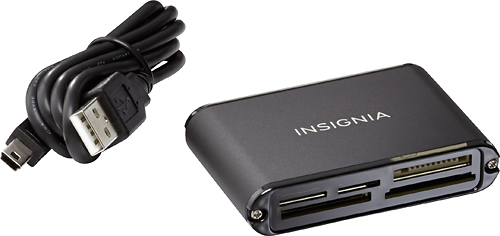
A:Answer If you're using a pc, simply insert the memory card into one of the slot of the memory card reader, then connect it to pc or mac. On a PC, windows explorer should recognize the memory card and will make it available as a drive, and you can choose you preferred photo editor or viewer to view the photos. At this point, you can choose to copy the files on the memory card to your desire folder. There are photo software like FREE GOOGLE PICASA that can detect the memory card reader and download all of your photos to your computer folder (e.g. picture folder).
On a MAC, you can use the build in iPhoto app. to import all of the photos to its database.