A:AnswerThe answers from you guys contradict each other. All I need to know is after something is changed does the screen turn off. Most tv allow you to shut the red light off because it’s a distraction
A:AnswerI have mine hooked to optic but think it works better when connected via Bluetooth which allows volume to be controlled by TV remote.
Samsung TV
A:AnswerHello there,
To check the firmware of your soundbar follow these steps below.
1. Turn off the Soundbar.
2. Press and hold the Sound Control button for about 5 seconds on the remote control.
3. Each version appears in the following order on the Soundbar display.
(Software version > HDMI > Tx > Rx)
• Tx : Wireless Tx module in the Soundbar.
• Rx : Wireless Rx module in the Subwoofer.
• R2 VERSION DISPLAY
– No connect rear R2---
– Connected rear R2xxx
~Samsung Solutions
A:AnswerHello Trego,
Please contact Samsung Customer Service for step-by-step troubleshooting, we are here and happy to help.
Call us at 1-800-SAMSUNG (ask for Soundbars), available 8 AM – 12 AM EST, 7 days a week.
~Samsung Solutions
A:AnswerHello Hoff,
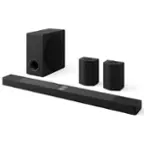
The HW-B650 Soundbar has the ability to connect using HDMI, Bluetooth, or Digital Optical. You will be able to use any of these to connect to your Samsung TV.
~Samsung Solutions
A:AnswerUnfortunately, I'm not sure. But according to the description under "Features," it has Bluetooth connection capabilities, so I would assume so.
A:Answeryou might be on wrong Source. So turn it off. Then turn it back on and the click the source button while holding it toward the doundbar and click it until you see TV ARC andvthen your sound should come on
A:AnswerHello Dan,
You are able to connect the HW-B650 using Bluetooth as a wireless connection as this soundbar is not Wi-Fi compatible.
~Samsung Solutions