A:AnswerRegarding recommendation to Switch the wireless LAN frequency of any nearby wireless LAN router or PC to 5 GHz range.
The TV does not recognize my 5GHz network. Tried to add manually but the TV will no connect.
A:AnswerHi joann, using any converter is not recommended as its operation is not guaranteed. We only recommend using the HDMI connection with this soundbar. Thank you. ~Earl
A:AnswerAn update to my question. I use the Sony OLED A8H for streaming and Blu Ray 4K playback only. The TV is not connected to cable or satellite. The HT-G700 sound bar periodically loses audio but only with certain streaming apps. Hulu tends to be the most problematic. Drop outs also occur with Netflix and Amazon Prime. I have not had sound bar drop outs with HBO Max, Disney +, Vudu or Blu Ray/4K physical media playback. Also no issues with the OLED A8H internal speakers.
A:AnswerHi Thomas1950,
Thank you so much for choosing Sony!
The volume/sound quality of our HT-G700 as well as our other soundbars will depends on the source that is playing and device that are using. If you are referring to a TV commercials, most TV commercials are created to be loud simply so you can hear the advertisement and get your attention. The Federal Communications Commission (FCC) does not regulate the volume of commercials, nor does it regulate the volume of TV programs. But, the FCC does require broadcasters to limit the power that is used to transmit the signal. So, technically, a commercial cannot be any louder than the loudest portion of the TV program you are watching. That said, however, if you are watching a program with soft dialog, when the program cuts to a commercial you will most likely hear a boost or fluctuation in the volume.
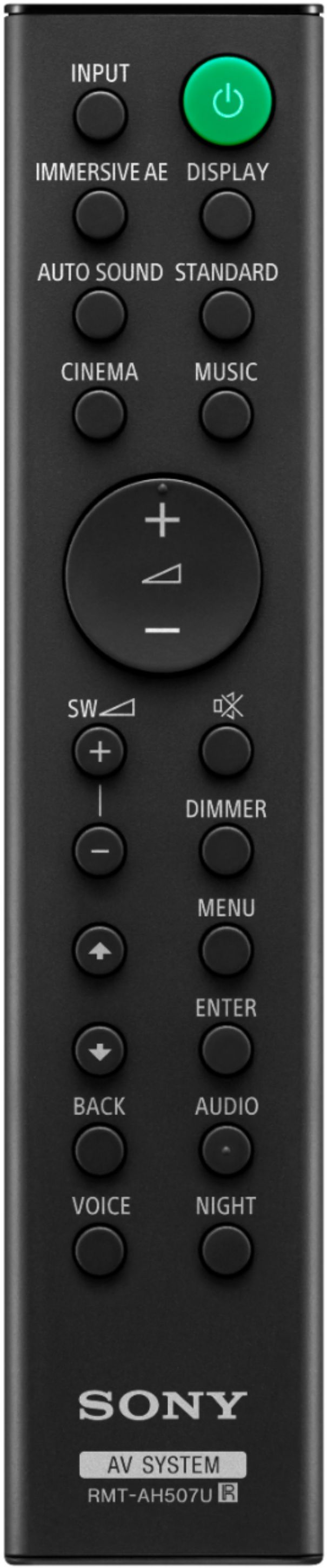
However, this soundbar features a sound mode that tailored to sound sources we recommend having the soundbar set to Auto Sound. This will change the Sound Mode from Standard, Cinema, and Music based on the content played.
Also, if your TV has advanced auto volume feature, you can use this to keep the volume constant even when watching commertials.
Should you need further assistance, please contact us for help.
Please email the below information to socialsupport@am.sony.com
Apologies if you disclosed some of this information in your review and to customer service, we just want to ensure that we have your accurate details at the time of communication.
Full Name:
Best Buy Username:
Telephone Number:
Model Number:
Issue:
Regards,
Carl
A:AnswerHi Dks202, Thank you for your inquiry! You can still use the TV with our HT-G700 Soundbar with Wireless subwoofer. For this, please make sure to enable Bravia Sync on both the TV and the Soundbar to enjoy this feature. I hope this helps! -Carl
A:AnswerHi Christemp,
Thank you for choosing Sony!
We are sorry to hear that you are experiencing audio cut out while in-game on your PS5. We'd love to troubleshoot the issue and make this a better experience for you. In the meantime, please follow these steps to troubleshoot the issue.
Unplug the Soundbar power cord and plug it back in
1. Turn off the soundbar.
2. Unplug the power cable from the wall outlet.
3. After one minute, replug the power cable back to the wall outlet.
4. Turn on the soundbar.
Verify if this resolves the issue.
- Disconnect the HDMI cable or the optical digital cable and then reconnect it
- Disconnect the cable from the soundbar and playback device and then reconnect the cable.
If the issue is resolved, the issue may have been caused by a faulty connection with the cable.
- If there is a device nearby that generates electromagnetic waves, such as a wireless LAN or a microwave oven in use, locate the system apart from it.
- If there is an obstacle between the bar speaker and the subwoofer, move or remove it.
- Do not cover the top of the bar speaker with metal objects such as TV frame, etc. Wireless functions may become unstable.
- Locate the bar speaker and the subwoofer as close as possible
May we contact you to help? If so, please email the below information to socialsupport@am.sony.com
Apologies if you disclosed some of this information in your review and to customer service, we just want to ensure that we have your accurate details at the time of communication.
Full Name:
Best Buy Username:
Telephone Number:
Model Number:
Issue:
Regards,
Carl
A:AnswerHi inky, thank you for your question. This unit mainly supports HDMI and optical connection. If your device supports the same connection, then you can hook it up with this unit. ~Earl
A:AnswerThis depends on your TV. If you have a newer TV with EARC, you will be able to sync the sound bar to your TV remote control. I have a Sony A80J which also has the sync function. On other TV’s I think it’s called CEC function. I hope this helps. Try this link: it will be very helpful.
I went to YouTube and searched syncing my sound bar to my remote.
https://youtu.be/ggrm0-6xLao
A:AnswerHi CLogan, we are sorry to hear that you are experiencing issues with your HTG700 soundbar. We'd love to troubleshoot this issue and make this a better experience for you.
In the meantime, please make sure to use a High-Speed HDMI for the soundbar and make sure to enable the Enhanced format to isolate the issue.
To enable the enhanced format,
Press MENU.
[SPEAKER] appears in the front
panel display.
Press up or down arrow to select [HDMI], then
press ENTER.
Press up or down arrow to select [FORMAT],
then press ENTER.
Press the up or down arrow repeatedly to select the
ENHANCED format.
May we contact you to help? If so, please email the below information to socialsupport@am.sony.com
Apologies if you disclosed some of this information in your review and to customer service, we just want to ensure that we have your accurate details at the time of communication.
Full Name:
Best Buy Username:
Telephone Number:
Model Number:
Issue:
Regards,
Carl