Customer Ratings & Reviews


- Model:
- PW513
- SKU:
- 11088350
Rating by feature
- Value
Rating 3.5 out of 5 stars
- Quality
Rating 3.8 out of 5 stars
- Ease of Use
Rating 3.6 out of 5 stars
Best Webcam I've ever had!
||Posted . Owned for 3 weeks when reviewed.This reviewer received promo considerations or sweepstakes entry for writing a review.When i was looking at it on the website the pictures make it look kinda big so I was very surprised to see just how compact it is. It's built very sturdy & high-quality material. Great picture, great quality, good feild of veiw for the pixel resolution. Plug & play easy to use, won't have to buy another Webcam for another 5 years!
I would recommend this to a friendGreat WebCam
||Posted . Owned for 2 months when reviewed.This reviewer received promo considerations or sweepstakes entry for writing a review.Amazing product. It has good quality of video and a clear audio from its microphone.
I would recommend this to a friendThis webcam really works well for me
||Posted . Owned for 3 weeks when reviewed.This reviewer received promo considerations or sweepstakes entry for writing a review.I'm very surprised with some of the not so great reviews of this Webcam. After installation of the Cam Engine software and updating the camera (due to the issue of too much default brightness) I found this webcam to be superior to any of the ones I own including Logitech Streamcam and other Logitech and HP webcams. With the updated software, you have the option to adjust multiple settings and not rely on "auto" or "default" settings that the camera provides. During use and depending on the lighting inside my office, I find that tweaking these adjustments provides the right exposure when I need to adjust. The only caveat is not all web meeting application supports 4k resolution/streaming but I'm sure that will change in due time.
I would recommend this to a friendgood but not what I was looking for.
||Posted . Owned for less than 1 week when reviewed.This reviewer received promo considerations or sweepstakes entry for writing a review.Is a nice-looking webcam but I bought it thinking on the max resolution and max fps for streaming and video recording, here some pictures of the program that comes with the cam.
I would recommend this to a friend
Great Quality Image & Audio with Caveats
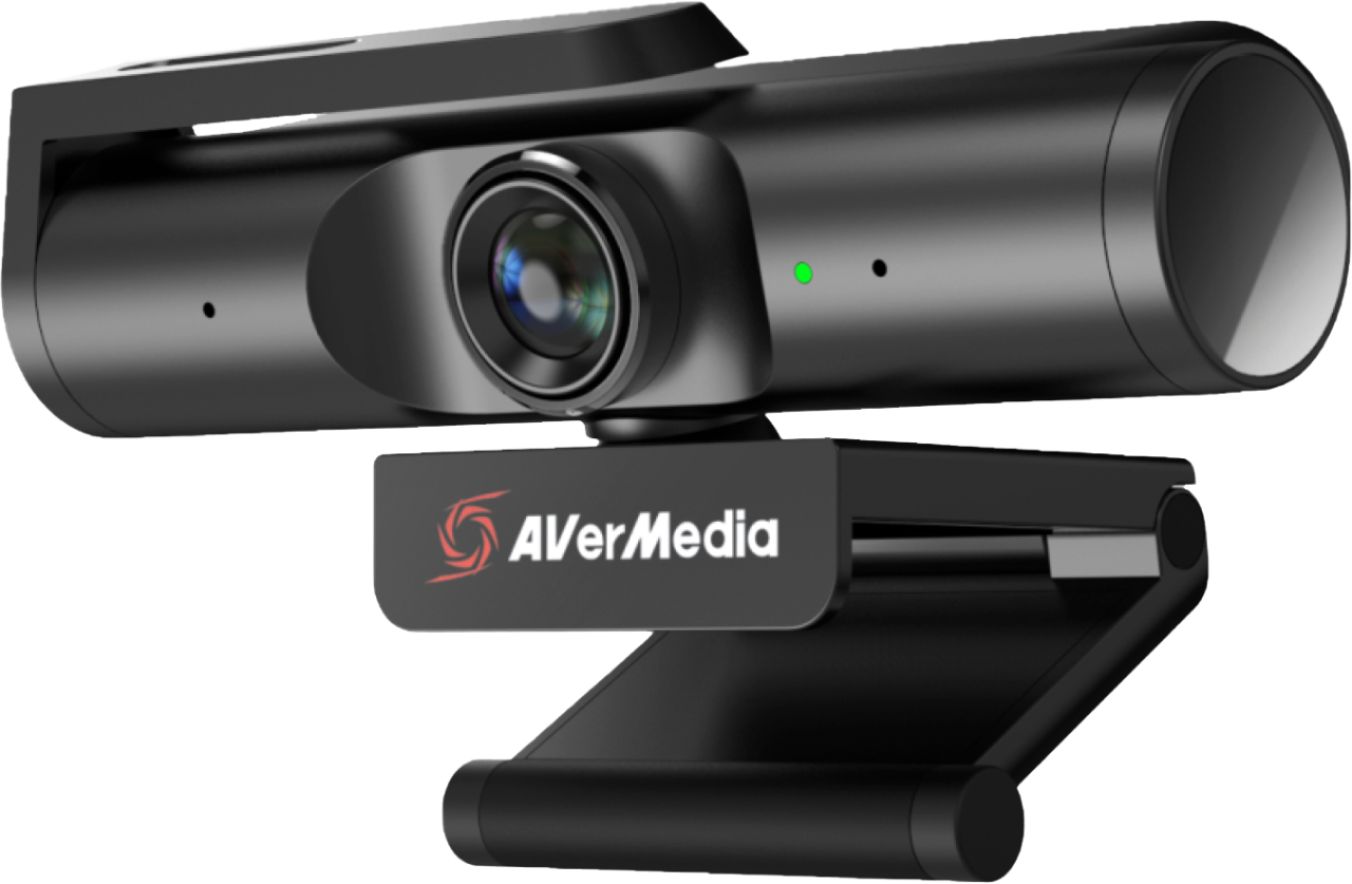
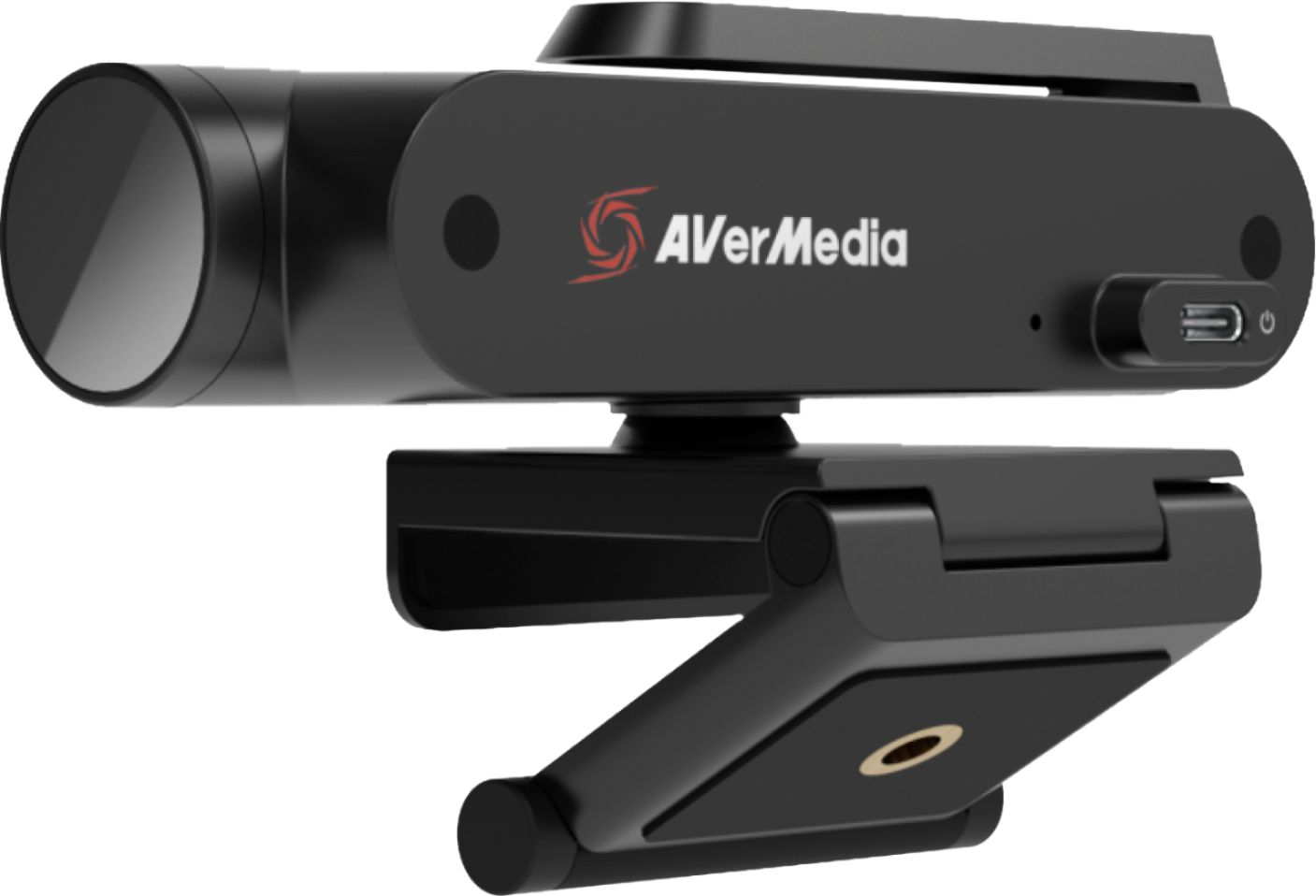
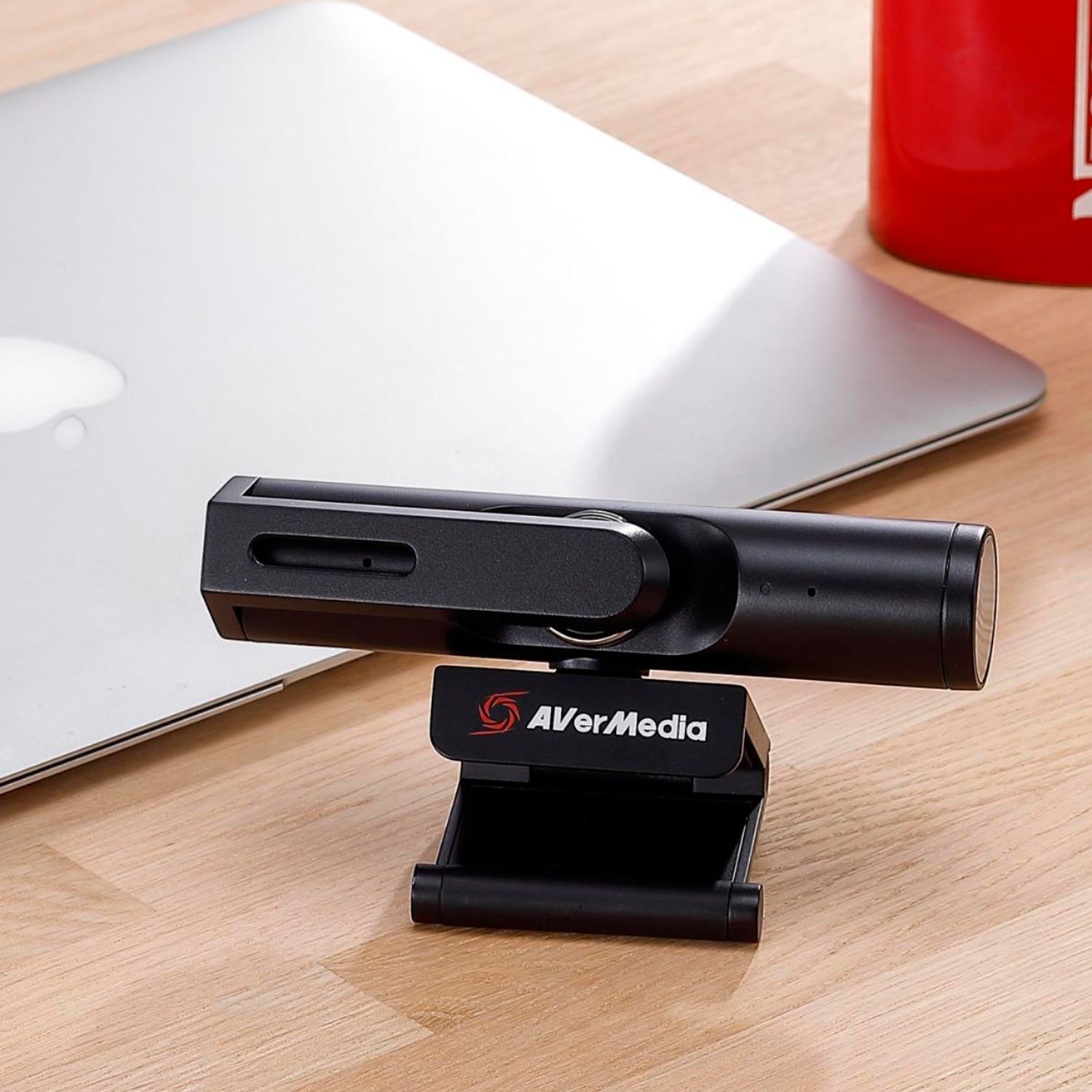
|Posted .This reviewer received promo considerations or sweepstakes entry for writing a review.INTRO: The AVerMedia Live Streamer CAM PW513 sets out to be a high-end webcam solution for 4K streaming. Whether it’s streaming on Twitch, YouTube, Discord, Skype, Zoom, WebEx, Teams or through softwares like OBS and XSplit, the PW513 might be what you’re looking for. COMPATIBILITY: It’s important to note that since this is a 4K webcam, it does require additional bandwidth and processing power, meaning USB 2.0 will not work. But if you’re on Windows, you’ll need a minimum CPU of i5-4660 and 4GB of RAM; and on macOS, it’s recommended to have an i7 with 16GB of RAM. AVerMedia also claims that the PW513 might experience video delay on macOS and that you may have to compensate your audio, as well. Not a great user experience, and for this reason, I might suggest macOS users consider alternative products—especially considering the very demanding system specifications compared to those using Windows. For Windows users who want to use the CamEngine software, AVerMedia recommends that you use a modern dedicated graphics card, with AVerMedia claiming the GTX 1060 being the minimum on desktops and the GTX 1050 Ti as the minimum requirement on laptops. You’ll also want respectable CPU performance with AVerMedia recommending a minimum of the i5-6000 series on desktops and i7-7700HQ on laptops. For macOS users, there is a CamEngine Lite software which allows adjustments such as Brightness, Sharpness, Contrast, Saturation, and Hue. BUILD / SETUP: While the PW513 does have a plastic build, it doesn’t feel cheap. The finish feels more like metal, which gives it a more premium look and feel. On the back, you have a single USB-C connection for power and data, and on the front you have the camera sensor and stereo microphone system. It should be noted that included in the box is a USB 3.0 Type-C to Type-A cable for compatibility with most laptops and desktops, but if you’re on a device with only USB-C, you’ll need to acquire a USB 3.0 Type-C (Male) to Type-C (Male) cable. The mounting system is simple with a very sturdy hinge design that allows it to mount atop your monitor or other objects, as you see fit. Alternatively, you can collapse the hinge and let it sit on your desk or other flat surface, or you can also use a 1/4" tripod mount (not included). I had no issues with the hinge loosening up like I’ve seen with cheap webcams, so the PW513 will have no issues staying mounted atop your monitor if you choose to use the hinge mechanism. Just mount it, plug it into a USB 3.0 port on your computer, and you’re just about ready to go! Additionally, there is a privacy swivel arm that physically covers the camera sensor so that you can always ensure that you’re not visible until you are ready. In the age of personal cyber attacks and online scammers that could leverage your webcam, this should be a standard feature for modern webcams. And while this does not disable the camera sensor nor the microphones, it is a step in the right direction. While Windows did recognize the PW513 upon connecting it, I also visited AVerMedia’s support website and downloaded the latest firmware update and optional CamEngine software. It’s important to note that the CamEngine software is currently in BETA. During my review period, I used AVerMedia CamEngine (Win) Beta v3.2.0.8 & Firmware: 0.0.8000.24 from their official support website. I have not tested any firmwares or CamEngine software prior to this. SOFTWARE: Using the CamEngine software on Windows, I was able to fine tune the image and preview the changes in real-time. You can make adjustments to the white balance, contrast, hue & saturation, exposure & gain. There are even some automatic options as well as defaults if you prefer to run with those. I found that initially I had a yellow/orange hue to my skin tone, but after making some adjustments to the exposure, white balance, hue and saturation, I was able to get a natural looking skin tone with properly exposed highlights in my environment. There are other features such as AI framing, effects, and facial smoothing. Personally, I think that the AI framing is probably the only notable one, as it will digitally zoom to crop the image to faces on screen, and can even crop to the current speaker. While I haven’t gotten to test the latter half with multiple people, I can confirm that it does crop to my face when it’s enabled. Additionally, the CamEngine software allows you to create image crop presets which you can bind to hotkeys. This allows you to quickly change which portion of the image you want to show while you’re broadcasting. It should be noted that the CamEngine AI features might not work in every software, but I have verified that it does work in OBS and Discord as long as you set your camera source to use the CamEngine, rather than the PW513 directly. Personally, I think it might be helpful if CamEngine allowed you to save presets for your video settings so that you can very easily switch if you do have different lighting conditions, but this is likely more of an edge case. VIDEO QUALITY: The PW513 is somewhat akin to a front-facing camera on a smartphone. When configured with the CamEngine software, it can be fine tuned to deliver proper exposure, color, and sharpness. With a 94 degree field-of-view, you can be sure that you’ll always be in frame, so you don’t have to position the camera at a distance. Additionally, if you need to crop the image, you can do so through the CamEngine software so that your audience will only see what you want them to see. The Sony Exmor R sensor can deliver both 3840x2160p@30fps as well as 1920x1080p@60fps, making it a great choice for different needs. However, I found that 1080p@60fps delivered a much softer image while 1080p@30fps was sharper and more detailed. The basic math here suggests that on average, 60fps has to deliver a frame every ~16.66 milliseconds, while 30fps has to deliver a frame every ~33.33 milliseconds. Photography science would suggest that by using 30fps instead of 60fps, that additional time per-frame is being used to gather more light, resulting in improved detail retrieval. So my recommendation is to use 30fps if you want better detail; however, 60fps could be useful for situations where you need to capture fast motion—such as playing an instrument very quickly. With webcams, low light exposure is always of concern, and overall, I found that with great lighting conditions, the PW513 does a good job handling exposure with low noise. If you’re the kind of person who uses a softbox for lighting, that will make a big difference when complemented with manual adjustments via the CamEngine software. But if you plan to use the PW513 with lower lighting conditions, you’ll find that the image can yield more visual noise. To balance things out, I manually raised the exposure in the CamEngine software. But this also decreases the shutter speed of the sensor in order to let more light in per-frame. This means that the framerate can be very low if you end up having to max out the exposure, and you’ll have to adjust the gain which will likely introduce visual noise. So it’s important to recognize this if your lighting conditions are not the best. That being said, having this much control over the sensor is fantastic compared to other webcam offerings. The PW513 can deliver very impressive results compared to others on the market because it gives you more advanced controls. Normally one might recommend that novice users leverage the default settings, but I think that it’s worthwhile to consider the advanced settings to maximize the image quality. AUDIO QUALITY: In terms of audio quality, I found that the built-in stereo microphone was very clear and delivered a very full frequency range that is more comparable to a dedicated USB microphone than a headset microphone or laptop microphone. It wasn’t shrill or harsh in the treble range, but rather a nice balanced sound that could be used for sharing voice, musical instruments, and more. That being said, the CamEngine software also has an option to enable AI noise cancellation which will allow you to reduce unintentional noise. I found that it was effective without adversely affecting the sound quality. However, it might be best to leave this setting off if you are streaming/recording a musical performance, as it can cut quieter sounds out. After turning it off, I played some clean and distorted electric guitar through a nearby amplifier and it picked up all the dynamics of my instrument without issue. CONCLUSION: The PW513 has a lot of potential for streamers who want a high quality webcam solution without needing to buy an expensive camera and microphone. It delivers a quality picture and is complemented with surprisingly great stereo audio. The CamEngine software is mostly easy to use, but cropping your frame can be a little clunky, and sometimes programs will crash if you don’t open them up *after* first opening the CamEngine software, should you choose to use it. But as a plug-n-play option, it generally works well. Once you get things set up and feel comfortable with the results, it’s pretty good, general speaking. In the end, if you don’t mind a bit of tinkering, the PW513 might just be a great choice. But if you’re hoping for a super easy experience with no difficulty, you might find yourself a bit frustrated with varying compatibility.
I would recommend this to a friendBest Webcam Around
||Posted .This reviewer received promo considerations or sweepstakes entry for writing a review.Be patient and take your time with set up. This is not a plug and play webcam. Amazing quality, color and 60fps. Mich cheaper than going with a mirrorless camera or DSLR, leaps and bounds ahead of any other webcam on the market.
I would recommend this to a friendGreat 4K streaming cam!
|Posted .This reviewer received promo considerations or sweepstakes entry for writing a review.Great camera, I love the many features it has and its very easy to install. It comes with a USB type C cable, a instruction guide and that's it. The camera itself can be placed above any monitor, or you can use a tripod, it has the threaded hole for it. Upon opening the box, there are instructions to go to their website and download the latest management software and firmware update. I did update the firmware, which fixes some bugs, then installed the cam engine software. I must say, its very comprehensive and lets you tweak many things (like brightness, exposure, backlight compensation etc), it has also some nice effects and the feature that I liked the most, is the virtual cams, where you can setup several virtual cams, and it has an intelligent way to follow which person is speaking or you can just have it focus on faces. The video quality is great, 4k! You can choose between very smooth video or very high quality, it warms you that your PC must have the horsepower (no problem with mine, have a 16 core Ryzen 9) and all worked great. It has noise canceling mics, I video chatted with a friend and told me my voice was clear and without any distracting noises. I highly recommend t his cam to anyone looking to upgrade their work from home setup, gaming setup for live streaming. Its so sleek and has little footprint above my monitor, also, I love the privacy shutter! ++++PROS++++ +Sleek and small enough. +Privacy shutter. +Great quality 4k video. +USB type C cable. +Good software/firmware support from the manufacturer. +Monitor mounting or tripod mounting available (tripod not included). +94 degree wide angle. +Status LED. ----CONS---- -4k only at max 30 fps, would have been great max 60 fps...(although you can lower the resolution to 1080p and get 60 fps). -No light (a bright LED would have been nice).
I would recommend this to a friend4K webcam
||Posted .This reviewer received promo considerations or sweepstakes entry for writing a review.The best you can buy for streaming! 4K quality with a 94*FOV (field of view). Best I’ve ever owned.
I would recommend this to a friendThe best webcam, period.
|Posted .This reviewer received promo considerations or sweepstakes entry for writing a review.The AVerMedia CAM 513, or PW513, is a breath of fresh air in the webcam market. My experience with webcams, is that they struggle with picture clarity, overexposure and a laggy/delayed image. I can also add low resolution and frame rate on top of that. The 513 is arguably the only sensible choice for a high quality webcam in 2021. It’s the only webcam I’ve been able to find, that does everything I want it to. It offers a natural looking, clear image, with a resolution of 1080p at 30/60 FPS (it also does 4K at 30 FPS.) The image is closer to real-time than most webcams, and it’s not overexposed or too contrasty/washed out. It also works perfectly, the first time you plug it in. No drivers necessary. With a Sony 4K CMOS image sensor, you can expect a clear picture, including under low lighting conditions, even though it can get slightly grainy. I recommend having plenty of lights available for the best looking results. I will mention that the camera was criticized for overexposure early on, but this seems to have been addressed in a firmware update. If that’s still a problem for you, it can easily be fixed with the camera’s software, CamEngine (Lite for Mac), which I recommend if you want to make more adjustments. I did notice that the image was slightly delayed when using CamEngine as the source, rather than the camera itself. In OBS, the image looked so good without it, that I preferred selecting the webcam directly, for that real-time, smooth camera action! As a Logitech StreamCam owner, the 513 wins easily. The StreamCam struggles with a delayed image, lag, FPS drops and overexposure, making it frustrating to use, when streaming live. I can’t wait to start using the 513 for streaming, as it resolves my main complaint about my current two-camera setup. The 94° FOV allows you to fit everything you want in the frame. That’s wider than any Logitech webcam on the market, the Brio comes closest at 90°. The cable is a USB-C to USB-A. The C-side plugs into the camera, and the A-side plugs into your computer. I assume you can use a C-to-C cable if you want, but many people have a limited amount of USB-C inputs, often just one, so it’s nice to have both options. It’s also nice that it’s detachable, unlike the StreamCam, so you can use any cable-length you want, or how about a 90 degree angle plug, if every inch counts? As I have my webcam between the monitor and keyboard, it’s something I might invest in. I keep mine on a small tripod (not included), but the webcam has a built in stand, that should fit most laptops and monitors. I had no problem adjusting mine, and it supports both horizontal and vertical adjustments. I would like to see better Mac support in the future, as on the software end, you definitely benefit from having a Windows computer. Macs only support CamEngine Lite, which lacks in features, in comparison to its Windows counterpart. This is my first experience with AVerMedia but as of now, they’ve made a fan for life! This is the best webcam I’ve ever had, and I can’t wait to see what’s in the future for this company!
I would recommend this to a friendExcellent 4K Webcam for Livestream and video call!
|Posted .This reviewer received promo considerations or sweepstakes entry for writing a review.I have been looking for a better webcam for 4K video streaming and video calls. AVerMedia Live Streamer 4K CAM PW513 Webcam is an excellent choice. Setup is relatively easy and connected the USB 3.0 cable with webcam and desktop PC. It is a plug and plays and no driver needs to work. I have downloaded AverMedia CamEngine software (beta) for the Windows version to utilize the full potential of this webcam. This webcam supports 4K Ultra HD to capture 4Kp30 video with an ultra-wide-angle design to cover 94 degrees. It has a privacy shutter which is really nice feature. I have tried the video quality without any adjustments and the quality is not great out of the box. It was really dark and grainy. However, after installing AverMedia CamEngine software, I was able to adjust brightness, contrast, pan, tilt, and zoom controls. The video quality is excellent after the adjustments. I have used this webcam for many Zoom / MS teams calls and everyone was saying the video quality is very good. It has an integrated microphone and works really well. The low light capabilities could have better and this camera has only a fixed focus instead of autofocus. The Sony Exmor R sensor delivers both 3840x2160p@30fps as well as 1920x1080p@60fps video streaming. It is a perfect webcam for high-quality video calls. For the price, autofocus and low light capabilities should be default features and it still delivers excellent video streaming quality in 4K.
I would recommend this to a friendWorth the money!
||Posted . Owned for 1 month when reviewed.This reviewer received promo considerations or sweepstakes entry for writing a review.I decided to get the Avermedia cam when I saw it on clearance, and safe to say it was a great choice. At first, I was pretty skeptical about whether or not the quality would be as good as it was stated and after using it for 2 months it was definitely worth the money. Since I'm in the tech industry a good-quality camera is a must for me so whenever Im in a meeting mainly on Zoom it is more than enough. Now the ease of use part I would say it is pretty self-explanatory you do have to play with the settings a little bit and change it to your liking, but overall I liked the fact that you could change the settings at any given time. Lastly, the lighting is a little problematic when it is dark. The contrast seems to be a little off as well as the saturation, but that is to be expected with any other webcam/camera so the solution for that would be to invest in lights (which I will be doing in the future).
I would recommend this to a friendGood for working from home, software needs work
|Posted .This reviewer received promo considerations or sweepstakes entry for writing a review.I'm lucky that I can work from home, but this involves many video conferences. The mic and camera built into my laptop just weren't good enough quality. This webcam just plugged into my laptop and it worked with no additional configuration needed, and I didn't have to install any drivers for it to work with Teams and Zoom. The picture is pretty good. It has a great depth of field, so I have to be really mindful of what's going on behind me! The microphone is really really good. People can hear me clearly and they tell me I sound pretty natural, and it doesn't pick up too much of my background noise. This is a great upgrade from your laptop's camera and mic if you're using it for remote conferencing. I then plugged it into my personal computer to take a look at some of the other features. There's lots of reviews out there to talk about how awesome those features are, but there were two major drawbacks for me -- first, Windows didn't trust the firmware installer, so I didn't run it. If there were at least an MD5 hash I might have attempted it, but these days you really shouldn't trust anything without certificates or other verification. Also, the features software has a scaling problem with my system. It works, but the text on some of the controls is oversized and doesn't fit on the buttons. That makes me trust the software and the firmware updater even less. So -- out of the box, it's great at what it's supposed to do, but I didn't have any success trying the firmware update or advanced features.
No, I would not recommend this to a friendGreat for starting creators
||Posted . Owned for 3 weeks when reviewed.This reviewer received promo considerations or sweepstakes entry for writing a review.The PW513 is an excellent starting camera for any up and coming streamer / content creator however there is one big caveat; good lighting is a MUST. I'd even go as far as to say that excellent lighting is required to get the most out of this webcam. When it works, the 4K 30fps is gorgeous and the 1080 60fps mode is also outstanding and not even to mention the ultra wide 94 degrees field of view. Overall, this is a great starter webcam. Bought it from best buy during its clearance around $100 and it provides a great bang for buck. AVerMedia's software is very lack-luster however.
I would recommend this to a friendGreat Cam For Streaming, Conference, Recording
Posted .This reviewer received promo considerations or sweepstakes entry for writing a review.Great Camera, Great Quality No problems setting it up
I would recommend this to a friendGreat cam. Needs software adjustments.
||Posted . Owned for 6 months when reviewed.This reviewer received promo considerations or sweepstakes entry for writing a review.Great webcam. Wide angle does not distort. The software tweaks seem necessary to get the best out of it. Mic is nothing to write home about. Gets a little grainy in low light but I haven't used a webcam yet that doesn't.
I would recommend this to a friendWOW! The 513 Works Very Good For Me..
||Posted . Owned for 2 weeks when reviewed.This reviewer received promo considerations or sweepstakes entry for writing a review.Pleasantly surprised. I bought this to replace my 920 which I was not happy with, my thought was, there has to be something better in this day and age, I was right. The 513 is heads and tails better then the 920 in both normal lighting & night (darker room) lighting, size and clarity of image. It was very easy to set up, I plugged it in, started the laptop and the setup info came right up which prompted for the software and updates, after just a few minutes (less then 5) it was up, running and looking good. I adjusted the software settings to my tastes and BOOM, all done. I have seen some of the bad reviews and considered not buying because of them, I'm very happy I did buy, no regrets at all.
I would recommend this to a friendGreat!
||Posted . Owned for 3 weeks when reviewed.This reviewer received promo considerations or sweepstakes entry for writing a review.It’s an amazing webcam. Beats all the others when it comes to budget streaming setups especially logitech which is saying something. The software is a bit annoying but that’s about all
I would recommend this to a friendSo-so picture quality and performance
||Posted . Owned for less than 1 week when reviewed.This reviewer received promo considerations or sweepstakes entry for writing a review.I bought this because it was an incredible bargain and for a high-end cam. It's good but not great. It comes with software that works on a MacBook, which is rare, but the software is somewhat limited in what it can do. The picture quality is not as good as other cams in the same league. II have been trouble shooting to see if I can improve the image quality.
No, I would not recommend this to a friendAVerMedia software smelly
||Posted . Owned for 1 year when reviewed.This reviewer received promo considerations or sweepstakes entry for writing a review.software is a bottleneck for sure, but its natively a good camera so that's why I put 3 stars
No, I would not recommend this to a friendGREAT, NOT PERFECT. 4K COMES CLUTCH IN LOW-LIGHT
||Posted . Owned for less than 1 week when reviewed.This reviewer received promo considerations or sweepstakes entry for writing a review.This webcam has picked up a lot of hype around it mainly on the Youtube side of things. While there were many honest reviews, I believe there was some bias in a lot of them. A good number of them were sponsored, but that is not to say that this product is bad. In fact, this camera is one of the best with one BIG flaw. First, you NEED to use the software to adjust the settings to make the image quality even remotely usable. The raw default image quality is very poor. Once done, it is top-notch. Here is the problem: no matter how much you try to tune it, the color will always be off. The dynamic range or color palette the sensor uses, or whatever it's called, is just not accurate to life. Overall, this webcam is pricey and maybe even overpriced for what it is. This webcam perfects the BEST in low-light setting and is mediocre at any other lighting. 4K does not come in clutch in those other lighting situations. The Logitech StreamCam Plus is an overall better all-in-one package deal handling everything very solidly.
I would recommend this to a friend