Customer Ratings & Reviews

- Model:
- 6992B002
- |
- SKU:
- 7919046
Customer reviews
Rating 4.4 out of 5 stars with 5351 reviews
(5,351 customer reviews)Rating by feature
- Value4.3
Rating 4.3 out of 5 stars
- Quality4.2
Rating 4.2 out of 5 stars
- Ease of Use4.3
Rating 4.3 out of 5 stars
Customers are saying
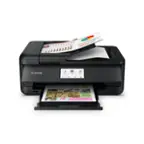
Customers have good things to say about the PIXMA MX922's print quality, ease of use, and wireless functionality. Many appreciate its convenient fax capabilities and straightforward setup process. However, some users noted that the printer can be noisy and that the paper tray could be improved. A few also mentioned occasional issues with reliability and slow warm-up times.
This summary was generated by AI based on customer reviews.
Rated 4 out of 5 stars
A full-featured multi-function printer/scanner
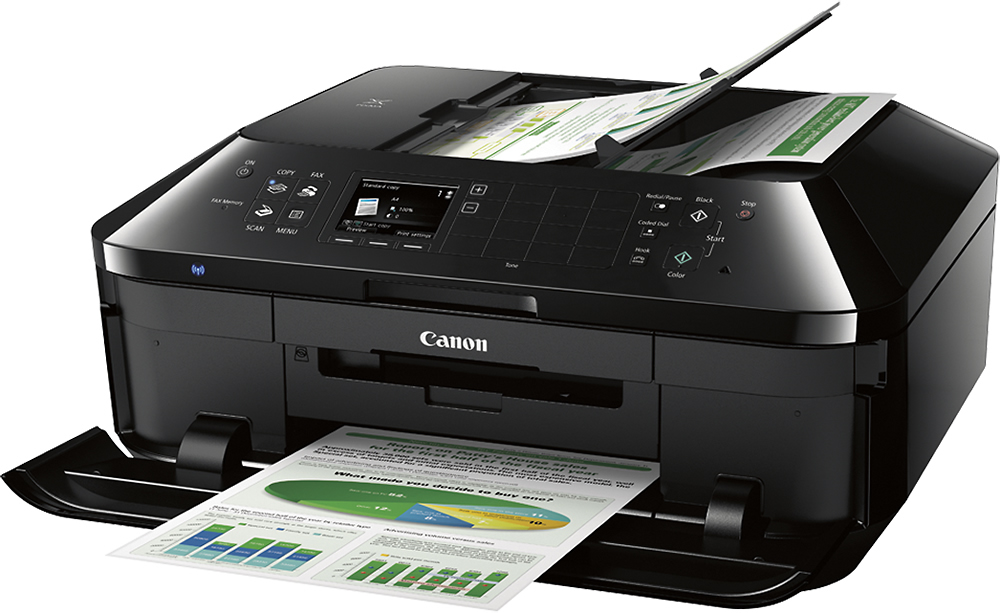
||Posted .This reviewer received promo considerations or sweepstakes entry for writing a review.The Canon PIXMA MX922 was a good replacement for separate printer, scanner, FAX machines. I also have an MX870, to compare the MX922 to, and the MX922 seems to have a slightly larger footprint, but is just as well-made. Setting up for a Mac running OS X 10.6.9 (Snow Leopard) was a little tedious. The installer CD's software went out to the Internet to pull down a 450MB file which then error'ed-out several times, with exceedingly cryptic messages. Had to hunt and peck on Canon's site for the right drivers, and discern which were the proper ones. Ultimately, the software from the web site was successful, and installed fine, and was easy-enough to understand, after a little poking around. The good thing about Canon printers is the separate ink tanks; if one color runs out, you just need to replace that cartridge, not throw out remainder unused ink. The borderless photo printing is a very nice touch, works well with their supplied Photo Glossy paper. The other nice thing about Canon is that they give full-sized ink cartridges, not smaller "starter cartridges" like some other manufacturers. The ink is probably middle-of-the-road in terms of cost, and is a commonly-found size. The MX870 seems to be in the middle in terms of ink-usage with maybe average printing (roughly a couple pages a day…), but wish it'd last longer, even in Fast-Draft/Low-Ink modes. But, that's the game. A quirk about the MX922 are the two stacked paper feed trays. The top tray is intended for photo and specialty paper, the bottom is meant for plain paper. Buuuut, the printer doesn't look to the upper tray first, to see if there's something in there—such as small paper or envelopes—it'll always default to the lower tray. To print on smaller sized paper, you have to essentially tell the printer that through the software's Printer Setup driver from whichever application you're printing from. The upper tray only gets pulled from if the Print Setup software settings indicate either small size (4x5 or 5x7, etc.) or Photo-grade paper intent. Basically, any software settings that'd be for photo, not typical document paper sizes. Which, can be fine, you just have to understand how the MX922 thinks. This is in contrast to the MX870 with a rear paper feed tray which you can quickly slip and envelope in, and the printer will check there first and print a one-off thing quickly. You'll need two or three feet clearance in front of the MX922 to handle the paper trays. So, putting it on a desk with things in front of it would be a problematic arrangement. The other thing about the paper trays is their flimsiness and fussiness. You usually have to pull the upper or lower tray out untruly to load specialty papers, but getting them in their rails can be hit-or-miss. For young folks, maybe not an issue, but for older folks this can be tedious. The multi-document feed is a nice feature, as is the two-sided printing/scanning ability. The context-senistive keypad is a nice feature; it obscures to unnecessary choices from view, and the user is just shown only the buttons available depending which mode they're in, and not be overwhelmed by too many choices. The ability to print from iOS devices is handy. And the ability for the printer to connect over WiFi is nice, though I just use hard-wired USB 2.0 for simplicity-sake. The MX922 was a good buy, and seems to be a fairly good unit, hope it'll last many, many years. It just took a few hours to set-up the hardware/software, and familiarize with the software utility's features. But, using it once set-up is simple.
I would recommend this to a friend- Pros mentioned:Ease of use, Wireless
Rated 4 out of 5 stars
A great value
||Posted .This reviewer received promo considerations or sweepstakes entry for writing a review.This printer is an excellent value. It's very easy to setup and has many, many features. Works great with my Mac and connects well wirelessly with my spouses PC. Can print and scan both sides of a document without any interaction from me. The automatic document feed (ADF) also works well with never a paper jam. My only negative is that it does take longer than I'd like to first start printing after being idle fir a while
I would recommend this to a friend - Pros mentioned:Print qualityCons mentioned:Paper tray
Rated 4 out of 5 stars
So far so good
||Posted .This reviewer received promo considerations or sweepstakes entry for writing a review.This printer has performed without any problems so far. I really like the sheet feeder for the scanner. I was a little disappointed that I couldn't get a second sheet feeder for legal size paper but it's not that difficult to change out the paper tray. The software is pretty good and as always has many more features than I will ever use. Setup was very simple and quick. It prints well and does a very good job on photos.
I would recommend this to a friend - Pros mentioned:PriceCons mentioned:Noise level
Rated 5 out of 5 stars
It's great!
||Posted .This reviewer received promo considerations or sweepstakes entry for writing a review.Needed a new printer so I decided on an all in one to get. And I am very happy with this one it is rather large but is works fine and is not to loud. I read the reviews before I got it so have not had any problems with it and the price was good. I use it daily and the ink seems to last a rather long time which is good. In all it was a good purchase and I am happy with it.
I would recommend this to a friend - Pros mentioned:Fax, Print quality, Wireless
Rated 4 out of 5 stars
Great all around printer
||Posted .This reviewer received promo considerations or sweepstakes entry for writing a review.Great value and great all around printer. prints CDs and has a fax and is wireless along with Canon printing. Like it a lot!
I would recommend this to a friend - Pros mentioned:Ease of use, Print qualityCons mentioned:Noise level
Rated 5 out of 5 stars
Nice Printer
||Posted .This reviewer received promo considerations or sweepstakes entry for writing a review.This was a Christmas gift from hubby. I really like this printer, it was easy to set up and easy to use. It is noisy though, but I got used to it. It prints very well.
I would recommend this to a friend - Pros mentioned:Ease of use, Print quality
Rated 5 out of 5 stars
Love This Printer !
||Posted .This reviewer received promo considerations or sweepstakes entry for writing a review.I've been looking for a printer that can handle some heavy duty college printing and I can honestly say that this is the one. I only got it a week ago and it hasn't disappointed me yet. I've been printing large pdfs and lecture notes for college (75 pages at a time) and it hasn't jammed or messed up the printing in anyway. My last printer absolutely sucked at separating papers while printing on both sides and it annoyed me so much, but this one I can just leave it and trust that it will do it's job while I'm off doing something else. Relatively easy to set up on mac as well so that a plus.
I would recommend this to a friend - Pros mentioned:Price, Print quality
Rated 5 out of 5 stars
Totally worth it
||Posted .This reviewer received promo considerations or sweepstakes entry for writing a review.I was looking for a bargained printer that could print and scan wirelessly. After reading some of the positive feedbacks about this printer and a recommendation from a friend who also owns this one, I decided to buy it when it was on sale. It is totally worth the money! Note: Although this printer has a faxing function, I have not used it yet. A couple downsides, a set up for the first time takes a little bit more work then I expected (but all doable), and it makes loud noises when printing (a symptom of not a laser printer, I guess).
I would recommend this to a friend - Pros mentioned:Print quality, Wireless
Rated 4 out of 5 stars
It's has all I need on Printer
||Posted .This reviewer received promo considerations or sweepstakes entry for writing a review.Easy setup, great print quality. Best of all its wireless and can access from different room in my home On both Mac and PC. We have been using it for a month now and no complain so far. Only time will tell if it is an ink saver or not. I will update my review after I consume the first set of inks.
I would recommend this to a friend - Pros mentioned:Print quality
Rated 5 out of 5 stars
This printer is great for any home office!
||Posted .This reviewer received promo considerations or sweepstakes entry for writing a review.I love this printer, i do admit it is large and bulky. But I find it quite the attractive option and economical as well. It prints very quickly and scans things even quicker. The built in controls on the printer can get most jobs done and you can print from or scan to flash drives which is great if you're not going to boot a computer up. The features I enjoy most are all the cloud printing options. The google cloud print functionality is fantastic and I print documents from around the world from the internet or my mobile devices. I also like that ink is relatively cheap if you buy remanufactured or generic cartridges. The dual paper tray system is nice because you don't have to go to the printer and change the paper type if your most common alternate paper type is always loaded in the alternate paper feed. Things that bother me: Of course as this is a networked printer, you're going to leave it on all the time. I just wish that the two lights that stay on were a little more attractive than the evil blue that they are. Also the cloud printing could have came with better instructions. It took me 20 min to set it up for a couple accounts because I kept making mistakes.
I would recommend this to a friend - Pros mentioned:Ease of use, Print quality, Wireless
Rated 5 out of 5 stars
Awesome
||Posted .This reviewer received promo considerations or sweepstakes entry for writing a review.I love being able to print from my IPad. The set up was easy. The quality on both printed copies and photographs is excellent. I highly recommend this air printer.
I would recommend this to a friend - Pros mentioned:Ease of use, Print quality
Rated 5 out of 5 stars
Canon - Pixma MX922- Awesome Printer
||Posted .This reviewer received promo considerations or sweepstakes entry for writing a review.Best printer I have ever owed. Very easy to setup. Print and photo quality is excellent. I have used both fax and copy with no problem. I really like the fact it has an autofeed for large fax files. Both Windows and MAC PC's have no issue connecting to the printer. My only con is its a little larger than I would like like.
I would recommend this to a friend - Pros mentioned:Print quality, Wireless
Rated 5 out of 5 stars
2nd Canon is #1
||Posted .This reviewer received promo considerations or sweepstakes entry for writing a review.This is the second Canon printer that I have purchased from Best Buy. There was nothing wrong with my old one, I just wanted to upgrade to wireless. As with the old Canon, it does a fantastic job! The quality of the printer (and scanner, which I use just as often) is amazing. One of the deciding factors for my having bought the first one (and this one as well) is the fact that ink cartridges can be bought separately. Of course, that wouldn't be such a big deal if the quality of the results suffered. But it doesn't, and it is. Get it? ps love this printer.
I would recommend this to a friend - Pros mentioned:Ease of use, Print quality, Wireless
Rated 5 out of 5 stars
Great printer
||Posted .This reviewer received promo considerations or sweepstakes entry for writing a review.Absolutely love this printer!! Very easy to use and set up. And it’s wireless. Quick response
I would recommend this to a friend - Pros mentioned:Fax, Print quality, Wireless
Rated 5 out of 5 stars
excellent feature for the price
||Posted .This reviewer received promo considerations or sweepstakes entry for writing a review.Excellent value for home use I like the wireless and simplicity, but has the features like scanning or fax in case I need them. Great 4 hour sale deal!
I would recommend this to a friend - Pros mentioned:Print quality
Rated 4 out of 5 stars
Nice AIO Unit for Home Office
||Posted .This reviewer received promo considerations or sweepstakes entry for writing a review.After replacing an older Canon AIO unit with the MX922, we are mostly pleased with this new addition to our home office. The set-up was a snap and getting this unit configured on our home network couldn't have been easier. Printing wirelessly from our iPad, iphones, and laptops has been a really nice upgrade over our older method of emailing ourselves so that we could print from the one desktop that was wired to the old printer. The print quality of photos and documents is fine for any home applications. Scanning documents is quick and simple either from the unit or from the computer-based software. The fax utility is simple to use and works quickly. We're still on the initial ink tanks that came with the unit so I cannot really comment on the cost of prints yet. My only complaint is that the unit does take what seems to be a long time to generate a print or copy after it has been sitting idly for a period of time. I had to wait nearly two minutes for it to make a copy of an invoice the other day. However, in a session during which I am working and printing a few pages with only minutes in between prints, it is plenty fast. Overall, I'm happy with the purchase and with the fact the the unit has a slightly smaller footprint than our older unit.
I would recommend this to a friend - Pros mentioned:Print qualityCons mentioned:Reliability, Warm-up time
Rated 5 out of 5 stars
Good all around printer for small office
||Posted .This reviewer received promo considerations or sweepstakes entry for writing a review.A little slow when warming up, but otherwise a good all around printer. Reasonable footprint, good photo quality prints, reasonable print speed, easy setup. Totally adequate for my small home office. Still too early to tell, but I'm hoping it proves to be more reliable than previous string of failed Epson printers that I owned.
I would recommend this to a friend - Pros mentioned:Price, Print quality
Rated 3 out of 5 stars
Good printer, but...
||Posted .This reviewer received promo considerations or sweepstakes entry for writing a review.Mixed feelings about this printer, my second purchase of the same model. It's large, very slow, sucks down the ink, and doesn't seem to scan multiple pages into one document--making each page its own file. On the good side, the print is good, the scan is accurate, paper and ink loading is easy, adjusting sizes is easy on prints and pictures. Eventually you can get the wifi to work so no cable is needed, and you can get the printer including ink for $100 so it's affordable to start. I had the Pixma MX 892 prior to this and it lasted 1 year with only light use, then error B200 appeared on screen and it quit working, even after I cleaned the printhead. It refuses to tell you what's wrong, just says go to service center. Since repairs are as costly as a new printer, gave up and bought a second MX 922 so I can at least use the same ink cartridges in them. Only time will tell if this one performs very long?
No, I would not recommend this to a friend - Pros mentioned:Fax, Print quality
Rated 5 out of 5 stars
Incredible Features
||Posted .This reviewer received promo considerations or sweepstakes entry for writing a review.This printer is the nicest prinster I've owned. It is a fax machine, a scanner, copier and printer. It has individual ink cartridges so you save money by only replacing the ones you need. It has two loading trays that hold a lot of paper in one and photo paper in the other. It is a WiFi which is very helpful especially since we all like to share and use the printer.
I would recommend this to a friend - Pros mentioned:Print quality, Wireless
Rated 5 out of 5 stars
great printer for the money
||Posted .This reviewer received promo considerations or sweepstakes entry for writing a review.I purchased this printer because I needed a wireless option for the winter in Florida. It was easy to set up and with the online manual I was using the printer in a few minutes. The copy function is outstanding and color copies were excellent. Again, for a low price this does everything.I paid $79 for the mx922 and was more than worth it. Do not get the lower model 522 or something like that, the few extra bucks for the 922 was well worth it. it does 2 sided printing that the lower models don't do.
I would recommend this to a friend