Customer Ratings & Reviews


- Model:
- B09JZ5BG26
- SKU:
- 12481235
Rating by feature
- Value
Rating 4.7 out of 5 stars
- Quality
Rating 4.7 out of 5 stars
- Ease of Use
Rating 4.7 out of 5 stars
Great service
||Posted . Owned for 1 month when reviewed.This reviewer received promo considerations or sweepstakes entry for writing a review.Great service and product! Love the quality and how easy it is to install and use.
I would recommend this to a friendGreat Product Considering the Price
||Posted . Owned for 1 month when reviewed.This reviewer received promo considerations or sweepstakes entry for writing a review.Definitely recommend getting the solar panel battery recharge attachments as some of the more active areas would require changing batteries weekly. Only wish it had the Motion Warning option like the Floodlight Cam Plus does.
I would recommend this to a friendBrand response from Ring
Posted .Hi NickL.
Thank you for taking the time to share your Ring experience with us and other consumers. We believe in keeping people close to what’s important. That is why we are driven to create products that help you protect what matters most at home and empower you to connect with your visitors from wherever you are. Together, we’ll make neighborhoods safer!
There are some troubleshooting steps that you can take to ensure that you have your device set up for optimal battery-life performance. The more events captured by your Ring devices, the more your battery is used. Using "Live View" can also drain your battery faster. If your device is capturing an excessive number of events each day, you may need to recharge your battery sooner.
To prevent excessive activity, under "Motion Settings" for your device in the Ring app, you can:
Adjust your "Motion Sensitivity" slider to a lower sensitivity.
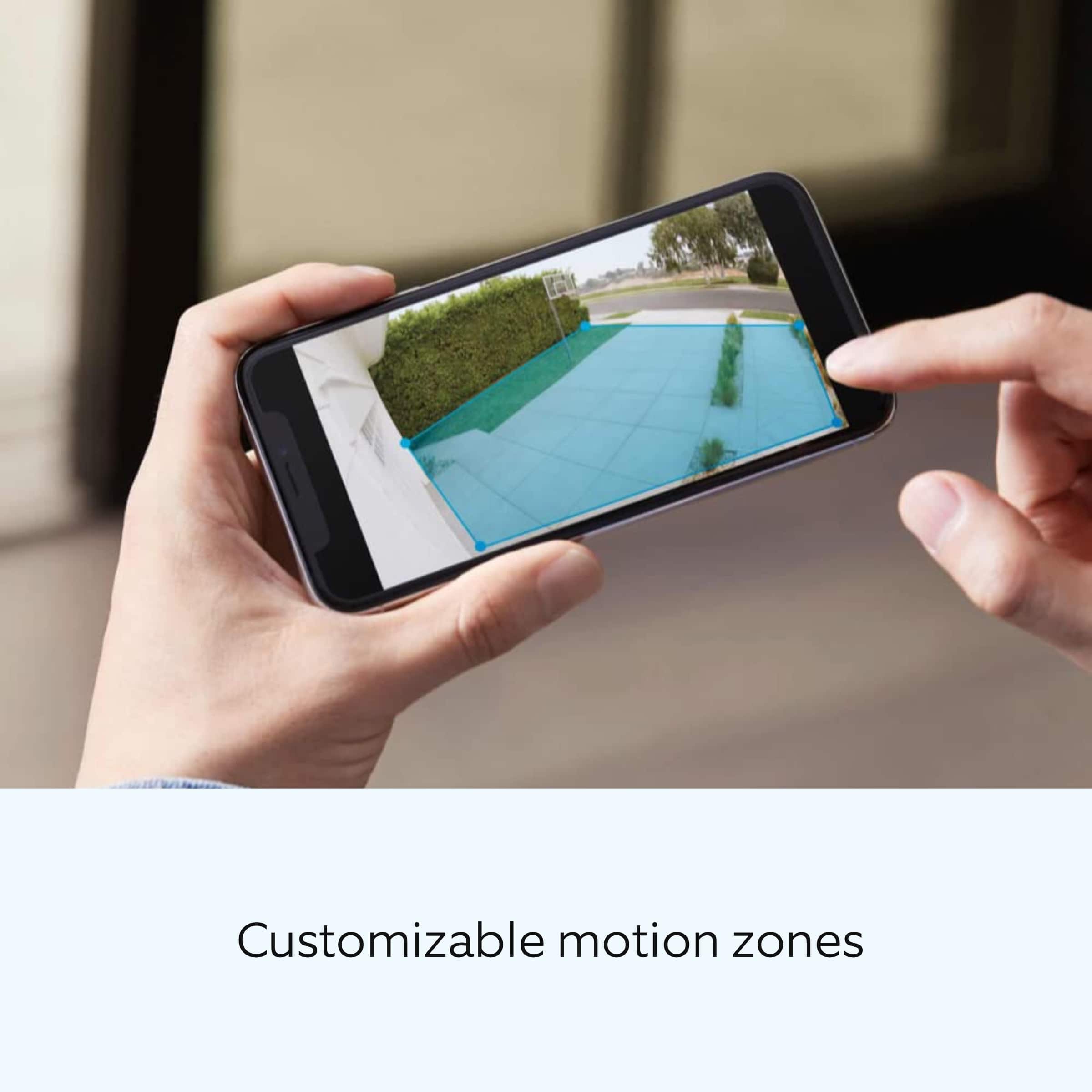
Redraw your "Customizable Motion Zones."
Change "Motion Frequency" to regularly or periodically.
You could also adjust the direction of your Ring device so it doesn't detect as much motion.
You can go to "Power Settings" in the Ring app to see what features may be draining your battery.
To access "Power Settings," open the Ring app:
Tap the menu (≡) on the top left of the dashboard.
Tap "Devices."
Tap the individual device (video doorbell or security camera) you want to check.
Tap "Power Settings" to check your "Battery Level" percentage and "Feature Power Usage."
Tap a feature to adjust "Snapshot Capture," "Motion Frequency," and "Video Recording Length.".
Regarding the Motion Warning, this feature requires a plug-in or hardwired power connection and is not available on battery-powered Ring devices. While the Ring Spotlight Cam Plus offers this feature, it is only available on the Wired and Plug-In versions.
For more information on your Ring Spotlight Cam Plus, we invite you to reach out to our community. Ring Community is our first peer-to-peer community forum, giving our customers the ability to help one another and share their personal feedback and experiences with Ring. We look forward to hearing from you if we can be of any further assistance!
Thank you,
Miyuki from Ring.
Excellent product
||Posted . Owned for 1 month when reviewed.This reviewer received promo considerations or sweepstakes entry for writing a review.This was an extra. Read my prior review. I would recommend!
I would recommend this to a friendWorth the purchase
||Posted .This reviewer received promo considerations or sweepstakes entry for writing a review.Very clear video footage. I also bought the solar charge panel. Great buy!
I would recommend this to a friendFilm plenty of nothing!
||Posted . Owned for 3 weeks when reviewed.This reviewer received promo considerations or sweepstakes entry for writing a review.Battery doesn’t last very long. Alert bell rings outside very loud and is a quiet ring in home. Camera doesn’t come on soon enough therefore plenty notices saying person at door yet when view nothing showed. I could get out of my house walk to car put walker in car and enter car before alert said person at door. Wish it would film faster. Other than that clear picture and I’m going to purchase a solar charger and see if that can keep battery charged more than one week. Not sure if filming can start earlier but will contact Ring for assistance. It could be good if faster filming alert not ring outside and battery last longer. I need another week to see if these problems can be resolved if not then I wasted my money. I hope all can be resolved.
No, I would not recommend this to a friendBrand response from Ring
Posted .Hi ShirleyB.
Thank you for taking the time to share your experience with us. We understand how important it is for your Ring Spotlight Cam Plus to function consistently and reliably, so you are alerted to any wanted or unwanted activity in or around your home. Having a solid connection ensures you do not miss any activity around your home. We are here to provide you with some information to resolve the issue you mentioned in your review.
It sounds like you are experiencing issues with the device in regards to connection and battery life. There are some troubleshooting steps that you can take to ensure that you have your device set up for optimal performance.
The more events captured by your Ring devices, the more your battery is used. Using "Live View" can also drain your battery faster. If your device is capturing an excessive number of events each day, you may need to recharge your battery sooner.
To prevent excessive activity, under "Motion Settings" for your device in the Ring app, you can:
Adjust your "Motion Sensitivity" slider to a lower sensitivity.
Redraw your "Customizable Motion Zones."
Change "Motion Frequency" to regularly or periodically.
You could also adjust the direction of your Ring device so it doesn't detect as much motion.
You can go to "Power Settings" in the Ring app to see what features may be draining your battery.
To access "Power Settings," open the Ring app:
Tap the menu (≡) on the top left of the dashboard.
Tap "Devices."
Tap the individual device (video doorbell or security camera) you want to check.
Tap "Power Settings" to check your "Battery Level" percentage and "Feature Power Usage."
Tap a feature to adjust "Snapshot Capture," "Motion Frequency," and "Video Recording Length.".
A poor wifi signal can cause connectivity with your Ring device to be unreliable. Check the Device Health section of your Ring application to ensure the device’s RSSI is within an acceptable range. The recommended range for optimal performance is 0 to -60 for the RSSI.
If your networking equipment hasn’t been power-cycled in a while, try unplugging it for 30 seconds and plugging it back in. Wireless networks utilize different channels for communication. In the United States, the 2.4 GHz band uses channels 1-11 and the 5 GHz band uses channels 36-165. In some cases, setting up your Ring device(s) can fail due to wireless interference or congestion.
If any additional information is needed regarding your Ring Spotlight Cam Plus, please reach out to our community. Ring Community is our first peer-to-peer community forum, giving our customers the ability to help one another and share their feedback and experiences directly with Ring.
Thank you,
Miyuki from Ring.
Good pick
||Posted . Owned for 3 weeks when reviewed.This reviewer received promo considerations or sweepstakes entry for writing a review.I have never install a security camera before. I love this one because is a Easy install and it has Good quality
I would recommend this to a friendGreat product
||Posted .This reviewer received promo considerations or sweepstakes entry for writing a review.Item received, well packaged, looks great , works very nice, great product…. Thanks
I would recommend this to a friendRing camera pro
||Posted . Owned for 3 weeks when reviewed.This reviewer received promo considerations or sweepstakes entry for writing a review.This Camara is easy to set up. The video is crystal clear the accuracy is on point when some is detected buy it
I would recommend this to a friendFTW!!
||Posted .This reviewer received promo considerations or sweepstakes entry for writing a review.Great value - love being able to solar charge this!
I would recommend this to a friendCamara
||Posted . Owned for 4 months when reviewed.This reviewer received promo considerations or sweepstakes entry for writing a review.Very good camara they captured very far and clears
I would recommend this to a friendRing Spotlight Camera!
||Posted . Owned for 8 months when reviewed.This reviewer received promo considerations or sweepstakes entry for writing a review.Awesome spotlight Ring Camera. Great resolution and clarity.
I would recommend this to a friendHANNA
||Posted . Owned for 2 weeks when reviewed.This reviewer received promo considerations or sweepstakes entry for writing a review.Nice unit works as.offered might try solar units for it
I would recommend this to a friendGreat visuals
||Posted . Owned for 2 weeks when reviewed.This reviewer received promo considerations or sweepstakes entry for writing a review.Great camera. Easy to use. Fantastic quality visuals. Precise warnings when activated
I would recommend this to a friendGood camera
||Posted . Owned for 2 weeks when reviewed.This reviewer received promo considerations or sweepstakes entry for writing a review.Love these cameras. Great video and sound quality. Battery lasts quite a long time also.
I would recommend this to a friendRing Spotlight
||Posted . Owned for 1 month when reviewed.This reviewer received promo considerations or sweepstakes entry for writing a review.This Ring Device work exactly how i needed it to work. I recommend this device. Good Quality, Price and Easy setup
I would recommend this to a friendGood surveillance camera
||Posted . Owned for 1.5 years when reviewed.This reviewer received promo considerations or sweepstakes entry for writing a review.The Ring Spotlight Camera works very well, and I bought a few more. I recommend this item.
I would recommend this to a friendGreat camera when hardwired
||Posted .This reviewer received promo considerations or sweepstakes entry for writing a review.Works really well when hard wired, however logic behind the two batteries doesn’t work quite right. Sometime only one of the two is visible, then the other, and sometime none, which makes the camera turn off.
I would recommend this to a friendRing camera
||Posted . Owned for 3 weeks when reviewed.This reviewer received promo considerations or sweepstakes entry for writing a review.This camera is great! I can see perfectly in the evening and the set up was simple.
I would recommend this to a friendMs. Ring
||Posted .This reviewer received promo considerations or sweepstakes entry for writing a review.Good product. I’ve used Ring for some years now. I have no complaints.
I would recommend this to a friendMy spot light cam plus
||Posted . Owned for 2 weeks when reviewed.This reviewer received promo considerations or sweepstakes entry for writing a review.This camera is very easy to set up. It is great for door entrances or parking lots. Very clear picture.
I would recommend this to a friend