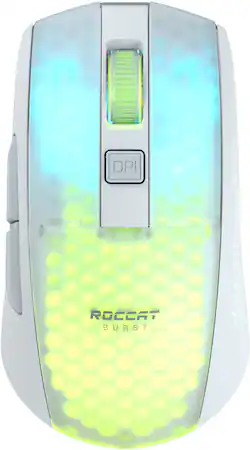
ROCCAT - Burst Pro Air Lightweight Wireless Optical Gaming Ambidextrous Mouse with AIMO Lighting - Wireless - White
- Key Specs
- Lighting Type: RGB
- Connection Type: Wireless
- General
- Product Name: Burst Pro Air Lightweight Wireless Optical Gaming Ambidextrous Mouse with AIMO Lighting
- Brand: ROCCAT
- Model Number: ROC-11-435
- Color: White
- Color Category: White
- Features
- Mouse Type: Gaming
- Lighting Type: RGB
- Customizable Lighting: true
- Maximum Number of Memory Profiles: 5
- Performance
- Mouse Operation: Tactile, Scroll wheel, Button(s)
- Mouse Grip Style: Ergonomic (In comparison to many palm and claw grips, ergonomic grip mice are designed for a specific handedness and put the hand and wrist in a position to promote comfort. Customizable grips feature buttons/keys that can be configured to perform specific actions and may also have customizable calibration and sensitivity settings.)
- Handedness: Ambidextrous
- Tracking Method: Optical (There are several types of computer mice, optical and laser being among the most common. Optical mice detect less detail and provide more precise and accurate movement. Laser mice detect more detail and can be used on a wider variety of surfaces, but are more sensitive to small movements.)
- Adjustable Weight: false
- Connectivity
- Connection Type: Wireless
- Wireless Connectivity: Radio Frequency (RF), Bluetooth (The manner in which a device sends data to another device over a short distance without the use of wires or cables.)
- Operating System Compatibility: Windows
- Power
- Mouse Power Source: Battery-powered
- On/Off Switch: false
- Rechargeable Battery (Mouse): true
- Wireless Charging: false
- Charging Interface(s): USB-C (The connection for transmitting power to charge the device.)
- Battery Chemistry: Lithium-polymer
- Included
- Mouse Pad Included: false
- Dimensions
- Product Height: 1.49 inches (The out of box height of the item. Height is measured as the vertical distance from the bottom of the item to the top as it would be primarily used or placed.)
- Product Length: 4.72 inches (The out of box length of the item. Length is measured as the longest dimension of the item.)
- Product Width: 2.28 inches (The out of box width of the item. Width is measured as the horizontal distance from one side of the item to the other as it would be primarily used or placed.)
- Product Weight: 81 grams (The out of box weight of the item.)
- Warranty
- Manufacturer's Warranty - Parts: Not provided
- Manufacturer's Warranty - Labor: Not provided
- Other
- UPC: 731855514359
Introducing the ROCCAT Burst Pro Air Lightweight Optical Wireless RGB Gaming Mouse for Windows PC. The Burst Pro Air brings ROCCAT’s symmetrical lightweight shape with its rich feature set, comfort and performance, into wireless. Meticulously crafted from the ground up, its shape delivers maximum comfort. Featuring ROCCAT Stellar Wireless technology, gamers get exceptional signal strength for a virtually latency-free connection and up to 100 hours of battery life. Running low on battery? Connect the detachable Phantom Flex cable with USB-C rapid charging to get back in the game quickly with 5 hours of battery life with just a 10-minute charge.Designed and engineered by ROCCAT, the Titan Switch Optical delivers improved durability and faster click speed with unparalleled precision. The ROCCAT Owl-Eye 19,000 DPI optical sensor with 400 IPS tracking speed equips gamers with incredible tracking accuracy and responsiveness.The ROCCAT Burst Pro Air features four RGB lighting zones with signature AIMO intelligent lighting that shine through a water and dust resistant, translucent Bionic shell. The Burst Pro Air also features our coveted heat-treated pure PTFE glides, pre-tuned for an incredibly smooth glide right out of the box.
- Symmetrical Shape: The Burst Pro Air symmetrical shape delivers more comfort than the competition. It features the Burst Pro’s ergonomic design crafted from scratch. You'll notice the improvement the second you put your hand on it.
- Stellar Wireless + Bluetooth: Choose between gaming-grade 2.4GHz low latency wireless and multi-purpose Bluetooth 5.2, with up to 100 hours of battery life. USB-C rapid charging gives you 5 hours of play time with just a 10-minute charge.
- ROCCAT Bionic Shell: At just 81g, the Burst Pro Air features a water- and dust-resistant Bionic Shell and an enhanced lighting showcase with its 4 RGB zones.
- Titan Switch Optical: Faster than any mechanical switch, the Titan Switch Optical with adjustable debounce provides a long-lasting 100 million click life cycle, and speed-of-light actuation for unprecedented speed and precision.
- ROCCAT Owl-Eye Optical Sensor: Experience smooth, precise tracking thanks to ROCCAT’s proven Owl-Eye optical sensor, now featuring 19K DPI and 400 IPS tracking speed with incredible power efficiency.
- AIMO Illumination: ROCCAT AIMO produces vibrant lighting displays in 16.8 million colors right out of the box. It also syncs with other compatible AIMO products for illumination scenarios that flow from device to device.
- Phantom Flex USB-C Charging Cable & Heat-treated Glides: Play as you charge with the flexible and lightweight USB-C Phantom Flex cable. Pair that with our heat-treated pure PTFE glides for a smooth experience, right out of the box.
- Phantom Flex USB-C Charging Cable: Play as you charge with the USB-C Phantom Flex cable. Flexible and lightweight, it virtually disappears during use to the point that you won't even know it's there.
- Heat-Treated Pure PTFE Glides: The Burst Pro Air 's heat-treated pure PTFE glides are a game changer. They're pre-tuned so you get incredible glide and smooth mouse movements right out of the box.
- Nvidia Reflex Compatible: Unleash your Burst Pro Air with NVIDIA Reflex. Powered by GeForce RTX 30 Series GPUs and NVIDIA G-SYNC monitors, it delivers sub-25ms response times. The Burst Pro Air is NVIDIA Reflex compatible to help you acquire targets faster and increase aim precision.
- 2-years Manufacturer Warranty: We’re confident in the quality and longevity of our products. To ensure additional peace of mind we provide a 2-year limited manufacturer warranty.
Q: Can I use this with my Acer - Aspire 5
A: The Burst Pro Air can be connected via cable (USB 2.0 and higher), Bluetooth, or wirelessly using its 2.4 GHz USB 2.0 transmitter. If the Acer Aspire 5 features either a USB port or Bluetooth, the mouse can be connected. When Windows is installed, the software Swarm can be installed and the mouse is fully supported.
A: Hi Alex, thank you for choosing one of our products. We are sorry the mouse doesn't seem to be working properly. Please make sure that when charging the mouse is connected via its original cable to the PC directly. When using it wirelessly, it is important that the mouse is turned on on its bottom and that the transmitter is connected to the PC directly as well. If using the mouse this way and the issue persists, it may make sense to reset and recover the mouse. This can be done through the Advanced Settings tab in Swarm and the update center in Swarm respectively. If the issue then persists or if you need more assistance in performing the reset, we are also more than happy to assist you. In that case, please reach out to our team using the contact form on the Turtle Beach website and you'll get help in no-time!
A: Thanks for your question about our products! This is absolutely possible by using the ROCCAT Swarm software and selecting the illumination mode "Fully Lit". You can customize the color and brightness and your settings will be applied to the device's internal memory. Thereby you can take your mouse to a different PC and keep your illumination settings.
A: Hi and thank you for choosing ROCCAT. This behavior is not normal and may relate to your PC. However, there could also be an issue with the mouse or simple user error, so it would be best if you reach out to our support team using the contact form on our official support website so that we can help you properly.
Q: Does this mouse work with an Xbox series s?
A: As long as the application or game run on the console supports mice, the Burst Pro Air should be functioning properly. However, please note that it does not officially receive support and no configuration software is available for this setup.
Q: Will this mouse work with mac OS?
A: yes


















