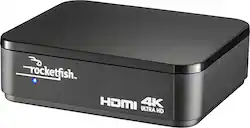
Rocketfish™ - 2-Output HDMI Splitter with 4K and HDR Pass-through - Black
- Key Specs
- Connector Type (End 1): HDMI Type A
- Connector Type (End 2): HDMI Type A
- General
- Brand: Rocketfish™
- Model Number: RF-G1502
- Product Name: 2-Output HDMI Splitter with 4K and HDR Pass-through
- Color: Black
- Quantity: 1
- Compatibility: Most HDMI enabled devices
- Connectivity
- Cable Type: HDMI
- Product Type: Splitter
- Connector Type (End 1): HDMI Type A
- Connector Type (End 2): HDMI Type A
- Warranty
- Warranty - Parts: 1 year
- Warranty - Labor: 1 year
- Other
- UPC: 600603203633
Add another HDMI port to your TV or PC with this Rocketfish HDMI splitter. It splits one HDMI signal into two high-quality outputs with no setup required, letting you connect the devices you need. With full 4K and HDR compatibility, this Rocketfish HDMI splitter provides additional functionality without sacrificing sound or picture quality.*
- Compatible with most HDMI components: Compatible with resolutions up to 4K (with HDR and other next-gen standards).
- Main purpose: Splits one HDMI signal into two outputs.
- Included AC adapter: For reliable power.
Whats Included
- AC adapter
- Quick setup guide
- Rocketfish 2-Output HDMI Splitter
Product Manuals
A: Same issue, want to get 4K HDR on my TV while sending audio through HDMI to a non HDCP2.2 receiver for Dolby Atmos. Tried this HDMI splitter and it did NOT solve the problem. It sent 4K to the TV and Atmos to the receiver but with no HDR. The manual says that all connected devices need to be compatible with HDCP2.2 for HDR to work. These splitters aren't designed for this type workaround application but it would be nice if it was. IS THERE A SPLITTER OR DEVICE THAT WILL ALLOW THIS APPLICATION TO WORK WITHOUT BUYING A NEW RECEIVER OR USING DUAL HDMI OUTPUT SOURCE? At the moment I am using the Audio Return Channel hdmi input on my TV to the ARC hdmi output on my receiver. No Atmos from the source this way but will still get DDPlus and will properly display 4K HDR from source. However I can still get Atmos with ONLY the local apps on the TV with this set up.
A: undefined
Q: Will this work with 50 ft. HDMI connected to tv?
A: I use one with 75 foot hdmi cable with no problem.
A: Once everything has turned on and synced up, I don't see any pixelation. I have a set top box routed through the splitter to an HD TV and an amplifier controlling a home theater. Both pictures are crystal clear. When first switched on, there is some garbling of the picture until everything syncs up (maybe 5 seconds), however. This is pretty typical though.
A: No.. what you need is a 4k HDR HDMI switch not a splitter. I would go with this http://www.bestbuy.com/site/rocketfish-4-port-4k-hdmi-switch-box-black/5055100.p?skuId=5055100 Good luck.