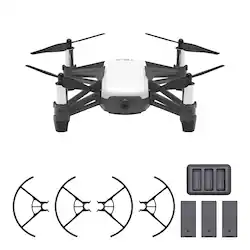
- Key Specs
- Control Type: Remote control
- General
- Brand: Ryze Tech
- Model Number: CP.TL.00000047.01
- Product Name: Tello Boost Combo Quadcopter
- Color: White And Black
- Assembly Required: Partial
- Recommended Minimum Age: 14 years
- Product Set: Boost Combo
- Series: Tello (Part of a group of the same product type with similar features.)
- Flight
- Autonomous Flight Modes: Circle, Hover, Landing
- Obstacle Avoidance Technology: Omnidirectional
- Directional Controls: All
- Maximum Wind Speed Resistance: 15 miles per hour
- Number of Rotors: 4
- Camera
- Integrated Camera: true
- Effective Pixels: 5 megapixels (The actual number of pixels which make up the viewable image.)
- First Person View (FPV): true
- Field of View: 82.6 degrees
- Camera Gimbal: Built-in (A support that pivots and stabilizes the camera.)
- Image Stabilization: Digital (This feature helps reduce image/video blur or distortion that may occur from unsteady motion.)
- Video Encoding Formats: MP4 (The process of preparing the video for output, where the digital video is encoded to meet proper formats and specifications for recording and playback with the use of a compatible device.)
- Image File Format(s): JPEG (Standardized software format(s) of storing digital images. The type of format chosen for capturing and compressing the image can determine quality, level of detail, and storage space required.)
- Image Sensor Type: Other (CCD and CMOS are the two main technologies used in image sensors. CCD, the older of the two types, turns analog light signals into digital pixels. This conversion happens without distortion, resulting in high-quality images. Newer CMOS sensors use transistors at each pixel to move electrical charges. CMOS sensors are typically less expensive, but also require more light to create distortion-free images.)
- Environmental
- Indoor Or Outdoor Use: Indoor and outdoor (Indicates the appropriate environment product was designed to be used in.)
- Minimum Operating Temperature: 32 degrees fahrenheit (The lowest recommended ambient (surrounding) temperature in which the product can ideally operate stated by the manufacturer. Generally long-term exposure of the product to temperatures less than the minimum can result in ineffective operation.)
- Maximum Operating Temperature: 104 degrees fahrenheit (The highest recommended ambient (surrounding) temperature in which the product can ideally operate stated by the manufacturer. Generally long-term exposure of the product to temperatures more than the maximum can result in ineffective operation.)
- Compatibility
- App Compatible: true (The product can be connected to a program or software application on a mobile device, which then receives collected data from the product.)
- Mobile Device Holder: false
- Operating System Compatibility: Android, Apple iOS
- Features
- Control Type: Remote control
- Integrated GPS: No
- Records Audio: true
- Landing Gear/Legs Included: Landing Legs
- Storage
- Memory Card Compatibility: None (The type of memory card(s) recommended for use with the product.)
- Memory Card Included: false (Indicates whether a memory card is included.)
- Power
- Rechargeable Battery: true
- Removable Battery: true
- Battery Model: Tello Flight Battery (The model number of the battery necessary for operation of the device.)
- Charging Interface(s): Micro-USB (The connection for transmitting power to charge the device.)
- Interface(s): Micro-USB (Refers to the types of connections that devices use to interact and communicate with each other.)
- Battery Capacity: 1100 milliampere hours (The amount of energy stored in the battery.)
- Battery Voltage: 3.8 volts
- Battery Charger Model: Tello Battery Charging Hub
- Controller Batteries Included: true
- Controller Battery Size: Other
- Other
- UPC: 190021324664
Shoot, code and play with this Ryze Tech Tello quadcopter boost combo. The programmable, interactive smart drone is VR headset-compatible and works with Scratch for block-based coding and Tello SDK for advanced users, and the built-in camera lets you take 720p videos and 5-megapixel photos.
Fly Responsibly:
Before takeoff, update all software and firmware, and read the instructions thoroughly.
See the FAA website for registration requirements and information about flying a drone safely: https://www.faa.gov/uas/getting_started/. Additional state or local requirements may apply. Check your local jurisdiction. The following websites may help you make informed decisions about flying your drone: www.knowbeforeyoufly.org and www.modelaircraft.org.
- Intelligent flight system with fail-safe protection: Automatically keeps the quadcopter in the air while ensuring you stay in control.
- Shoots 720HD video at 30 fps: With electronic image stabilization, you can capture smooth and stable aerial footage.
- Real-time, first-person view of your flight: Beam what your drone sees through its camera straight to your phone or tablet using a free iOS and Android app so you can go on a virtual flight, take great photographs, and monitor telemetry data.
- Control your drone from up to 328' away: The built-in lithium-polymer battery provides up to 13 minutes of flight time per charge, with LEDs indicating battery status during flight.
- Downloadable Tello app with friendly UI: Allows you to configure your aircraft, view photos and videos, copy them to folders in your mobile device.
- Propeller guards: Reduce the risk of harm or damage to people or objects from accidental collisions with the aircraft.
- Fail-safe protection: Ensures safe landing even if you lose connection.
- Fly Responsibly:: The following website may help you make informed decisions about flying your drone: KnowBeforeYouFly.org. Additional state or local requirements may apply. Check your local jurisdiction.
- Intelligent flight system with fail-safe protection: Automatically keeps the quadcopter in the air while ensuring you stay in control.
- Shoots 720HD video at 30 fps: With electronic image stabilization, you can capture smooth and stable aerial footage.
- Real-time, first-person view of your flight: Beam what your drone sees through its camera straight to your phone or tablet using a free iOS and Android app so you can go on a virtual flight, take great photographs, and monitor telemetry data.
- Control your drone from up to 328' away: The built-in lithium-polymer battery provides up to 13 minutes of flight time per charge, with LEDs indicating battery status during flight.
- Downloadable Tello app with friendly UI: Allows you to configure your aircraft, view photos and videos, copy them to folders in your mobile device.
- Propeller guards: Reduce the risk of harm or damage to people or objects from accidental collisions with the aircraft.
- Fail-safe protection: Ensures safe landing even if you lose connection.
- Fly Responsibly:: The following website may help you make informed decisions about flying your drone: KnowBeforeYouFly.org. Additional state or local requirements may apply. Check your local jurisdiction.
Whats Included
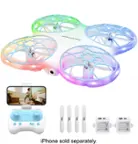
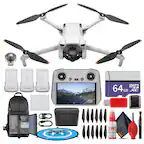
- Ryze Tech Tello Boost Combo Quadcopter
- 4 x Propellers(pair)
- 3 x Lithium-polymer battery
- Battery charging hub
- Micro-USB cable
- Owner's manual
- propeller removal tool
- Propellers guards
- Ryze Tech Tello Boost Combo Quadcopter
- 4 x Propellers(pair)
- 3 x Lithium-polymer battery
- Battery charging hub
- Micro-USB cable
- Owner's manual
- propeller removal tool
- Propellers guards
Product Manuals
Q: Does the boost combo come with a remote control? And if not, does it work with the apple 5s?
A: It does not. You have to DL the App. And use the control on your phone. You can buy the control online. Think it’s like $35 give or take.
Q: What is its range and how long will it fly on one charge?
A: About 300 feet with no obstructions. It works based on a wifi access point in the drone, and your tablet's/phone's wifi client. 10-13 min, so the trio of batteries in the combo are helpful. We have tried several small drones, and this one by far is the best we have experienced at the low price point.
Q: What is in the Boost Combo pkg? How many props, battery charger?
A: Comes with one set of extra props, three batteries, and a charger that will hold 3 batteries. (Just a note, the charger will only charge one at a time, not all three at the same time).
Q: Is it necessary to have an SD card for this? TIA
A: No it records to your phones internal storage. The drive emits a WiFi signal that you connect to while flying.
A: These type self-discharge to prevent leaking and overcharging. Also, low tech batt discharge when they are making contact with metal (charging terminals). Try taking them out after fully charging, they will still discharge but not as quick.
A: Hi Marylin first make sure that the phone he's going to connect it to can work with the app that needs to be downloaded into inorder to control the drone with the cell using a virtual control which works great on my IPOD 6th GEN which wasn't on the list for compatible cell phones in the IOS & Android list. But after experimenting with the ipod it works great. As far as connecting to wifi, it has a built in ssid ( wifi name of connection) that'll show up in your setting and wifi connection. Then you'll see TELLO to connect to. So at my home it connects me to tello and disconnect from the home wifi. Almost like a bluetooth connection. I've heard if using a regular cell place it in airplane mode and should work. But like always look deeper into this. Hope this helps.
Q: Does it come with a camera?
A: Yes it has a great camera built in for video and pics check out my youtube channel JeepdogsRCbikelife1 i did a video with this drone.
A: I am just another customer, but I have a few tellos. I would check that the propellers are not bent, or the propellers guards are not bent up, making contact with blade. If all that looks fine, use the forked end of the small shiny tool to wedge between the top of the motor, and bottom of prop. They will slide off, and push back on very easily. Just note which ones are CW, and CCW. I have found that I will occasionally pick up a loose piece of long hair, and it will wrap around the motor shaft under the propellers. But with the propellers off, it's easy to slide the tiny "roll" of hair up and off of the shaft. After a few hundred flights, the motors will start to fail causing spins and landings. They are available online fairly cheap, although it is a bit of a project to replace them. I'd recommend watching a couple YouTube videos on the task. Hope I could help a bit, those are the only problems I have ran into with the few I own these past few years.