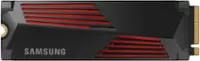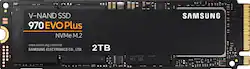
Samsung - 970 EVO Plus 2TB Internal SSD PCIe Gen 3 x4 NVMe
- Key Specs
- Storage Capacity: 2000 gigabytes (Measured in megabytes (MB), gigabytes (GB) and terabytes (TB), this is the amount available for storing files, music, movies, photos and more. The total includes the capacity of the hard disk drive and solid state drive if both are included on the computer.)
- Storage Drive Type: SSD (Traditional, mechanical hard disk drives are the most common type of storage because they're relatively inexpensive and offer huge capacities. However, they also generate both noise and heat. Solid state drives, also known as SSDs, are many times faster than hard disk drives and have no moving parts to wear out, but typically offer less capacity for the same price.)
- Maximum Read Speed: 3500 megabytes per second (The greatest speed at which the device can read information; for example, opening files.)
- Maximum Write Speed: 3300 megabytes per second (The greatest speed at which the device can write information; for example, saving files.)
- Form Factor: M.2 2280
- Interface(s): PCIe Gen 3 x4 (Refers to the types of connections that devices use to interact and communicate with each other.)
- General
- Product Name: 970 EVO Plus 2TB Internal SSD PCIe Gen 3 x4 NVMe
- Brand: Samsung
- Model Number: MZ-V7S2T0B/AM
- Capacity
- Storage Capacity: 2000 gigabytes (Measured in megabytes (MB), gigabytes (GB) and terabytes (TB), this is the amount available for storing files, music, movies, photos and more. The total includes the capacity of the hard disk drive and solid state drive if both are included on the computer.)
- Performance
- Storage Drive Type: SSD (Traditional, mechanical hard disk drives are the most common type of storage because they're relatively inexpensive and offer huge capacities. However, they also generate both noise and heat. Solid state drives, also known as SSDs, are many times faster than hard disk drives and have no moving parts to wear out, but typically offer less capacity for the same price.)
- Maximum Read Speed: 3500 megabytes per second (The greatest speed at which the device can read information; for example, opening files.)
- Maximum Write Speed: 3300 megabytes per second (The greatest speed at which the device can write information; for example, saving files.)
- Heatsink: false (Dissipates heat during intense operation for sustained peak performance.)
- Compatibility
- Internal Or External: Internal
- Product Compatibility: Desktop computers, Laptop computers
- Form Factor: M.2 2280
- Interface(s): PCIe Gen 3 x4 (Refers to the types of connections that devices use to interact and communicate with each other.)
- Features
- Security Features: None
- Data Encryption: true
- Encryption Algorithm: 256-bit AES (The algorithm standard used to encrypt data on a device.)
- Usage: Backup, Enterprise/server, Everyday computing, Gaming, Low power storage
- Lighting Type: None
- Memory
- Cache Buffer Size: 2 megabytes (The data capacity of the cache buffer (or disk buffer) that acts as temporary memory for the drive. The cache holds the most recently and frequently used data to save the drive the extra step of pulling it from permanent storage every time it's needed, which helps increase the drive's overall speed.)
- NAND Flash Memory Type: TLC (Single Level Cell (SLC) stores 1 bit of data per memory cell; Multi Level Cell (MLC) stores 2 bits per cell, Triple Level Cell (TLC) 3 bits, and Quad Level Cell (QLC) 4 bits. Vertical NAND (V-NAND) or 3D NAND stores more data by layering cells vertically. Similarly, there are 3D MLC, 3D TLC and 3D QLC stacked cells.)
- Dimensions
- Product Height: 3.16 inches (The out of box height of the item. Height is measured as the vertical distance from the bottom of the item to the top as it would be primarily used or placed.)
- Product Width: 0.87 inches (The out of box width of the item. Width is measured as the horizontal distance from one side of the item to the other as it would be primarily used or placed.)
- Product Weight: 0.3 ounces (The out of box weight of the item.)
- Included
- Included Software: Magician Software for SSD management
- Other
- UPC: 887276303765
Upgrade your computer for high-end gaming or video editing with this Samsung 970 EVO Plus NVMe SSD. The 2TB capacity lets you store large-size media files and programs, and the Smart Magician software monitors drive health. This Samsung 970 EVO Plus NVMe SSD features sequential read speeds up to 3500MB/sec. for exceptional performance and prompt boot times.
- 2TB storage capacity: Provides ample storage space for your music, movies and other files.
- PCI Express 3.0 x4 (NVMe) interface: Offers simple connection to your computer.
- AES 256-bit hardware encryption: Helps safeguard sensitive data.
- 2GB cache buffer: Offers rapid processing speed.
Whats Included
- Samsung 970 EVO Plus 2TB Internal PCI Express 3.0 x4 (NVMe) Solid State Drive for Laptops with V-NAND Technology
- User Manual
Product Manuals
A: NVMe stands for Non-Volatile Memory Express which is a newer standard for high read and write speeds when compared to SATA. Most SATA m.2 devices will still only be able to produce around 500-600 MB/s read and write speeds. The 970 EVO drive is an NVMe M.2 drive. The read and write speeds are on this drive are 3500 MB/s. It is super fast. It uses an M.2 slot on your motherboard instead of a SATA cable.
Q: Is this for laptop or desktop? I check the model name, it seems this is for desktop?
A: This is for either Laptop or Desktop that supports PCIe(PCI Express) NVMe M.2 slots that is 80mm in size. It has to be a fairly new Model Laptop or Desktop Motherboard of the last ~2-5years for it to work right. Don't get it confused with the other M.2 SATA model that looks almost identical to it. The SSD industry really decided to make it as confusing as possible for the non-technical consumer.
Q: Does this drive have the good Phoenix controller or the gimpy Samsung "in-house" controller?
A: Thank you for your question. After a little more of a deep drive on my part, reading what I could initially find on this topic, I pulled the M2 drive and checked under the sticker (Hiding something?) The labeling on the chip shows PHOENIX. I have the 2TB and the P/N ends in HALB. Most of the documentation I am finding says PHOENIX controller, BUT looking at the PASSMARK performance numbers, being significantly lower 19,026 than the original numbers for the drive at 25,158, I am suspicious, now. I have two of these drives (2TB) and one was manufactured 2021.06 and the other 2021.07. Based on the news story dates, I suspect it might be the "in-house" controller (Unless they still use the Phoenix in the 2TB model, and the 'in-house' in the 1TB and below) - BUT I'M NOT 100% SURE at this point. This will require additional digging... if this is true - I will be a little disappointed. I might start looking at other manufacturers that don't feel a need to mislead. Sad, because Samsung has been SOLID for a long time. Caveat emptor.
Q: Will this work on the PS5 ?
A: No. You'll need a pci gen 4 m.2 and also one with high enough read speed
Q: Does this SSD require a heat sink in order to stay within the "ideal" temperature range under load?
A: I currently run this drive without a heatsink, and have been using it for roughly a month. I have transferred a ~250 GB to the drive while also playing a game during the transfer, and didn't see temps higher than 50°C. So in my experience I do not believe a heatsink is required. Now my ambient temperature in the room is typically 68-70°F, this could change my testing if I was running in a hotter room.
Q: Will this 2TB fit in an Asus Zenbook Flip 13 OLED UX363EA? Will I need a heatsink?
A: Den: Yes, the 970 EVO Plus is compatible with the ASUS Zenbook Flip13. Samsung NVMe SSDs rarely require a heat sink yet maintain optimal performance thanks to Samsung’s advanced design and manufacturing capabilities coupled with an integrated, heat dissipating thermal label. In rare instances of extreme workloads (transfer of several hundreds of GB), performance may be throttled through Samsung’s dynamic thermal throttling algorithm to protect the SSDs integrity. Please be aware, however, that an external heat source such as a high-powered graphics card, or CPU placed in close proximity to a Samsung NVMe SSD, can adversely affect airflow around a Samsung NVMe SSD which may lead to performance degradation. Therefore, please ensure there is appropriate airflow around your Samsung NVMe SSD. To better address your heat concerns, please contact Samsung Customer Support and a representative will gladly help you. Call: 1-800-SAMSUNG (ask for Memory or press #, then 6 for Memory products) Available 9AM – 9PM EST (Mon-Fri) - Samsung Memory
Q: hi is this compatible with a ASUS ROG STRIX Z370-E GAMING -- Aura RGB,
A: Hey barbz, yes this m.2 drive is compatible. For reference you can go to the following site: https://rog.asus.com/motherboards/rog-strix/rog-strix-z370-e-gaming-model/ There is a diagram part way down the page with locations that the m.2 drive attaches to the motherboard (12 and 14). I suggest using the slot with the heat sync which is slot 14. You will need to take the plate off which probably has a thermal paste pad that you will need to peel the protecting cover off of. Good luck with with your gaming.
A: Depends on why you're installing the drive ...if you are just upgrading to a similar but bigger drive, just clone it....but going from HDD to SSD, I would do a fresh OS and program/app install and copy your user files.







![The text on the image reads:
"SAMSUNG 990 EVO Plus 2TB HF 87 29 34] D2 UIT 21-c 341-0 CrUNE AZMECHB 25 SAMSUNG OCS 200 SSo 8 SAVSUNG KIVL OHEL"
Corrected text:
"SAMSUNG 990 EVO Plus 2TB HF 87 29 34] D2 UIT 21-c 341-0 CrUNE AZMECHB 25 SAMSUNG OCS 200 SSo 8 SAVSUNG KIVL OHEL"
The text is a description of a Samsung product, which is a 2TB hard drive.](https://pisces.bbystatic.com/image2/BestBuy_US/images/products/ee3c5861-78da-4d93-97ad-825a9eff529a.jpg;maxHeight=144;maxWidth=200?format=webp)