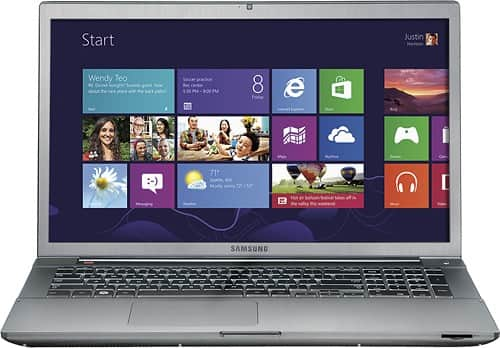

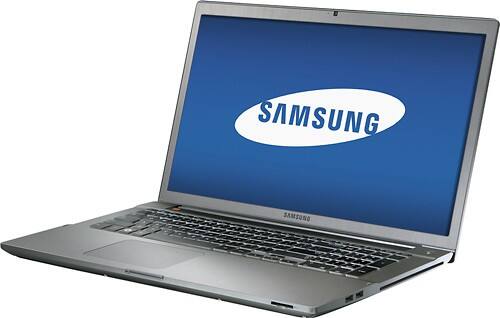
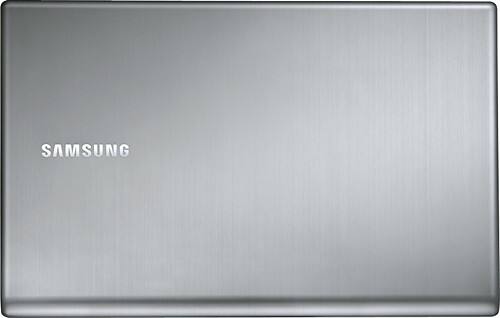



Samsung - Geek Squad Certified Refurbished Series 7 17.3" Laptop - 8GB Memory - 1TB Hard Drive - Titan Silver
This item is no longer available in new condition.
See similar items below.
Description


Features
17.3" Full HD display
SuperBright technology with matte finish maintains the vivid colors in your movies, photos and videos while also reducing glare. 1920 x 1080 resolution boasts impressive color and clarity. Energy-efficient LED backlight.
3rd Gen Intel® Core™ i7-3635QM processor
Powerful quad-core, eight-way processing performance. Intel Turbo Boost Technology delivers dynamic extra power when you need it, while increasing energy efficiency when you don't.
8GB system memory for advanced multitasking
Substantial high-bandwidth RAM to smoothly run your games and photo- and video-editing applications, as well as multiple programs and browser tabs all at once.
1TB hard drive for ample file storage space
Holds a significant collection of digital photos, music, HD videos and DVD-quality movies. 5400 rpm spindle speed for standard read/write times.
Computer comes back to life in seconds
Close the lid to enter powerless sleep mode and Fast Start technology saves all your data and system settings. Return to the exact same place when you open the lid.
NVIDIA GeForce GT 650M graphics
Driven by 2GB dedicated video memory to quickly render high-quality images for videos and games.
Stream entertainment from your laptop to your TV
Intel® Wireless Display (WiDi) wirelessly transmits content to your HDTV* — photos, music, Web videos, Internet TV — whether on the hard drive or online.
Built-in JBL stereo speakers with sub-woofer
SoundAlive technology creates a virtual surround sound experience for your music, movies, streaming Web content and games.
Weighs 6.6 lbs. and measures 1" thin
Prioritizes screen size without sacrificing portability, so you get lots of viewing space without the laptop being too hefty to move around. 8-cell lithium-ion battery.
Aluminum finish in titan silver
Creates a sophisticated look and provides a rigid but lightweight frame.
Bluetooth 4.0 interface syncs with compatible devices
Wirelessly transfer photos, music and other media between the laptop and your Bluetooth-enabled cell phone or MP3 player, or connect Bluetooth wireless accessories.
2 USB 3.0 ports maximize the latest high-speed devices
Also includes 2 USB 2.0 ports to connect more accessories and peripherals, plus sleep-and-charge support. The USB 3.0 ports are backward-compatible with USB 2.0 devices (at 2.0 speeds).
HDMI output expands your viewing options
Connect to an HDTV or high-def monitor to set up two screens side by side or just see more of the big picture.
Built-in media reader for simple photo transfer
Supports Secure Digital, Secure Digital High Capacity and SDXC memory card formats.
Dual-band wireless and wired network connectivity
Built-in high-speed wireless LAN connects to both wireless frequencies (802.11a/b/g/n) for the fastest available signal. The Ethernet LAN port also lets you plug into wired 10/100/1000 networks.
Microsoft Windows 8 operating system
Customize your new Start screen with instant access to the things you care about most, or restore the familiar Windows desktop experience with an improved taskbar and streamlined file management.
Built-in webcam with microphone
1.3MP resolution generates a clear picture during video chats with your family and friends — or with gaming allies and enemies.
Backlit keyboard for easy typing in dim or dark locations
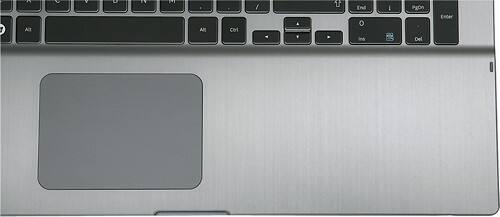
Built-in 10-key numeric keypad to quickly input numbers. Scroll-scope, flat-type touchpad with gesture support.
DVD/CD burner
Reads and writes to a wide variety of media formats, including DVD+R/RW, DVD-R/RW, CD-R/RW and double-layer DVD.
Additional ports
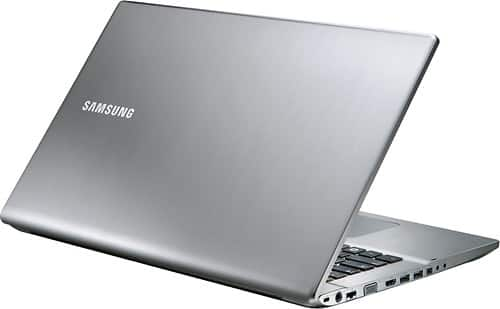
Microphone input. Headphone output. Mini VGA port (mini-VGA-to-VGA adapter sold separately).
*Requires a separate wireless display adapter (not included), such as NETGEAR Push2TV, or a TV or receiver with built-in Intel WiDi.
Intel, Pentium, Celeron, Core, Atom, Ultrabook, Intel Inside and the Intel Inside logo are trademarks or registered trademarks of Intel Corporation or its subsidiaries in the United States and other countries.
What's Included
Samsung Geek Squad Certified Refurbished Series 7 17.3" Laptop - 8GB Memory - 1TB Hard Drive
8-cell lithium-polymer battery
Power cable
Other
- Energy Star CompatibleYes
- Processor BrandIntel®
- <a href="javascript:winopengld('1083716230738','pcmcat38200050027','cat12080')">Processor</a>Intel® 3rd Generation Core™ i7
- <a href="javascript:winopengld('1083716230979','pcmcat38200050027','cat12080')">Processor Speed</a>2.4GHz (with Turbo Boost up to 3.2GHz)
- Battery Type8-cell Lithium Polymer (Li-Polymer)
- <a href="javascript:winopengld('1087340511518','pcmcat38200050027','cat12080')">Display Type</a>HD widescreen LED
- <a href="javascript:winopengld('1087340566303','pcmcat38200050027','cat12080')">Screen Size (Measured Diagonally)</a>17.3"
- <a href="javascript:winopengld('1083716231665','pcmcat38200050027','cat12080')">Cache Memory</a>6MB on die Level 3
- <a href="javascript:winopengld('1083716231937','pcmcat38200050027','cat12080')">System Memory (RAM)</a>8GB
- <a href="javascript:winopengld('1083716236490','pcmcat38200050027','cat12080')">System Memory (RAM) Expandable To</a>Nonexpandable
- Type of Memory (RAM)DDR3
- <a href="javascript:winopengld('1083716232062','pcmcat38200050027','cat12080')">Hard Drive Type</a>SATA II (5400 rpm)
- <a href="javascript:winopengld('1083716235838','pcmcat38200050027','cat12080')">Computer Hard Drive Size</a>1TB
- Optical DriveDouble-layer DVD±RW/CD-RW
- <a href="javascript:winopengld('1087340511924','pcmcat38200050027','cat12080')">Optical Drive Speeds</a>Drive speeds not specified
- Direct-Disc LabelingNo
- Digital Media Reader or SlotsYes, digital media card reader
- <a href="javascript:winopengld('1083716236524','pcmcat38200050027','cat12080')">Graphics</a>NVIDIA GeForce GT 650M
- <a href="javascript:winopengld('1083716235920','pcmcat38200050027','cat12080')">Video Memory</a>2GB
- <a href="javascript:winopengld('1083716238297','pcmcat38200050027','cat12080')">TV Tuner</a>No
- <a href="javascript:winopengld('1083716236935','pcmcat38200050027','cat12080')">MPEG</a>Yes
- Built-in WebcamYes
- <a href="javascript:winopengld('1083716237122','pcmcat38200050027','cat12080')">Modem</a>None
- <a href="javascript:winopengld('1087340512096','pcmcat38200050027','cat12080')">Networking</a>Built-in Gigabit Ethernet LAN (RJ-45 connector)
- Wireless NetworkingWireless-A+B+G+N
- Bluetooth-EnabledYes
- <a href="javascript:winopengld('1087340818871','pcmcat38200050027','cat12080')">S-Video Outputs</a>None
- AudioHD with Sound Alive
- SpeakersInternal
- <a href="javascript:winopengld('1087340512157','pcmcat38200050027','cat12080')">PCMCIA Slots</a>None
- <a href="javascript:winopengld('1083716239272','pcmcat38200050027','cat12080')">USB 2.0 Ports</a>2 USB 3.0; 2 USB 2.0
- <a href="javascript:winopengld('1083716239354','pcmcat38200050027','cat12080')">IEEE 1394 FireWire Ports</a>None
- <a href="javascript:winopengld('1083716239311','pcmcat38200050027','cat12080')">Parallel Ports</a>None
- <a href="javascript:winopengld('1083716239499','pcmcat38200050027','cat12080')">Game Ports</a>None
- Laptop WeightStandard (more than 5.5 lbs.)
- Battery Life<a href="javascript:openOfferDetails('1218066009426','cat12178');">Not available</a>
- Pointing DeviceTouchpad with scroll scope, flat type and gesture user interface
- HDMI OutputYes
- Blu-ray PlayerNo
- Operating System PlatformWindows
- <a href="javascript:winopengld('1083716241291','pcmcat38200050027','cat12080')">Operating System</a>Windows 8
- <a href="javascript:winopengld('1218331155414','pcmcat38200050027','cat12080')">Operating System Bit Version</a>64-bit
- <a href="javascript:winopengld('1218870374819','pcmcat38200050027','cat12080')">ENERGY STAR Certified</a>Yes
- Best Buy PC AppNo
- Graphics ChipNVIDIA
- Backlit KeyboardYes
- Drive Capacity1TB
- Graphics CardNVIDIA GeForce GT 650M
- Wireless DisplayYes
- UPC400088159339
Customer reviews
Rating 3 out of 5 stars with 4 reviews
(4 customer reviews)to a friend
Rated 1 out of 5 stars
Refurbished? No. Repackaged, and poorly
||Posted .This reviewer received promo considerations or sweepstakes entry for writing a review.Issues with 1st purchase: • Ordered. Arrived poorly packed, no protection from impact • The mutli touch on trackpad is not working. Which makes the already dubious prospect of using Windows 8 on a non-touchscreen device even more daunting. Not acceptable even for a Windows 7 machine. It only works as regular trackpad, single touch. Also, cursor jumps when I'm not even touching trackpad. • More alarming - there are squiggly black lines on the screen, almost like thin Etch A Sketch lines looking like you'd imagine hairs would appear if they were somehow trapped in screen. • No Samsung software ("easy" settings, etc) Before making purchase was told by Geek Squad & Samsung representatives that Samsung refurbishes these, not Best Buy. I go to Best Buy store, return it, order another one. The new one is worse- • ALL the same issues as 1st machine, plus: • Windows partition has been shrunk to 39.9GB • Recovery partition is gone (cannot restore or refresh Windows without it) & in its place there is a 900 GB partition. Someone installed Windows 7 on here, then wiped it leaving this big partition?more circumstantial evidence for this… • Secure Boot is off, even though Microsoft insists all Windows 8 machines ship with it enabled. Other UEFI settings have been changed • backlit keyboard doesn't work, except for Wireless key, Mute key & FN LOCK key Back to Best Buy. I talk to Samsung rep instead of Best Buy folks. He looks it up in system- it has never been serviced by Samsung. We agree that Geek Squad didn't do a darn thing with it either. Except stick it in a cardboard box & ship it. We get on phone with Samsung. Arrange for me to ship it to Samsung for repairs; they take detailed notes on what's wrong. I ask repeatedly for phone rep to verify what he is telling me- that despite this being refurbished I have a full Samsung warranty. He assures me this is the case: I have a full 12 month + additional 3 month warranty, just as if I had bought machine new. They will repair laptop, he explains, & if that is somehow not possible will replace it with machine of greater specifications & value. I am happily surprised; feel satisfied that Samsung is taking care of customer despite Best Buy's incompetence & indifference. I get it back. Things are fixed, except • trackpad is not very responsive. I've used store models of this machine that worked better • overall performance seems slower than before • there is a blank (0 KB used; 0 KB available) "E:" drive which Samsung rep assures me should not be visible. • the backlit keyboard still doesn't work, except for the three keys noted above SO, per Samsung phone rep I install Samsung software updates. No improvement. I restore to factory settings. No improvement. I run all Windows updates (so many !) & no improvement. I send back to Samsung. Get back after second repair. New keyboard installed. Has Windows 8 key, instead of old Windows 7 key so it's obviously new & that's nice. After repair, the trackpad replaced with keyboard works much more smoothly. Great. Other keys also have backlighting but now those three keys F6 {Mute} F9 {Wireless} & F12 {Fn Lock} & a little less noticeably the CAPS LOCK key always remain fully backlighted unless their corresponding features are disabled, even when I manually reduce lighting or when the auto sensor does! The other keys dim, these don't. I can even dim other keys all the way to Dark (off) & yet those keys remain fully lit. So those function keys with separate indicator lights always stay fully backlit unless I disable their corresponding features as follows: F6 {turn off Mute}, F9 {turn off WiFi & Bluetooth} F12 {turn off Fn Lock} & CAPS LOCK {turn off CAPS LOCK} The ambient light sensor in general tends to choose all on or off for the auto-lighting. The documentation regarding ambient light sensor control on Samsung site & included in laptop's built in "Help" is all out of date. So I GOOGLE the problem. It is a known issue with users. Known in this review of a slightly earlier or slightly different model - http://www.mobiletechreview.com/notebooks/Samsung-Series-7-Chronos.htm & Known by these three customers on Samsung's own site - http://answers.us.samsung.com/answers/7463/product/NP700Z5AH/samsung/questions.htm So I call Samsung to report bug or see if it can be fixed. (It was not an issue on the first unit I got from Best Buy, so I was expecting it could be fixed.) I am surprised to hear it's not a known issue in their database. I try getting it added as a known issue as courtesy to Samsung & customers & even that is an enormous hassle!) I am told to go online. I go live chat,told to Windows Refresh, & later to Samsung Restore. I explain this will not resolve issue - that I have done all this before. I am told Samsung procedures insist I must do all this before a bug report can be filed. So I perform both steps. Neither resolve issue. This is now middle of 5 hours that day between phone service & live chat just trying to find out if this can be fixed or not. After Restore the multi touch on trackpad isn't working, & only backlight keys that work are those 4function keys- & only when their functions are enabled. This means Samsung has shipped me a PC which out of the box does not have a Recovery partition that matches the C drive; that means using provided Restore feature "restores" machine to state that is not fully functional nor purported "factory settings" !!! The trackpad driver wasn't even installed. After running Samsung Software Update the trackpad works properly, & all the keys light up but the ambient light sensor no longer adjusts keyboard brightness. .After running all Windows updates, light sensor will dim keys (except for persistent function keys which also have an indicator light - they remain fully lit) & I am able to adjust the keyboard but still Wireless key & other three stay backlit even when all other keys are off.Te ambient light sensor is sporadic, & when it does work tends to either go all on or all off. So those function keys with separate indicator lights always stay fully backlit unless I disable their corresponding features as follows: F6 {turn off Mute}, F9 {turn off WiFi & Bluetooth - not very practical for a laptop!!!} F12 {turn off Fn Lock} & CAPS LOCK {turn off CAPS LOCK}. Speaking with a supervisor I am told repair has been escalated to Executive Customer Relations. Next day I get a call from a ECR rep asking me to email. I email & rehash all these troubles & after a couple of messages where my questions go unanswered he tells me: "Your unit is a refurbished product from Best Buy & does not come with Samsung Warranty. We apologize but you will need to contact Best Buy for resolution." I reply that this isn't acceptable and believe Samsung needs to honor documented guarantees. I ask whether I should expect replacement unit or UPS Shipping label so I can send my unit in for repair again. He never replies; he just ignores me. To Best Buy location yet again to see Experience Sales rep. He calls ECR. I explain to rep I'm at Samsung Experience shop with Sales Rep. She tells me I have no warranty because I bought it refurbished from Best Buy & therefore repairs /replacements are not covered! i explain all this yet again. I insist Samsung needs to honor what they promised. Finally I have to suggest what a bad job she is doing as a Customer Service rep (a field I have worked in) & she puts me on hold & comes back & suddenly tells me I have a 3 months, repair-only warranty. I express shock that after insisting I have no warranty, she will come back with a 3 month (repair-only) warranty only after I state how I would lose any customer service job I held with this kind of service. We are not negotiating my warranty; I am due what I was told I would get- the 12 month + 3 month full warranty for repair & if not possible then replacement. She tells me she was just clarifying & that my warranty is only 3 months but then adds if Intelisol says it can't be fixed I MAY be due an "accommodation." This is all ridiculous. But she's presumably just doing her job as she's been trained to do, so I get my new transaction number, she emails me a UPS Shipping Label, & I thank her. I call Intelisol directly to relay repair issues to them. They ask I email a brief summary. I do so, after going yet again to the UPS store 5 days ago to send this back to Texas yet again for repair. Machine has been with Intelisol since yesterday morning, per UPS, but I have no status update from them (My latest service request doesn't even show up on my account page at Samsung's poorly designed website. My last one didn't either. Makes it very difficult to follow repair progress) so I email back. I am told it has yet to be assigned to a technician. Who knows what will be wrong when I get it back. Maybe it'll work right. Sunday I wrote a descriptive email of my experience at the request of the helpful Sales rep, who wants it so he can forward it to his VP. I have yet to hear back regarding that email. I advise against purchasing anything supposedly refurbished by Best Buy.. Nor would I advise buying anything from Samsung, except maybe a new TV. If anybody asked me if they should buy a Samsung laptop (or phone) I would say, resoundingly: no. & if anyone asked how dealing with Samsung is, I would laugh (or maybe cry). Best Buy twice shipped me laptops in complete disrepair. Samsung put me in a position where I am unable to return it to retailer, by guaranteeing me the 12+3 month warranty & trying to back out of it. Together, they have put me line to have thrown away over $900 on a malfunctioning unreliable laptop which well over a month after purchase I haven't even had an opportunity to use.
No, I would not recommend this to a friendRated 5 out of 5 stars
Great for gaming
||Posted .This reviewer received promo considerations or sweepstakes entry for writing a review.Exactly what I was looking for in my price range. The touchpad is finicky, but can be slightly improved by downloading Samsung drivers. I'm able to play pretty demanding games on high to ultra settings
I would recommend this to a friendRated 1 out of 5 stars
Worst computer in the world-throw it away
Posted .This reviewer received promo considerations or sweepstakes entry for writing a review.First. I've never actually left a review for a product. But with the worlds crappiest laptop...I felt compelled. Do not by this computer if you plan to have more than 1 program open at any time. Do not buy this computer if you plan to use it for work. It will fail you more than 50% of the time and probably take 5 years off your life expectancy. Do not plan on consistently being able to connect to any wifi source. Use a 10 year old laptop or a garage sale laptop for that. You'll have better luck. And yes I'm computer savvy and own about 20 laptops that I maintain for work and employees. I wish I could even use the laptop to write this review...unfortunately it's tooooo slow even for that. My iphone is about a cagillion times faster. I'm the bad guy for being attracted to its design, large screen and good looking specs on paper. Been struggling with her for almost a year now. Geeksquad will not be able to help you. Run as far away from this laptop as possible. Even if you don't like running....RUN. When I get a new laptop I will run this over repeatedly with a truck and send it back to samsung with a note that I've improved their laptops functionality*. Do not buy this computer. I am doing you a favor. If you like being able to reliably send and receive emails, do Not buy this laptop. If you like to work and not deal with constant freezing...do Nor buy this computer. It is horrible. Bestbuy and samsung won't be able to help you. Friends and family may leave you when they see the anger this computer causes you. If you are still reading this....WHY??...RUN. Save yourself the money and aggravation. Get any no name cheap laptop available, they'll all run circles around this Lump
No, I would not recommend this to a friendRated 5 out of 5 stars
Great good graphic and in range pc
Posted .This reviewer received promo considerations or sweepstakes entry for writing a review.This pc can play tons of demanding games, AND it looks like it is compatible with the nvidia shield :D ( I don't have it )
I would recommend this to a friend
Customer reviews from Samsung US
See all Samsung US reviewsUser rating, 4.7 out of 5 stars with 11 reviews on Samsung US.
4.7(11 reviews)
Q: Questiondoes a refurbished laptop come with any kind of warranty?
Asked by Anonymous.
- A:Answer Yes, however the warranty may vary from its new product counterpart. For the most up-to-date information on the current and available warranties on products sold in Best Buy, please reach out to the Best Buy Geek Squad or your Samsung Salesperson. Thanks for your interest in Samsung products. --Mr.Samsung
Answered by Samsung

Q: QuestionWhat was repaired and is it returnable for a full refund or store credit?What was the issue that was repaired on this laptop. Is it returnable for a full refund and or Best Buy credit if it is not working correctly when it arrives?
Asked by Anonymous.
- A:Answer There would be no way to determine how exactly it was refurbished. Also, you would certainly be able to return it for up to 15 days from when you receive your order.
Answered by MatthewSBBY
Q: QuestionDoes the refurbished computer come with a Windows/recovery disk?
Asked by Anonymous.
- A:Answer No. Mine did not come with any Windows install or recovery disk(s).
Answered by BestEye
Q: QuestionWhere is this shipping from?
Asked by Anonymous.
- A:Answer Both of mine came from Best Buy in Ohio
Answered by BestEye
Q: QuestionIs this touchscreen?
Asked by J.
- A:Answer No touchscreen. There's a trackpad which is supposed to have multi-touch functionality though my first laptop didn't work nor did replacement unit until I sent it to Samsung for repair, and even then that didn't function too well
Answered by BestEye
Q: QuestionIs there a backlit keyboard?Is the keyboard backlit?
Asked by Anonymous.
- A:Answer Yes, but mine doesn't work except for WiFi and FN LOCK keys, even after sending and receiving back from Samsung for repair. It has gone back to Samsung again for this issue
Answered by BestEye
Most viewed
- $999.99Your price for this item is $999.99
- $499.99Your price for this item is $499.99
- $69.99Your price for this item is $69.99
- $499.99Your price for this item is $499.99$799.99The comparable value for this item is $799.99
- $249.99Your price for this item is $249.99
- $899.00Your price for this item is $899.00$999.00The comparable value for this item is $999.00
- $579.99Your price for this item is $579.99$869.99The comparable value for this item is $869.99
- $33.34Your price for this item is $33.34/mo.per monthfor 36 mos.; 0% APR
- $779.99Your price for this item is $779.99
- $499.99Your price for this item is $499.99
- $139.99Your price for this item is $139.99
- $179.99Your price for this item is $179.99$299.99The comparable value for this item is $299.99
- $199.99Your price for this item is $199.99$329.99The comparable value for this item is $329.99
- $1,579.98Your price for this item is $1,579.98
- $169.00Your price for this item is $169.00$399.00The comparable value for this item is $399.00
- $199.99Your price for this item is $199.99
- $499.00Your price for this item is $499.00$599.00The comparable value for this item is $599.00
- $649.99Your price for this item is $649.99
- $69.99Your price for this item is $69.99
- $799.99Your price for this item is $799.99$1,199.99The comparable value for this item is $1,199.99