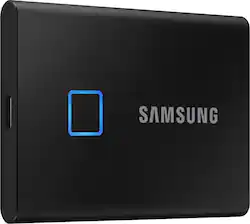
Samsung - T7 Touch 2TB External USB 3.2 Gen 2 Portable SSD with Hardware Encryption - Black
- Key Specs
- Storage Capacity: 2000 gigabytes (Measured in megabytes (MB), gigabytes (GB) and terabytes (TB), this is the amount available for storing files, music, movies, photos and more. The total includes the capacity of the hard disk drive and solid state drive if both are included on the computer.)
- Storage Drive Type: SSD (Traditional, mechanical hard disk drives are the most common type of storage because they're relatively inexpensive and offer huge capacities. However, they also generate both noise and heat. Solid state drives, also known as SSDs, are many times faster than hard disk drives and have no moving parts to wear out, but typically offer less capacity for the same price.)
- Interface(s): USB Type C (USB 3.0 Gen1) (Refers to the types of connections that devices use to interact and communicate with each other.)
- General
- Product Name: T7 Touch 2TB External USB 3.2 Gen 2 Portable SSD with Hardware Encryption
- Brand: Samsung
- Model Number: MU-PC2T0K/WW
- Capacity
- Storage Capacity: 2000 gigabytes (Measured in megabytes (MB), gigabytes (GB) and terabytes (TB), this is the amount available for storing files, music, movies, photos and more. The total includes the capacity of the hard disk drive and solid state drive if both are included on the computer.)
- Performance
- Storage Drive Type: SSD (Traditional, mechanical hard disk drives are the most common type of storage because they're relatively inexpensive and offer huge capacities. However, they also generate both noise and heat. Solid state drives, also known as SSDs, are many times faster than hard disk drives and have no moving parts to wear out, but typically offer less capacity for the same price.)
- Compatibility
- Internal Or External: External
- External Hard Drive Type: Portable (Physical characteristics of the hard drive, including size, weight and how you connect to your device.)
- Interface(s): USB Type C (USB 3.0 Gen1) (Refers to the types of connections that devices use to interact and communicate with each other.)
- Minimum System Requirements: Microsoft Windows 7 or later, Apple MacOS X 10.10.x or later, Android 5.1 (Lollipop) or later
- Features
- Security Features: Fingerprint reader
- Data Encryption: true
- Encryption Algorithm: 256-bit AES (The algorithm standard used to encrypt data on a device.)
- Usage: Backup, Enterprise/server, Everyday computing, Gaming, Low power storage
- Power
- Power Source: USB port
- Dimensions
- Product Height: 3.3 inches (The out of box height of the item. Height is measured as the vertical distance from the bottom of the item to the top as it would be primarily used or placed.)
- Product Width: 2.2 inches (The out of box width of the item. Width is measured as the horizontal distance from one side of the item to the other as it would be primarily used or placed.)
- Product Weight: 0.13 ounces (The out of box weight of the item.)
- Other
- UPC: 887276380919
Keep work and personal files readily accessible with this black Samsung T7 Touch portable SSD. The USB 3.1 Gen 2 Type-C port enable rapid file sharing, while the 2TB capacity offers plenty of room for media files and documents. This Samsung T7 Touch portable SSD features 256-bit AES encryption, a fingerprint reader and password protection for secure access. Transfer in a flash, secure with a touch whether you're storing critical business documents, games, or movies, the Portable SSD T7 Touch gives you speed and security in a palm-sized package.
- USB 3.2 Gen 2 interface: Offers an easy-to-use connection to devices. Backward compatible with USB 2.0 for simple connection to your computer. USB-powered.
- Password protection and 256-bit AES hardware encryption: Help keep your files secure.
- Solid state drive with no moving parts: Ensures cool, quiet operation.
- Compatible with PC, Mac and Android: For flexible installation options.
- 2TB storage capacity: Provides ample space for storing documents, photos, music and more.
- Portable design: Lets you take your data on the go.
Whats Included
- Samsung Portable T7 Touch 2TB External USB 3.2 Gen 2 Portable Solid State Drive with Hardware Encryption
Product Manuals
Q: How many fingerprints can be used at a time? Can multiple users use the fingerprint security option?
A: Yes. The device allows multiple finger prints to be saved to unlock. I actually saved both my hands so I never forget which one I setup. Works great.
A: Read/write speeds of up to 1,050/1,000 MB/s (per sequence) according to Samsung's website https://www.samsung.com/us/computing/memory-storage/portable-solid-state-drives/portable-ssd-t7-touch-usb-3-2-2tb-black-mu-pc2t0k-ww/# Here is some info from an asterisk on their site: Performance may vary depending on host configuration. To reach maximum read/write speeds of up to 1,050/1,000 MB/s, respectively, the host device and connection cables must support USB 3.2 Gen 2 and the UASP mode must be enabled.
A: Yes, The T7 Touch 2TB drive comes with two cords, one Type C and one Type A.
A: potentialbuyer: Samsung drives adhere to the IDEMA standard of advanced formatting, which will result in the drive appearing as less than the listed size. The amount of space that appears to be "missing" is in fact used by the drive/card for storing firmware, metadata and spare blocks. Your operating system (Windows, Linux, etc.) will also affect the usable space -- different operating systems will use different amounts of space to store their metadata. Consequently, formatted space will always be less than unformatted space. You can look IDEMA up online for more technical details about this standard, which is established by The International Disk Drive Equipment and Materials Association. Should you have additional questions or need assistance, please contact Samsung Customer Support. Call: 1-800-SAMSUNG (ask for Memory or press #, then 6 for Memory products) Available 9AM – 9PM EST (Mon-Fri) - Samsung Memory
A: Yes, it does work with the M1 running 12.5.1. Yes, there is a known issue with it running straight out of the box. However, there is a work around that, although will seem too "complicated", doing it will allow the T7 Touch to work as intended. I consider this a great purchase. I bought a 2nd one after the initial order.
Q: Does the device get hot while it’s being used. Does it work with the M2 chip from Mac?
A: Windows user--of two T7'-2T's--says, "warm to the touch, but not hot"
Q: what is the file format, NTFS or FAT32?
A: You make the choice. Do you want NTFS? If yes, then connect the drive to your PC and use the FORMAT command with the /FS:NTFS switch. If you want, instead, to run with exFAT, then FORMAT with /FS:exFAT switch, etc.


















