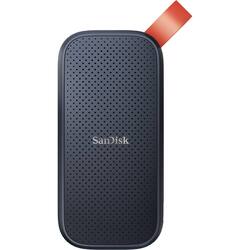
SanDisk - 2TB External USB 3.2 Gen 2 Type C Portable SSD - Black
- Key Specs
- Storage Capacity: 2000 gigabytes (Measured in megabytes (MB), gigabytes (GB) and terabytes (TB), this is the amount available for storing files, music, movies, photos and more. The total includes the capacity of the hard disk drive and solid state drive if both are included on the computer.)
- Storage Drive Type: SSD (Traditional, mechanical hard disk drives are the most common type of storage because they're relatively inexpensive and offer huge capacities. However, they also generate both noise and heat. Solid state drives, also known as SSDs, are many times faster than hard disk drives and have no moving parts to wear out, but typically offer less capacity for the same price.)
- Maximum Read Speed: 520 megabytes per second (The greatest speed at which the device can read information; for example, opening files.)
- Interface(s): USB Type C (USB 3.2 Gen2) (Refers to the types of connections that devices use to interact and communicate with each other.)
- General
- Product Name: 2TB External USB 3.2 Gen 2 Type C Portable SSD
- Brand: SanDisk
- Model Number: SDSSDE30-2T00-G25
- Capacity
- Storage Capacity: 2000 gigabytes (Measured in megabytes (MB), gigabytes (GB) and terabytes (TB), this is the amount available for storing files, music, movies, photos and more. The total includes the capacity of the hard disk drive and solid state drive if both are included on the computer.)
- Performance
- Storage Drive Type: SSD (Traditional, mechanical hard disk drives are the most common type of storage because they're relatively inexpensive and offer huge capacities. However, they also generate both noise and heat. Solid state drives, also known as SSDs, are many times faster than hard disk drives and have no moving parts to wear out, but typically offer less capacity for the same price.)
- Maximum Read Speed: 520 megabytes per second (The greatest speed at which the device can read information; for example, opening files.)
- Compatibility
- Internal Or External: External
- External Hard Drive Type: Portable (Physical characteristics of the hard drive, including size, weight and how you connect to your device.)
- Interface(s): USB Type C (USB 3.2 Gen2) (Refers to the types of connections that devices use to interact and communicate with each other.)
- Features
- Usage: Everyday computing
- Power
- Power Source: USB port
- Dimensions
- Product Height: 3.81 inches (The out of box height of the item. Height is measured as the vertical distance from the bottom of the item to the top as it would be primarily used or placed.)
- Product Width: 1.85 inches (The out of box width of the item. Width is measured as the horizontal distance from one side of the item to the other as it would be primarily used or placed.)
- Product Weight: 1.4 ounces (The out of box weight of the item.)
- Other
- UPC: 619659183684
Secure valuable digital content with this SanDisk portable SSD. A USB 3.2 Gen 2 interface allows seamless connectivity with compatible devices, while read speeds of up to 520MB/sec. support fast file transfers. Boasting a 2TB capacity, this SanDisk portable SSD provides ample room for media and digital information, and the included rubber hook makes portability simple.
- USB 3.2 Gen 2 Type-C interface: Ensures compatibility with a wide range of USB Type-C computers and smartphones for fast and easy backup.
- Fast solid-state performance: Provides up to 520MB/sec. speeds for a rapid response when updating files.
- 2TB storage capacity: Offers plenty of space to store your media library.
- Drop protection construction: Ensures protection against falls from heights of up to 2m.
- Warranty: Travel worry-free with a three-year limited warranty.
Whats Included
- SanDisk 2TB External USB 3.2 Gen 2 Type C Portable Solid State Drive
- USB-C to USB-A Cable
- Safety and Warranty Guide
Q: can i use this to add more storage for a gaming pc
A: Please allow us to inform you that all SanDisk®️ portable SSDs are a plug and play devices. You can connect the drive to the computer and start transferring the data using drag and drop or copy/paste method. You do not require any special driver, firmware update or software to use the drive on computer.
Q: Can you hook to a go Google Pixel 6 and download from the phone?
A: Please allow us to inform you that the amount of current required to power this portable SSD device is approximately 1.1 amps. This SSD should work with most higher-end mobile phones that do provide sufficient power. However, we would suggest you to check the same with your host device manufacturer.
A: See how Chrome book formats drives. This comes formatted as xFat . Windows can use this better if it is Formatted as NTSF instead of xFat. see what the Chrome will accept.
Q: Can this type of product be used by an S53 phone? I don't have a computer.
A: Don’t know, but I also used it w my iPad Pro
Q: Does this drive have an on/activity LED?
A: No it does not have an ON light. it does not have its own power source.
A: It has 2TB total storage. Some storage is used for data management, so a bit less than 2TB remains. This is a SSD storage light weight. It is no bigger than a large match box. Very handy for travel and compact.
Q: Is this password protected?
A: it can be , if you want. But, if you forget your password, I am not sure how to recover your password.
Q: Will this record shows for a tablo over the air recorder?
A: Please allow us to inform you that all SanDisk®️ portable SSDs are a plug and play devices. You can connect the drive to the computer and start transferring the data using drag and drop or copy/paste method. You do not require any special driver, firmware update or software to use the drive on computer. We also recommend you to contact the host device manufacturer for compatibility check.














