Sevenhugs - Smart Remote U - Black
- Key Specs
- Remote Control Type: Universal
- Remote Control Features: IR device control, Smart Touch
- Number Of Devices Controlled: 80
- General
- Brand: Sevenhugs
- Model Number: SR1AI0BL
- Product Name: Smart Remote U
- Color: Black
- Features
- Remote Control Type: Universal
- Remote Control Features: IR device control, Smart Touch
- Setup Method: App, Learning
- Connectivity
- Number Of Devices Controlled: 80
- Wireless: true
- Connectivity Technology: Bluetooth, Infrared, Wi-Fi (The manner in which a device sends data to another device over a short distance.)
- Compatibility
- Compatible Product(s): Streaming media player, Television
- Power
- Rechargeable: true
- Charging Base Included: true
- Battery Chemistry: Lithium-ion
- Dimensions
- Product Weight: 2.2 ounces (The out of box weight of the item.)
- Warranty
- Warranty - Parts: 1 year
- Warranty - Labor: 1 year
- Other
- UPC: 858779007061
Control TVs, lights and stereos with this black Sevenhugs smart remote. The intuitive touch screen offers simplicity, and the Smart Remote companion app allows the user to customize the remote's interface for different devices. This Sevenhugs smart remote lets you connect electronics and services via Wi-Fi, Bluetooth, infrared and smart hubs for a simple installation.
- Controls up to 80 devices total or 20 infrared devices: Works with select Wi-Fi and Bluetooth devices and services (Apple TV, Amazon Fire TV, Roku, Philips Hue, Sonos, Spotify, LIFX, TP-Link, Kodi, WeMo plugs, NVIDIA and more), and over 650,000 infrared devices (TVs, media players, etc.).
- Smart Remote app: Lets you easily find and add all your devices and services.
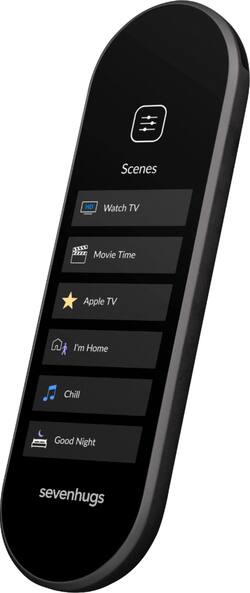
- High-resolution color 3.4" touch screen with haptic feedback: Offers simple and intuitive on-screen controls, making it easy for anyone to watch TV, listen to music, and control smart home devices.
- Rechargeable lithium-ion battery: Delivers up to one day of battery life with a convenient charging base.
- Control multiple devices simultaneously with a single tap: With this smart remote, you can create custom TV and home scenes for your convenience.
- Controls up to 80 devices total or 20 infrared devices: Works with select Wi-Fi and Bluetooth devices and services (Apple TV, Amazon Fire TV, Roku, Philips Hue, Sonos, Spotify, LIFX, TP-Link, Kodi, WeMo plugs, NVIDIA and more), and over 650,000 infrared devices (TVs, media players, etc.).
- Smart Remote app: Lets you easily find and add all your devices and services.
- High-resolution color 3.4" touch screen with haptic feedback: Offers simple and intuitive on-screen controls, making it easy for anyone to watch TV, listen to music, and control smart home devices.
- Rechargeable lithium-ion battery: Delivers up to one day of battery life with a convenient charging base.
- Control multiple devices simultaneously with a single tap: With this smart remote, you can create custom TV and home scenes for your convenience.
Whats Included
- Charging base
- Owner's manual
- Power adapter
- Sevenhugs Smart Remote U
- Charging base
- Owner's manual
- Power adapter
- Sevenhugs Smart Remote U
Q: Will this take the place of a charter spectrum remote, and a TCL TV remote simultaneously?
A: It will, I have Charter Spectrum and it works seamlessly.
A: In theory, yes you can have multiple tvs on it. The only issue you may run into is most manufacturers use the same IR codes for remotes so it may change more than one of the tvs.
A: It won't go through walls as it's ir only. I use a ir repeater to do the job
A: That is a great question. Please click here: https://support.sevenhugs.com/category/scenes
A: I don’t think so I believe it is a good size and I have had no problems with navigating the screen it just takes getting used to.
Q: Will this device control a Bose Lifestyle 535/525 series 3 sound system ?
A: I think this will control everything. I love it did away with 5 remotes. Only down fall is the scroll control with it was more of boron control instead of the scroll field idk its great ... everything has downfalls