Sony - PlayStation VR2 PC Adapter - Black
More Buying Options
Specifications
- Display TypeNot ApplicableResolution (Per Eye)2000 x 2040Refresh Rate120HzInternal Memory0 gigabytesMovement TrackingHeadSensorsNone
- Key Specs
- Display Type: Not Applicable
- Resolution (Per Eye): 2000 x 2040 (Refers to the highest number of pixels that a screen can process and display per eye. Higher resolution signals produce more detailed images.)
- Refresh Rate: 120Hz (The number of frames per second the device can produce natively without enhancement. Higher rates help produce smooth, seamless pictures.)
- Internal Memory: 0 gigabytes (Data storage capacity for built-in memory circuits.)
- Movement Tracking: Head
- Sensors: None (Detects stimuli such as heat, light, sound, motion, or pressure and responds accordingly by operating a control or initiating a function of the device.)
- Wireless: false
- General
- Product Name: PlayStation VR2 PC Adapter
- Brand: Sony
- Model Number: 1000044792
- Color: Black
- Display
- Display Type: Not Applicable
- Resolution (Per Eye): 2000 x 2040 (Refers to the highest number of pixels that a screen can process and display per eye. Higher resolution signals produce more detailed images.)
- Refresh Rate: 120Hz (The number of frames per second the device can produce natively without enhancement. Higher rates help produce smooth, seamless pictures.)
- Interpupillary Distance Adjustment: false (Adjusts the distance between the device's eyepieces to match the distance between the user's two pupils. This allows for optimal focus and viewing.)
- Features
- Internal Memory: 0 gigabytes (Data storage capacity for built-in memory circuits.)
- Controller(s): false
- Interactive Buttons: false (Interact with virtual buttons to control or interact with various elements of virtual reality gameplay. // Use buttons on the device to control or interact with various elements of virtual reality gameplay.)
- Movement Tracking: Head
- Sensors: None (Detects stimuli such as heat, light, sound, motion, or pressure and responds accordingly by operating a control or initiating a function of the device.)
- Product Use: Virtual Reality (VR)
- Compatibility
- Operating System: Windows 10 (The operating system manages all software and hardware, including files, memory and connected devices. Most importantly, it lets you interact with your device and your programs in a visual way; otherwise, you'd be typing computer code to get anything done.)
- Operating System Compatibility: Windows
- Minimum Graphics Processing Unit (GPU) Recommended: NVIDIA GeForce GTX 1650 or later (Turing or later architecture is required) | NVIDIA RTX series | AMD Radeon RX 5500XT or later | AMD Radeon RX 6500XT or later (Often referred to as a graphics card, a graphics processing unit (GPU) is the electronic circuitry responsible for manipulating and processing computer graphics/images and accelerating video decoding.)
- Minimum System Memory Required: 8 gigabytes (The minimum data capacity of the system memory, or RAM, required in order to use the device.)
- Connectivity
- Interfaces with: Computer
- Wireless: false
- Connector Ports Required: DisplayPort 1.4, USB 4.0
- Headphone/Headset Connectivity: 3.5mm (mini-phone), Bluetooth
- Warranty
- Manufacturer's Warranty - Parts: 1 year
- Manufacturer's Warranty - Labor: 1 year
- Other
- UPC: 711719592075
Expand the library of games to play on your PlayStation VR2. Browse, buy and play thousands of virtual reality games on Steam. Discover multiplayer open worlds, survival horrors and stealth action games, plus sports sims, quirky puzzlers and free-to-play epics – explore Steams huge range of virtual reality games to expand your PlayStation VR2 experience. Connect the PlayStation VR2 PC adapter to your PlayStation VR2 and a Windows PC, download the SteamVR App and the free PlayStation VR2 App from Steam, and find your next favourite virtual reality game.1 Operating system: Windows 10 64bit / Windows 11 64bit. Processor: intel Core i5-7600 / Ryzen 3 3100 (Zen2 or later architecture is required). RAM / Memory: 8GB or more. GPU / Graphics Card: NVIDIA GeForce GTX 1650 or later (Turing or later architecture is required) | NVIDIA RTX series | AMD Radeon RX 5500XT or later | AMD Radeon RX 6500XT or later. For best performance, we recommend that you use an NVIDIA GeForce GTX 3060 or AMD Radeon RX 6600XT graphics card. DisplayPort: 1.4. Must have a standard DisplayPort or Mini DisplayPort output port, USB: direct connection only, Bluetooth: 4.0 or later, (Some Bluetooth adapters may not work due to Bluetooth adapter compatibility. Please check playstation.com/psvr2-pc-spec/ for more information.)
- Access to SteamVR: Thousands of virtual reality games on Steam available to buy and play.1
- Convenient connectivity: Connects PlayStation VR2 to a PC.2
- Get the app: Download the free PlayStation VR2 App from Steam to connect the PlayStation VR2 headset to a PC.
- DisplayPort cable sold seperately: Use of this product requires a commercially available DisplayPort cable (sold separately) that is compatible with DisplayPort 1.4.
- Access to SteamVR: Thousands of virtual reality games on Steam available to buy and play.1
- Convenient connectivity: Connects PlayStation VR2 to a PC.2
- Get the app: Download the free PlayStation VR2 App from Steam to connect the PlayStation VR2 headset to a PC.
- DisplayPort cable sold seperately: Use of this product requires a commercially available DisplayPort cable (sold separately) that is compatible with DisplayPort 1.4.
Whats Included
- PlayStation VR2 PC adapter
- AC adapter
- AC power cord
- Instruction manual
- PlayStation VR2 PC adapter
- AC adapter
- AC power cord
- Instruction manual
Disclaimers
- 1 HDR, headset feedback, eye tracking, adaptive triggers, and haptic feedback (other than basic rumble) features are not available when playing on PC. See playstation.com/psvr2-pc-usage/ for details.
- Internet connection required to access Steam® and apps.
- Use of this product requires a commercially available DisplayPort™ cable (sold separately) that is compatible with DisplayPort 1.4.
- Visit playstation.com/psvr2-pc-spec/ for supported Windows PCs and OS versions.
- Network services, content, the operating system and software of this product may be subject to individual terms and conditions and changed, interrupted or discontinued at any time and require fees, registrations and credit card information.
- 2 Use of this product requires a commercially available DisplayPort™ cable (sold separately) that is compatible with DisplayPort 1.4.
- 1 HDR, headset feedback, eye tracking, adaptive triggers, and haptic feedback (other than basic rumble) features are not available when playing on PC. See playstation.com/psvr2-pc-usage/ for details.
- Internet connection required to access Steam® and apps.
- Use of this product requires a commercially available DisplayPort™ cable (sold separately) that is compatible with DisplayPort 1.4.
- Visit playstation.com/psvr2-pc-spec/ for supported Windows PCs and OS versions.
- Network services, content, the operating system and software of this product may be subject to individual terms and conditions and changed, interrupted or discontinued at any time and require fees, registrations and credit card information.
- 2 Use of this product requires a commercially available DisplayPort™ cable (sold separately) that is compatible with DisplayPort 1.4.
Q: Does this Playstation VR2 PC Adapter require a specific type of cable?
A: Yes, this adapter requires a commercially available DisplayPort cable that is compatible with DisplayPort 1.4. The cable is sold separately.
Q: How do I connect the Playstation VR2 headset to a PC?
A: You will need to download the free PlayStation VR2 App from Steam to connect the headset to a PC.
Q: What operating systems are compatible with this adapter?
A: This adapter is compatible with Windows 10 64bit and Windows 11 64bit.
Q: What type of connectivity does this adapter offer?
A: This adapter connects the PlayStation VR2 to a PC.
Q: What is the minimum amount of RAM required for this adapter?
A: This adapter requires a minimum of 8GB of RAM.
A: Yes, it is real, but it's in very high demand currently which is why it's out of stock everywhere.
Q: Do you need a powerful computer to use this? Can it work on a laptop?
A: It *can* work on a laptop as long as it meets the minimum specs. You *must* have a dedicated GPU and either displayport (very, very rare on laptops) or a USB-C port that both supports displayport over USB-C *and* is connected to the dedicated GPU. HDMI and HDMI -> Displayport adapters will NOT work.
A: at the time of this writing they will soon be available from apple of all places as a stand alone option for there ar thing. they should still work for this use case
Compare similar products

Expand the library of games to play on your PlayStation VR2. Browse, buy and play thousands of virtual reality games on Steam. Discover multiplayer open worlds, survival horrors and stealth action games, plus sports sims, quirky puzzlers and free-to-play epics – explore Steams huge range of virtual reality games to expand your PlayStation VR2 experience. Connect the PlayStation VR2 PC adapter to your PlayStation VR2 and a Windows PC, download the SteamVR App and the free PlayStation VR2 App from Steam, and find your next favourite virtual reality game.1 Operating system: Windows 10 64bit / Windows 11 64bit. Processor: intel Core i5-7600 / Ryzen 3 3100 (Zen2 or later architecture is required). RAM / Memory: 8GB or more. GPU / Graphics Card: NVIDIA GeForce GTX 1650 or later (Turing or later architecture is required) | NVIDIA RTX series | AMD Radeon RX 5500XT or later | AMD Radeon RX 6500XT or later. For best performance, we recommend that you use an NVIDIA GeForce GTX 3060 or AMD Radeon RX 6600XT graphics card. DisplayPort: 1.4. Must have a standard DisplayPort or Mini DisplayPort output port, USB: direct connection only, Bluetooth: 4.0 or later, (Some Bluetooth adapters may not work due to Bluetooth adapter compatibility. Please check playstation.com/psvr2-pc-spec/ for more information.)
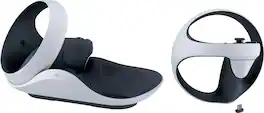
Always be ready for your next adventure into thrilling new virtual reality worlds with the PlayStation VR2 Sense controller charging station. Quickly and easily charge your PlayStation VR2 Sense controller set through a simple click-in design without having to connect them to your PlayStation5 console, freeing up your USB ports.

Conquer colossal peaks, overcome fearsome machines and uncover a hidden danger to the world of Horizon in the PlayStation VR2 Horizon Call of the Mountain bundle. Play from a new perspective – experience the sensations of height and wonder as you take in stunning vistas across the Carja and Nora homelands through the eyes of new character, Ryas. View the breathtaking natural world of Horizon in 360 degrees and interact with your surroundings using two PlayStation VR2 Sense controllers. Enjoy immersive action – use intuitive movements to climb mountains, hunt machines, shoot your bow and craft items from raw materials. Brave a new adventure – enter a living, breathing world of dangerous machines, tribal lore, exciting quests and new and returning characters. Share the experience – feel the adrenaline rush in a riverboat ride filled with surprises, that offers the chance to show off PS VR2 to your friends and family. 1 Features available in compatible games. 2 PlayStation Plus subscription may be required for online multiplayer modes. 3 Consists of two 2000 x 2040 OLED displays. 4 Combined resolution. 2000 x 2040 per eye. 5 Analogue/USB stereo headphones required. PlayStation 5 console required to play PlayStation VR2. PlayStation VR2 is not compatible with the PlayStation 4 console and cannot play content that requires PS VR. PlayStation VR2 is not for use by children age 12 and under.
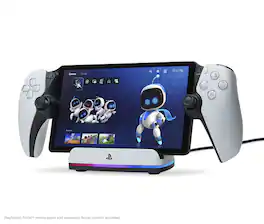
Charge and display your PlayStation Portal remote player with the officially licensed PowerA Charging Station for PlayStation Portal Remote Player with Lumectra. Offering an easy docking experience, the PS Portal remote player slides into place on the Charging Station to recharge and the added stability from the weighted base keeps it from moving around. A built-in RGB charging indicator keeps you informed on the charging status and can cycle between 5 lighting modes and different brightness levels. An included USB-C cable and magnetic USB-C charging adapter lets you connect it to your PlayStation5 so your PS Portal remote player can be displayed next to your console as it recharges. 2-Year Limited Warranty. *PlayStation Portal Remote Player and PlayStation5 console not included
| Pros for Sony - PlayStation VR2 PC Adapter - Black | |||
|---|---|---|---|
| Overall Performance, Ease of use, Compatibility, OLED Display, Setup | Overall Performance, Design, Charging Speed, Ease of Use, Cable Management | Overall Performance, Comfort, Immersion, Eye Tracking, Realism | Overall Performance, Design, Lighting |
| Cons for Sony - PlayStation VR2 PC Adapter - Black | |||
| Connectivity | There were no cons for this product— | Connectivity, Cord Design, Motion Sickness, Compatibility, Weight | There were no cons for this product— |
Specs
Reviews
Customers are saying
Customers regard the PlayStation VR2 PC Adapter's easy setup process and PC compatibility positively. They appreciate the adapter's user-friendly design and the ability to connect their PSVR2 headsets to their PCs seamlessly. While some users have experienced headset drawbacks such as Bluetooth connection issues, the overall sentiment is that the adapter is a valuable addition for PC VR gaming.
Customer Images
The vast majority of our reviews come from verified purchases. Reviews from customers may include My Best Buy members, employees, and Tech Insider Network members (as tagged). Select reviewers may receive discounted products, promotional considerations or entries into drawings for honest, helpful reviews.
- Rated 5 out of 5 stars
Pleasantly surprising upgrade!
I purchased for my 77" OLED with no expectations of regrets. Also love the smoother performance of Psvr2. What I didn't expect was the massive improvement to using my Playstation Portal! Something I was beginning to regret purchasing is not in my hands for every movie I watch with the family. System has never crashed on anything yet either.
Posted by JeremiahD
- Rated 3 out of 5 stars
Recieved Used Item instead of New Item.
I recieved used item box instead of new item box. This is the first time I got this kind of experience from BestBuy. I will recommend to buy this item in person from BestBuy rather than placing order online on BestBuy.
Posted by Janmejay
- Rated 5 out of 5 stars
This is a must have for PC VR!
This is a must have it works great! It is easy to set up and the menus walk you right through the process. You will now finally be able to experience Halflife Alyx VR on your PC through PS VR2.
Posted by ThatVRGuy