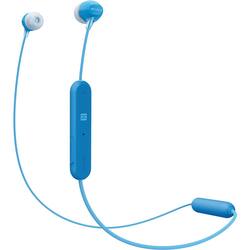
Sony - WI-C300 Wireless In-Ear Headphones - Blue
- Key Specs
- Sound Mode: Stereo
- Connection Type: Wireless
- Wireless Connectivity: Bluetooth (The manner in which a device sends data to another device over a short distance without the use of wires or cables.)
- True Wireless: false (These headphones not only lack wires between the device and headphones, they also lack wires between the headphones themselves. (true wireless is really only possible with in-ear headphones))
- Maximum Wireless Range: 33 feet
- Built-In Microphone: true
- Headphone Fit: In-Ear
- Battery Life: 8 hours (Battery life will vary depending on the product configuration, product model, applications loaded on the product, power management setting of the product and the product features used by the customer. As with all batteries, the maximum capacity of this battery will decrease with time and usage.)
- General
- Product Name: WI-C300 Wireless In-Ear Headphones
- Brand: Sony
- Ear Cushions: true
- Model Number: WIC300/L
- Color: Blue
- Audio
- Sound Isolating: false
- Minimum Frequency Response: 20 hertz (Describes the maximum range of frequencies or musical tones a product can reproduce, from very low tones to very high treble tones. The minimum frequency or musical tone the speaker can reproduce. High treble tones have higher frequencies while low tones and deep bass have lower frequencies.)
- Maximum Frequency Response: 22 kilohertz (Describes the maximum range of frequencies or musical tones a product can reproduce, from very low tones to very high treble tones. The maximum frequency or musical tone the speaker can reproduce. High treble tones have higher frequencies while low tones and deep bass have lower frequencies.)
- Sound Mode: Stereo
- Driver Size: 9 millimeters
- Connectivity
- Connection Type: Wireless
- Wireless Connectivity: Bluetooth (The manner in which a device sends data to another device over a short distance without the use of wires or cables.)
- True Wireless: false (These headphones not only lack wires between the device and headphones, they also lack wires between the headphones themselves. (true wireless is really only possible with in-ear headphones))
- Bluetooth Version: 4.2 (The Bluetooth specification formalized by the Bluetooth Special Interest Group. All versions of the Bluetooth standard are backwards compatible with previous versions.)
- Maximum Wireless Range: 33 feet
- Features
- Built-In Microphone: true
- Controls: Volume
- Maximum Talk Time: 8 hours
- Stand-By Time: 8.3 days (Amount of time it takes for the device to deplete a single battery charge when powered on but not in active use. This length of time is dependent on the network environment the device is connected to, if applicable, and the applications running.)
- Design
- Headphone Fit: In-Ear
- Style: Travel
- Power
- Rechargeable: true
- Battery Life: 8 hours (Battery life will vary depending on the product configuration, product model, applications loaded on the product, power management setting of the product and the product features used by the customer. As with all batteries, the maximum capacity of this battery will decrease with time and usage.)
- Charging Interface(s): USB (The connection for transmitting power to charge the device.)
- Warranty
- Manufacturer's Warranty - Parts: 1 year
- Manufacturer's Warranty - Labor: 1 year
- Other
- UPC: 027242908765
Listen all day with the long battery life of these Sony wireless headphones. The controls are separate from the earbuds for comfortable behind-the neck wear, and simple NFC Bluetooth setup connects with your compatible device quickly. These Sony wireless headphones have controls for hands-free calling and personal voice assistant use.
- Bluetooth 4.2 interface: Enables simple wireless pairing with your Bluetooth-enabled device.
- Rechargeable battery: Offers up to 8 hours of use and lasts up to 200 hours on standby mode.
- Built-in microphone: Enables simple hands-free chatting via a compatible device.
- In-ear design: Fits securely and directs music into your ears for full, uninterrupted audio.
- 9mm drivers: Provide high-quality sound.
Whats Included
- Earbuds (S/M/L)
- Micro-USB cable
- WI-C300 Wireless In-Ear Headphones
Q: Can these be connected to a tv, something simple for the elderly.
A: They can connect to any bluetooth device and they are very simple to use, I'm 73 years old.
Q: How long do the headphones charge from 0-100%
A: Hi AudioBrains, The battery charging time is approximately 2 hours. Regards, Jen
Q: Will these earbuds work with an I phone 6?
A: I just paired them with my iPhone 6 and it was very easy.
Q: Can they be used while charging?
A: No they can not.
A: If is flashing red and blue it means is trying to connect to the Bluetooth
Q: do these headphones need a charger that is purchased seperately?
A: Hi straight7, It is supplied with a micro-USB cable which you can connect to a computer for charging. You may refer to this link for more information(hint): https://helpguide.sony.net/mdr/wic300/v1/en/contents/TP0001613489.html ~Ralph
Q: Can I sync or watch tv with this earphones
A: Hi there, It will depend if the TV supports Bluetooth headphones. The headphones will support the following Bluetooth profiles: -A2DP (Advanced Audio Distribution Profile) -AVRCP (Audio Video Remote Control Profile) -HFP (Hands-free Profile) -HSP (Headset Profile) Regards, ~Ralph
A: Hi Frustrated, these are the supported Bluetooth profiles of this headphones: - A2DP (Advanced Audio Distribution Profile) - AVRCP (Audio Video Remote Control Profile) - HFP (Hands-free Profile) - HSP (Headset Profile). If the Bluetooth profile of the third-party device is one of the listed below, then it should work. Also, visit the link below for additional troubleshooting steps. Thanks! ^Ron http://helpguide.sony.net/mdr/wic300/v1/en/contents/TP0001613433.html



















