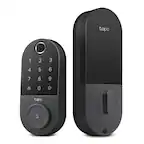
TP-Link - Tapo DL100 Smart Wi-Fi Deadbolt Door Lock – Keyless Tactile Buttons, App-Controlled Custom Access, Fits Standard Doors - Black
Related Item

Highlights
- Key Specs
- Color Finish: Black
- Lock Type: Deadbolt
- Lock/Unlock Mechanism: App, Electronic guest keys, Keypad, Key (There are several technologies used by smart locks to manage access, such as biometrics, Bluetooth, or NFC. Some locks allow codes to be entered via a keypad or touchscreen; digital keys can often be sent to multiple authorized devices or temporarily shared with guests.)
- Power Source: Battery-powered
- Installation Type: Replacement
- Wireless Connectivity: Bluetooth, Wi-Fi (The manner in which a device sends data to another device over a short distance without the use of wires or cables.)
- General
- Brand: TP-Link
- Model Number: Tapo DL100
- Product Name: Tapo DL100 Smart Wi-Fi Deadbolt Door Lock – Keyless Tactile Buttons, App-Controlled Custom Access, Fits Standard Doors
- Color: Black
- Color Finish: Black
- Features
- Finish: Black
- Lock Type: Deadbolt
- Lock/Unlock Mechanism: App, Electronic guest keys, Keypad, Key (There are several technologies used by smart locks to manage access, such as biometrics, Bluetooth, or NFC. Some locks allow codes to be entered via a keypad or touchscreen; digital keys can often be sent to multiple authorized devices or temporarily shared with guests.)
- Auto Unlock: true (Locks with this feature automatically unlock when certain conditions are met, such as coming within range of a home wireless network or when activated via a mobile app.)
- Unlock Notifications: true
- Shareable Keys: true (This feature allows a single key to be shared with multiple users or authorized devices.)
- Number of Keypad Codes Supported: 200 (Multiple keypad codes can be programmed to allow temporary access for guests, deliveries, and more while keeping primary codes secure.)
- Remote Monitoring Capabilities: true (Monitor)
- Power
- Power Source: Battery-powered
- Rechargeable Battery: false
- Battery Size: AA (The battery size required for operation.)
- Number of Batteries Required: 4
- Batteries Included: true (Indicates whether the product comes with the required batteries for its operation.)
- Compatibility
- Installation Type: Replacement
- App Compatible: true (The product can be connected to a program or software application on a mobile device, which then receives collected data from the product.)
- Wireless Connectivity: Bluetooth, Wi-Fi (The manner in which a device sends data to another device over a short distance without the use of wires or cables.)
- Works With: Amazon Alexa, Google Home, SmartThings (Compatible with or able to be connected to other smart devices or applications.)
- Warranty
- Warranty - Parts: 1 year limited
- Warranty - Labor: 1 year limited
- Other
- UPC: 840460601023
Upgrade your home security with the TP-Link Smart Door Lock — the perfect blend of convenience, control, and peace of mind. Keypad entry or the Tapo app, and manage access from anywhere with remote locking and real-time alerts. With advanced encryption, tamper detection, and auto-lock features, you get enhanced security without sacrificing ease of use. Whether you're home or away, TP-Link puts smarter, safer access at your fingertips.
- Quick & Easy Installation: Tapo DL100 offers hassle-free setup with all mounting tools included
- AA Battery Powered: Lasts up to 200 days in Wi-Fi mode or 300 days in Bluetooth mode. Includes easy battery replacement and a USB-C port for emergency power. 4xAA batteries included.
- Smart Wi-Fi Deadbolt Door Lock: Convenient and secure, the DL100 provides certified, durable deadbolt security with thoughtful smart features for enhanced convenience.
- Multiple Ways to Unlock: Keyless keypad, energy-efficient Bluetooth for nearby access, remote Wi-Fi via the Tapo App, voice commands with PIN verification, and 2 backup keys for peace of mind.
- Convenient and Secure Access: Manage access effortlessly by creating groups for family, guests, or visitors in the App - no physical keys required.
- Keyless Tactile Buttons: Skip the hassle of keys with up to 200 customizable codes. Our smart lock features a backlit keypad for nighttime use and the option to enter your passcode in between random digits for added security.
- Stay Informed, Control from Anywhere: Receive real-time alerts, check door status, and lock or unlock it remotely with the App. Set custom profiles for family and guests, and track all activity with timestamps to see who accessed your home and when.
- Protect with Auto-Lock and PIN Attempt Limiter: Automatically lock after use with customizable intervals, and guard against unauthorized access by locking the system after a set number of failed unlock attempts
- Certified for Durability: BHMA Grade 3 certification ensures long-lasting reliability and can withstand daily use for years. With an IP54 weatherproof rating, this product also protects against rain, dust, and dirt.
- Smart Home Integration: Compatible with Alexa, Google Home, and Samsung SmartThings for one-app management. Say a voice control and PIN to Alexa and Google Assistant to lock or unlock the door.
- Door Compatibility: Installs on the standard lock hole sizes of 2-1/8'' (54mm) and 1-1/2'' (38mm). No drilling, no extra holes, no hassle.
- Quick & Easy Installation: Tapo DL100 offers hassle-free setup with all mounting tools included
- AA Battery Powered: Lasts up to 200 days in Wi-Fi mode or 300 days in Bluetooth mode. Includes easy battery replacement and a USB-C port for emergency power. 4xAA batteries included.
- Smart Wi-Fi Deadbolt Door Lock: Convenient and secure, the DL100 provides certified, durable deadbolt security with thoughtful smart features for enhanced convenience.
- Multiple Ways to Unlock: Keyless keypad, energy-efficient Bluetooth for nearby access, remote Wi-Fi via the Tapo App, voice commands with PIN verification, and 2 backup keys for peace of mind.
- Convenient and Secure Access: Manage access effortlessly by creating groups for family, guests, or visitors in the App - no physical keys required.
- Keyless Tactile Buttons: Skip the hassle of keys with up to 200 customizable codes. Our smart lock features a backlit keypad for nighttime use and the option to enter your passcode in between random digits for added security.
- Stay Informed, Control from Anywhere: Receive real-time alerts, check door status, and lock or unlock it remotely with the App. Set custom profiles for family and guests, and track all activity with timestamps to see who accessed your home and when.
- Protect with Auto-Lock and PIN Attempt Limiter: Automatically lock after use with customizable intervals, and guard against unauthorized access by locking the system after a set number of failed unlock attempts
- Certified for Durability: BHMA Grade 3 certification ensures long-lasting reliability and can withstand daily use for years. With an IP54 weatherproof rating, this product also protects against rain, dust, and dirt.
- Smart Home Integration: Compatible with Alexa, Google Home, and Samsung SmartThings for one-app management. Say a voice control and PIN to Alexa and Google Assistant to lock or unlock the door.
- Door Compatibility: Installs on the standard lock hole sizes of 2-1/8'' (54mm) and 1-1/2'' (38mm). No drilling, no extra holes, no hassle.
Whats Included
- 1 x Tapo DL100 Smart Wi-Fi Door Lock
- 1 x Installation Mounting Plate
- 1 x Latch Bolt
- 1 x Strike Plate
- 1 x Dust Box
- 1 x Battery
- 1 x USB Adapter Cable
- 1 x Physical Key
- 1 x Set of Screws
- 1 x Quick Start Guide
- 1 x Tapo DL100 Smart Wi-Fi Door Lock
- 1 x Installation Mounting Plate
- 1 x Latch Bolt
- 1 x Strike Plate
- 1 x Dust Box
- 1 x Battery
- 1 x USB Adapter Cable
- 1 x Physical Key
- 1 x Set of Screws
- 1 x Quick Start Guide
Disclaimers
- 1. Battery life is based on Tapo laboratory tests. Actual battery life may vary due to device settings, usage, router specifications, and environmental factors.
- 2. External only.
- 3. Speed is based on Tapo laboratory tests. Actual speed may vary due to device settings, usage, router specifications, and environmental factors.
- 1. Battery life is based on Tapo laboratory tests. Actual battery life may vary due to device settings, usage, router specifications, and environmental factors.
- 2. External only.
- 3. Speed is based on Tapo laboratory tests. Actual speed may vary due to device settings, usage, router specifications, and environmental factors.
Q: What happens when the batteries die?
A: Hi Joey, The Tapo DL110 Smart Wi-Fi Door Lock lasts up to 7 months in Wi-Fi mode or 10 months in Bluetooth mode. It offers easy battery replacement and a USB-C port for emergency power, as well as physical backup keys, just in case. 4 AA batteries included for your convenience.
Q: Does the unit require a separate bridge to access wifi remote monitoring?
A: Hi, The DL100 conveniently connects to your existing Wi-Fi network for both local and remote management.
Q: Does the app notify when the battery is low? If the battery is not working and need to be changed?
A: Hi GApeach, Yes, for your convenience, the Tapo DL100 will provide a low-battery warning, so you can replace the batteries preemptively when needed.
Q: Is the keypad required to be installed or can I keep the key hole original to the door.
A: Hi Bestbuyer, Yes, the complete DL100 unit must be assembled for installation and use.
A: Hi LouisIVmba, We would first suggest re-verifying the physical installation, such as checking tolerances, alignment, etc., to see whether the door or deadbolt requires minor adjustments. We would encourage you to stop by our official TP-Link Community Forum to share more details and have conversations with our community and members of our staff who may be able to provide additional insights or recommendations for your installation. Additionally, our official TP-Link Support Team is always available and happy to help. Feel free to get in touch with us via the Support Portal on our official TP-Link website, or using the support contact information on the installation documents included with your Smart Deadbolt. Best Regards, TP-Link Systems Support
Q: Does this lock work with Alexa? If yes is set up easy?
A: Yes, this lock works with both of my smart home assistants: Alexa and Google Home.
Q: What is the temperature range for this device ? Can I withstand freezing Midwest winter
A: Operating Temperature: -30℃ ~70℃ (-22 ℉ ~158 ℉ )
A: Hi Rekey, The Tapo DL100 Smart Wi-Fi Deadbolt Door Lock is not designed to be rekeyed. We appreciate your feedback and interest in the ability to rekey the device, and we will be happy to pass it along to our Tapo team for future consideration.
Compare similar products

Upgrade your home security with the TP-Link Smart Door Lock — the perfect blend of convenience, control, and peace of mind. Keypad entry or the Tapo app, and manage access from anywhere with remote locking and real-time alerts. With advanced encryption, tamper detection, and auto-lock features, you get enhanced security without sacrificing ease of use. Whether you're home or away, TP-Link puts smarter, safer access at your fingertips.

Unlock convenience and security with Tapo DL110. Its lightning-fast fingerprint sensor unlocks your door in under 1 second, and the ultra-long battery life keeps it powered for up to 1 year. Access in six different ways: by fingerprint recognition, using custom passcodes on the keypad, manage from anywhere with Wi-Fi, via close-range Bluetooth, your smart home assistant, or by using the included backup keys. Manage residents and guests with ease by creating custom permanent, one-time or scheduled passcodes. Pair with your Amazon Alexa, Google Home or Samsung SmartThings for hands-free voice operation and mangement. Security features such as auto-lock, real-time alerts for suspicious activity, and a detailed activity log give you ultimate peace of mind. Finally, the Tapo DL110 boasts a hassle-free installation with all necessary tools included so that you can take control of your front door security in no time.

Meet Yale Code, the non-connected door lock that brings key-free entry to your door an an approachable price point. Ideal for those who are new to electronic locks, or just want an affordable way to upgrade their home, Yale Code has a simple DIY installation process that doesn’t require any professional help, and there’s no app or phone set-up is needed. Create and store up to 20 key-free entry codes directly in the lock itself, and share secure and convenient access with friends, family, housemates, caretakers, and more. The backlit keypad ensures that you can easily read its numbers for entry at any time of day, and the backup key allows all members of your household to choose their preferred way to unlock the door. With its sleek design and low profile, Yale Code looks great on any door while bringing trusted security to your home.
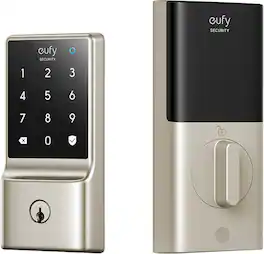
Enhance your home security from wherever you are with eufy 5-in-1 Smart Lock C210. No separate bridge required, this smart lock is Wi-Fi enabled and compatible with eufy Security App for remote control anytime, anywhere. Receive notifications, set and disable time-based passcodes, and view door activity history for added peace of mind. In The Smart Lock C210 offers 5 unlocking methods: hands-free via the eufy App, voice control with Alexa or Google Voice Assistant, a smudge-free touchscreen keypad, Apple Watch, or the included physical keys. Its sleek design suits all door styles and features an automatic lock to prevent unauthorized access. Withstanding outdoor temperatures of -22℉ to 158℉, it offers around 4 months of battery life and can be instantly unlocked with a portable charger if power runs out. Tested by BHMA, the Smart Lock C210 can be expected to lock and unlock up to 10 times a day for over 30 years.
| Pros for TP-Link - Tapo DL100 Smart Wi-Fi Deadbolt Door Lock – Keyless Tactile Buttons, App-Controlled Custom Access, Fits Standard Doors - Black | |||
|---|---|---|---|
| Installation Ease, Overall Performance, Battery Life, Connectivity, Button Layout | Ease of use, Battery Life, Installation, Overall Performance, Fingerprint Recognition | Installation Ease, Design, Keypad Illumination, Security, Locking Mechanism | Ease of use, Installation, Overall Performance, App, Notifications |
| Cons for TP-Link - Tapo DL100 Smart Wi-Fi Deadbolt Door Lock – Keyless Tactile Buttons, App-Controlled Custom Access, Fits Standard Doors - Black | |||
| There were no cons for this product— | There were no cons for this product— | Connectivity | Battery Life, Biometric Access |
Specs

Reviews
Customers are saying
Customers regard the Tapo DL100 Smart Wi-Fi Deadbolt Door Lock favorably, particularly praising its ease of installation and convenient connectivity features. Many appreciate the ability to control the lock remotely via smartphone app and smart home integration. Positive feedback also highlights the user-friendly keypad and long-lasting battery life. Overall, the product receives high marks for its ease of use and functionality.
Customer Images
The vast majority of our reviews come from verified purchases. Reviews from customers may include My Best Buy members, employees, and Tech Insider Network members (as tagged). Select reviewers may receive discounted products, promotional considerations or entries into drawings for honest, helpful reviews.
- Rated 5 out of 5 stars
Easy Access
As the reviews stated, installing the deadbolt yourself is simple but expect some bumps along the road if your door slots are uneven lol. Besides that, enjoy easy access into your home without the worries of having your keys. It also has an auto-lock timer and an app to operate the deadbolt. And lastly for safety, if the batteries die and you can’t get in, keep a spare in a lockbox outside the door.
Posted by Iammsfree
- Rated 5 out of 5 stars
Great value
I was very easy to install, and it is working great
Posted by GonzaloC
- Rated 4 out of 5 stars
Easy to use and looks great
This lock is great! It looks good, is easy to install and works very well with mobile devices and services. Installation: Installing this was easier than I thought. So long as your door is compatible, everything you need is in the box. There are the internal and external sides to the lock, the deadbolt assembly, various screws, a cushion plate, a set of keys (if needed), batteries, and a plate for the door frame. I had this up and running in about 30 minutes. It looks great on my door though I will have to fix the paint from the previous lock’s outline which is to be expected. Connectivity: The bolt uses the TP-Link Tapo app to control the device. This app will help you set it up with Wi-Fi and assist with connecting it to third party services. Supported services are Amazon Alexa, Google Assistant, Samsung SmartThings and IFTTT. I was a bit disappointed that there was no Matter connectivity and no HomeKit support. This is the only reason I took away a star since Matter would greatly increase compatibility with various devices. Daily use: The device has keys in the event of battery failure. You can also connect a power supply to the bottom of the external side to a power bank via a USB-C connection if needed, though the app should warn you prior to battery drainage. The app does routinely show the battery percentage with the 4 AA batteries. You can control the lock status, create a one-time PIN code, change PIN codes, set smart routines, control device sharing, and much more. One advanced feature I very much liked is the ability to scramble your PIN. For example, if your pin is 1111, you can enter it as 195371111837 and it will recognize the “1111” in the middle. This is to deter anyone who might be observing from remembering the code.
Posted by psyclopps