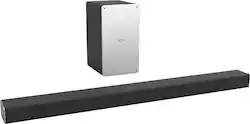
VIZIO - 2.1-Channel Soundbar System with 5-1/4" Wireless Subwoofer
- Key Specs
- Wireless Connectivity: Bluetooth, Wi-Fi (The manner in which a device sends data to another device over a short distance without the use of wires or cables.)
- Wireless Subwoofer Connectivity: true
- Wall Mountable: true (The product is able to be secured to a wall. Some products are designed ready to mount, while others may require additional hardware/accessories for installation.)
- General
- Product Name: 2.1-Channel Soundbar System with 5-1/4" Wireless Subwoofer
- Brand: VIZIO
- Model Number: SB3621N-E8M
- Audio
- Number of Channels: 2.1 (The number of discrete channels of sound output. This can be a single number or multiple numbers separated by decimal(s). The first number is the primary, horizontally directed audio channels. The number after the first decimal, if applicable, is the number of subwoofer outputs or channels. The number after the second decimal, if applicable, is the number of height or atmospheric channels designed to immerse the listener by producing overhead sound effects.)
- Surround Sound Supported: DTS Studio Sound, DTS TruSurround, DTS TruVolume, Dolby Digital (Surround sound systems use multiple audio channels and speakers to create an immersive sound experience for the listener. There are also various proprietary technologies that imitate this kind of sound via a device's built-in speakers or soundbar.)
- Minimum Frequency Response: 50 hertz (Describes the maximum range of frequencies or musical tones a product can reproduce, from very low tones to very high treble tones. The minimum frequency or musical tone the speaker can reproduce. High treble tones have higher frequencies while low tones and deep bass have lower frequencies.)
- Maximum Frequency Response: 20 kilohertz (Describes the maximum range of frequencies or musical tones a product can reproduce, from very low tones to very high treble tones. The maximum frequency or musical tone the speaker can reproduce. High treble tones have higher frequencies while low tones and deep bass have lower frequencies.)
- Connectivity
- Wireless Connectivity: Bluetooth, Wi-Fi (The manner in which a device sends data to another device over a short distance without the use of wires or cables.)
- Wireless Multi-Room Audio: false (Technology that allows multiple speakers and/or soundbars to be connected wirelessly and play audio in separate rooms.)
- Wireless Subwoofer Connectivity: true
- Satellite Speakers: Not compatible (Using satellite speakers in conjunction with a soundbar allows for a surround sound experience; the soundbar can serve as a center channel speaker while satellites provide rear channel audio or additional front channel audio.)
- Number of HDMI Inputs (Total): 0
- Number of HDMI Outputs (Total): 0
- Features
- Wall Mountable: true (The product is able to be secured to a wall. Some products are designed ready to mount, while others may require additional hardware/accessories for installation.)
- Speaker
- Subwoofer: Included
- Dimensions
- Product Height: 2.1 inches (The out of box height of the item. Height is measured as the vertical distance from the bottom of the item to the top as it would be primarily used or placed.)
- Product Width: 36 inches (The out of box width of the item. Width is measured as the horizontal distance from one side of the item to the other as it would be primarily used or placed.)
- Product Depth: 3.2 inches (The out of box depth of the item. Depth is measured as the distance from the front of the item to the back as it would be primarily used or placed.)
- Product Weight: 4.6 pounds (The out of box weight of the item.)
- Subwoofer Height: 11.8 inches
- Subwoofer Width: 6.7 inches
- Subwoofer Depth: 7.9 inches
- Subwoofer Weight: 8.85 pounds
- Included
- Remote Control Included: true
- Cable(s) Included: Power
- Mounting Hardware Included: true
- Certifications Listings & Approvals
- ENERGY STAR Certified: false (Devices carrying the ENERGY STAR service mark, such as computer products and peripherals, kitchen appliances, and other products, generally use 20% to 30% less energy than required by federal standards.)
- Warranty
- Manufacturer's Warranty - Parts: 1 year
- Manufacturer's Warranty - Labor: 1 year
- Other
- UPC: 845226014932
Enjoy even the quietest footstep in full sound with this VIZIO sound bar, featuring Dolby Digital technology. The 5.25-inch subwoofer speakers perfectly replicate the deepest bass, and 50 Hz - 20 kHz frequency response catches all the highs and lows. This VIZIO sound bar can be placed on a table or mounted on your wall, expanding your possibilities.
- Wireless subwoofer: With 5-1/4" driver for powerful bass.
- Bluetooth music streaming: Makes it easy to enjoy tracks stored on a compatible Bluetooth-enabled device (not included).
- Volume control: Lets you find a comfortable listening level.
- Sleek appearance: Fits seamlessly along most HDTVs for a streamlined look.
- Inputs: Includes RCA x 2, 1 coaxial digital audio RCA, 1 optical digital audio and 1 USB type A.
- Remote: Enables simple operation from a distance.
- Wall-mountable design: For versatile placement options.
- 50Hz - 20kHz frequency response: Ensures a wide range of accurately reproduced sound.
Whats Included
- 36” 2-channel sound bar
- 4 ft optical cable with Toslink ends
- 5 ft RCA to 3.5mm stereo mini jack
- 5 ft digital 75 ohm coaxial cable with RCA connectors
- 5 ft power cord for subwoofer
- 8 ft power cord for sound Bar
- Quick start guide
- Remote control
- Wireless Subwoofer with 5.25” driver
A: I was able to price match with the $149 price but after investigating I did find that the difference between these two models is the remote. The Best Buy version has a small LCD (?) screen at the top and lacks the "TVOL", "TSHD", "MOVIE", "MUSIC", "SUB", "BASS", and "TREB" buttons. I actually prefer the remote of the less expensive model because it adds functionality and the LCD screen is hard to read and not useful. I've attached an image of the remote from the SB3621N-E8 model.
A: I was wondering the same thing after a couple days of having this bar set up. As far as I know you cannot add any additional speakers. This unit does sound great however you don’t quite get “surround” sound from the bar. If I were to go back I’d get a 5 channel set or the sound bar with 2 speakers indcluded as I feel my sound isn’t so much lacking just not exactly what I was looking for. Recap, no you cannot add speakers, get a 5 channel set or the sound bar with 2 speakers included if you want real surround sound as you can tell all the sound is coming from right in front of the tv.
Q: Will this sound bar work with a Samsung TV?
A: yes. it will work with any tv with RCA or Optical inputs. This sound bar also works with any bluetooth device. This sound bar will integrate with the Vizio TV's standard remote so only one remote is needed for sound. If you use this sound bar with a samsung TV then you will need to use the vizio remote that comes with sound bar in addition to your TV remote.
Q: Can i pair 2 vizio subwoofers (the same models sub) with 1 vizio sound bar?
A: The sound bar does not have the ability to pair to multiple subwoofers at the same time.
A: This model does have the DTS TruSurround feature. To disable to feature change the equalizer setting to Music. The Soundbar has it defaulted to on with the Equalizer set to Movie.
A: On this model there was a misprint in the Quick Start Guide. DTS TruSurround is automatically enabled out of the box. If you wish to disable the setting simply change the EQ setting to music.
A: Yes it will. The soundbar has digital optical audio input that can be plugged in to the digital optical audio output of your television. A small optical cord comes with the soundbar, and it's specifically for TV sets like yours. On your TV, set the Digital Audio Out option on the SOUND menu to PCM.
A: this sounds like you have both the tv speakers turned on AND the sound barn turned on. On the TV settings, make sure audio is set to external speakers only, or internal speakers off (there are a variety of ways that it's worded on a tv). you can simply also check by manually turning the TV speakers down to 0, and see if the echo stops.


















